Steps to Reproduce a Bug: Examples, Template and Checklist
How to write steps to reproduce a bug that a developer can follow on the first try: a template, four worked examples and a pre-submit checklist.
In this article
- What steps to reproduce are, and why developers ask for them first
- A steps-to-reproduce template you can copy
- How to write the steps: seven rules
- Steps to reproduce a bug: four worked examples
- Example 1: payment succeeds at the bank, fails in the app
- Example 2: OTP does not autofill
- Example 3: a web checkout total
- Example 4: a crash that comes and goes
- How to find the steps when a bug is hard to pin down
- The details that change the result on mobile
- Web and API bugs need a few different details
- Common mistakes in steps to reproduce
- A checklist before you submit
- When an AI tool drafts the bug report
- Who checks that the steps work
- Frequently asked questions
A tester in Pune files a ticket at 6 pm: "Payment failing on my phone, please check." The next morning a developer in Bengaluru opens the app on a Pixel on office Wi-Fi, adds ₹200 to the wallet, watches it succeed, and closes the ticket as "cannot reproduce."
Both of them were right about what they saw. The payment did fail, on a Redmi Note 12 on Jio 4G, in the few seconds after the user came back from the UPI app. It did succeed on the Pixel. The only thing missing was a set of steps that carried the failure from one desk to the other.
That is what steps to reproduce are for. They turn "it broke for me" into something a second person can make happen on demand. A fix for a bug nobody can make happen on demand is a guess.
What steps to reproduce are, and why developers ask for them first
Steps to reproduce are the ordered actions that take the software from a known starting state to the failure, written so that someone who has never seen the bug can follow them and see it too. They sit between two other parts of a bug report: the expected behaviour (what should have happened) and the actual behaviour (what happened instead).
Researchers have asked developers which parts of a report they rely on. In a survey of developers and users of Apache, Eclipse and Mozilla that drew 466 responses, developers rated steps to reproduce, stack traces and test cases as the most helpful items, and the same items turned out to be the hardest for reporters to supply (Zimmermann et al., IEEE Transactions on Software Engineering). The information that matters most is the information that most often goes missing.
How often? An analysis of bug reports summarised in a 2021 study of non-reproducible bugs found that about 49% contained no steps to reproduce at all, and about 65% never stated the expected behaviour.
The cost shows up in the tracker. A study that mined one industrial and five open-source bug repositories found that non-reproducible reports made up about 17% of all bug reports and stayed open roughly three months longer than the rest (Joorabchi, Mirzaaghaei and Mesbah, MSR 2014).
A complete report answers six questions, and the steps are the second of them.
| Part of the report | Question it answers | Example |
|---|---|---|
| Starting state | Where do I begin? | Logged in, wallet balance ₹500, UPI app installed |
| Steps to reproduce | What exactly do I do? | Open Wallet, tap Add money, enter 200, pay with UPI |
| Expected behaviour | What should happen? | Balance shows ₹700 within 10 seconds |
| Actual behaviour | What happened instead? | Spinner never stops, balance stays ₹500 |
| Environment | Where does it happen? | Build 4.2.1 (318), Redmi Note 12, Android 13, Jio 4G |
| Evidence | How do I know it is real? | Screen recording, fails 3 of 3 attempts |
The test of good steps: a person who has never used the app can follow them on their own device and reach the same wrong result.
A steps-to-reproduce template you can copy
Here is the wallet bug from the opening, written the way it should have been filed.
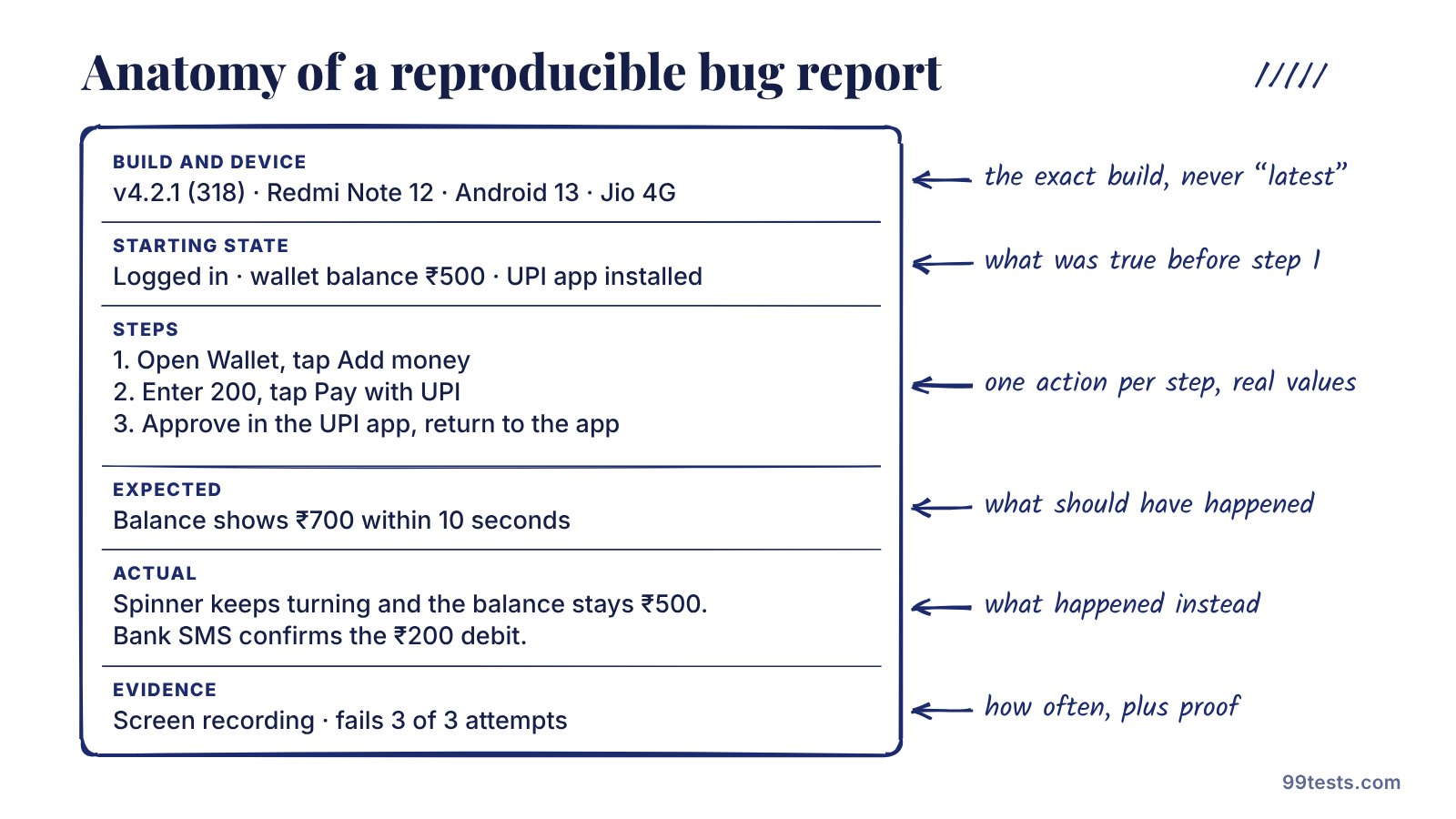
The plain-text version below fits any tracker. Fill in every line. Write "none" where a line does not apply, so the reader knows you checked.
Title: [Where] [what goes wrong] [under which condition]
Build: [app version and build number, or web URL and release]
Device and OS: [model, OS version, browser if web]
Network: [Wi-Fi, or carrier and 4G or 5G, and signal strength]
Account and data: [test account, balance, cart contents, language]
Starting state: [what is true before step 1]

Steps to reproduce:
1. [One action, with the exact value used]
2. [One action]
3. [One action]

Expected: [what should happen, and how soon]
Actual: [what happened, including any message text]
Reproducibility: [for example 3 of 3, or 2 of 5]
Evidence: [screenshot, recording, logs]
A title in that pattern does half the triage work on its own. "Wallet top-up spinner never stops after returning from UPI app on Redmi Note 12" tells the reader the feature, the symptom and the trigger before they open the ticket.
The full set of fields a tracker needs, including severity and priority, is covered in our bug report template. This guide stays with the part people find hardest.
How to write the steps: seven rules
1. Start from a state anyone can reach. "Logged in as a user with ₹500 in the wallet" is a starting state. "On the payment screen" is not, because it hides how you got there. If the bug needs a fresh install, an upgrade from the previous version or a particular account type, say so before step 1.
2. One action per step. "Open Wallet, add money and pay" is three actions and at least two decisions. When a developer's run diverges from yours, single numbered actions show exactly where.
3. Use the real values. Write "enter 200", not "enter an amount". Write the coupon code, the PIN code, the search term. Bugs often live in one specific value: an amount with a decimal, a name with an apostrophe, a phone number pasted with a space.
4. Name things as the screen names them. If the button says "Pay with UPI", write that. "Click the payment option" sends the reader hunting, and in an app with three payment buttons it sends them to the wrong one.
5. Write down the waiting and the interruptions. Timing is a step. "Wait for the OTP SMS, switch to Messages and come back" is different from "enter the OTP". So are a call arriving mid-payment, the screen locking, and a switch from Wi-Fi to mobile data.
6. Stop at the first wrong thing. The steps end where the software first misbehaves. Everything after that belongs under actual behaviour. If you keep tapping, you describe a second and a third failure caused by the first, and the report becomes hard to triage.
7. Say how often it happens. "3 of 3 attempts" tells the developer the bug is deterministic. "2 of 5" tells them to look for a timing or network condition, and stops them closing the ticket after one clean run.
Practical rule: if a step contains the word "and", it is probably two steps.
Steps to reproduce a bug: four worked examples
Each example shows the report as it is usually filed, then the version a developer can act on.
Example 1: payment succeeds at the bank, fails in the app
As filed: "Payment not working on my phone. Money got cut. Urgent."
Title: Wallet top-up spinner never stops after returning from UPI app (Redmi Note 12, Jio 4G)
- Build: 4.2.1 (318), Android
- Device and OS: Redmi Note 12, Android 13
- Network: Jio 4G, 2 of 4 bars
- Starting state: Logged in, wallet balance ₹500, UPI app installed
Steps to reproduce:
- Open Wallet and tap "Add money".
- Enter 200 and tap "Pay with UPI".
- In the UPI app, approve the payment with the UPI PIN.
- Tap "Done" to return to the app.
- Expected: Wallet balance shows ₹700 within 10 seconds.
- Actual: Spinner keeps turning for over 2 minutes. Balance stays ₹500. Bank SMS confirms ₹200 debited.
- Reproducibility: 3 of 3 on Jio 4G. 0 of 3 on office Wi-Fi.
- Evidence: Screen recording, bank SMS screenshot.
The reproducibility line is what cracks the case. The failure follows the network, not the phone.
Example 2: OTP does not autofill
As filed: "OTP autofill broken on Samsung."
Title: Login OTP does not autofill when SMS arrives after app is backgrounded (Galaxy A14)
- Build: 4.2.1 (318), Android
- Device and OS: Samsung Galaxy A14, Android 14
- Network: Airtel 4G
- Starting state: Logged out, SMS permission not yet requested
Steps to reproduce:
- Open the app and enter the mobile number 98XXXXXX10.
- Tap "Get OTP".
- Press Home before the SMS arrives.
- When the SMS notification appears, tap the app icon to return.
- Expected: The six OTP boxes fill automatically and login continues.
- Actual: OTP boxes stay empty. Typing the OTP by hand works.
- Reproducibility: 4 of 4 when the app is backgrounded. 0 of 4 when it stays in the foreground.
- Evidence: Screen recording.
Step 3 is the whole bug. Without it, every developer who tests in the foreground closes the ticket. Our guide to why OTP autofill fails for real users lists the other conditions worth trying.
Example 3: a web checkout total
As filed: "Coupon gives wrong total sometimes."
Title: Cart total ignores coupon SAVE10 after quantity is changed (Safari on macOS)
- Build: Production website
- Device and OS: MacBook Air, macOS 26, Safari 26
- Starting state: Logged in, empty cart
Steps to reproduce:
- Add "Cotton Kurta, size M" (₹1,200) to the cart.
- Open the cart and apply coupon SAVE10.
- Confirm the total shows ₹1,080.
- Change the quantity from 1 to 2.
- Expected: Total shows ₹2,160 (10% off ₹2,400).
- Actual: Total shows ₹2,400. Coupon chip still reads "SAVE10 applied".
- Reproducibility: 3 of 3 in Safari. Not seen in Chrome on the same laptop.
- Evidence: Two screenshots, before and after step 4.
Step 3 is a checkpoint. It proves the coupon worked before the quantity changed, which rules out an invalid coupon and points at the recalculation.
Example 4: a crash that comes and goes
As filed: "App crashes randomly."
Title: App closes when a photo is attached to a support ticket with storage nearly full (Realme C55)
- Build: 4.2.1 (318), Android
- Device and OS: Realme C55, Android 13
- Starting state: Logged in, under 500 MB free storage, camera permission granted
Steps to reproduce:
- Open Help and tap "Raise a ticket".
- Tap "Attach photo" and choose "Camera".
- Take a photo and tap the tick to confirm.
- Expected: Photo thumbnail appears on the ticket form.
- Actual: App closes to the home screen. Reopening shows an empty ticket form.
- Reproducibility: 3 of 5 with under 500 MB free. 0 of 5 with 4 GB free.
- Evidence: Screen recording, Android bug report taken within a minute of the crash.
"Randomly" almost always means a condition nobody has named yet. Here it was free storage, and naming it turned a ticket that would have been closed into one that could be fixed.
How to find the steps when a bug is hard to pin down
Some failures do not repeat on the second try. Work through four passes before you file.
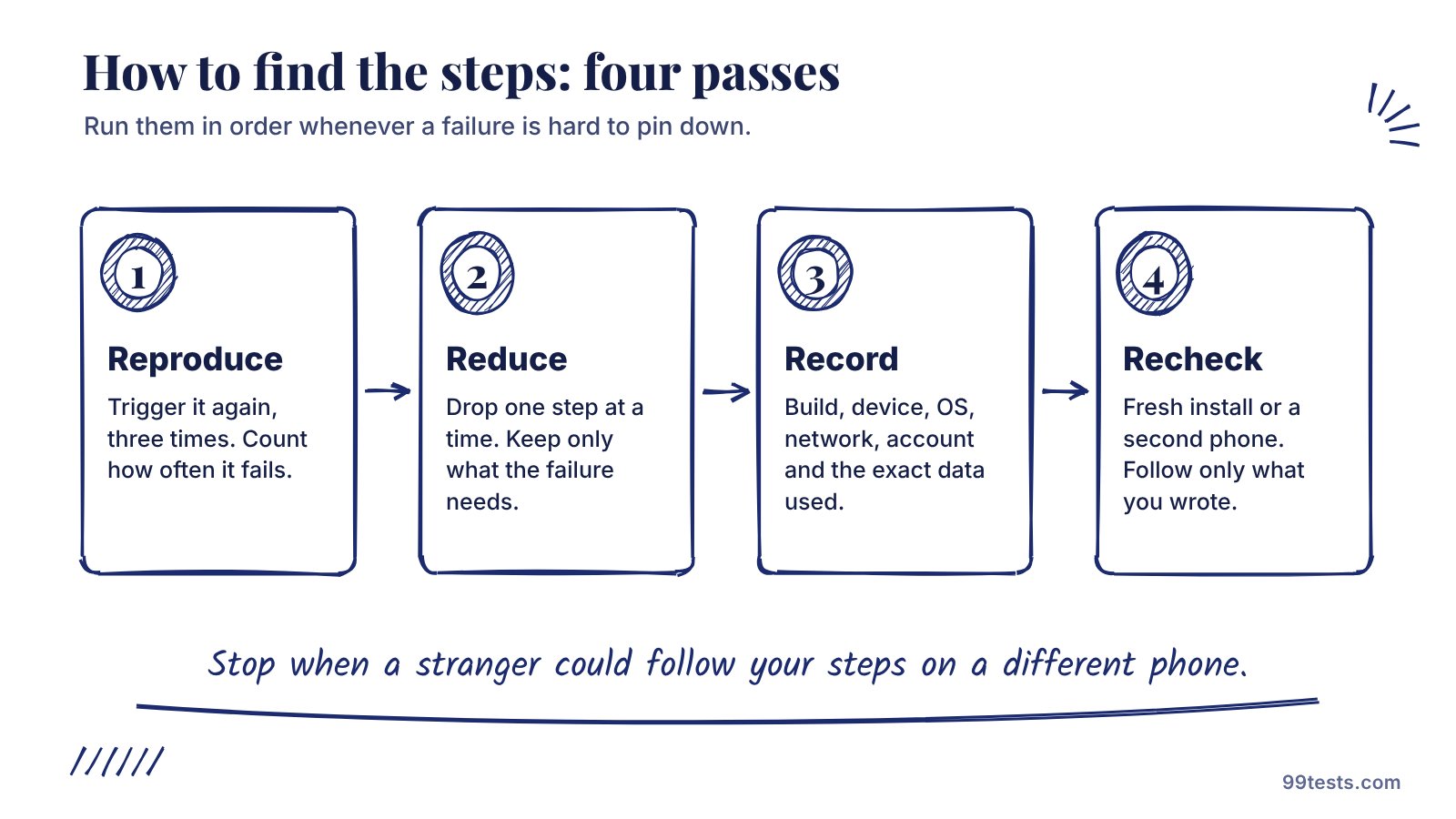
Reproduce. Do it again straight away, the same way, at least three times, and count. A failure you saw once and cannot trigger again is still worth filing, but label it "seen once" and attach whatever evidence you have.
Reduce. Remove one step at a time and retry. If the bug still appears without step 2, step 2 was never needed. Shorter steps are faster to follow and point closer to the cause. Then vary one condition at a time: network, account, amount, orientation.
Record. Capture the build, device, OS, network, account and exact data while they are still on the screen. On Android, the bug report option in Developer options saves device logs and stack traces to a file you can attach, and it is most useful when taken straight after a crash. On an iPhone, a screen recording plus the time of the failure lets a developer find the matching crash log.
A recording is stronger evidence when it is easy to follow. Start it before step 1, not at the moment of failure. Open the app's About screen first so the build number is on camera. On Android, switch on "Show taps" in Developer options so each touch leaves a visible mark. Keep it to one bug and under a minute, and note in the report the second at which the failure appears.
Recheck. Clear the app data or pick up a second phone, and follow only what you wrote. If you have to add something from memory to make it fail, that something is a missing step.
Exploring around a failure without a script is a skill of its own. Our guide to ad hoc testing describes it, and it pairs well with the reduce pass.
The details that change the result on mobile
On a phone, the environment is part of the steps. A bug report that says "Android" describes thousands of different devices.
| Detail | Why it matters | How to write it |
|---|---|---|
| Device model | Screen size, memory and chipset differ | Redmi Note 12, not "Xiaomi phone" |
| OS and manufacturer skin | Background limits and permission dialogs vary by skin | Android 13, HyperOS |
| Network | Timeouts and retries depend on speed and carrier | Jio 4G, 2 bars, or office Wi-Fi |
| Install type | Upgrades keep old data, fresh installs do not | Upgraded from 4.1.9 |
| Permissions | A denied permission changes the flow | Location denied, notifications allowed |
| Battery and data saver | Both can stop background work | Battery saver on |
| Language and font size | Long strings and large text break layouts | Hindi, largest system font |
| App state | Cold start, background and killed behave differently | Returned from background after 5 minutes |
A recording of the failure on the real handset settles most arguments about whether a bug exists. The differences between a simulated phone and a physical one are laid out in emulator vs real device testing, and the network conditions most worth naming are in the Jio and Airtel test.
Web and API bugs need a few different details
The same rules apply off the phone, with a different environment block.
For a website or web app, record the browser and its version, the operating system, the window size if the layout is involved, and whether you were logged in. Say whether the bug also appears in a private window, which rules out a stale cache and most extensions in one move. If the page shows an error, copy the text instead of describing it.
For an API or backend bug, the steps are the request itself: the method and endpoint, the body, the relevant headers, and the response code and body that came back. Add the time of the call and any request or trace ID in the response, because that ID is often the fastest route to the matching log line. Remove tokens and personal data before you paste anything into a ticket.
Common mistakes in steps to reproduce
| Mistake | What the developer experiences | Fix |
|---|---|---|
| Steps start mid-flow | Cannot reach the screen you started on | Give the starting state before step 1 |
| Several actions in one step | Cannot tell where their run diverged | One action per step |
| Placeholder data | The bug needs a value they never try | Write the exact value |
| No expected result | Unsure whether the behaviour is wrong | Add one line on what should happen |
| "Always" or "sometimes" | No idea how many tries to budget | Give a count: 3 of 3, 2 of 5 |
| Environment missing | Tests on a different device and sees nothing | Model, OS, network and build |
| Two bugs in one report | One is fixed, the ticket closes, the other is lost | One failure per report |
| Opinion instead of observation | "Looks bad" cannot be verified | Describe what is on the screen |
A checklist before you submit
- The title names the feature, the symptom and the trigger.
- The build number is exact.
- Device model, OS version and network are written down.
- The starting state is one anyone can reach.
- Each step is a single action with the real value.
- Waiting, backgrounding and interruptions appear as steps.
- The steps stop at the first wrong result.
- Expected and actual are both stated.
- Reproducibility is a count, not an adjective.
- Evidence is attached: a screenshot, a recording or a log.
- You followed your own steps once more from a clean state.
When an AI tool drafts the bug report
More reports now start life as a draft from an AI assistant, written from a crash log, a failed test run or a user complaint. The drafts are fluent and well structured, and that is the risk: a tidy numbered list reads as verified even when nobody has performed it.
Treat generated steps as a hypothesis. Before the ticket is filed, a person or a real run has to carry out each step on a named device and build, and the report should say which. If a step cannot be executed as written, because the button has another label or the screens come in a different order, fix the step or remove it. The same applies to generated test cases, a problem we covered in how to test AI-generated test cases before release.
Who checks that the steps work
A report's author is the worst person to judge whether its steps are complete, because the author already knows what to do. The reliable check is a second person working from the report alone, on their own device.
That is why verification is a separate role in our testing runs. A tester executes the case on their own phone and files the finding. A reviewer then reads it cold, checks that the steps, the expected and actual results and the evidence are complete, merges duplicates and grades severity before the report reaches the customer. The result is described section by section in what a 99tests report looks like.
The same check works inside any team. Before a ticket goes to development, hand it to someone who was not in the room when the bug was found. If they need to ask a question, the answer belongs in the report.
Frequently asked questions
How many steps is too many? There is no limit, but past ten or twelve it is worth asking whether the first few can be replaced by a starting state. "Logged in with one item in the cart" can stand in for six steps of setup.
What if I cannot reproduce the bug again? File it anyway, marked "seen once", with the time it happened, the device and whatever evidence you captured. A timestamp lets a developer search the server logs, and a second report from another tester may complete the picture.
Are steps to reproduce the same as a test case? They are close relatives. A test case is written before testing and says what to check. Steps to reproduce are written after a failure and say how to see it again. A good set of steps often becomes a regression test case once the bug is fixed. Our guide on how to execute test cases manually covers the first half of that loop.
Should I put test account passwords in the steps? No. Name the account or its role ("test user with KYC completed") and share credentials through the channel your team uses for secrets.
Steps to reproduce are only proven when a second person follows them on a different device and sees the same failure. 99tests runs your test cases on tester-owned Redmi, Realme, Galaxy, Vivo and iPhone handsets on Jio, Airtel and Vi, and a reviewer verifies every finding before it reaches you, with steps, expected and actual results, environment details and a screenshot or recording. Read a sample report, or start from the free test case library, which has 950 cases for UPI, OTP, KYC and other Indian app flows.