Positive and Negative Testing: Differences, Examples and Test Cases
What positive and negative testing are, how to design both kinds of test case, and sample cases for OTP login, UPI payments, KYC and search.
In this article
- What positive and negative testing mean
- Why the negative side gets skipped, and what it costs
- How to design the cases: classes and boundaries
- Positive and negative test cases by feature
- Mobile number and OTP login
- UPI and card payments
- KYC and document upload
- Search and forms
- Negative conditions beyond the input field
- Where to run them: unit, API, screen and real device
- What a negative test has to check
- How to write a negative test case someone else can run
- How much of each, and in what order
- Common mistakes
- Frequently asked questions
A sign-up form passes all 40 of its test cases on Friday. On Monday a user in Indore pastes a mobile number copied from WhatsApp, "98765 43210", with a space in the middle. The form accepts it, the OTP request goes out to a number that does not exist, and the user waits for an SMS that will never come.
None of the 40 cases was wrong. Every one of them checked that the form worked when it was used correctly. Nobody had asked what it does when it is used the way people use things: in a hurry, with pasted text, on a weak signal, with a thumb that taps twice.
That gap is the difference between positive and negative testing, and most release-week surprises live on the negative side of it.
What positive and negative testing mean
Positive testing checks that the software does what it should when it is given valid input and used as intended. Enter a correct mobile number and the right OTP, and you are logged in. This is the happy path.
Negative testing checks that the software behaves sensibly when it is given invalid input or used in a way it was not designed for. The ISTQB glossary describes it as testing a component or system in a way it was not intended to be used. Enter nine digits, an expired OTP or nothing at all, and the app should refuse clearly, keep running and leave your data alone. This is also called error path testing or failure testing.
Both run against the same feature. They differ in the input, the expected result and the question being asked.
| Positive testing | Negative testing | |
|---|---|---|
| Question | Does it work when used correctly? | Does it fail safely when used incorrectly? |
| Input | Valid and expected | Invalid, unexpected, out of order or interrupted |
| Expected result | The task completes | A clear refusal, no crash, nothing half-saved |
| Source of cases | Requirements and user stories | Limits, formats, states and things that go wrong |
| Typical count | A few per feature | Many per feature |
| Finds | Missing or broken functions | Weak validation, poor error handling, corrupted data |
| Example | Top up ₹500 with a valid UPI ID | Top up ₹0 or ₹-500, or tap Pay twice |
One point trips people up. A negative test passes when the software rejects the bad input properly. "Pass" describes the test, not the input.
Why the negative side gets skipped, and what it costs
Requirements describe what the product should do. Few of them list everything it should refuse, so test cases written from requirements lean positive by default. Time pressure finishes the job: when a release is late, the happy path gets run and the error paths get postponed.
The evidence on where serious failures come from points the other way. Researchers at the University of Toronto studied 198 randomly sampled, user-reported failures in five widely used distributed systems, including Cassandra, HDFS and Redis. They found that 92% of the catastrophic failures came from incorrect handling of errors the software had already signalled, and that in 58% of the catastrophic failures the fault could have been caught by simple testing of the error-handling code (Yuan et al., OSDI 2014). The systems worked when everything went right. They fell over when something small went wrong and nobody had tested what happened next.
Security data tells a similar story. Improper input validation, where a product accepts data without checking it properly, ranked 12th on MITRE's list of the 25 most dangerous software weaknesses in 2024 and 18th in 2025.
There is a newer reason too. Test cases generated by AI coding tools are produced from the same requirements and the same code, so they inherit the same tilt toward valid input. We looked at that pattern in what AI-generated test cases usually miss.
The asymmetry: there are a handful of ways to use a feature correctly and a very large number of ways to use it incorrectly. Users find the second group without trying.
How to design the cases: classes and boundaries
You cannot test every wrong input, and you do not need to. Two standard techniques cut an endless list down to a short one.
Equivalence partitioning groups inputs that the software should treat the same way. If one value from a group works, the others should too, so you test one representative from each group. Valid groups give you positive cases. Invalid groups give you negative ones.
Boundary value analysis adds the values at the edges of each group, because off-by-one mistakes sit exactly there. If the minimum is 100, test 99, 100 and 101.
Take a wallet top-up that accepts whole rupees from ₹100 to ₹10,000.
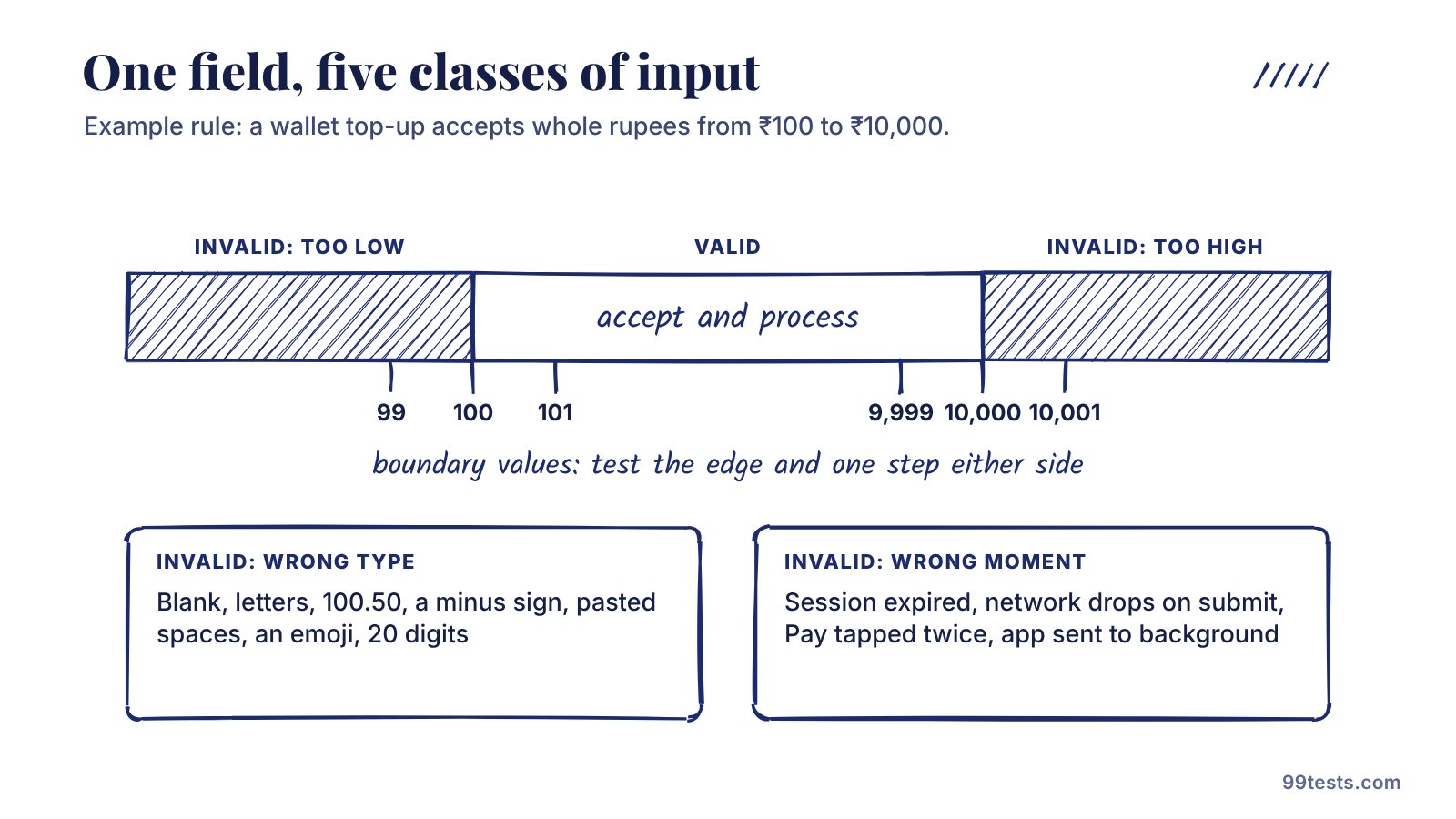
The rule produces five classes: one valid range, an invalid range on either side of it, inputs of the wrong type, and inputs that arrive at the wrong moment. Twelve cases cover them.
| ID | Input | Class | Type | Expected result |
|---|---|---|---|---|
| T1 | 500 | Valid, mid-range | Positive | Payment screen opens for ₹500 |
| T2 | 100 | Valid, lower boundary | Positive | Accepted |
| T3 | 10000 | Valid, upper boundary | Positive | Accepted |
| T4 | 99 | Invalid, below minimum | Negative | "Minimum top-up is ₹100" shown, Pay disabled |
| T5 | 10001 | Invalid, above maximum | Negative | "Maximum top-up is ₹10,000" shown |
| T6 | 0 | Invalid, zero | Negative | Rejected with the minimum message |
| T7 | -500 | Invalid, negative | Negative | Minus sign cannot be typed, or is rejected |
| T8 | 100.50 | Invalid, decimal | Negative | Rejected, or rounded with a visible message |
| T9 | (blank) | Invalid, empty | Negative | Pay stays disabled |
| T10 | five hundred | Invalid, wrong type | Negative | Letters cannot be entered |
| T11 | 500, then Pay tapped twice quickly | Invalid, wrong moment | Negative | One payment request only |
| T12 | 500, network drops after Pay | Invalid, wrong moment | Negative | Clear status, no duplicate debit on retry |
Three positive cases and nine negative ones, for a single field. That ratio is normal. Our black box testing examples guide walks through both techniques on other kinds of input.
Positive and negative test cases by feature
The same thinking applies to every feature. These are the cases worth having for the flows most Indian consumer apps share.
Mobile number and OTP login
Indian mobile numbers have ten digits and begin with 6, 7, 8 or 9, which gives the field a clear rule to test against.
| Positive | Negative |
|---|---|
| Valid 10-digit number and correct OTP | 9 digits, 11 digits |
| Number filled in by the keyboard's autofill | Number starting with 0 or 5 |
| OTP read automatically from the SMS | Number pasted with spaces or a +91 prefix |
| Resend OTP after the timer, then log in | Wrong OTP, expired OTP, OTP from the previous request |
| Five wrong attempts in a row | |
| Resend tapped repeatedly |
For the pasted number, the team has to decide the right behaviour first: clean it up and accept it, or reject it with a clear message. Either is fine. Accepting it unchanged is the bug. More cases for this flow are in the free OTP login test cases.
UPI and card payments
| Positive | Negative |
|---|---|
| Pay with a valid UPI ID and approve in the UPI app | UPI ID without the @ handle, or with an unknown handle |
| Pay with a saved card and the correct OTP | Wrong UPI PIN, or payment declined in the UPI app |
| Apply a valid coupon, then pay | Request left to expire without approval |
| Back button pressed on the bank page | |
| App killed while the payment is pending | |
| Money debited but confirmation never received |
The last row is the one users write one-star reviews about. Mandate flows add their own set, covered in how to test UPI AutoPay mandates.
KYC and document upload
A PAN has a fixed pattern of five letters, four digits and one letter, so its format checks are easy to specify.
| Positive | Negative |
|---|---|
| Valid PAN in capitals | PAN typed in lower case |
| Clear photo of the document, under the size limit | Letter O typed in place of a zero |
| Name that matches the document | Blurred photo, or a photo of the wrong document |
| File over the size limit, or an unsupported file type | |
| Camera permission denied | |
| Upload interrupted at 80% |
Search and forms
| Positive | Negative |
|---|---|
| A term that has results | A term with no results |
| Hindi or another regional language, where supported | A single character, or 500 characters |
| Filters that match some items | Emoji, HTML tags or SQL-like text in the box |
| Names with apostrophes, such as D'Souza |
An empty result should produce a helpful empty state, not a blank screen.
Negative conditions beyond the input field
On a real phone, the invalid thing is often not the data. It is the moment.
| Condition | How to create it | What failing well looks like |
|---|---|---|
| Network drops mid-request | Switch on flight mode after tapping submit | Clear message, retry works, nothing duplicated |
| Slow network | Move to a weak-signal spot | Progress shown, timeout handled, no frozen screen |
| App sent to background | Press Home during a payment or upload | State restored on return |
| Incoming call | Call the test phone mid-flow | Flow resumes after the call |
| Permission denied | Tap "Don't allow" for camera, location or SMS | App explains why and offers another route |
| Double tap | Tap the main button twice quickly | One action only |
| Back button | Press back on every screen of the flow | No crash, no orphaned transaction |
| Low storage | Fill the phone to under 500 MB free | A clear message on download or photo capture |
| Wrong clock | Set the phone's date a day ahead | Sessions and OTP timers still behave |
| Session expired | Leave the app idle past the timeout, then submit | Sent to login, input not lost |
These are hard to script and easy for a person holding a phone. They are also where emulator results and handset results part company, which is the subject of the bugs only a real phone shows. A fuller list of network cases is in 12 network conditions your app should survive in India.
Where to run them: unit, API, screen and real device
The same invalid input can be tested at four levels, and each level catches something the others miss.
| Level | What a negative test does here | What it catches |
|---|---|---|
| Unit | Calls the validation function with bad values | Wrong limits, missing checks |
| API | Sends the invalid request straight to the server | Rules enforced only in the app and not on the backend |
| Screen | Types or pastes the value into the field | Wrong or missing messages, lost input |
| Real device | Runs the flow while interrupting it | Timeouts, duplicates, state lost in the background |
The API row deserves a special mention. An app can stop you typing ₹10,001, but if the server accepts a request for ₹10,001 sent to it directly, the limit does not really exist. Negative cases for money and identity should be run against the API as well as the screen.
The cheapest place to catch a wrong limit is a unit test. The only place to catch a duplicate debit after a dropped connection is a phone on a mobile network.
What a negative test has to check
Rejecting bad input is the minimum. A negative test should confirm four things, and it fails if any one of them is missing.
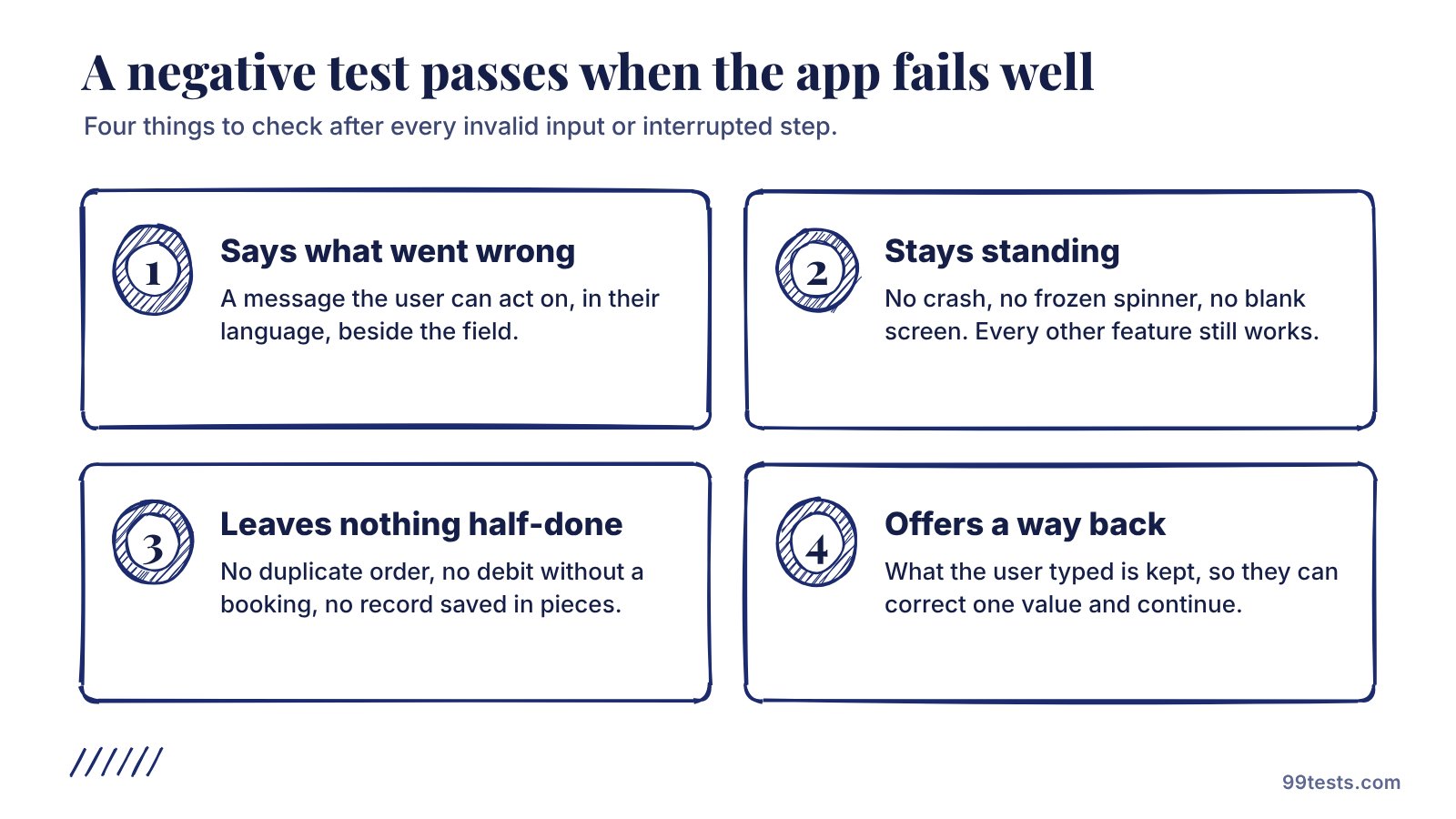
- The app says what went wrong. "Something went wrong" is not a message a user can act on. "Enter a 10-digit mobile number" is. Check the wording, the language, and that the message appears beside the field that caused it.
- The app stays standing. No crash, no spinner that never ends, no blank screen. The rest of the app still works.
- Nothing is left half-done. No duplicate order, no debit without a booking, no profile saved with half its fields. This check needs someone to look past the screen: at the order history, the bank SMS, the admin panel.
- There is a way back. The user's other input is preserved, the wrong field is highlighted, and correcting one value lets them continue.
A quick way to judge a message is to ask whether it tells the user what to do next.
| Message the app shows | Problem | Better |
|---|---|---|
| "Invalid input" | Does not say which field or why | "Enter a 10-digit mobile number" |
| "Error 500" | An internal code with no next step | "We could not reach the server. Check your connection and try again." |
| "Payment failed" | Leaves the user unsure about their money | "Payment not completed. No money was debited." |
| "Something went wrong" | Could mean anything | Name what failed and offer Retry |
| No message, and the button does nothing | The user taps again and again | Disable the button and show why |
Error states are also where translation and accessibility gaps hide, because they are the screens a team sees least. Run the same negative cases with the app set to Hindi or another supported language, and check that the message is translated, fits the space and still makes sense. Turn on TalkBack or VoiceOver and confirm the error is announced, not just coloured red.
Practical rule: write the expected error message into the test case. "Shows an error" passes even when the app shows the wrong one.
How to write a negative test case someone else can run
A negative case needs more precision than a positive one, because "invalid" covers so much. Each case should carry:
- The exact invalid value or action. "98765 43210 pasted with a space", not "invalid number".
- The state before the step. Logged out, permission not yet asked, ₹500 in the wallet.
- The expected message, word for word, if the product team has defined it.
- The expected state afterwards. No OTP sent, balance unchanged, button disabled.
- One invalid condition at a time. If a case combines a wrong number with an expired OTP, a rejection tells you nothing about which check fired.
Written out in full, a negative case looks like this.
| Field | Content |
|---|---|
| ID | LOGIN-NEG-07 |
| Title | Mobile number pasted with a space is cleaned before the OTP is sent |
| Starting state | App freshly installed, logged out, on the login screen |
| Test data | 98765 43210, copied with a space after the fifth digit |
| Steps | 1. Long-press the mobile number field and tap Paste. 2. Tap "Get OTP". |
| Expected | The field shows 9876543210 with the space removed, and one OTP is sent to that number |
| Check afterwards | Exactly one OTP request was made for the number |
| Devices | One Android phone and one iPhone, because paste behaviour differs |
If the product rule is to reject the pasted value instead, the expected result changes to the exact message and "no OTP request sent". The case stays just as specific.
A short list covers the negative cases almost every form needs:
- A required field left empty
- A value that is too short, and one that is too long
- The wrong type, such as letters in a number field
- Leading and trailing spaces
- A pasted value that carries formatting
- Special characters and emoji
- The same form submitted twice
- Submission with no network
- A value that was valid and has expired, such as an OTP, a session or a coupon
When a negative case does fail, the report needs the same care. Our guide to writing steps to reproduce a bug shows the format, and best practices for test case creation covers keeping a growing suite readable.
How much of each, and in what order
Positive cases come first for a simple reason: if the happy path is broken, nothing else can be tested. Run them as a smoke check on every build.
Then spend most of the remaining time on negative cases, ordered by what a failure would cost:
- Money. Payments, refunds, wallet, coupons.
- Identity and access. Login, OTP, KYC, password reset.
- Data the user cannot recreate. Orders, bookings, uploaded documents.
- Everything else. Search, profile, settings.
For each input in the top three groups, the floor is one valid value, both boundaries and one value from every invalid class. For each multi-step flow, add the interruption conditions from the table above at the step where money or data changes hands. Our guide to risk-based testing explains how to rank the rest.
Automation suits the input matrix: the twelve top-up cases above are a natural data-driven script. People suit the interrupted flows, the permission dialogs, and the judgement about whether an error message makes sense to someone reading it in Hindi on a small screen.
Common mistakes
- Counting a rejection as a pass without reading the message. The app refused the input, but for the wrong reason.
- Testing only at the screen. The interface blocked the value, but the API behind it would have accepted it.
- Combining several invalid inputs in one case. You learn that something was rejected, not what.
- Skipping negative cases on internal screens. Admin panels and agent apps tend to get the least validation and hold the most data.
- Treating negative testing as a one-off. Every new field and every new state adds invalid classes. Add the cases when the feature is built.
- Testing only on Wi-Fi. Many wrong-moment cases cannot happen on a fast, stable connection.
Frequently asked questions
Is boundary testing positive or negative? Both. The values on the valid side of a boundary (100 and 10,000 in the example) are positive cases. The values just outside it (99 and 10,001) are negative cases.
Can a negative test pass? Yes. It passes when the software handles the invalid input the way the requirements say it should. It fails when the bad input is accepted, the app crashes or the error handling is wrong.
Is negative testing the same as security testing? They overlap but are not the same. Negative testing asks whether ordinary mistakes are handled well. Security testing asks whether a deliberate attacker can cause harm. Typing HTML into a name field is a negative test. A full penetration test is a specialist job.
Who should write negative test cases? Anyone who knows where the product's limits are: the tester, the developer who wrote the validation, and the support agent who hears what users do in practice. Support tickets and app store reviews are the best source of negative cases a team has.
How is negative testing different from exploratory testing? Negative testing is defined by the input, which is invalid or unexpected. Exploratory testing is defined by the method: there is no script, and the tester decides each next step from what they observe. An exploratory session usually includes many negative checks, and the good ones get written down as cases afterwards.
How many negative test cases are enough? Enough to cover every invalid class and boundary for the inputs that touch money, identity and data, plus the interruption conditions on those flows. Coverage of classes matters more than the raw count.
Positive cases tell you the app works for the user who does everything right. Negative cases tell you what happens to everyone else, and many of them only show up on a real phone, on a real network, in a real hand. 99tests runs both kinds on tester-owned Redmi, Realme, Galaxy, Vivo and iPhone handsets on Jio, Airtel and Vi, and a reviewer verifies every finding before it reaches you. Start with the free test case library, which marks the cases that need a physical device, or send your own cases to 99tests.