Validation of Test: What Makes a Test Trustworthy
Validation of test means proving a case is relevant and reliable, not just that it passed. See the evidence checklist teams use in 2026.
In this article
- Evidence That a Test Is Fit for Purpose
- What Strong Validation of a Test Looks Like
- Repeatability, Precision, and Reproducibility
- Three Levels of Agreement
- How to Validate One Test Case
- Coverage Numbers That Miss Faults
- Study Figures Behind the Oracle Gap
- Two Pairs Worth Comparing
- False Assurance from Generated and Simulated Tests
- An Environmental Checklist in Plain Terms
- Choose Which Tests to Trust Before Release
The most popular advice in testing sounds reasonable: write more tests, raise coverage, and ship when the run is green. It's also incomplete. A suite can grow, coverage can climb, and every case can pass while the checks themselves prove almost nothing about the product your customers will use.
That's the problem validation of test work is meant to solve. You're not asking, "Did the steps execute?" You're asking a harder question: "Would this test fail if the behavior were wrong, and can someone else reproduce what we saw?" If the answer is no, a green run is activity, not evidence.
A smaller suite with precise expected-versus-observed checks can justify a release better than a large suite that only clicks through screens. What follows is a practical way to judge one test, then a whole suite, before you trust either one with a release decision.
Evidence That a Test Is Fit for Purpose
A test that runs and a test that can support a release decision are different things. The working rule is simple: validation of test work shows the case is suitable for a specified use. It's tied to a requirement, it would fail if the product were wrong, and it produces a result another person can reproduce.
The NIST software development guidance draws a useful line here. Validation determines whether delivered software satisfies user needs and requirements, while verification demonstrates consistency, completeness, and correctness at each development stage and across stage boundaries. Teams that blur those two often verify that steps were followed, then act as if they've validated the behavior.
If you want the lifecycle view of that distinction, applying verification and validation across the SDLC is a helpful companion. For sorting what a given case should even check, the distinction between functional and non-functional testing helps you name whether you're validating a business rule, a speed limit, or a permission boundary.
What Strong Validation of a Test Looks Like
| Criterion | Question it answers | Weak evidence | Strong evidence |
|---|---|---|---|
| Relevance | Does this case serve a stated requirement or release decision? | A case exists and executes | Requirement linked to scenario, oracle, and decision |
| Accuracy | Would a wrong product fail this test? | One green run or high line coverage | Expected versus observed outcome, or a killed known defect |
| Precision | Do repeated runs agree? | A single successful execution | Repeats under defined conditions, with disagreement noted |
| Specificity | Does it check the intended behavior? | A broad happy-path click-through | Assertion on the business rule, state change, or user-visible result |
| Range and conditions | Are representative edges and targets covered? | Default emulator or one browser | Named devices, OS versions, browsers, data boundaries, and networks |
| Reproducibility | Can someone else reach the same conclusion? | An aggregate pass rate | Steps, environment, time, outcome, and screenshot or recording |
| Blocked and unrun work | What was not actually tested? | Missing cases omitted from the report | Passed, failed, blocked, or unexecuted status plus the reason |
| Robustness | Does the check survive a small setup change? | Passes only on one lab image | Still meaningful on a nearby OS, browser, or network |
Walk the rows in order. Relevance asks whether the scenario answers a business question, such as whether a customer can pay. Accuracy asks whether your oracle, the rule that defines acceptable behavior, compares observed behavior with an accepted expected result. Precision asks whether repeats under the same conditions agree, and specificity asks whether the assertion checks the intended rule rather than any click that happens to succeed.
Range asks which devices, browsers, data boundaries, and networks were included. Reproducibility asks for steps, environment, time, participants, and artifacts. Blocked and unrun cases stay visible with a reason, because an aggregate pass rate can hide them. Stability asks whether a small setup change still leaves the check meaningful.
Scoring habit: Before you trust a pass percentage, mark each important case weak or strong against the last two columns.
Requirements need to be verifiable in the first place, with observable conditions and measurable acceptance criteria. "Checkout works well" can't be validated. "A declined card shows a decline message and creates no order" can.
Repeatability, Precision, and Reproducibility
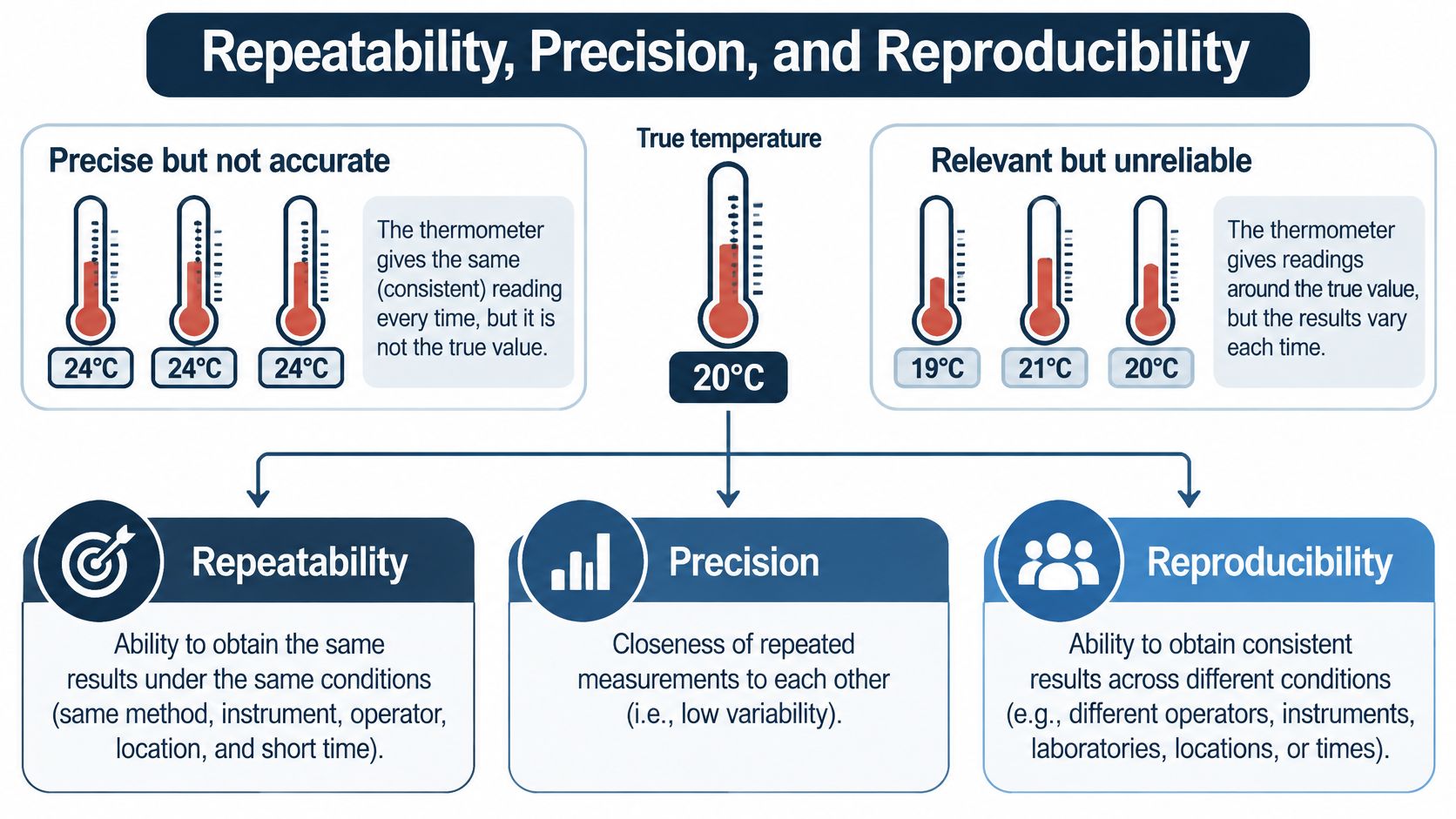
Say you buy two cheap thermometers. The first reads 21.0 degrees every single time, even in a hot room. The second jumps between 19 and 26 degrees in the same spot. The first is precise but not accurate. The second points at the right idea but is too unreliable to act on.
Software tests fail in the same two ways. A login test can pass every morning because it only checks that a button exists, so it reliably misses a broken permission rule. Another test checks the right rule but flakes depending on who runs it, which account they use, or whether the network hiccups, so nobody trusts its failures.
The visual below maps that thermometer problem onto three levels of agreement you should look for.
Three Levels of Agreement
- Repeatability: The same person, build, and environment produce the same result when the case runs again.
- Intermediate precision: The result holds when the tester, time, or setup changes within your own team.
- Reproducibility: Another person or another lab can follow your record and reach the same conclusion.
The U.S. Food and Drug Administration method validation guidance frames method validation as evidence that a procedure is suitable for its specified use, and it separates repeatability, intermediate precision, and reproducibility so variability can be examined within a run, across conditions, and between laboratories. You don't need the chemistry. You need the habit of asking where disagreement could enter.
Scanners face a cousin of this problem when noisy tools flag harmless behavior, which is why practitioners tune scanners for fewer false positives instead of trusting raw output. Your test suite deserves the same suspicion toward results that look clean but mean little.
For an app release, matching evidence means predefined device and browser targets, reproducible steps, observed versus expected outcomes, and a written reason whenever a case is blocked or unexecuted. A solid software testing report template gives that evidence a consistent home. Historically, this is the shift from informal demonstration, such as one scripted walkthrough in front of a manager, toward acceptance criteria that name the evidence required before anyone decides to release.
How to Validate One Test Case
Take one case you care about, such as login, payment, or a permission prompt. Run it through the seven steps below before you test it against a build. The flowchart gives you the shape of the routine at a glance.
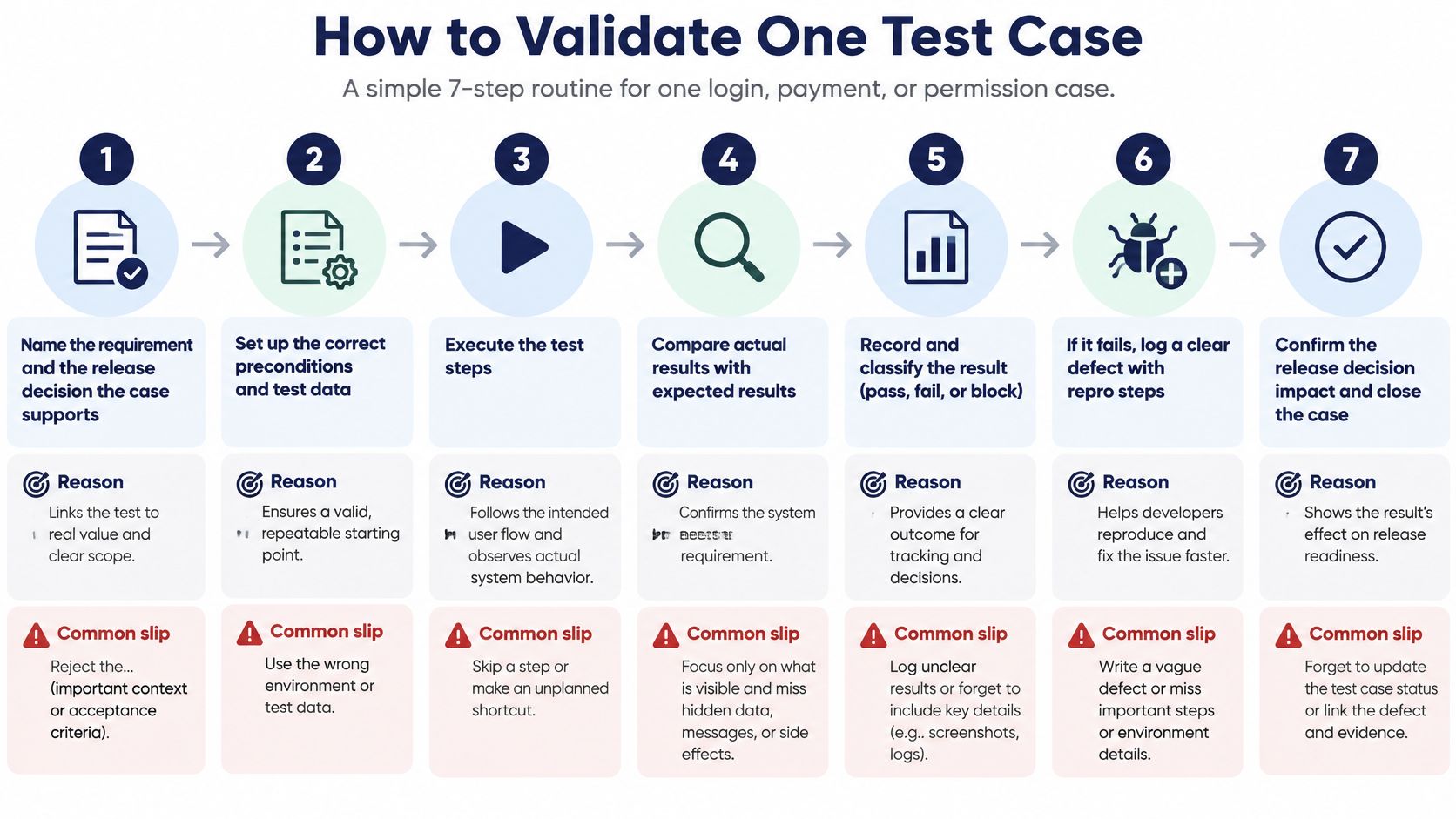
Name the requirement and the release decision. Write down which requirement the case supports and what changes if it fails. If nothing changes, reject the case. The usual slip is keeping a case because it's easy to automate, not because it protects anything.
Write the oracle before execution. Record the starting state, the action, the expected user-visible result, the expected data or state change, and what must not happen. Writing expectations after you see the output turns the product into its own answer key, so don't do it.
Replace adjectives with measurable criteria. Swap words like fast or easy for an observable condition, such as a confirmation screen appearing after payment. The common slip is accepting "works well" as a requirement and leaving the tester to guess.
Choose the smallest set of conditions that represents the claim. One current phone OS, one older OS, one browser, and one constrained network usually beat twenty runs on a lab default. Add edges like empty input, an expired session, a denied permission, and offline use. Testing only the default setup is the slip that hides real customer failures.
The short video below walks through test case thinking you can compare against your own case before you execute it.
Run the case and record the full context. Capture the date and time, environment, participant, problems encountered, recovery actions, and an outcome of passed, failed, blocked, or unexecuted. Recording only a pass is the slip, because it erases everything a reviewer needs.
Separate product failure from test failure. A login blocked because credentials were never issued proves nothing about the login feature, so don't count it as a product fail. Mark it blocked, state the reason, and keep it out of the pass rate until it runs.
Have a different person check the work. A second reviewer confirms the oracle was applied and that any defect severity follows a shared rubric. Verification is separate from testing, so the person who found a bug is never the person who grades it.
A case is done when it has a trace, an oracle, a named environment, a status, and a reason for anything not run.
That definition of done fits on an index card. Tape it above the desk of whoever approves your test plans.
Coverage Numbers That Miss Faults
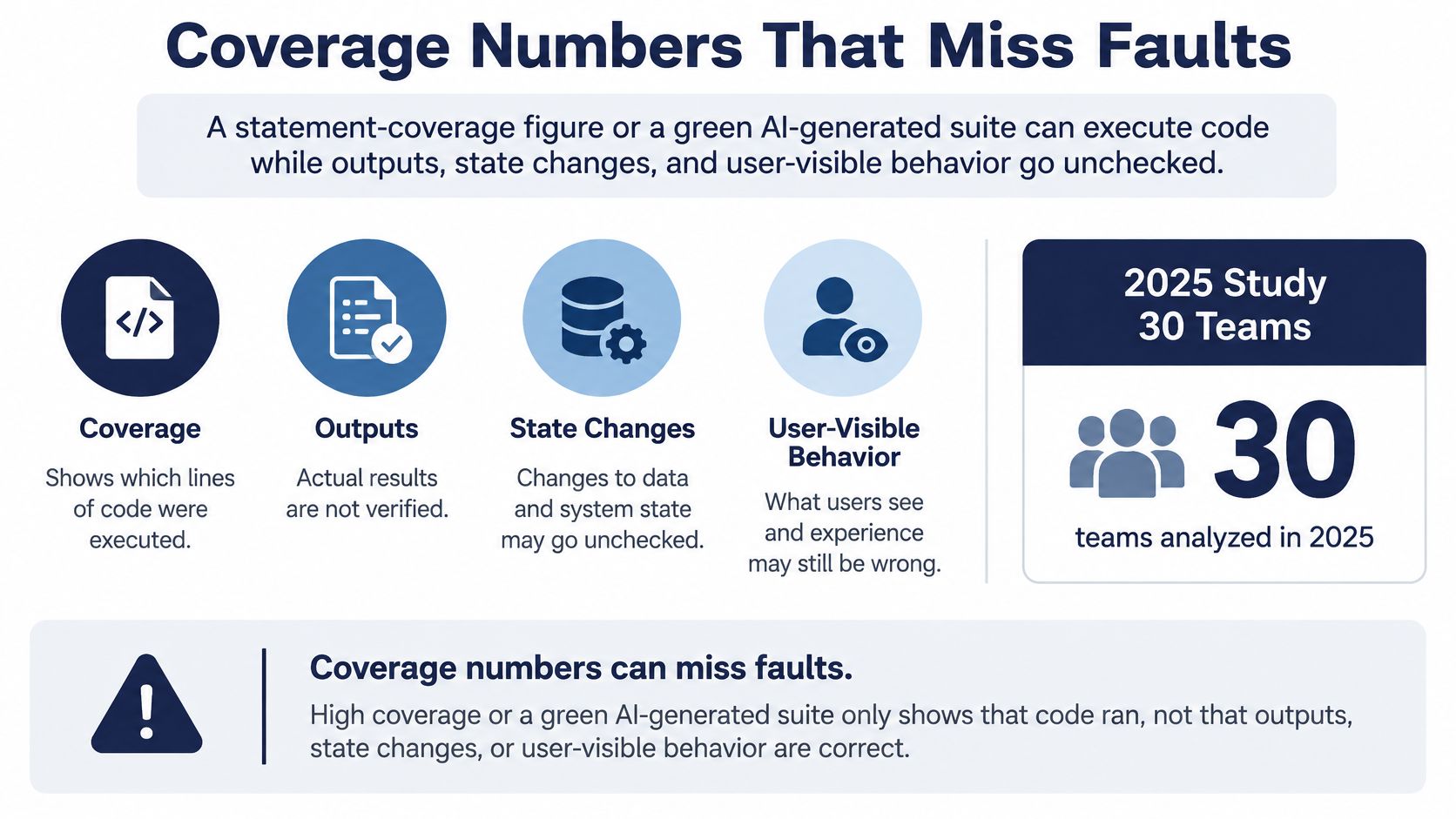
A large test suite can produce an impressive coverage percentage and still miss a release-blocking fault. Coverage shows which code ran; it does not show whether the tests checked the behavior that matters.
In a 2025 empirical study of 30 Java classes across six open-source projects, statement coverage alone detected as little as 10% of faults. The same study reported a median mutation score of 0.32 for pseudo-tested statements. Code can run while its outputs, state changes, and user-visible behavior go unchecked. That gap is called the oracle gap.
AI use makes the distinction more pressing. The State of Testing report for 2025 found that 40.58% of respondents used AI for test-case creation. A growing case count does not necessarily mean stronger evidence: a test can execute many lines without checking whether the application behaved correctly.
The infographic below shows why a coverage percentage alone cannot answer whether a release is ready.
Study Figures Behind the Oracle Gap
| Measure | Reported value | Source |
|---|---|---|
| Faults detected by statement coverage alone | As little as 10% | 2025 study of 30 Java classes in six open-source projects |
| Median mutation score of pseudo-tested statements | 0.32 | 2025 study of the same classes |
| Mutations and mutated test runs analyzed | More than 43,000 mutations across 1.1 million runs | 2024 empirical study |
| Respondents using AI for test-case creation | 40.58% | State of Testing report, 2025 |
Mutation testing checks whether tests notice deliberate changes to program behavior. A mutant is a small artificial change, such as flipping a comparison. If a test fails because of the change, it kills the mutant. If the test still passes, the mutant survives, suggesting that the altered behavior went undetected.
A 2024 empirical study analyzed more than 43,000 mutations across 1.1 million mutated test runs. It found that an incorrect state could propagate through execution without causing an observable test failure. The wrong value traveled through the program, but no assertion caught it.
Two Pairs Worth Comparing
Consider checkout. A weak test clicks Pay, sees HTTP 200, and passes. A stronger test checks the order total, tax, confirmation screen, and whether a declined card leaves no order behind. Its expected-versus-observed checks give a reviewer better grounds for answering the release question: can customers pay the right amount?
Now consider a browser login test. A case may cover many lines yet never assert the permission error message. Mutation testing can help reveal that gap: change behavior around the permission rule and check whether the test fails. If a mutant survives, review it against the requirement. Some equivalent mutants do not change observable behavior, so distinguish those from genuine misses.
For a critical workflow, run the case against a representative build, record which mutants are killed or survive, and review the survivors. Choose changes that target the requirement's risks, such as boundaries, error handling, permissions, network loss, and device-specific branches. A smaller suite with precise expected-versus-observed checks can justify a release better than a larger suite that only executes code.
False Assurance from Generated and Simulated Tests
Teams blur five labels that mean very different things. A case can be generated, then executable, then executed, then observed, and only then independently verified. Each step removes one kind of false assurance, and skipping steps is where trouble starts.
A 2025 review of large language models in testing warns that these models can generate test cases that appear syntactically correct while failing to represent intended system behavior, producing false confidence in software quality. A generated case that compiles and clicks through a happy path has cleared the lowest bar, not the highest. If your team is sorting machine-written cases, a disciplined approach to how to test AI-generated test cases helps you separate plausible text from trustworthy checks.
Simulators add a second illusion. An emulator or a single lab browser can miss real hardware behavior, OS version quirks, browser engine differences, permission prompts, and mobile-network drops. For customers on budget Android phones and local networks, those misses aren't edge cases. They're Tuesday.
An Environmental Checklist in Plain Terms
- Target hardware or browser: Name the phones, laptops, and browser engines the case must run on.
- OS floor: State the oldest operating system version you still promise to support.
- Network: Include at least one constrained or interrupted connection, not just office Wi-Fi.
- Account and permission state: Record whether the tester was logged in, and whether permissions were granted or denied.
- Reason for every unrun case: Setup, access, device availability, or a crash, written down rather than omitted.
Validating a test's logic and validating its environmental realism are both required, and neither replaces the other. A case can be logically sound and still unproven on your customer's device. It can also run on exactly the right phone while asserting nothing important.
Choose Which Tests to Trust Before Release
Sort your current suite into three piles, and be honest about it.
- Trust: Release-critical cases that already score strong on a named target and would fail a wrong product.
- Repair: Cases that pass but wouldn't fail a wrong product, so their oracle or trace needs fixing before they count.
- Do not count: Generated cases that have never left an emulator, plus anything blocked by access, device availability, or setup.
Rerun the trusted and repaired set on the next build instead of carrying an old pass forward. A pass against last week's build says nothing about this week's code. Then decide, with that evidence in front of you, whether your in-house setup is enough.
Where your team lacks the phones, browsers, or independent reviewers, we can run your test cases, including AI-generated ones, on testers' own Android phones, iPhones, and laptops, and send back a human-verified pass/fail report in 3 business days. That's execution and verification evidence for your release decision. It isn't test automation, and it isn't a certification or an audit under any standard.
Release rule of thumb: If you can't say what a case checked, where it ran, and why anything missing is missing, don't let it vote on the release.
Bring us the cases you aren't sure you can trust, whether your team wrote them or an AI tool generated them, and we'll run them on real phones, laptops, and browsers and return a human-verified pass or fail for each one. You'll get the evidence to sort your suite into trust, repair, and do not count before your next release. Start at 99tests.