Software Testing Report Template: Fields and Layout
Software testing report template with fields for coverage, environments, results, defects and execution notes, plus examples for each.

In this article
- Reusable Software Testing Report Structure
- Put evidence in reading order
- Keep the structure reusable
- Header and Scope Fields Filled Before Testing Starts
- Define the boundary of the claim
- Make completion checkable
- Environment Matrix for Devices, Browsers and Builds
- Write configurations precisely
- Coverage Status Values and Reasons for Unrun Cases
- Separate passing from completing execution
- Give every gap an explanation
- Failure Classification Before Failures Are Counted
- Apply the classification in a controlled order
- Keep classification separate from coverage
- Defect Entry Fields and Severity Grades
- Define severity before grading
- Worked checkout defect
- Execution Notes and Run Conduct
- Record interruptions and deviations differently
- Keep the narrative factual
- Provenance and Confidence Fields for AI-Generated Cases
- Preserve authorship and review history
- Rate confidence by evidence type
- Confirm Release Readiness From the Report
- Make the decision against recorded conditions
- Compare the fix under comparable conditions
The popular advice to lead a software testing report with a pass percentage puts the easiest number ahead of the hardest questions. A useful software testing report template shows which configurations weren't tested, why executions failed, and whether someone reviewed the AI-generated cases before trusting their results. Without those fields, a tidy summary can support the wrong release decision.
Reusable Software Testing Report Structure
A 2002 study prepared for NIST estimated that inadequate software-testing infrastructure cost the U.S. economy approximately $59.5 billion annually. The study also found that more than half of software defects weren't discovered until downstream development stages or after release, when diagnosis, remediation, operational disruption, and data loss become more expensive.
A pass count can't tell a release manager where that uncertainty remains. Organize the report around the questions someone must answer before approving a build.
Seven blocks of a software testing report
| Report block | Question it answers | Typical owner |
|---|---|---|
| Header and scope | What was tested, on which build, and what counts as done | QA lead |
| Environment matrix | On which devices, browsers, OS versions and networks each case ran | Test engineer |
| Coverage matrix | Which cases ran, which did not, and why | Test engineer |
| Failure classification | Whether each failure is a real product defect | QA lead |
| Defect register | What broke and how a developer can reproduce it | Tester |
| Execution notes | How the run was conducted and what limited it | Test manager |
| Release recommendation | Whether the evidence supports release, and on what conditions | Release manager |
Put evidence in reading order
Start with the intended scope so readers know the boundary of the claim. Then show where testing happened and what ran, before asking readers to interpret failures or investigate defects.
Failure classification belongs before the defect register because an execution problem isn't automatically an application problem. Execution notes explain limitations and deviations; the recommendation then connects the evidence to a decision.
The layout accommodates the documentation covered by ISO/IEC/IEEE 29119-3, including the test object, scope, risks, environments, execution results, incidents, and completion criteria. Using a compatible layout isn't a claim of certification or full conformity. The fields still need to suit the testing activity and its risks.
Keep the structure reusable
Use a workbook tab or document heading for each block. Assign stable identifiers to cases, configurations, sessions, and defects, and preserve them when the build changes. Store execution results separately from case definitions so a rerun doesn't overwrite the previous evidence.
Build the report alongside the plan rather than reconstructing it at the end. These test plan examples help establish the scope, responsibilities, and conditions that the final report must assess.
Practical rule: Write none recorded when a block has no entries. An absent defect register could mean no defects were found, or that nobody completed the register.
Leave raw log dumps in attachments. Keep the report itself focused on evidence a reader can find, verify, and act on.
Header and Scope Fields Filled Before Testing Starts
Complete the header before assigning sessions. If the team can't identify the build or the person who will approve the result, testing hasn't started from a reliable baseline.
- Report ID. Use a persistent identifier that distinguishes this report from earlier runs.
- Test object name. Identify the application, website, service, or module under examination.
- Application build or version. Include an immutable build identifier, not just a release nickname.
- Testing dates. Record the planned window initially, then preserve actual execution dates separately.
- Requester. Name the person who commissioned the work and can resolve scope questions.
- Report recipient. Identify who needs the result and who has release authority.
Add the plan reference and report revision alongside these fields. Don't put credentials, customer records, or access tokens in a forwardable header.
Define the boundary of the claim
List features in scope, features out of scope, and a reason for every exclusion. Tie objectives to user journeys, such as account creation on Android or checkout in Safari, rather than broad labels such as functional testing.
For teams still validating a prototype, Uxia's guidance on how to organize testing around prototype feedback is useful for choosing objectives before converting them into execution cases. Prototype feedback and release verification answer different questions, so state which activity the report covers.
A hypothetical filled scope line could read:
Scope SC-CHECKOUT: Verify guest checkout through payment confirmation in Safari on the required iPhone configuration. Refunds are excluded because the refund service isn't included in this release candidate.
Record risks and assumptions with an owner. For example, the payment integration owner must confirm that the sandbox will remain available throughout the test window. An assumption without an owner leaves the tester responsible for discovering a dependency failure during execution.
Make completion checkable
Write exit criteria as conditions someone can verify:
- Critical findings: No open critical defects remain.
- Required execution: Every release-critical case has a conclusive result on each required configuration.
- Accepted risk: Every accepted high-risk issue names its approver and acceptance conditions.
Also state the service boundary. At 99tests, we provide human testing on tester-owned devices according to the purchased package. That isn't test automation, a security test, or certification, and the scope must say so when stakeholders expect those assurances.
Freeze the scope and build before execution. Record later changes as approved deviations rather than silently editing the baseline.
Environment Matrix for Devices, Browsers and Builds
| Field | What to record |
|---|---|
| Configuration and session IDs | Stable configuration reference plus the actual execution session |
| Device | Manufacturer, exact model, and hardware type |
| Operating system | Version and full OS build identifier |
| Browser | Name and complete version string |
| Display | Screen resolution, viewport where relevant, and orientation |
| Application | Installed build or deployed web build |
| Network | Wi-Fi, carrier network, or defined speed profile |
| Locale and account | Language, region, authentication state, permissions, and relevant account conditions |
Give each target configuration a row before testing starts. Attach a session ID when execution occurs; if the same configuration is used in multiple sessions, preserve each session record.
Write configurations precisely
These hypothetical examples show the format. Capture full version strings and build identifiers from the actual device rather than guessing them from a product name.
| Example configuration | Device and platform | Other conditions to capture |
|---|---|---|
| CFG-ANDROID | Samsung Galaxy A15, Android 14 | Carrier 4G, Hindi locale, portrait, actual OS build and browser version |
| CFG-WINDOWS | Windows 11 laptop, Edge | 1366 × 768 display, landscape, actual Windows build and Edge version |
| CFG-IOS | iPhone 13, iOS 17, Safari | Wi-Fi, portrait, actual OS build, Safari version, signed-in account state |
Browser versions and screen dimensions help developers investigate rendering, wrapping, and interaction problems. Record the actual values, not the versions the tester was expected to use.
An emulator can report its simulated configuration, but it can't establish what happened on a particular physical handset and carrier connection. Our sessions record the actual browser version and screen size, and the report includes device, OS build, and browser details for each case.
Select targets from requirements and user-device information. Budget Android phones and local mobile networks deserve separate rows when their behavior matters, rather than disappearing into a generic Android category.
Use the real-device app testing guide to prepare access and configuration requirements. Where the internal team lacks hardware, we match sessions to testers who own the requested phones and computers.
Coverage Status Values and Reasons for Unrun Cases
Coverage status values and what each one means
| Status | Pass rate treatment | Reason required | Example |
|---|---|---|---|
| Passed | Counts as passed and in the denominator | None | Login passes on Galaxy A15 |
| Failed | Counts in the denominator, not as passed | Linked defect ID | Coupon produces the wrong cart total |
| Blocked | Counts in the denominator, listed on its own | Blocker ID | Staging login down, checkout blocked |
| Inconclusive | Counts in the denominator, flagged for repeat | Specific reason | Video stalled, result cannot be judged |
| Not run | Counts in the denominator, listed by name | Reason code such as device not available or time-box ended | NFC case not run, no test device |
| Excluded by scope | Outside the denominator, stated in scope | Scope line reference | Desktop native app excluded in header |
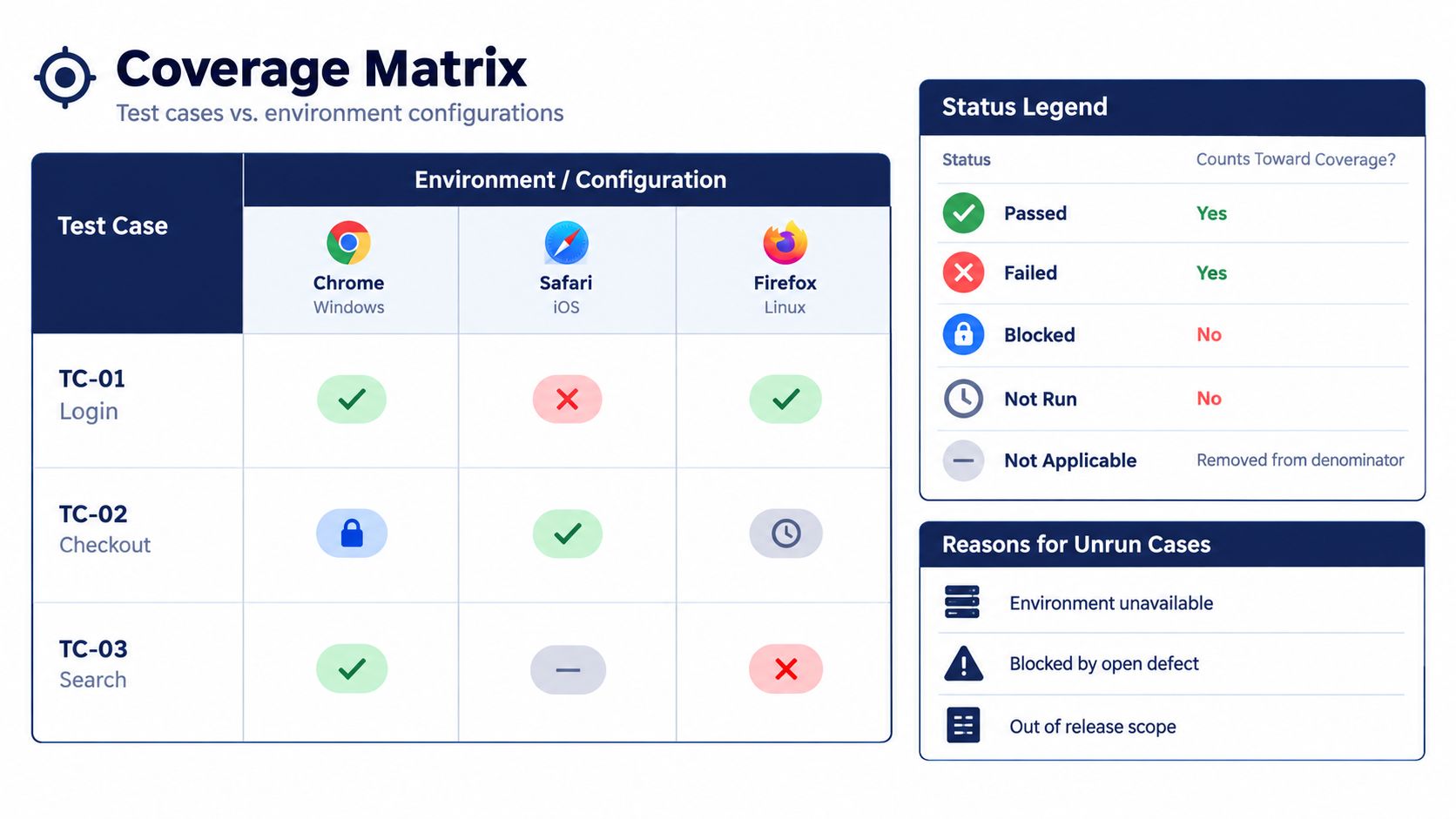
Build the coverage matrix with test cases as rows and required configurations as columns. Every applicable cell receives exactly one current status, with execution history stored behind it.
The visual below illustrates the case-by-configuration layout. Use the status definitions above as the report's calculation rules.
Separate passing from completing execution
Define the headline metric explicitly: planned-scope pass rate equals passed applicable cells divided by all applicable planned cells. Blocked, inconclusive, and unrun cells remain in that denominator because they still represent unresolved planned work.
Also report conclusive execution coverage, calculated from passed and failed cells against applicable planned cells. A blocked case contributes to neither the passed count nor completed execution, even though it remains part of planned scope.
If an automation dashboard reports passes divided only by passes plus failures, label that executed-case pass rate. Don't substitute it for planned-scope reporting.
Microsoft's testing-gap guidance) separates tests not executed by configuration and result owner. Apply that distinction by showing status totals for each configuration as well as overall.
A web campaign can have successful desktop execution while leaving mobile checkout untouched. The overall result won't expose that gap unless the reader can inspect the mobile column.
Give every gap an explanation
For every missing execution, preserve:
- Case and requirement references: Identify the intended behavior and its requirement or user-story link.
- Missing configuration: Point to the exact environment row.
- Reason code: Use controlled values such as environment unavailable, credentials unavailable, blocker, capacity limit, or time-box ended.
- Risk and ownership: State whether a release-critical path is affected, who owns the gap, and what happens next.
Avoid an unexplained skipped status. If a tester intentionally skipped work, retain that event in the execution history and map the current result to not run or an approved scope exclusion.
A case doesn't become out of scope merely because the team ran out of time.
Keep risk weighting separate from raw counts. Prioritize release-critical journeys on high-volume configurations over cosmetic checks on marginal targets, and publish the chosen weighting rule. Don't use a weighted score to conceal an unresolved mandatory case.
Our coverage table shows every test case against every device, with pass, fail, blocked, or not-run results; failures link directly to the finding. If an uploaded list exceeds package capacity, we identify the uncovered cases before execution. Customers can add five sessions at a time or leave those named cases in the report as not run.
Failure Classification Before Failures Are Counted
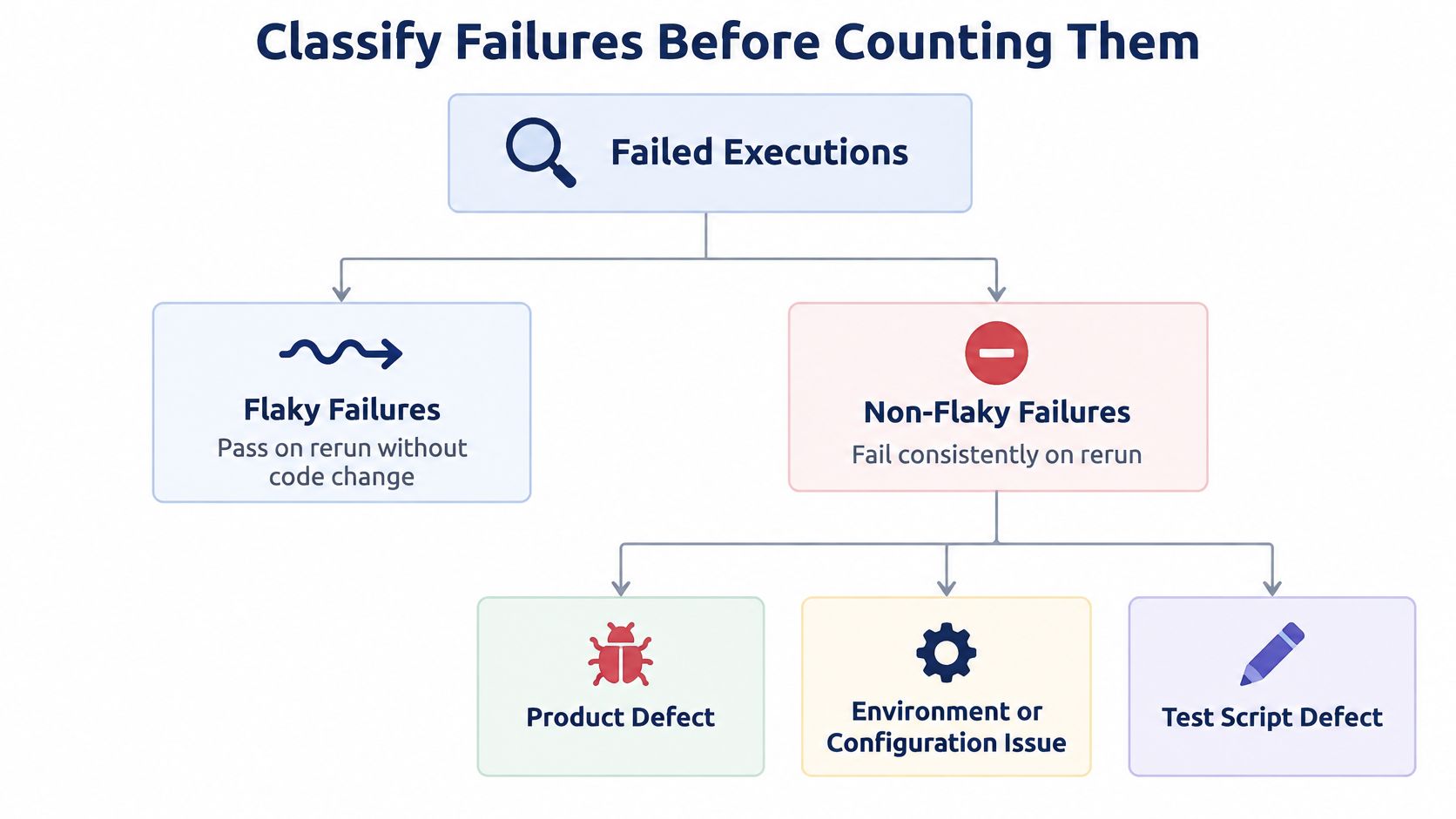
In a 2017 industrial regression-testing study, 13% of test-suite execution failures were flaky, and 26% of non-flaky failures resulted from incorrect or obsolete tests, rather than defects in the system under test. Those findings concern the studied regression suites, but the reporting lesson applies directly: a red execution result doesn't establish its cause.
Preserve the original failure, then classify it. Don't change the historical execution to passed merely because the test itself needed correction.
The branching view helps reviewers separate inconsistent observations from repeatable failures before investigating the cause.
Failure classes and the action each one requires
| Class | Meaning | Example | Report action |
|---|---|---|---|
| Product defect | Behavior is wrong and reproduces | Cart total wrong after coupon applied | Log in defect register with ID |
| Flaky result | Fails and passes under the same conditions | Hypothetically, timeout on 2 of 5 runs | Repeat run, record flake rate |
| Obsolete or incorrect test | Expectation no longer matches the product | Case expects an old button label | Update case version, exclude from defect count |
| Infrastructure issue | Device, network, account or build access caused the failure | Test account locked, staging down | Record cause, rerun after fix |
| Environment-incompatible | Case needs a feature the configuration lacks | NFC pairing case on a phone without NFC | Mark not testable, not failed |
Apply the classification in a controlled order
First confirm the build, case version, environment, and preconditions. Repeating a case against changed data or a different deployment doesn't establish flakiness under the same conditions.
Then compare the expectation with the approved requirement. If the requirement changed, update the test with a versioned correction and retain the original execution reference. Don't rewrite the expected result to match whatever the application did without recording that change.
For inconsistent results, record repeat attempts, failed attempts, timestamps, and evidence. Calculate the flake rate from those recorded attempts, but treat flaky as an observation, not a root-cause diagnosis. An intermittent product defect can initially look like an unreliable test.
Infrastructure classification also needs evidence. A lost connection may be a test-network interruption, or the application may mishandle an ordinary network change. The observed trigger alone doesn't settle responsibility.
Keep classification separate from coverage
Environment-incompatible describes why the case can't be executed as written. In the coverage matrix, keep the cell unresolved until the requirement is clarified or an authorized scope exclusion is recorded.
Count confirmed product defects in the defect register. Keep unverified observations visible in triage so reviewers don't mistake their exclusion from the confirmed count for a clean result.
That separation preserves useful totals: execution failures describe what happened during testing; confirmed defects describe the product problems the team has established.
Defect Entry Fields and Severity Grades
Give developers enough evidence to reproduce the behavior without arranging a handoff meeting. Every defect entry should carry these fields:
- Identity and linkage: Unique defect ID, linked case ID and version, concise title, source session, and current status.
- Assessment: Severity, priority, rubric name and version, owner, and verification status.
- Reproduction: Preconditions, numbered steps, expected result, actual result, and failed attempts out of total attempts.
- Context: Environment ID, observation timestamps, application build, and relevant test-data reference.
- Evidence: Screenshots, recording, console output, or network evidence appropriate to the finding.
IEEE 829-2008 describes test documentation whose breadth and depth can be selected according to testing tasks and integrity level. Apply that principle by requiring evidence appropriate to the decision, rather than collecting attachments nobody uses.
Define severity before grading
Severity describes impact; priority describes the order in which the team intends to act. Use the following as a proposed project rubric, not as grades prescribed by the standard.
| Severity | Typical definition | Release impact | Evidence required |
|---|---|---|---|
| Critical | Crash, data loss or failed payment on a release path | Blocks release | Screen recording, steps, device, build |
| High | Core flow fails on a configuration with no workaround | Blocks unless the risk is accepted by a named approver | Screenshot, steps, console log |
| Medium | Feature behaves incorrectly but a workaround exists | Fix before release or schedule a follow-up | Screenshot and steps |
| Low | Cosmetic or copy issue with no functional effect | Does not block release | Screenshot |
Name the rubric and its revision in the report. For our delivered findings, we use the published severity rubric; every failing case includes a real-device screenshot and reproduction steps, and every serious bug includes a screen recording.
Worked checkout defect
The following is a hypothetical completed entry, not an actual customer finding.
| Field | Example value |
|---|---|
| Defect and case | DEF-CHECKOUT-CRASH; TC-CHECKOUT-PAY, revision B |
| Title | Checkout closes after payment submission on Galaxy A15 |
| Severity and priority | Critical under Checkout Rubric revision A; immediate fix priority |
| Status and owner | Open; checkout engineering owner |
| Preconditions | Signed-in sandbox account, stocked cart, valid sandbox payment method |
| Reproduction steps | 1. Open cart. 2. Continue to payment. 3. Select sandbox method. 4. Submit payment. |
| Expected result | Confirmation appears and order remains accessible |
| Actual result | Application closes before confirmation |
| Reproducibility | Failure on every recorded attempt |
| Environment | CFG-ANDROID; Galaxy A15, Android 14; full OS build and browser string retained in linked session; carrier 4G |
| Build and timestamp | Checkout candidate B; observation time retained in session metadata |
| Attachments | Screenshot, crash recording, sanitized console output |
| Verification | Independent reproduction confirmed on candidate B; fix verification pending |
| Provenance | Initial session SES-CHECKOUT-A; independent session SES-CHECKOUT-B; consolidated ID DEF-CHECKOUT-CRASH |
Keep the initial observation and verification outcome separate. When merging duplicates, retain source sessions, independent reproductions, consolidated IDs, and the confidence rationale.
Break defect totals down by severity and configuration, with feature and session filters where useful. A single aggregate hides whether failures cluster on a required target.
Execution Notes and Run Conduct
Execution notes explain the conditions under which testers produced the results. They shouldn't read like a diary or repeat every test step.
| Run field | Required content |
|---|---|
| Session identity | Session ID, tester name or approved identifier, and role |
| Timing | Start and end timestamps, time zone, and allocated time-box |
| Tools | Test-management system, recording tools, and relevant diagnostic tools |
| Test data | Data-set reference, account state, and reset procedure |
| Deployment | Build deployed to each environment |
| Assignments | Cases assigned, completed, and returned unresolved |
| Freeze status | Whether scope or build changed after approval |
Our session logs show start and end times, tester band, cases assigned, and cases completed for each session that ran. Keep sensitive account details outside the forwardable report.
Record interruptions and deviations differently
An interruption prevents planned work. A deviation changes how the team conducts that work.
For interruptions, record the start, end, cause, affected cases, and recovery action. For deviations, capture the original plan, the change, its reason, the approver, and the affected coverage cells.
- Staging outage: Record the unavailable interval and link checkout cells that couldn't proceed.
- Account lock: Identify affected login and account-management cases without exposing credentials.
- Device failure: Record the session boundary and distinguish completed evidence from work interrupted mid-case.
- Case reordering: Explain why the tester changed sequence and whether shared state affected later results.
Use none recorded for categories without entries. If the build changed after the freeze, attach a deviation ID and identify which results belong to each deployment.
Keep the narrative factual
A hypothetical run narrative could read:
Checkout execution stopped when staging became unavailable. The tester completed independent search cases while the incident remained open. Payment cases weren't resumed before the session ended. The affected cells remain blocked and reference the staging incident.
That narrative states what happened without claiming the product is stable or unstable. Link each interruption and deviation to its exact coverage cells so the reader can distinguish a planning limitation from an execution-environment problem.
Provenance and Confidence Fields for AI-Generated Cases
An AI-written case needs the same execution evidence as any other case, plus a record of how someone validated its assumptions. In mabl's 2025 Testing in DevOps report, reported AI use for generating test cases rose to 47%, from 38% in 2024, while AI use for summarizing results reached 49%, from 45%.
Review the generated artifact, not just its polished wording.

Preserve authorship and review history
Give each case a primary provenance label: human-authored, AI-generated, AI-modified, or imported. Record the import source, such as TestRail or Jira, separately so importing a case doesn't erase its known authorship.
Keep the reviewer, review timestamp, source requirement, and correction status. Flag duplicate, ambiguous, obsolete, and environment-incompatible cases before approving them for the execution baseline.
Don't delete rejected generated cases without a disposition. Retain them in intake history, with duplicates mapped to the retained case and invalid cases linked to the correction decision. Once cases enter approved scope, changing their applicability requires a visible scope decision.
The guide to testing AI-generated test cases helps turn generated instructions into executable steps and verifiable expected results. Pay particular attention to invented prerequisites and expected behavior that merely repeats the implementation.
Rate confidence by evidence type
| Confidence dimension | What the reviewer checks |
|---|---|
| Execution confidence | Reproducible observations, session evidence, repeat runs, and identifiable environments |
| Finding confidence | Independent verification, complete reproduction details, and duplicate review |
| Coverage confidence | Requirement traceability and execution across required configurations |
Rate each dimension high, medium, or low, with a reason beside the rating. High execution confidence doesn't justify high coverage confidence when required targets remain untouched.
A reviewer might accept a clearly recorded failure while marking finding confidence medium because independent verification is pending. That distinction is more useful than a single unexplained confidence score.
Use this video as supporting viewing, not as a replacement for case-linked evidence.
Review gate: Every AI-generated summary claim must reference a case, defect, or scoped coverage result. Unsupported claims remain draft text and carry no release weight.
Before sign-off, a human reviewer checks those references and confirms that the wording doesn't claim more than the evidence establishes.
Confirm Release Readiness From the Report
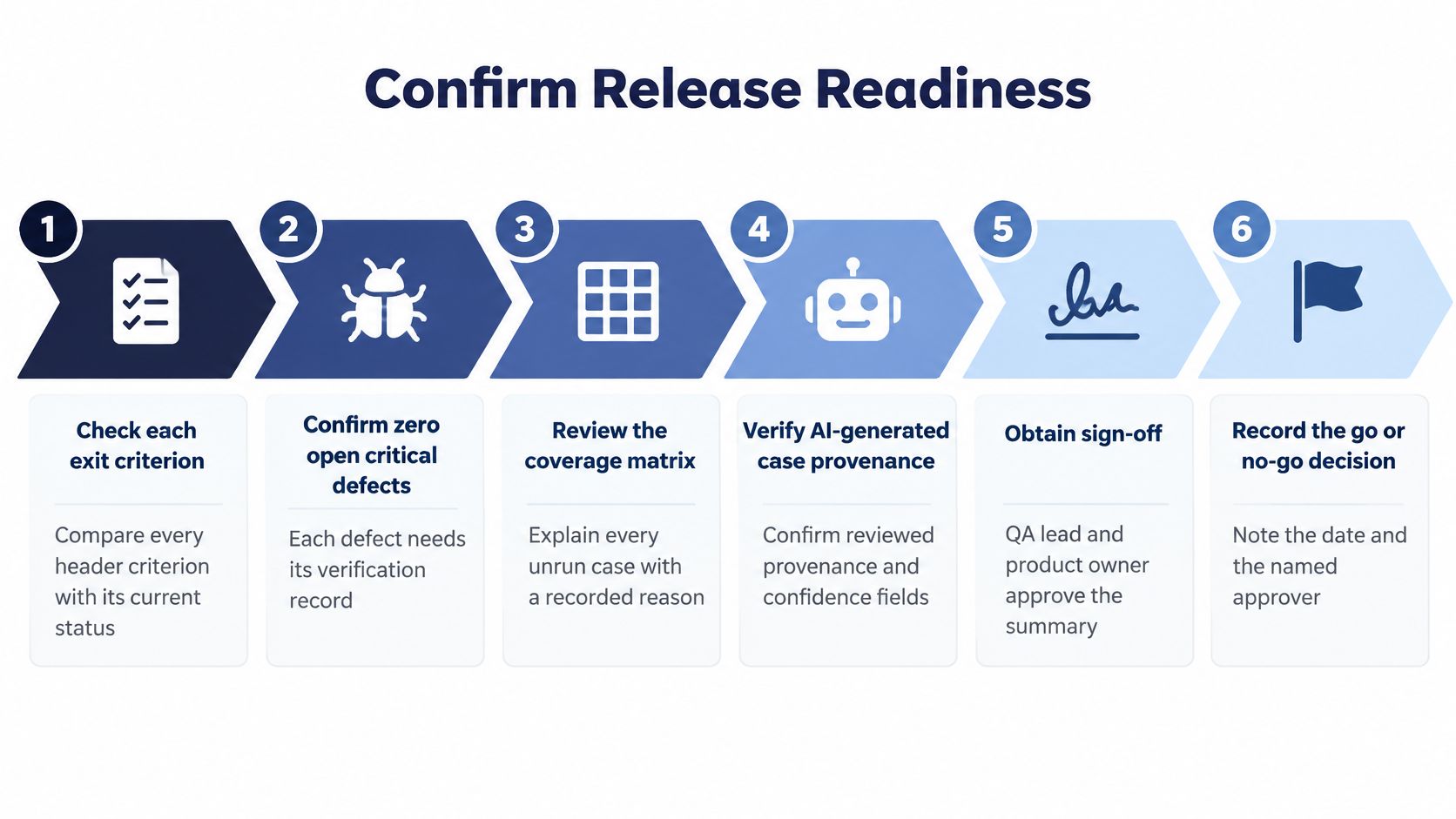
Use the completed report to make a bounded decision about a named build. Approval shouldn't mean that testing is finished in the abstract; it should mean that the available evidence meets the agreed release conditions.
The diagram provides a compact decision checklist.
Make the decision against recorded conditions
- Check every exit criterion. Mark each condition met, unmet, or subject to an authorized exception. Attach the supporting record rather than writing a general testing-complete statement.
- Confirm no critical defects remain open. Inspect verification records for resolved critical findings. A developer's fixed status isn't evidence that the correction worked.
- Inspect release-critical coverage. Check every mandatory case on each required configuration. List unresolved cells and reasons, and confirm that generated-case provenance and review fields are complete.
- Review accepted high-risk issues. Record each issue, the named approver, acceptance date, and operating conditions. Obtain QA lead and product-owner sign-off on the evidence summary.
- Write the residual-risk statement. Name remaining failed or unrun areas, say whether they affect release-critical journeys, and include the relevant confidence ratings.
- Record the outcome. Choose release, release with named accepted risks, or hold, then record the build, decision date, and authorized decision-maker.
For a health-tech MVP, release planning also needs product-specific checks beyond a general functional report. Zee Palm's quality checks for health-tech MVPs provide a useful planning reference, but a manual execution report mustn't be presented as regulatory approval or certification.
Compare the fix under comparable conditions
After remediation, rerun the same cases and devices on the new build. Compare the coverage matrices side by side, preserving failed-to-passed transitions, newly blocked work, and configuration differences rather than overwriting the earlier report.
Our reports include a one-click rerun of the same plan against a new build using the same devices and cases. We deliver each report as a hosted page and PDF, addressed to the purchaser and forwardable to the people who must act.
For a bounded campaign, our Standard package costs ₹18,999 + GST and includes 10 sessions of 45 minutes, 4 freely mixed device or browser targets, up to approximately 50 test cases, and a report in 3 business days. Match the planned case-by-configuration workload to that capacity before approving execution.
99tests turns your supplied test cases into manual testing sessions on real devices, with coverage gaps, reproducible findings, and verification records in the resulting report. Visit 99tests to submit your cases and build, choose your device and browser targets, and review planned coverage before testing starts.