Testing the Application: A Practical Workflow
Learn how to plan, prepare, execute and report on testing the application, with a coverage matrix, device checklist and release gate criteria.
In this article
- Build a Coverage Matrix Before Testing Starts
- Turning Requirements Into Matrix Rows
- Covering Interactions Without Testing Everything
- Prepare Devices, Builds and Test Data
- How to Run Tests and Record Every Outcome
- Four Statuses, No Shortcuts
- Reruns and Intermittent Failures
- Write Bug Reports Developers Can Reproduce
- Start With a Title That Carries the Condition
- Fields a Report Cannot Ship Without
- Severity Is a Release Decision, Not a Feeling
- Verification Comes Before Triage
- Common Problems and How to Fix Them
- Decide Whether the Build Is Ready to Ship
You've generated a long list of test cases, the release candidate is built, and someone asks the only question that matters. Can we ship? A pass rate on a slide doesn't answer it. You need to know which cases ran, on which phone or browser, on which network, against which build, and what happened when they didn't pass.
That's the difference between having tests and testing the application. Test creation gives you breadth. Execution gives you evidence. If your report can't separate passed, failed, blocked, and unrun cases by device and build, you don't have coverage, you've got an estimate. I would treat every case as a claim that needs proof, and build the whole workflow around collecting that proof before the release meeting, not after it.
Build a Coverage Matrix Before Testing Starts
Start with the journeys this release must prove, not the phones sitting in a drawer. For most products that's sign-up, login, search, checkout, and payment, plus the one or two flows this build changed. If a journey can block revenue or lock a user out, it belongs at the top of the matrix. Everything else is prioritised underneath it.
Pull your targets from three places. Production analytics tells you which devices, OS versions, and browsers your users already run. Support tickets tell you where customers have already hit failures, which is usually a better predictor than a wishlist. Store listings and release notes give you the minimum supported OS, which is the version teams most often forget until it breaks.
The cost of getting this backwards isn't abstract. In the NIST economic impact study of inadequate software testing infrastructure, more than half of software bugs were discovered only downstream, and NIST estimated the annual cost to the U.S. economy at approximately $59.5 billion. That study also reported that identifying and correcting defects during development represented approximately 80% of software-development costs. Late discovery is expensive because the fix is only part of the bill. You also pay for retesting, delayed release, and support time.
Turning Requirements Into Matrix Rows
Convert each requirement or generated case into one row with preconditions, inputs, expected result, target device or browser, execution status, defect ID, and evidence location. That last field matters more than teams expect. A result with no screenshot, recording, or log attached is an opinion someone has to re-verify later.
A useful row reads like this: checkout, Android 13 on a mid-range phone, 4G connection, logged-out user, card payment, expected result is order confirmation with the correct total. Compare that with a row that just says test checkout. Only the first one can be reproduced by someone who wasn't in the room.
When you're deciding which of these rows belong in continuous delivery, mapping QA tests to CI/CD is a practical starting point for separating fast functional checks from slower release-level runs. Keep the distinction clear in the matrix itself, and be careful not to let a green pipeline stand in for device coverage. Our guide to the difference between test coverage and code coverage covers why those two numbers answer different questions.
Covering Interactions Without Testing Everything
You can't run every combination of OS, network, permission, and locale. You don't need to. Build a pairwise covering set where every pair of values appears at least once. That catches most interaction failures with far fewer rows than exhaustive testing. Then raise a small number of critical flows to 3-way coverage when a bug needs three conditions to line up, such as an expired session, a throttled network, and a denied location permission during checkout.
| Dimension | Why it matters | Values to cover |
|---|---|---|
| Operating system | Behavior shifts between major versions | Oldest supported, current, and latest beta where available |
| Screen size and density | Layouts break on small and foldable screens | Smallest budget phone, common mid-range model, large tablet |
| Browser engine | Rendering and web APIs differ by engine | Chrome, Safari, Edge and Firefox on Windows, macOS and ChromeOS |
| Network state | Timeouts and retries hide on fast connections | Wi-Fi, 4G, throttled 3G, offline and reconnect |
| Permissions and auth state | Permission dialogs can block a flow | Denied, granted once, first launch, logged out, expired session |
| Locale and payment conditions | Text expansion and currency formats change layouts | Target language, right-to-left if supported, local payment method |
| Input method | Touch, keyboard and assistive tools follow different paths | Touch, hardware keyboard, screen reader, text zoom at 200% |
Finish with two checks. Every critical journey needs at least one row on each priority platform, and every row needs a named owner. A high executed-case count means little if no row ever touched a low-end Android phone on a throttled network.
Practical rule: If a combination isn't in the matrix, it wasn't tested. Don't let a summary number imply otherwise.
Prepare Devices, Builds and Test Data
Work only from the release candidate. The seven steps below take minutes per device and prevent the kind of setup error that makes a whole session worthless. This flowchart shows the sequence to complete before any case runs.
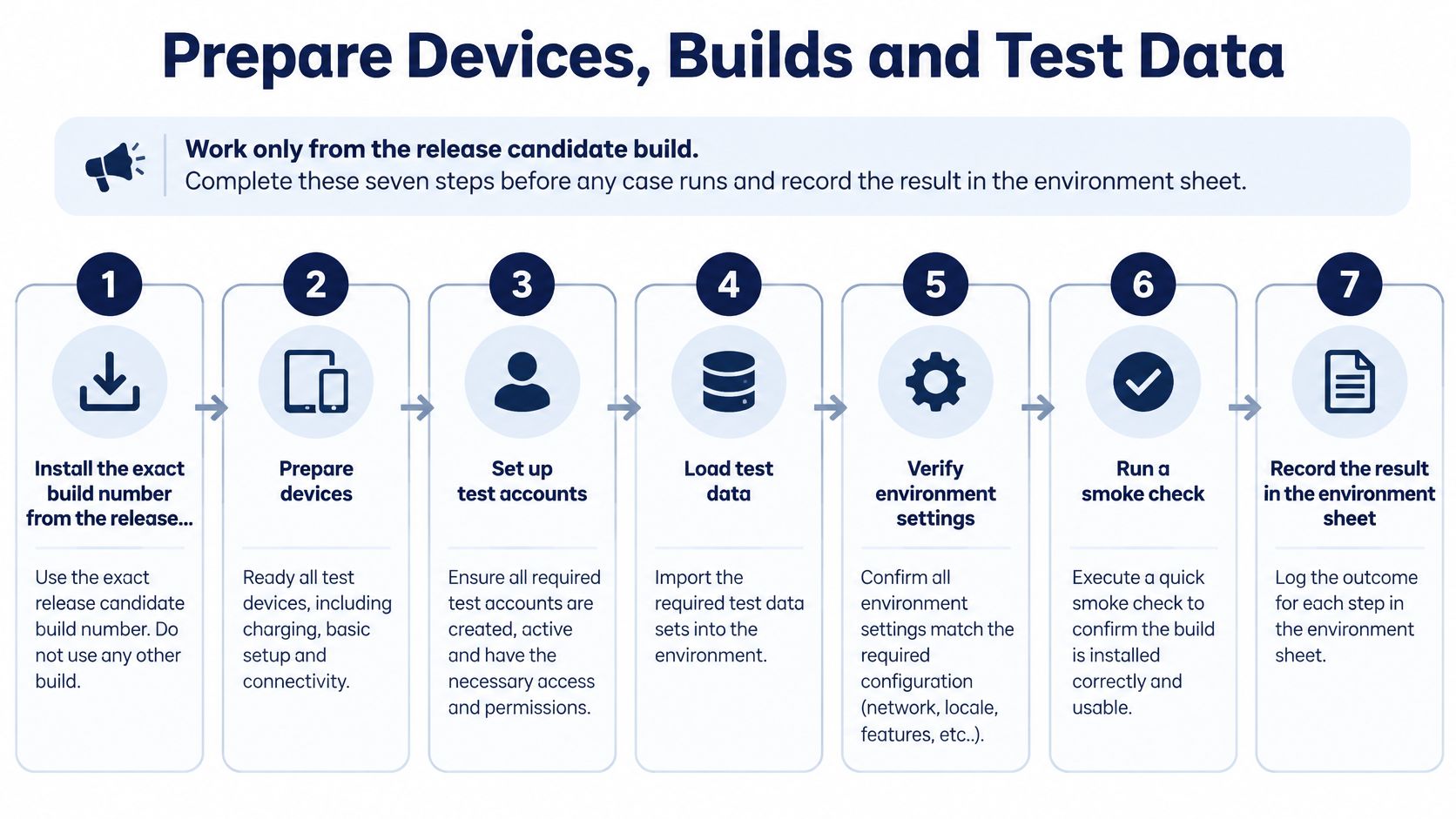
- Install the exact release candidate build number. Never test a rebuilt copy, because a rebuild changes the thing you're certifying. Check that the APK, Play internal track, TestFlight build, or web URL matches the candidate's version string before you install.
- Reset app data and clear caches. Leftover sessions and cached assets hide first-launch bugs and make a broken onboarding flow look fine.
- Set language, region, date, and network before opening the app. Changing locale halfway through a session invalidates the earlier results.
- Grant, deny, and revoke each permission the app requests. Record what the app does after each choice, because the denied path is where users get stuck.
- Create accounts for each state in the matrix. You need a new user, a returning user, an expired session, and an account with no saved payment method.
- Load a known page or screen to confirm connectivity. Do this before the timer starts so a dead connection doesn't eat your session.
- Log device model, OS version, browser version, build number, and network type in the environment sheet. An unlogged OS version makes a failure impossible to reproduce later.
Structured preparation is what makes combinatorial coverage affordable. NIST's combinatorial testing programme reports that systematic 2-way through 6-way combinatorial coverage can achieve fault detection close to exhaustive testing while reducing the test-suite size by approximately 20x to 700x. That saving only holds when each selected combination is set up as specified. A row that says throttled 3G but runs on office Wi-Fi delivers neither the coverage nor the saving.
This short walkthrough shows how a prepared environment sheet looks in practice before execution starts.
To start a job with us, customers provide a build link (APK, Play internal testing or TestFlight) or a web URL, plus their test cases. You're done with preparation when the environment sheet is complete for every row. An empty field is a result you can't defend.
How to Run Tests and Record Every Outcome
Run in a deliberate order. Start with the critical journeys, because a broken login makes the rest of the session academic. Move to negative and boundary inputs next, empty fields, null values, very long strings, and invalid formats. Finish with exploratory work around anything that failed, since a defect rarely sits alone.
Timebox sessions to 45 to 90 minutes. Attention drops after that, and late-session findings get sloppy, with thinner notes and weaker evidence. Shorter sessions with a clear charter produce reports developers can act on. Longer sessions produce volume.
Four Statuses, No Shortcuts
Never mark a case passed unless you checked the stated expected result on the stated environment. Tapping through a flow and seeing no crash isn't a pass. If the expected result says the discounted total appears, the discounted total has to appear.
| Status | Use when | What to record |
|---|---|---|
| Passed | Behavior matches the expected result on the stated environment | Build, device, OS, browser, timestamp |
| Failed | Actual behavior differs from the expected result | Steps, expected versus actual, screenshot or recording, rerun result |
| Blocked | A precondition or dependency stops execution | Blocking defect or missing access, owner, date to retry |
| Unrun | Case was planned but not executed on its environment | Reason, planned environment, scheduled re-run |
Reporting in this shape is covered in our software testing report template, which keeps status, environment, and evidence together rather than in separate documents. That structure matters when a release manager asks why a number changed between two builds.
Reruns and Intermittent Failures
Repeat every failure from a clean state before you classify it. Reset the app data, reapply the preconditions, and run the same steps. If a failure passes on two of three clean reruns, label it intermittent and record the rerun count. Don't discard it, and don't report it as settled either. Intermittent failures are often the ones tied to timing, network retries, or a specific device state.
Tooling alone won't catch these for you. In a NIST evaluation of static analysis tools, seven tools jointly detected only 16 of 61,387 weaknesses, and 60% of weaknesses in a Java suite were detected by none of four tools. Automated checks are valuable, but they have blind spots, which is why human reruns on real hardware still earn their place in testing the application.
The same discipline applies under load. If you're validating a storefront before a sale, it helps to prepare your WooCommerce shop for peak traffic so performance failures don't get misfiled as functional defects.
A run is complete only when every row has a status, and every blocked or unrun row names a reason and an owner.
Unrun cases aren't failures. They're gaps. A report that folds them into the pass count overstates coverage and leaves the release decision resting on work nobody did.
Write Bug Reports Developers Can Reproduce
A developer who can't reproduce a bug can't fix it. They can only guess, and a guessed fix costs you a full retest cycle to discover it didn't work. The report is where testing the application turns into engineering value or into noise, and the difference is almost entirely in how the report is written.
Start With a Title That Carries the Condition
Compare these two. Weak: Checkout broken. Strong: Checkout button unresponsive on Samsung A14, Android 14, after coupon applied. The second title tells a triage meeting what's wrong, where it happens, and what triggers it, without anyone opening the ticket. It also stops three testers filing the same defect under three vague titles.
Before you file, search existing reports by symptom and screen. Merge duplicates into one ticket and add your environment as an additional reproduction. Ten tickets for one defect don't signal severity. They signal a team that can't tell how many problems it has, and they scatter the evidence a developer needs into ten places.
Fields a Report Cannot Ship Without
- Build and environment: Build number, device model, OS version, browser and version where relevant, and network type. A defect without a build number can't be retested against a fix.
- Numbered reproduction steps: Written so someone who has never used the feature can follow them exactly, including the account state and data you started from.
- Expected versus actual behavior: Two separate statements. Merging them into one sentence about what's wrong forces the reader to infer what correct looks like.
- Media evidence: A screenshot for a static state, a short screen recording for anything involving timing, animation, or a flow. Recordings settle arguments that steps alone can't.
- Rerun count: For example, reproduced 4 of 4 reruns from a clean install. That single line tells a developer whether they're chasing a deterministic defect or a race condition.
Don't describe a defect as device-independent unless it reproduced on at least two different environments. A bug that appears on one phone model may be a hardware, manufacturer skin, or permission behavior issue. Calling it universal sends a developer into shared code when the fault sits in a vendor-specific path, and burns days.
Severity Is a Release Decision, Not a Feeling
| Severity | Typical example | Release action |
|---|---|---|
| Critical | Crash, data loss or a blocked core journey such as login or payment | Blocks release until fixed or formally waived |
| High | Major feature fails on a priority device or browser | Fix before release; confirm reproducibility first |
| Medium | Workaround exists or failure limited to an edge case | Fix in the next cycle unless customer-visible |
| Low | Cosmetic issue or minor text error | Log and batch with similar fixes |
Grade against the rubric, not against how annoying the bug felt. Testers who found a defect tend to overrate it, and developers who own the code tend to underrate it. A shared rubric gives both sides the same reference point, so the argument becomes about which row applies rather than whose judgement wins.
Assign confidence separately from severity. Confidence comes from repeatability and evidence quality. A critical defect seen once with no recording is high severity and low confidence, which means the next action is more reruns, not an emergency fix. A medium defect reproduced every time with a clean recording is ready for a developer immediately.
Verification Comes Before Triage
Keep execution and verification as separate jobs. A reviewer who didn't run the case should merge duplicates, check that reproduction steps and environment data are complete, confirm severity against the rubric, and set confidence from the evidence. Then they try to reproduce the failure using only what's written in the report.
If they can't, the report goes back. It doesn't matter how severe it looks. An unverified critical in a release meeting creates panic and then distrust when nobody can trigger it, and distrust is hard to recover from. Only verified findings should reach the release gate.
The test of a good report: A developer who has never seen the feature reproduces the failure on the first attempt, using nothing but the ticket.
Common Problems and How to Fix Them
Most real-device setbacks repeat. The most common is the failure that appears on exactly one Android model. It usually traces to a manufacturer skin changing a dialog or a vendor camera API behaving differently, so arguing about it from a different phone wastes everyone's time.
| Symptom | Likely cause | Fix |
|---|---|---|
| Fails only on one Android model | Manufacturer skin or vendor camera API | Reproduce on that model, record the OS build, add a device-specific note |
| Passes on emulator, fails on phone | Emulator misses hardware, GPU or real network behavior | Rerun on tester-owned or lab hardware and log hardware details |
| Crash only on the oldest OS | Deprecated API or changed permission behavior | Check release notes and keep the oldest supported version in the matrix |
| Flow stops at a permission dialog | Dialog not handled in the test steps | Add denied and granted-once cases to the matrix |
| Random timeouts | Unstable network with hidden retries | Run throttled and offline cases and log request timing |
Emulator passes are the most misleading. An emulator gives you a clean GPU, generous memory, and a fast, stable network. A budget phone gives you none of those. When a flow passes in the emulator and fails on hardware, believe the hardware and log the device details rather than rerunning the emulator hoping for a different answer.
Random timeouts need a real network, not a faster one. Run throttled and offline cases deliberately and log request timing, so you can see whether the app retries or hangs. Include at least one live SIM run, because carrier-specific timeouts rarely appear on office Wi-Fi. Our testers run cases on their own phones and laptops on Jio, Airtel and Vi, which surfaces exactly that class of failure.
Budgets differ by fix. Adding denied and granted-once permission cases to a matrix takes minutes. Getting reliable coverage on a low-end device you don't own takes days of sourcing and setup. Record every diagnosis back into the matrix, including the model and OS build, so the next run starts from what you learned instead of rediscovering it.
Decide Whether the Build Is Ready to Ship
Judge the release against explicit gate criteria, not a feeling about how many tests ran. This checklist sets out the conditions to pass before the release meeting starts.
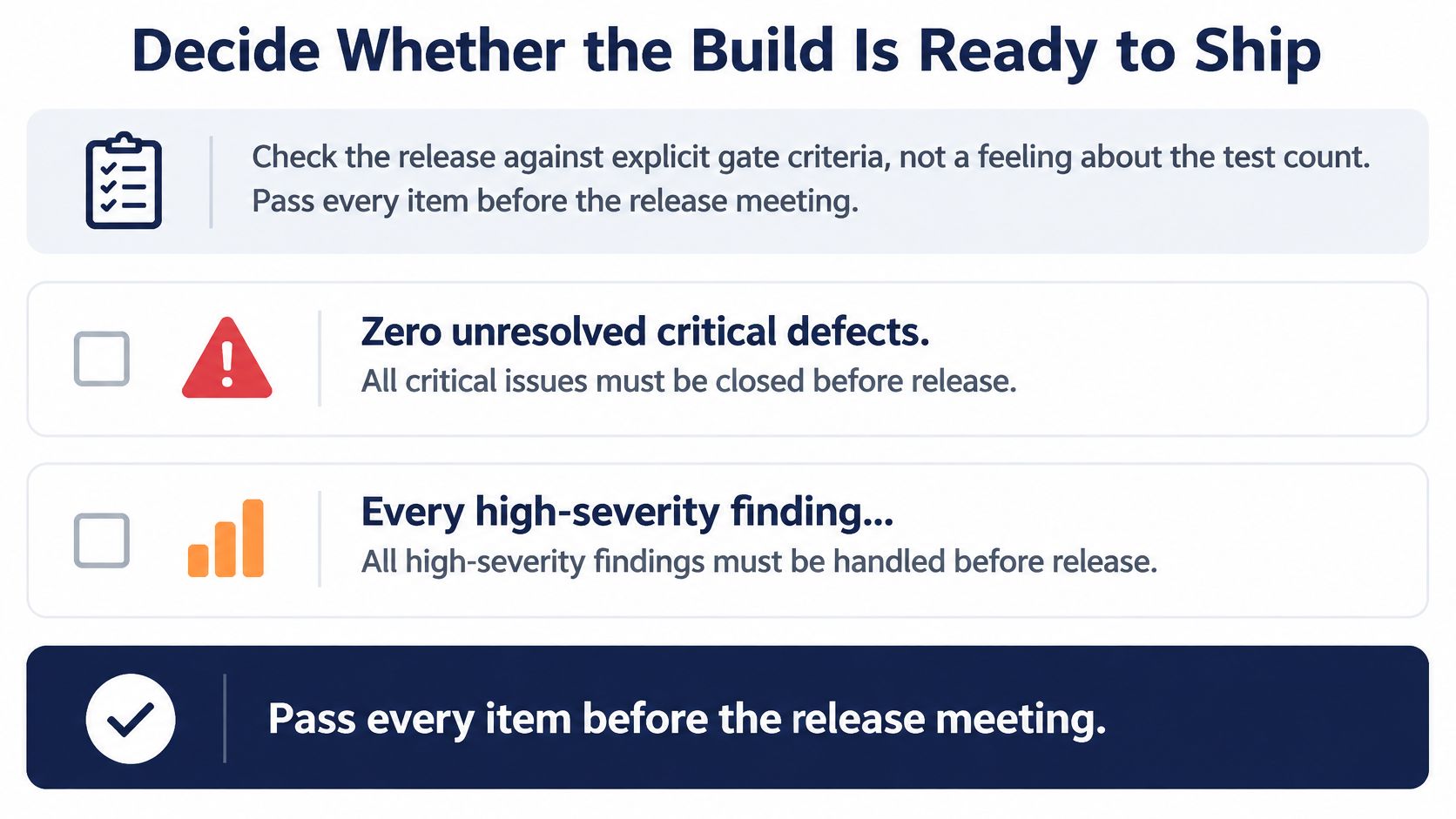
- Zero unresolved critical defects.
- Every high-severity finding reproduced on the environment where it was reported.
- Every critical journey executed on each priority platform.
- Every blocked case has a documented disposition with an owner and a retry date.
- A signed environment matrix lists the devices, OS versions, browsers, and network conditions exercised.
- Coverage stated as executed against planned, broken down by status, not as a total number of tests.
AI-generated cases need the strictest reading here. In an analysis of 14,320 LLM-generated tests, applicable null inputs were covered in only 34.8% of cases, negative inputs in 23.8%, and empty inputs in 38.8%. A generated case therefore counts toward the gate only when it links to an execution record with its device, build, and result. Generated isn't executed, and executed isn't verified. A quick sanity check before release is useful for confirming a fix landed, but it doesn't substitute for the full gate.
If any condition fails, you have three honest options. Hold the release when a critical journey is unproven or a critical defect is open. Fix and rerun the affected rows when the gap is limited to one platform or flow and time allows. Ship with a waiver only when a named owner accepts the specific risk in writing and that waiver is recorded in the matrix. We help clients plan and prioritise their test cycles and the app features they test, so gate conversations start from evidence rather than from whoever argues loudest.
Run the gate against the execution report and the verified findings before the meeting. A gate applied afterwards is decoration.
If you've got test cases, including ones your AI coding tools generated, and no reliable way to prove they ran on the devices your customers use, we can execute them on real tester-owned phones, laptops, and browsers and return a verified report showing passed, failed, blocked, and unrun cases by device and build. Send us your build link or web URL and your cases, and we'll help you turn testing the application into evidence you can defend at release. Start at 99tests.