Sanity Testing Software: What It Checks and When to Use It
Learn what sanity testing software checks after a build, how it differs from smoke and regression testing, and how to run a focused check.
In this article
- What Sanity Testing Means in Software
- Why the early check matters
- Sanity, Smoke and Regression Compared
- Why smoke and sanity get confused
- What a Focused Sanity Check Covers
- Why each area earns its place
- Keep the boundary deliberate
- Worked Examples From Web and Mobile Releases
- A checkout fix checked only in Chrome
- An Android login fix on a flagship phone
- A payments upgrade with blocked cases
- When a Passing Sanity Result Misleads
- Green execution without behavioral proof
- Unclear failure attribution
- Missing rows mistaken for success
- Automated Versus Manual Sanity Checks
- What belongs in the automated subset
- Where a person adds value
- Run the Cycle and Make the Release Call
- Execute with a defined boundary
- Apply the decision criteria
The checkout fix is merged, a new build is waiting, and someone asks whether QA can give it a quick sanity check. You've got generated test cases, a staging environment and a release deadline, but no clear agreement on what a pass would mean.
That's the challenge with sanity testing software. Running a short check is straightforward. Making that check useful requires a clear boundary around what was tested, where it ran and what still needs attention.
What Sanity Testing Means in Software
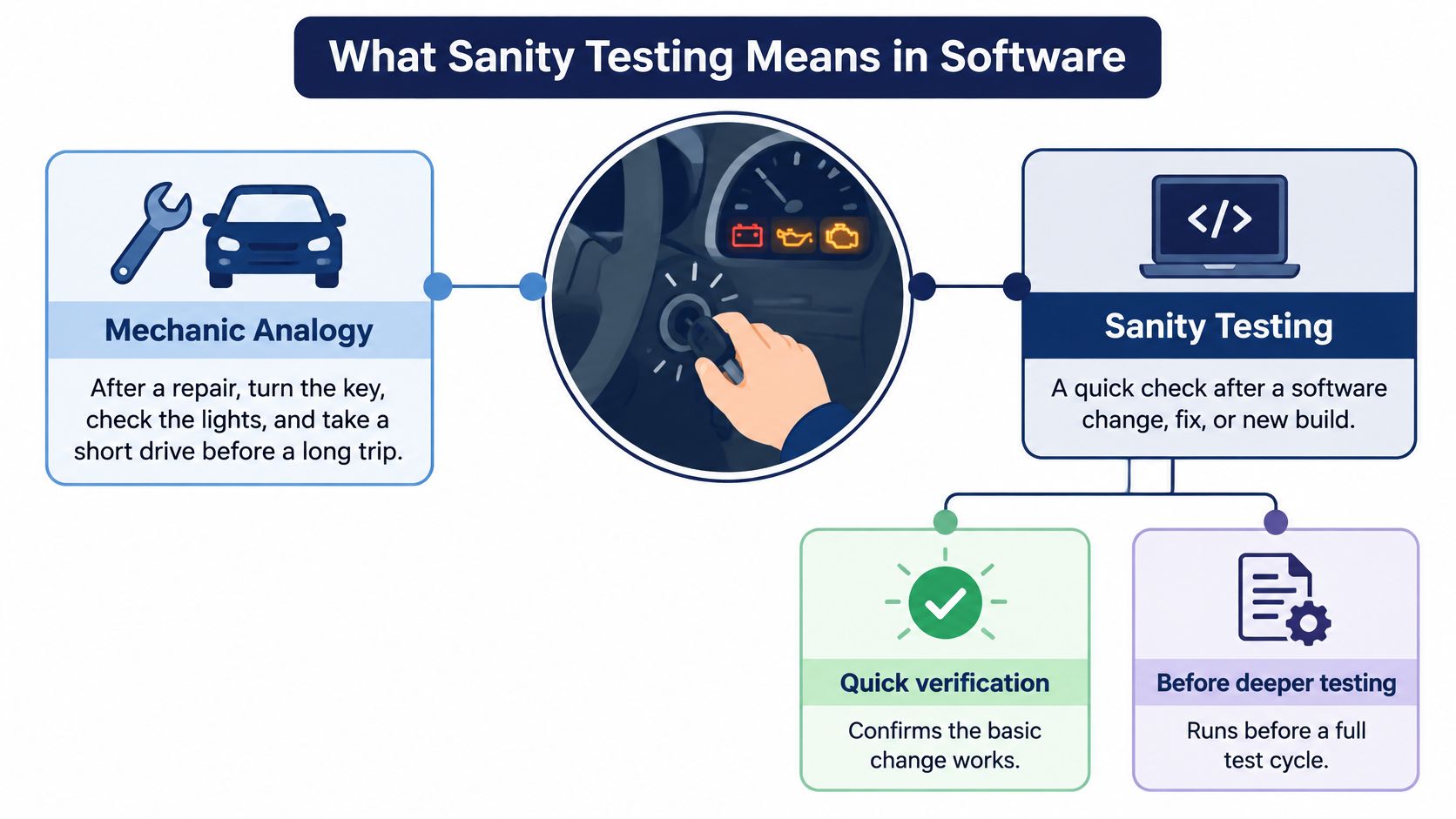
After a mechanic repairs your car, you turn the key, check the lights and take a short drive before setting off on a long trip. You're not inspecting every component. You're checking that the repair worked and that the car is usable enough to continue.
Sanity testing applies that reasoning to a software change, fix or new build, a packaged version of the application that testers can run. The tester checks the changed behavior and closely connected functions before the team invests in deeper testing.
Say an engineer fixes a coupon calculation. A useful sanity check applies a valid coupon, rejects an invalid one, checks the total and completes checkout. Merely seeing the checkout page open wouldn't establish that the repair worked.
The analogy captures the purpose of this early check.
Why the early check matters
A 2002 National Institute of Standards and Technology study estimated that inadequate software testing cost the U.S. economy $59.5 billion annually and found that more than half of software errors were discovered downstream in development or after release. Those historical findings explain the value of identifying obvious breakage before committing more testing effort.
If checkout crashes immediately, compatibility testing across browsers or acceptance testing against business requirements can't meaningfully proceed along that path. The team needs a corrected build first.
A sanity pass isn't full assurance. It establishes that the checked behavior is usable enough for the next testing activity, not that every feature is correct or the product is ready to ship.
Reusable definition: Sanity testing is a focused verification of a software change and its connected core workflows to determine whether the build is suitable for further testing.
Sanity, Smoke and Regression Compared
Sanity, smoke and regression testing on the same criteria
| Test type | Triggered by | Scope | Question it answers | Typical run time |
|---|---|---|---|---|
| Sanity testing | A specific fix or change to an existing build | Changed area plus linked core workflows | Did this change work well enough to test further? | A short, agreed change-verification timebox |
| Smoke testing | A new build, before other testing starts | Critical paths across the whole product | Does this build start and run at all? | The build-verification budget set by the team |
| Regression testing | Any change that could affect existing behavior | Large or full selected test suite | Did anything that worked before break? | The scheduled regression window for the selected suite |
These duration descriptions are planning rules, not universal benchmarks. Automated execution, application complexity and environment setup make a fixed clock-based definition misleading.
Smoke testing checks a build broadly but shallowly. For an online shop, it might establish that users can open the site, sign in, search for a product and reach checkout.
Regression testing checks previously working behavior after a change. Its scope can include shipping rules, payment methods, refunds and account preferences, even when the latest fix touched only coupon handling.
Why smoke and sanity get confused
Both happen early, and both can be quick. The useful distinction is trigger and scope, not whether someone ran them manually or whether they finished before lunch.
A smoke test might confirm that checkout opens. A sanity test for a coupon fix must examine the coupon's effect on the order. The second check goes deeper into a narrower area.
Practical rule: Give a new build a smoke check, give a targeted fix a sanity check, and give a risky change appropriate regression coverage.
These activities can share test cases without becoming interchangeable. A login case may belong in every suite, but the reason for executing it changes.
For teams expanding repeatable coverage, TekRecruiter's guide to streamline regression testing with automation offers context for organizing the broader automated work. Keep that suite separate from the compact decision you need after a targeted fix.
Teams use these labels inconsistently, so define them in the test plan. State the trigger, included workflows and next decision explicitly. A shared definition is more useful than arguing over whether a particular check deserves the smoke or sanity label.
What a Focused Sanity Check Covers
Start with what could prevent meaningful testing, then follow the change toward a user outcome. A workflow is the sequence of actions a person takes to complete a task, such as signing in and saving a document.
The checklist below is a starting point, not an instruction to expand every sanity pass across every platform.
Coverage areas for a focused sanity check
| Area | Check | Pass signal | Common miss |
|---|---|---|---|
| Build launch | Install and open the build on a target device | App opens to the first screen with no crash | Testing only on an emulator |
| Sign-in and session | Sign in, leave the app, then reopen it | Session persists as required and sign-out clears it | Skipping the reopen step |
| Changed feature | Run the exact workflow the fix touched | Output matches the requirement | Checking the fix but not its neighbouring screens |
| Core transaction | Complete a purchase, save or submit | Record is saved and confirmation is shown | Using test data that never fails validation |
| Network and data | Run on a slow connection with empty and large data sets | Clear error messages and no blank screens | Testing only on Wi-Fi with clean data |
| Device and browser | Include a low-end Android and an older supported browser when relevant | Layout and permission prompts work | Assuming iOS results apply to Android |
Why each area earns its place
Build launch comes first because a startup crash blocks everything behind it. An emulator, which simulates a device, is useful during development but isn't evidence that installation succeeds on the targeted hardware.
Sign-in and session handling establish whether users retain the access the application promises. A session is the application's record of an authenticated user, so reopening matters as much as the initial login.
For the changed feature, compare the result with the requirement and inspect the adjacent screen that consumes its output. A corrected address editor can still send the wrong address to order review.
The core transaction confirms a completed outcome, not just a successful button click. Reopen the saved record or inspect the order rather than trusting a confirmation message alone.
Network and data checks expose assumptions hidden by convenient test conditions. Empty states, validation failures and interrupted requests deserve deliberate attention when the change touches them.
Finally, choose device and browser combinations for risk, not convenience. NIST's guidance on software testing and coverage supports evaluating exercised requirements and software behavior rather than treating test count alone as confidence; configuration interactions also deserve attention.
Keep the boundary deliberate
Separate correct behavior from operating conditions when defining expectations. Our guide to functional and non-functional testing helps distinguish whether a feature works from qualities such as responsiveness.
Choose only cases that inform the immediate decision and fit the agreed timebox. Put excluded platforms, data conditions and workflows in the report rather than dropping them from view.
Worked Examples From Web and Mobile Releases
The following hypothetical scenarios show how similar test steps can support very different decisions.
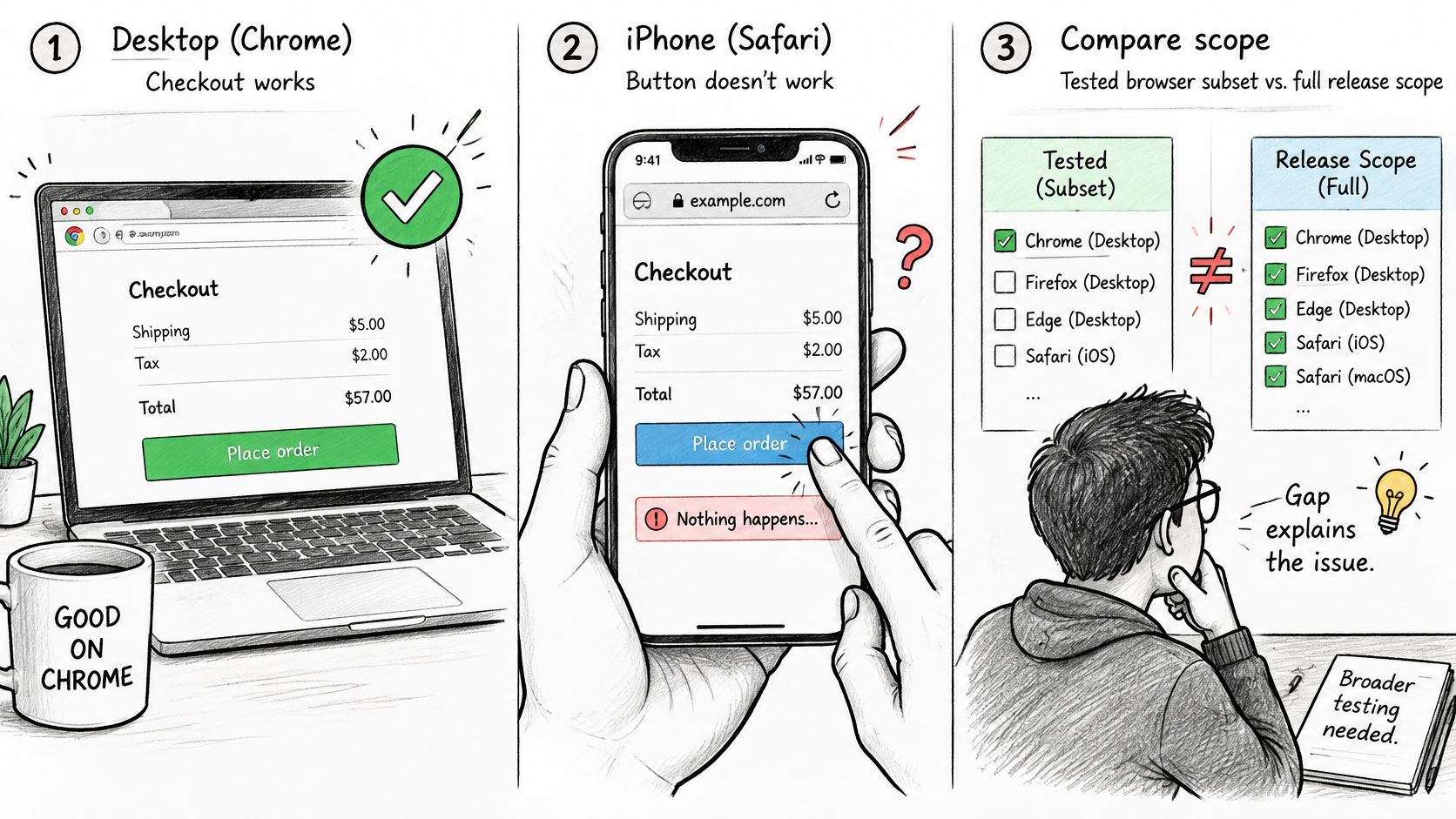
This illustration highlights the gap between a successful desktop check and a mobile checkout outcome.
A checkout fix checked only in Chrome
A tester applies a coupon in desktop Chrome, confirms the revised total and completes a purchase. The check catches the calculation error if it returns, but misses an iPhone Safari problem that prevents tapping the payment button.
The team adds Safari on a supported iPhone to the environment matrix, the list of device, operating-system, browser and network combinations selected for testing. Faberwork LLC's browser testing insights from Faberwork provide additional context for planning browser-specific validation.
The report should have said:
Checkout calculation verified in desktop Chrome. Mobile Safari wasn't executed, so mobile payment-button behavior remains unverified.
An Android login fix on a flagship phone
An Android hotfix succeeds on a flagship phone over stable Wi-Fi. The tester verifies that credentials are accepted, but the plan misses session recovery under weak connectivity.
On a budget Android device using a weak mobile connection, the session request times out and leaves the user at a loading screen. The team records the request timing and visible result, then adds recovery checks under the affected conditions.
Our guide to testing an app on real devices can help translate a device target into an executable session. The report should have said: Login verified on the listed flagship device over Wi-Fi; budget-device and weak-network recovery weren't covered.
For a complementary walkthrough of the testing concept, the video below provides another explanation.
A payments upgrade with blocked cases
After a payments-library upgrade, every completed case passes. However, the payment provider's sandbox, its isolated testing service, becomes unavailable before refund and declined-payment checks can run.
The check confirms successful payment behavior but establishes nothing about those unavailable paths. The release manager holds the build until access returns and the blocked cases can be executed.
The report should have said: Completed payment cases passed; refund and declined-payment validation are blocked by the sandbox outage, so payment coverage is incomplete. These scenarios differ primarily in environment selection and reporting, not in the basic act of following test steps.
When a Passing Sanity Result Misleads
A generated test can execute cleanly while proving very little. The missing ingredient is often the assertion, the explicit comparison between an expected result and the behavior observed.
A 2025 assessment of AI-driven QA reported 8.3% flaky executions in generated tests while identifying semantically duplicated coverage and poor explainability. Low flakiness didn't establish that the cases meaningfully tested distinct user outcomes.
Green execution without behavioral proof
Consider a generated checkout test that clicks Apply and checks that the page remains open. It may pass even when the discount is wrong because it never compares the displayed total with the required calculation.
Review the expected result before trusting the execution status. Check where the expected value came from, whether it is independent of the application's output and whether the test would fail if the original defect returned.
Useful evidence includes:
- Visible outcome: The displayed total, saved record or error message matches the requirement.
- Independent expectation: The test doesn't calculate its expected answer by repeating the implementation's potentially faulty logic.
- Distinct purpose: Each case validates a different behavior rather than rephrasing an existing check.
Unclear failure attribution
A failed check also needs interpretation. A product defect means the application violates its requirement; a test defect means the steps or expectation are wrong; an environment issue means access, configuration or dependencies prevented valid execution.
For example, an expired test account doesn't prove that login is broken. Conversely, calling a timeout an environment issue without examining the request and application response can hide a real recovery defect.
Preserve the original failure before rerunning. Record what changed between attempts, such as the account, connection or application state, so a later pass doesn't erase the investigation.
Missing rows mistaken for success
A blocked case couldn't proceed because a prerequisite failed. A not-run case wasn't attempted within the session. Neither belongs in the passed category, and neither should disappear from the denominator when a manager reads the summary.
A human review of generated cases is most useful when it verifies intent and observations, rather than just repeating clicks.
Every sanity report should answer these questions:
- Behavior: Which expected results were compared with observed behavior?
- Context: Which environment produced each result?
- Omissions: Which cases were blocked or not run, and why?
Automated Versus Manual Sanity Checks
Automation uses scripts and tools to execute predefined actions and comparisons. Manual testing asks a person to perform the checks and evaluate the observed behavior. A useful sanity strategy assigns each kind of work deliberately.
Automate stable checks that recur across builds: authentication, a deterministic calculation or saving and reopening a record. Keep the selected checks connected to the change rather than executing an arbitrary collection because it happens to run quickly.
What belongs in the automated subset
An automated case needs controlled starting data, a meaningful assertion and output that helps someone investigate a failure. Browser tools such as Playwright or Selenium can execute repeatable web workflows, but the tool can't compensate for an incorrect expected result.
When comparing tooling, you can explore test automation with AppJet as a starting point for evaluating options. Choose based on your application, supported environments and maintenance responsibilities, not the number of generated cases.
Selection still carries risk. A study evaluating test-suite reduction in real software evolution examined 1,478 failed builds from 32 GitHub projects and found that reduced suites missed all faults detected by the original suite in as many as 52.2% of failed builds.
That finding concerns reduced regression suites, not a universal failure rate for sanity checks. Its practical warning is that a smaller suite's speed doesn't establish the quality of its selection.
Where a person adds value
Give manual testers a focused charter: the changed workflow, the target conditions and the evidence required. A charter is a short statement of what to investigate, rather than permission to browse aimlessly.
Useful manual assignments include:
- Visual and interaction checks: Confirm that controls remain usable with the keyboard open, permission prompts displayed, or longer text present.
- Recovery behavior: Observe what a user sees after an interrupted request or expired session.
- Requirement interpretation: Decide whether the result satisfies the intended customer task.
Manual work isn't automatically more trustworthy. A person can overlook a wrong total just as a script can omit its assertion, so execution and verification should remain distinguishable.
Automate repeatable comparisons. Use people to evaluate the customer experience under deliberately selected conditions.
Keep both forms of evidence in the same case-level record. That lets the release manager understand the contribution of each without confusing a scripted success with broader assurance.
Run the Cycle and Make the Release Call
Use a repeatable cycle so that each build produces a decision record, not just a chat message saying the checks look good.
Research on regression-test selection across five open-source Java projects found that change-affected selection reduced end-to-end processing time by an average of 40.49%, while reducing fault-detection capability by 8.75% relative to the full suite. Treat selection as a trade-off to document, not a shortcut to conceal.
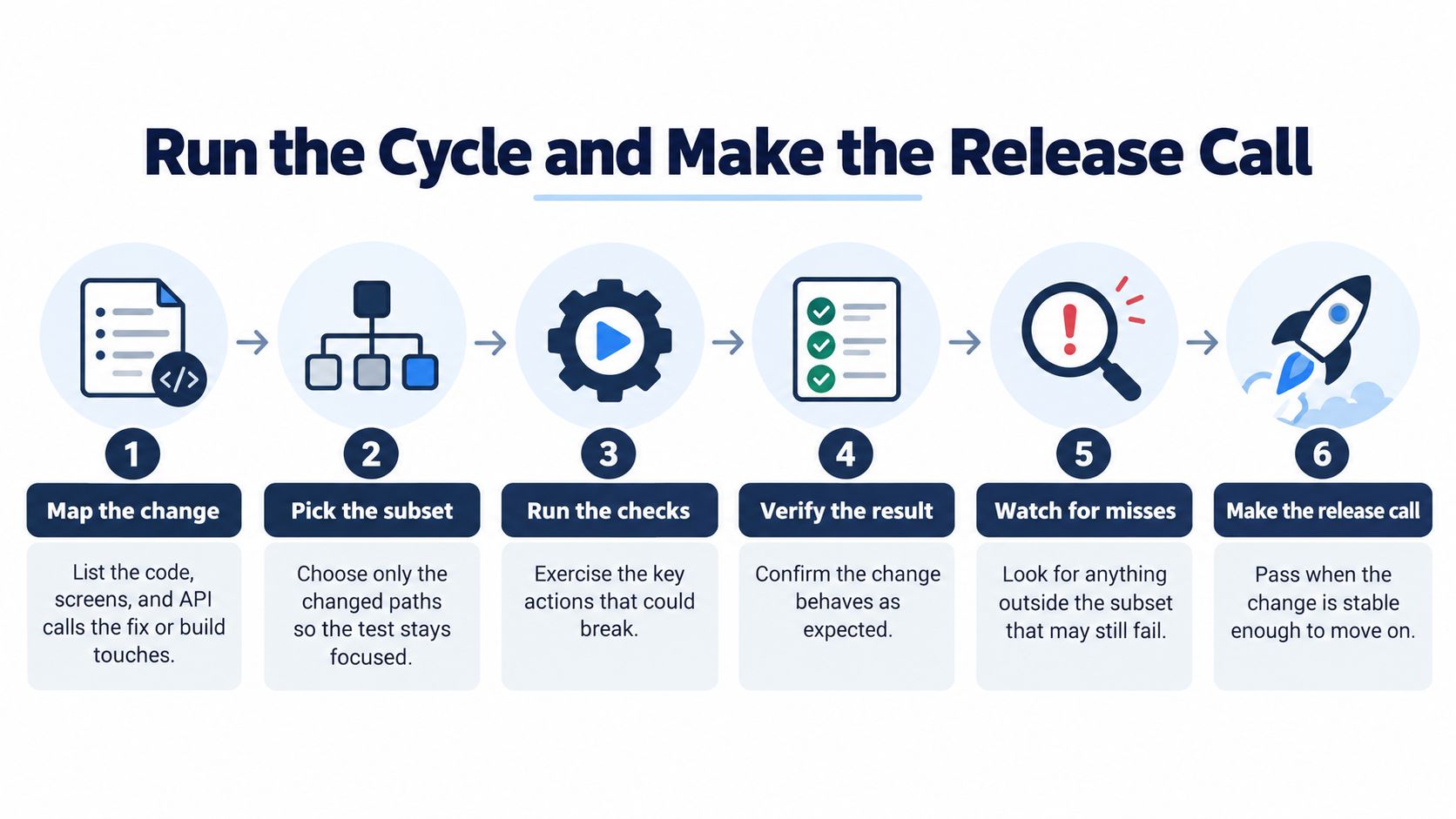
The process below keeps that decision tied to observable evidence.
Execute with a defined boundary
- Map the change. List the affected code, screens and application programming interface calls, the requests exchanged between software components. Include shared dependencies that could widen the impact.
- Pick the subset. Select the changed behavior and the critical journeys that depend on it. Record why other candidate cases were excluded.
- Set the environment matrix. Specify devices, operating systems, browsers, accounts and network conditions. The TestFiesta sanity-testing guide describes the limits of focused checks; a staging result shouldn't be treated as proof across different production conditions.
- Execute within the timebox. Record passed, failed, blocked or not run for every planned case, tied to the exact build and environment. Capture evidence while the state is reproducible.
- Investigate failures. Determine whether the evidence supports a product defect, test defect or environment issue. If attribution remains uncertain, retain that uncertainty instead of forcing a confident label.
- Make the decision. Name the next activity, its owner and any accepted coverage exceptions.
Apply the decision criteria
Proceed to deeper testing when the agreed executable subset passes, no high-severity issue remains open and the release manager explicitly accepts any named gaps. That's permission to continue verification, not an automatic production release.
Hold when a core workflow fails on a target configuration or incomplete execution prevents a credible decision. Escalate to broader regression when the change affects shared components, payments, security or data integrity.
The release record should contain:
- Traceability: Case identifier, build, device, operating system and browser.
- Observed evidence: Result, expected versus actual behavior, reproduction steps and supporting captures.
- Coverage exceptions: Blocked, unrun and excluded cases, reasons, owners and acceptance decisions.
Use our software testing report template to organize that handoff. Rerun the identified plan on the corrected build while preserving the previous results, so reviewers can compare what changed.
At 99tests, our real testers run your supplied cases, including AI-generated ones, on their own phones, laptops and browsers and return a human-verified pass/fail report in 3 business days. Send us your focused sanity plan and target configurations to test across multiple environments without buying devices or hiring full-time staff, with execution results and coverage gaps documented for your release decision.