8 Test Plans Example Templates for Real Software Projects
See 8 test plans example formats, from IEEE 829 to TestRail device matrices, and learn what each section of a test plan is actually for.
In this article
- 1. IEEE 829 / ISO/IEC/IEEE 29119-3 Master Test Plan
- Where This Plan Catches Trouble
- 2. Risk-Based Test Plan
- How To Borrow the Ranking
- 3. Atlassian Confluence Test Plan Template
- What Makes It Work or Fail
- 4. Azure Test Plans Test Plan with Suites and Configurations
- Setup Choices That Matter
- 5. Google Play Pre-Launch Report Test Plan for Android Releases
- What It Doesn't Prove
- 6. Session-Based Test Management (SBTM) Charter Plan
- Writing Charters That Expose Gaps
- 7. Agile Testing Quadrants Lightweight Test Plan
- Where Devices Belong
- 8. TestRail Test Plan with Configurations Matrix
- Keeping the Matrix Honest
- How the eight test plan examples differ in structure, traceability, and environment handling
- Turning Your Test Plan Into Verified Device Coverage
- A Practical Sequence for Your Next Release
Your team ships an Android and iOS update on a Friday. Checkout passed on your flagship phones. By Monday, support tickets show payment failures on one mid-range Android model, and nobody can say whether that phone was ever tested. The post-mortem finds the answer in the test plan. That device was never named.
Releases usually fail this way. A section was missing, vague, or left blank before testing started, and the gap only surfaced after users did. A good test plans example makes that gap visible early. It names scope, devices, owners, entry and exit criteria, and what counts as untested.
The business cost isn't theoretical. In a 2002 report, NIST estimated inadequate software testing cost the U.S. economy approximately $59.5 billion annually, with about 64% falling on users through disruption, repair, and damaged data, according to NIST's estimate of inadequate testing costs. The same summary put the potentially avoidable share at about $22.2 billion through feasible testing improvements.
The eight examples below are dissected by section purpose. Each one catches a different release risk, and you can borrow the strongest section from each for a device-based, human-executed cycle.
1. IEEE 829 / ISO/IEC/IEEE 29119-3 Master Test Plan
Regulated teams still start here for a reason. IEEE 829-2008 defined what a test plan should contain, and ISO/IEC/IEEE 29119-3 (2013) superseded it as the current international reference. Medical device, aerospace, and government programs commonly reference these structures because auditors want traceability, not a chat thread saying testing looked fine.
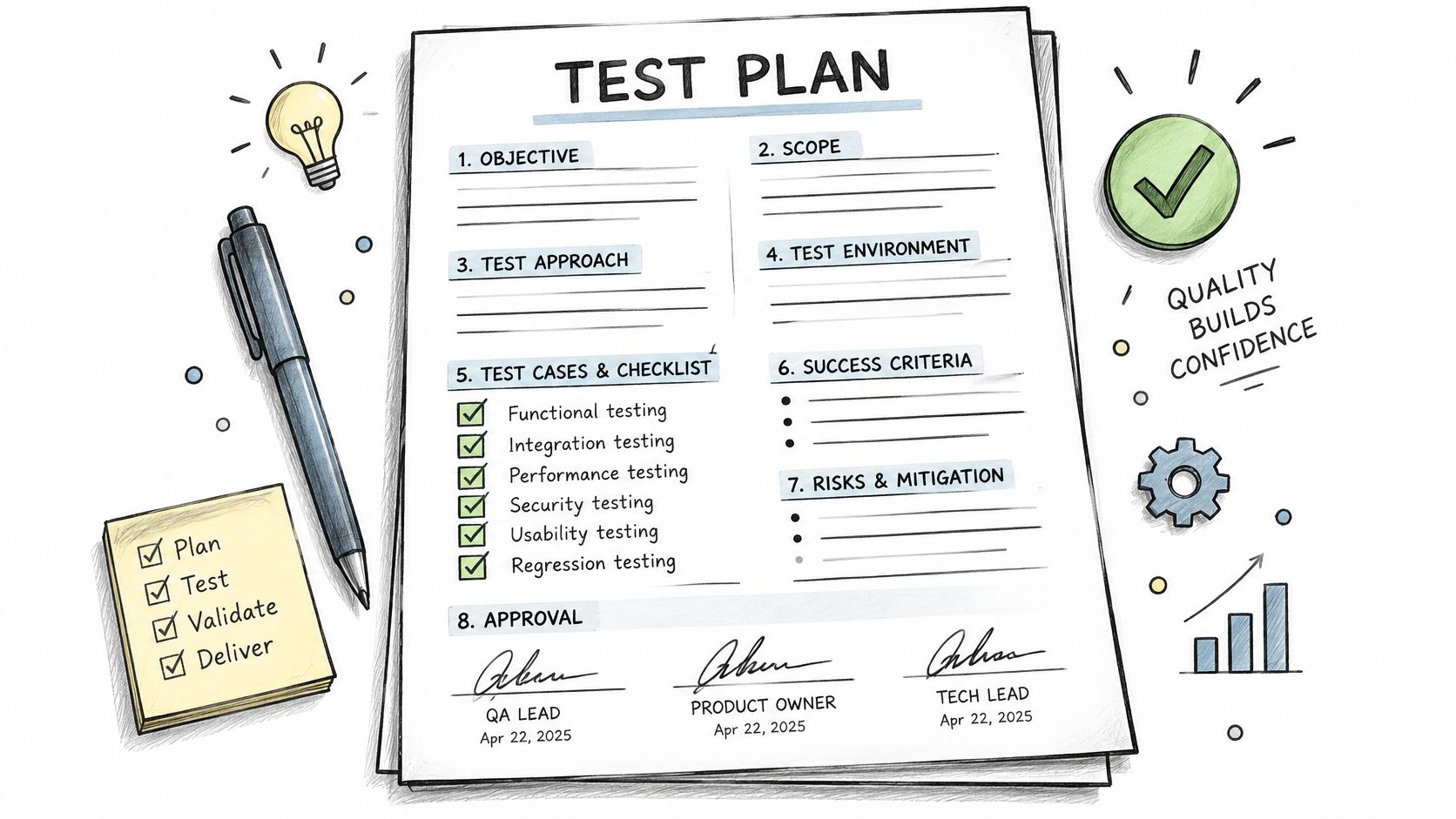
The value isn't the document length. It's the completeness checklist. Scope, approach, pass and fail criteria, suspension and resumption rules, environments, staffing, schedule, risks, deliverables, and approvals all get a named section. If one section is empty, you've found your risk before you've spent a session.
The illustration below captures the intent behind this formal approach.
Where This Plan Catches Trouble
Outsourced QA contracts often require this format because exit criteria and deliverables are explicit. Use it that way even if you're not regulated. Don't write twenty pages. Borrow the headings.
- Environmental needs: Replace vague wording with a real matrix, such as specific Android versions, iPhone models, and Chrome, Safari, Edge, and Firefox on Windows, macOS, and ChromeOS.
- Suspension criteria: Define a stop rule, for example a build that fails login in the first session, so testers don't burn sessions on an unstable build.
- Approvals: Name who signs off. An unsigned plan usually means nobody owns the uncovered areas.
Practical rule: If you can't point to the section that names your target devices, you don't have device coverage. You have a hope.
2. Risk-Based Test Plan
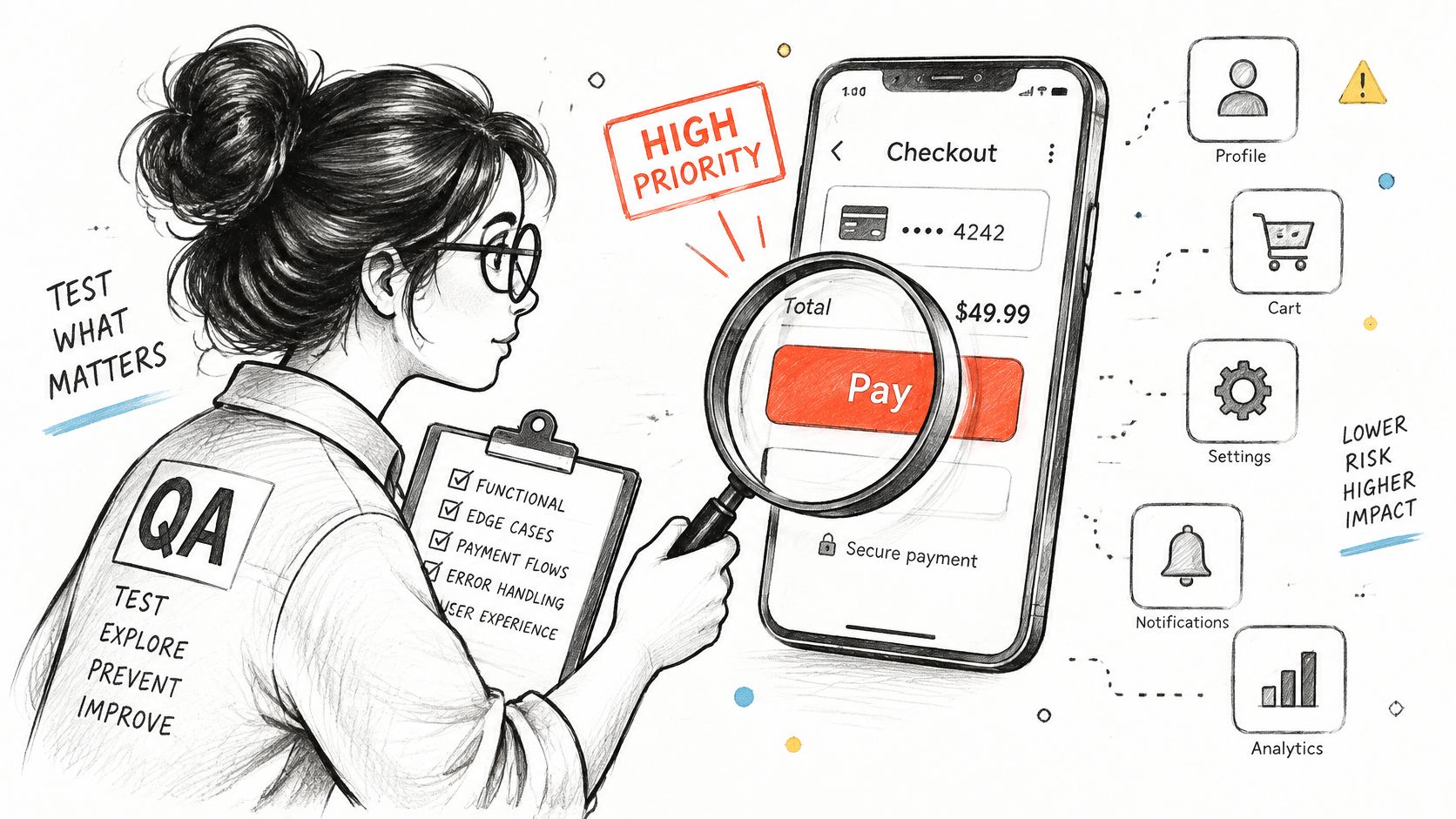
You don't have time to test everything equally. This plan admits it. Popularized by Rex Black and the ISTQB Foundation syllabus, risk-based testing ranks features by likelihood and impact of failure, then gives deeper coverage to the top tier.
A fintech team might put UPI payment and OTP flows in the highest tier and run them on every target phone. An e-commerce team might focus checkout on the browsers its customers use most. Low-risk settings screens get less attention. That's not carelessness. That's allocation.
This image shows the kind of high-risk flow that should sit at the top of that ranking.
How To Borrow the Ranking
Score each feature by user impact and likelihood of failure on specific devices. Put low-RAM Android phones in the high-risk tier if your users rely on them, even if your developers don't. Then revisit the list after each report, because verified defects reveal new risk areas.
Automation fits the same logic. A Canadian oil-and-gas case study reported, after 10 rounds, ROI of approximately 307% for test-case design, 675% for test execution, and 41% for test-result evaluation when automation choices were made effectively, per the industrial test-automation ROI case study. Automate repeatable regression. Keep humans on exploratory work, real-device compatibility, and network variation.
If your cases come from an AI tool, rank before you run. This guide on how to test AI-generated test cases explains how to check generated cases before they consume high-risk sessions.
3. Atlassian Confluence Test Plan Template
Many product teams don't need a formal standard. They need a page people will keep updating. The Confluence test plan template covers objectives, scope, strategy, environments, schedule, entry and exit criteria, risks, and roles, and it sits next to the product docs in Atlassian's wiki.
Teams that track releases in Jira commonly keep one Confluence page per release. Teams on weekly release trains use it to record environment and device changes between builds. The plan stays alive because it's in the tool the team already opens.
What Makes It Work or Fail
The failure mode is a stale page. The template is created, filled once, and never touched again. Three habits prevent that.
- Standing matrix: Keep a device and browser table on the page, with OS version and owner for each row.
- Linked requirements: Link each test case to its Jira requirement, so a requirement with no linked case shows up as a gap.
- Build identity: Record build number and date, so reports match the exact release candidate.
Tool sprawl makes this discipline harder. In 2025, 23% of surveyed companies used five or more testing tools, according to mabl's survey of more than 750 software professionals. If your plan, cases, defects, and device results live in different places, the Confluence page should at least link them into one release record.
4. Azure Test Plans Test Plan with Suites and Configurations
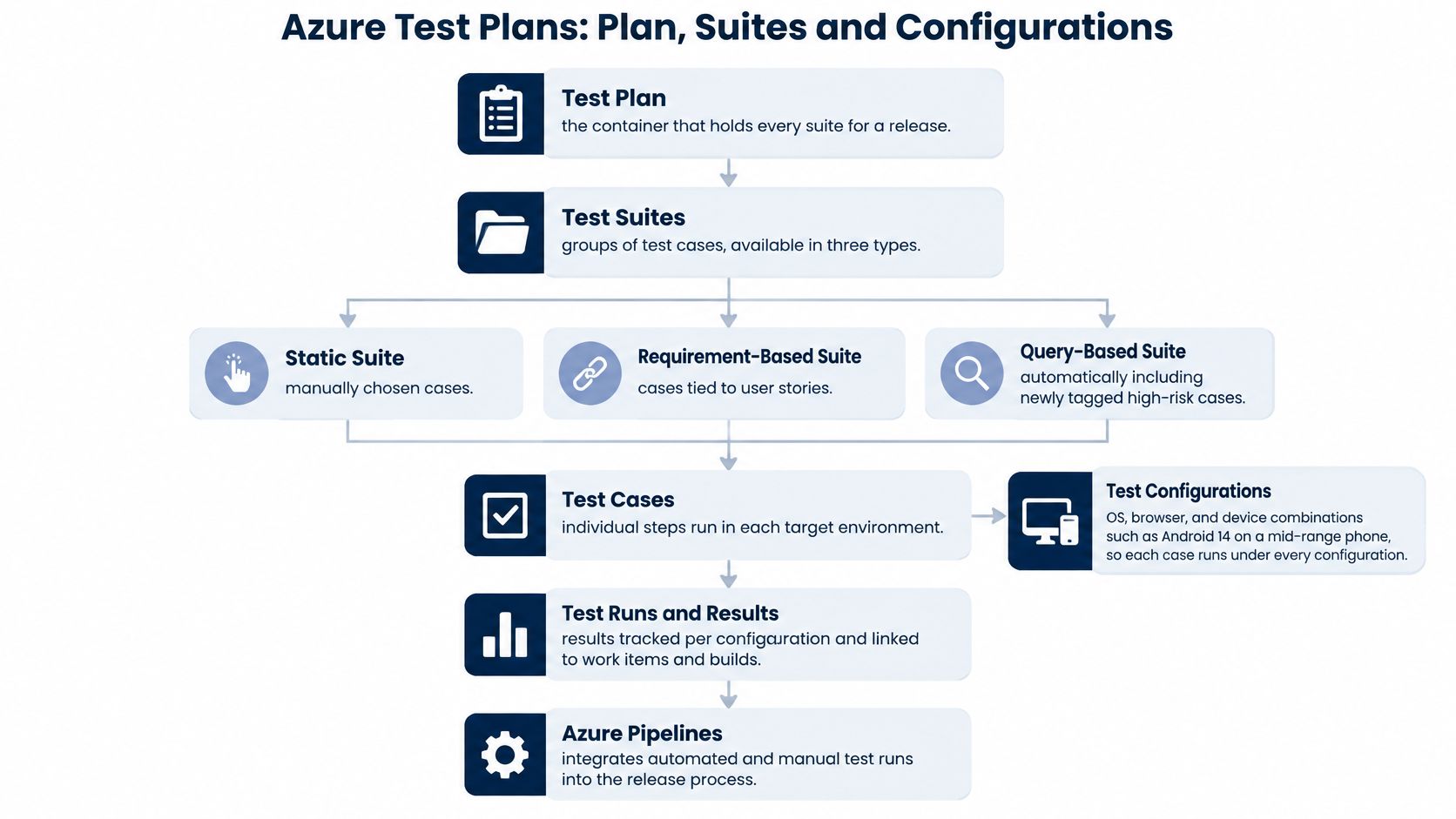
Azure DevOps gives you structure inside the tool. A plan contains test suites, suites contain cases, and configurations define where each case must run. Suites can be static, requirement-based, or query-based, so the same regression set can run across several OS and browser combinations with results tracked per combination.
This diagram shows how plans, suites, and configurations fit together.
Enterprise teams use requirement-based suites to confirm every user story has linked cases before release. That's the section purpose here. The configuration isn't administrative detail. It's your evidence that a case passed on the combination that matters, not just somewhere.
That's also the gap in many templates. A case-by-environment matrix with explicit passed, failed, blocked, and unrun statuses prevents a green summary from hiding untested targets, a point developed in guidance on comprehensive test plans and coverage reporting. Define exit criteria as coverage obligations, not just total pass rate.
Setup Choices That Matter
Define configurations before you create suites, for example Android 14 on a mid-range phone. Use query-based suites to pull in newly tagged high-risk cases automatically. Export results or link them to build artifacts so reviewers can verify execution.
The walkthrough below shows the Azure Test Plans workflow in practice.
5. Google Play Pre-Launch Report Test Plan for Android Releases
This isn't a document. It's a device gate. You upload an APK or app bundle, Google installs and exercises it on physical devices in Firebase Test Lab, and the pre-launch report flags crashes, performance issues, accessibility problems, and security findings before production.
Mobile teams use it as a first gate before manual regression. Apps with large Android user bases use it to catch crashes on older Android versions before staged rollouts. It covers a range of manufacturers, versions, and screen sizes you probably don't own.
What It Doesn't Prove
A clean pre-launch report doesn't prove your checkout, OTP, or payment flow works for a real user on a budget phone with a weak network. Automated crawling explores screens. It doesn't exercise judgment.
- Use it as a baseline: Add manual sessions on the budget and mid-range phones your users own.
- Start internal: Upload to an internal testing track first, so the report runs before any public release.
- Check context: Cross-check accessibility findings against the device and OS version listed in the report.
Measure it by phase, not by total bugs. A Dutch SME case study comparing TDD and CI against a baseline found more defects detected during development shouldn't automatically be read as poorer quality, as described in the Dutch SME TDD and CI case study. Track pre-release and post-release defect density separately. For the iOS side of the same release, see how to test iOS apps on real devices.
6. Session-Based Test Management (SBTM) Charter Plan
Exploratory testing fails when it's unplanned wandering. Session-Based Test Management, introduced by James Bach and Jonathan Bach in 2000, fixes that with timeboxed sessions guided by a charter. The charter format is simple. Explore a target, with specific resources, to discover specific information.
Consultancies use charters to structure short, device-specific sessions during tight release windows. Crowdsourced QA providers commonly time-box sessions and report by session for the same reason. You get discovery with accountability.
The photo below reflects the human, session-based nature of this approach.

Writing Charters That Expose Gaps
Write one charter per device and browser combination. "Explore checkout on Safari 17 with an iPhone 12 to discover payment failures" is testable. "Test checkout" isn't. Debrief the same day, while screenshots, steps, and environment details are fresh.
Record what you didn't explore and why. A report that explains its gaps is more trustworthy than one that hides them.
One pass won't find everything. Research assembled by Capers Jones from 1984 through 2010 across roughly 13,500 projects reported that a typical testing round found approximately 30 to 35% of defects, summarized in Capers Jones's empirical software quality research. Plan multiple charters and multiple quality activities. Don't treat one session as proof.
7. Agile Testing Quadrants Lightweight Test Plan
A release candidate can look ready until a billing screen fails on an older Android in low storage. The lightweight quadrant plan exists to surface that risk early. Brian Marick's model, popularized by Lisa Crispin and Janet Gregory in Agile Testing (2009) and More Agile Testing (2014), sorts tests by audience and purpose: technology-facing or business-facing, supporting the team or critiquing the product.
Use the four boxes as a gap map. Q1 holds unit and component checks that support the team. Q2 holds acceptance tests written to guide development; they are business-facing, and their job is still support. Q3 is where user acceptance testing and exploratory testing critique the product from the user's side. Q4 holds technology-facing critiques such as performance checks. An empty box names the release risk you have accepted.
Where Devices Belong
Put real-device exploratory work in Q3 and name the phone, OS, and browser targets beside the scenario. That makes manual coverage a deliberate answer to user-facing risk, especially for teams with strong unit automation. AI-drafted cases usually fit Q2 only after someone ties each one to a requirement or risk. In 2025, 60% of respondents said their organization used AI somewhere in QA, and 70% of those organizations used AI to develop test cases, according to Applause's State of Digital Quality findings summarized by DevOps Digest. Volume is not coverage.
A 2025 assessment found 8.3% flaky executions among generated cases, plus semantically duplicated coverage and limited explainability, reported in the 2025 assessment of AI-driven QA. Map each generated case to a requirement or risk, remove duplicate intent, review expected results independently, and record rejected cases before execution.
8. TestRail Test Plan with Configurations Matrix
TestRail, from Gurock Software, solves a specific problem well. A plan groups multiple test runs, and configurations let one case execute across combinations of device, OS, and browser. Each combination produces its own run and result set, so coverage reads as a case-by-device matrix.
QA teams use configuration groups to run the same regression suite across several browsers and operating systems in one plan. Release managers use plan-level reports to show which configurations passed before sign-off. That's the practical value. You can answer the mid-range phone question from the opening without digging.
Keeping the Matrix Honest
- Limit combinations: Use analytics to pick the combinations your users really run, not every possible pairing.
- Trace the hardware: Record tester and device owner on each run, so results trace to physical equipment.
- Mark blocked candidly: If a device is unavailable, mark the case blocked with a reason instead of leaving it untested without explanation.
The matrix only reflects what was run. A green cell means someone ran that case on that configuration, not that automation covered it in a different environment. Teams pushing automation targets sometimes treat a pass on one browser as evidence for the whole row, and the gap shows up after release. Automation coverage does not substitute for per-configuration results. For execution on physical hardware, this overview of how to test an app on real devices covers the practical setup.
How the eight test plan examples differ in structure, traceability, and environment handling
| Item | Best For | Core Structure | Traceability | Environment Handling |
|---|---|---|---|---|
| IEEE 829 / ISO/IEC/IEEE 29119-3 Master Test Plan | Regulated and large-scale projects | Formal plan sections with scope, criteria, deliverables, risks, and approvals | Links test plans to test designs, cases, and reports | Documents environmental needs; device and browser choices must be specified separately |
| Risk-Based Test Plan | Prioritizing limited testing time and device access | Risk register, risk tiers, and effort matched to likelihood and impact | Coverage targets and decisions tied to risk ratings | Prioritizes environments based on user impact and failure risk |
| Atlassian Confluence Test Plan Template | Teams already using Confluence and Jira | Collaborative plan page covering scope, strategy, schedule, and risks | Links requirements, cases, and defects to Jira issues | Supports a maintained device and browser matrix |
| Azure Test Plans Test Plan with Suites and Configurations | Teams using Azure DevOps for test management | Plans contain suites and cases, with configurations for test variables | Connects stories, cases, defects, builds, and results | Configurations track OS, browser, and device combinations |
| Google Play Pre-Launch Report Test Plan for Android Releases | Android teams seeking automated release checks on real devices | Automated app exploration followed by a diagnostic report | Results are tied to device models and Android versions | Uses Google's hosted physical-device catalog |
| Session-Based Test Management (SBTM) Charter Plan | Exploratory testing with human testers | Timeboxed, charter-led sessions with logs and debriefs | Session records document findings and areas not covered | Charters can specify each device and browser combination |
| Agile Testing Quadrants Lightweight Test Plan | Agile teams balancing automation and human testing | Four test categories with lightweight, iterative planning | Coverage is shared across test types and team roles | Environment details are not built in and must be added |
| TestRail Test Plan with Configurations Matrix | Managing compatibility testing across many environments | Plans group runs; configurations create case-by-environment runs | Results and defects can be linked to specific configurations | Uses device, OS, and browser configuration groups |
Turning Your Test Plan Into Verified Device Coverage
Start by picking the section list that matches your release risk. A regulated release needs the formal completeness of the IEEE and ISO structure. A weekly mobile release may need only a Confluence page, a risk ranking, and a configuration matrix. Don't copy a template whole. Borrow the section that catches the failure you're most likely to ship.
Next, fill the device and browser matrix with real targets. Name brands, minimum OS versions, browsers, and operating systems your users run. Include budget smartphones and local network conditions if that's your market. A matrix that lists only the phones on your developers' desks will produce exactly the blind spot from the opening scenario.
Then make every unrun case explicit. Passed, failed, blocked, and not run are four different outcomes, and your exit criteria should treat them that way. A high pass rate means little if high-risk cases never ran on a targeted platform. Every blocked case needs a reason and a disposition. Every uncovered case needs to be visible before sign-off, not discovered after release.
A Practical Sequence for Your Next Release
- Define scope and risk: Rank payment, login, and data-loss paths first, then assign your deepest sessions there.
- Validate generated cases: If AI wrote your cases, map them to requirements, remove duplicates, and review expected results before anyone executes them.
- Lock the matrix: Confirm device and browser targets, build link, test data, and deadline before sessions start.
- Report by combination: Read results case by device, rerun the same set on the next build, and compare pre-release and post-release findings.
A plan only protects a release when its cases are executed on the devices it names. That's where 99tests fits for teams without a large device library. We run uploaded test cases by hand on tester-owned phones and browsers, parse your cases into a plan, and show coverage before testers start. If there are more cases than your package covers, you'll see exactly which cases are uncovered, and the report lists anything not run.
Our packages are fixed price, with Starter at ₹9,999 plus GST, Standard at ₹18,999 plus GST, and Deep at ₹34,999 plus GST. You can mix phone, laptop, and browser slots in one job. Submission starts with a build link, test cases in any format, your targets, and a deadline. The report includes a coverage table showing every case against every device, with fails linking directly to the finding, screenshots, and reproduction steps.
Use whichever test plans example fits your team. Just don't ship until the matrix in the plan matches the evidence in the report.
Upload your test cases in any format, name your target phones and browsers, and we'll run every case by hand on real tester-owned devices with a case-by-device coverage report. Choose a fixed-price package that fits your release and see exactly what passed, failed, blocked, or didn't run. Visit 99tests to start your first job.