Plan Testing the Google Way: The ACC Method (Attributes, Components, Capabilities)
How Google's ACC method (Attributes, Components, Capabilities) turns a product into a test plan in under an hour, with a worked example for a UPI payments app and a risk grid.
In this article
Most test plans are long documents nobody reads after the kickoff meeting. Google's test engineers tried a different approach and described it in the book How Google Tests Software (James Whittaker, Jason Arbon and Jeff Carollo, 2012). They called it ACC: Attributes, Components, Capabilities.
The idea is simple: describe the product in three short lists, cross them in a grid, and use the grid to decide what to test and where bugs matter most. A team can draft it in under an hour, and it stays useful because it's short enough to update.
The three lists
Attributes: adjectives
Attributes are the qualities that make users choose the product, the words marketing would use. Keep it to a handful.
For a UPI payments app: fast, secure, reliable, simple.
Components: nouns
Components are the major parts of the product, the things you'd draw as boxes on a whiteboard.
For the same app: login, bank linking, send money, scan QR, transaction history, AutoPay mandates, notifications.
Capabilities: verbs
Capabilities are what a component does to deliver an attribute. Each one should be testable: a tester can show it working or not.
- Send money × fast: "Payment confirms within a few seconds on 4G"
- Send money × reliable: "A payment interrupted by a network drop settles to one final status"
- Login × secure: "Wrong MPIN attempts lock the account after the configured limit"
- AutoPay × reliable: "A revoked mandate takes no further debits"
Build the grid
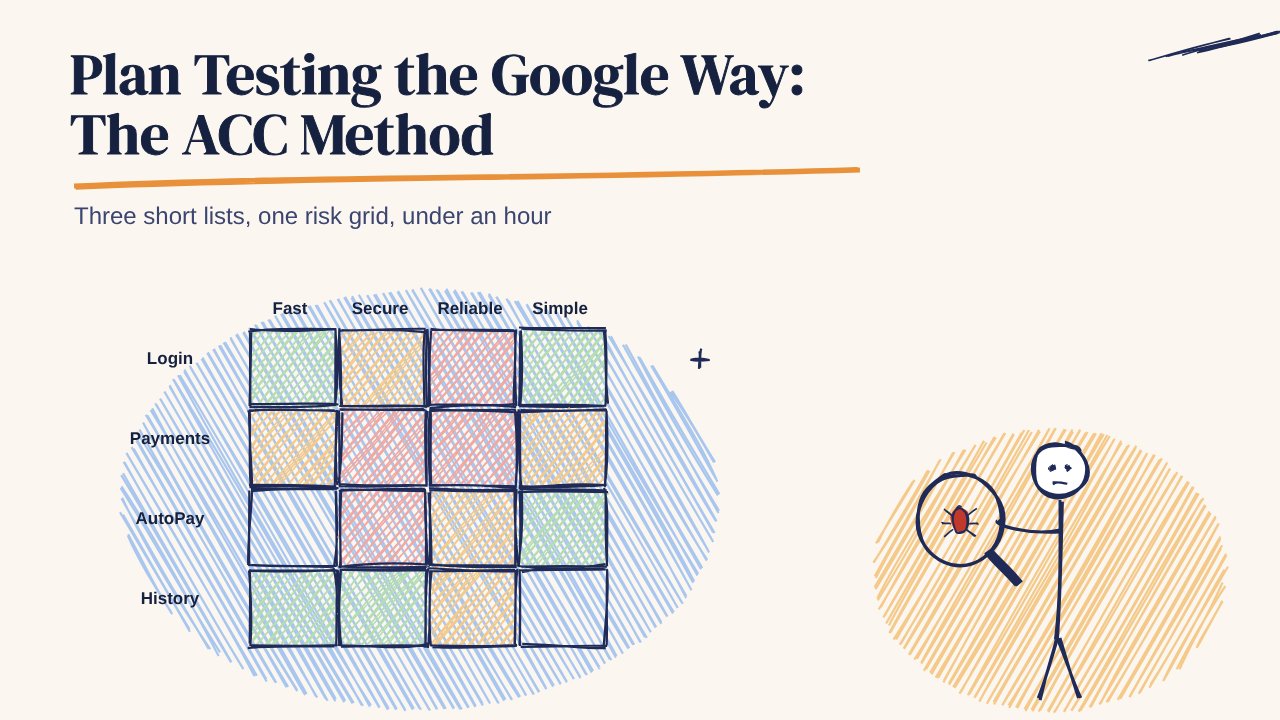
Put components down the side and attributes across the top. Each cell lists the capabilities that connect them. Empty cells are fine; they show where an attribute doesn't apply.
| Fast | Secure | Reliable | Simple | |
|---|---|---|---|---|
| Login | OTP auto-reads | Lock after wrong MPIN | Resumes after app kill | One screen |
| Send money | Confirms quickly | PIN screen blocks screenshots | One final status after network drop | Recent payees shown |
| AutoPay | – | Shows terms before PIN | No debits after revoke | Pause in two taps |
Add risk
For each cell, score two things from 1 to 4:
- Frequency: how often users hit this capability
- Impact: how bad it is for the user if it fails
Multiply them. Cells scoring 9 or more get tested first and most deeply. In the grid above, "one final status after network drop" scores high on both, and "recent payees shown" scores low on impact.
This is the same thinking as risk-based testing, in a format that fits on one screen.
Use the grid when logging bugs
ACC also helps with bug reports. Tag each bug with its component and attribute, such as "Send money / Reliable". After a test cycle you can see which cells collect the most bugs, and those cells get more test time in the next cycle.
A good bug report still needs the basics: steps to reproduce, expected and actual results, device, OS version, network and a screenshot or video. The ACC tag adds the "where does this sit in the product" view that a flat bug list loses.
Why ACC works for small teams
- It's quick. Three lists and a grid, not a 30-page plan.
- It's product-shaped. Engineers, PMs and testers all recognise the components.
- It shows gaps. A capability with no test cases is visible at a glance.
- It updates easily. A new feature is a new row or a few new capabilities.
Turn the grid into test cases
Each capability becomes one or more test cases with steps and expected results. The free 99tests test case library has ready-made cases for 25 Indian app flows, including UPI payments, OTP login and AutoPay mandates, and you can map them straight into your grid.
For high-risk cells that depend on real networks and real phones, 99tests runs exploratory sessions on real Android phones and iPhones across Indian cities, with a report in 3 business days.