Managing Software Testing: A Practical Guide for Teams
Learn how managing software testing works: plan coverage, assign testers, track execution, triage defects and prove release readiness with clear evidence.
In this article
- Map the Testing Work Before the Sprint Starts
- How to Build a Risk-Based Test Plan
- Allocating Testers, Devices and Automation
- Tracking Execution and Triage Defects
- Verifying Tests You Didn't Write
- Triage Means Grading, Not Listing
- Release Reporting and Readiness Sign-Off
- The Release Report Is a List of Gaps
- The Readiness Check Before Sign-Off
The dashboard is green. The release call starts in ten minutes. Someone asks whether the build is safe to ship, and the honest answer is that nobody in the room can prove it either way. Not because the team is careless, but because the evidence everyone is holding is a count of things that ran, not a record of what the risk really was.
That gap is the whole job. Managing software testing is the work of turning execution into evidence a release decision can rest on, including the awkward part most dashboards hide: what you didn't test, and why. Get that right and release calls get shorter. Get it wrong and you'll keep shipping on optimism.
Map the Testing Work Before the Sprint Starts
Say your team holds 600 generated test cases, a dashboard that has been green for eleven days, and no defensible answer to "is this build safe?" The cases exist. Some are duplicates. A few hundred have never run on a physical device. A handful have been marked blocked since the last sprint and nobody remembers why. The count looks like coverage, but it's a count.
Managing software testing is five linked decisions, not one execution step. Planning decides what matters, allocation decides who proves it and where, execution produces the run log, triage decides what blocks a release, and reporting turns the whole chain into a ship or hold call. Skip one and the rest degrade.
The stakes aren't theoretical. A National Institute of Standards and Technology study from 2002 estimated that inadequate software testing infrastructure cost the U.S. economy between $22.2 billion and $59.5 billion annually, with more than half of that burden falling on users working around and recovering from software errors (NIST report on testing infrastructure costs). The same study found defect identification and correction accounted for more than half of development cost. Finding defects earlier is cheaper. That is the entire economic argument for managing test work as a pipeline rather than a phase.
Testing management phases and what each one decides
| Phase | Core decision | Output | Metric to track |
|---|---|---|---|
| Planning | Which features and user journeys need testing first | Risk-ranked test list | Coverage of business-critical journeys |
| Allocation | Who tests what, on which devices and browsers | Assignment matrix with an owner per case | Share of cases with a named owner and target |
| Execution | Run order, and what to do with blocked cases | Run log per case per device | Counts of passed, failed, blocked and unrun cases |
| Triage | Which defects block the release | Graded defect list with reproduction steps | Escaped defects and time to resolution |
| Reporting | Is the build ready to ship | Release evidence summary with gaps stated | Change-fail rate and rework after release |
The phases feed each other or they fail together. A beautifully risk-ranked plan with no owner per case is a wish list. A run log with no triage rubric produces a defect pile the release manager can't act on.
Manual work isn't going away either, so plan for it. In 2025, 82% of surveyed testers still used manual testing in their day-to-day work, while 45% automated regression testing, according to Katalon's State of Quality survey of 1,400 QA professionals.
Working rule: keep all five phases in one tracker. When planning, allocation, execution, triage and reporting live in four tools and a spreadsheet, every release call becomes an archaeology project.
How to Build a Risk-Based Test Plan
Start from user risk, never from the existing test case list. The existing list reflects what was easy to write two years ago, not what your users depend on today. Work through seven steps in order and the plan writes itself.
The sequence matters more than any single step, which is why a risk-based approach to software testing beats exhaustive coverage as a starting frame.
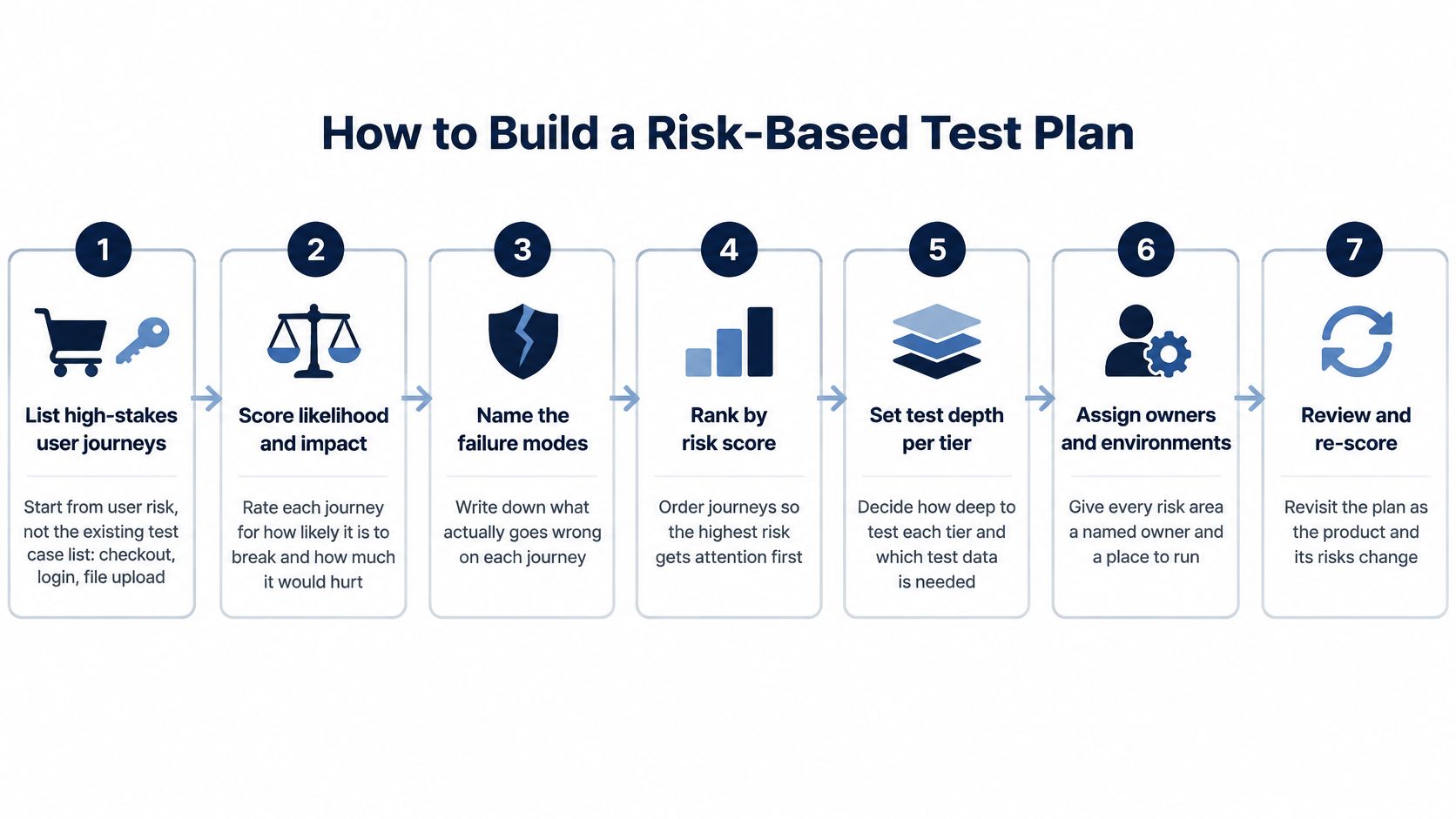
1. List the journeys that carry revenue, sign-up or core work. Checkout, login, password reset, file upload, search, payment retry. Name them as user outcomes, not as modules. The mistake to avoid is inheriting last quarter's suite and declaring it the plan.
2. Rank each journey by business impact and by how many real users depend on it. A payment failure hurts every user; a broken admin export hurts four people. Ranking by ease of automation is the common error, and it inverts your priorities.
3. Add change impact. Anything touching code changed in the last two sprints gets pushed up the list. The trap is treating a stable-looking area as safe when three pull requests landed in it last week.
4. Fold in historical defects. Pull the areas with the most reopened tickets and the longest resolution times, not just this sprint's bugs. Teams that look only at the current sprint keep rediscovering the same broken corner.
5. Map device, browser and network exposure. Look at your analytics for phone models, operating system versions and connection types. If a meaningful slice of users is on budget Android hardware over weak mobile networks, that combination belongs in the matrix. Testing only on the team's own flagship phones is how compatibility bugs reach production.
6. Set a minimum real-environment matrix and state what won't run. For each cycle, write down which cases will not execute and why. Leaving unrun cases unstated is the most expensive omission in the whole plan, because the gap survives into the release and nobody owns it.
7. Get product and engineering to sign off on what's in and what's out. Scope is a shared decision, not a tester's private judgement. When product accepts an out-of-scope item in writing, the release conversation changes from blame to trade-off.
Writing the cases is a separate task. It stays with your internal team, and 99tests helps clients plan and prioritise test cycles and the app features they test, while authoring test cases sits outside package scope.
Allocating Testers, Devices and Automation
A test plan can have plenty of cases and still leave key user journeys unchecked. Assign work by the evidence each journey needs: repeatable regression checks may suit automation, while hardware-specific behavior calls for people testing on real devices.
Automation versus real-device manual testing
| Work type | Best for | Limits | Owner |
|---|---|---|---|
| Automation | Stable, repeated regression checks | Scripts need maintenance as the interface changes | Internal team |
| Manual on real devices | Exploratory sessions, new features, and checks involving cameras, permissions, battery, touch input, or network conditions | Slower, and limited to the devices available for the cycle | Named tester per journey |
| Crowd sessions on tester-owned devices | Widening the device and browser matrix without buying hardware | Sessions are timeboxed | Internal lead sets scope |
Automation and manual execution answer different questions. A passing automated check can confirm that a repeated workflow still behaves as expected in its configured environment. It cannot establish how a permission prompt appears on a particular phone or how the app behaves over a weak connection. Reserve human sessions for those conditions, exploratory work, and features whose behavior is still changing.
Three assignments need an owner: the journey, the device and browser combinations, and any coverage target the internal team cannot meet. Use user-market data to choose devices rather than defaulting to the handsets on the team's desks. These parameters for choosing devices for mobile app testing provide a practical starting point.
When the required equipment is not available internally, crowd testing can extend the matrix without buying devices or hiring full-time staff. 99tests runs supplied test cases on tester-owned phones, laptops, and desktops, adds exploratory testing around those cases, and returns findings with steps and media. The same plan can be rerun against a new build. Test case and automation script writing are not included in its packages.
Estimate capacity before assigning the cycle. Multiply the cases by the target device and browser combinations, then compare that workload with the time available. Allow time for automation script maintenance too; otherwise, planned execution competes with keeping the checks usable. For teams coordinating several cycles, Fluidwave on workload forecasting tools offers another perspective on capacity planning.
The rule I'd enforce: every critical journey needs an owner and a defined device check. A case count alone does not show whether the important conditions were covered.
Tracking Execution and Triage Defects
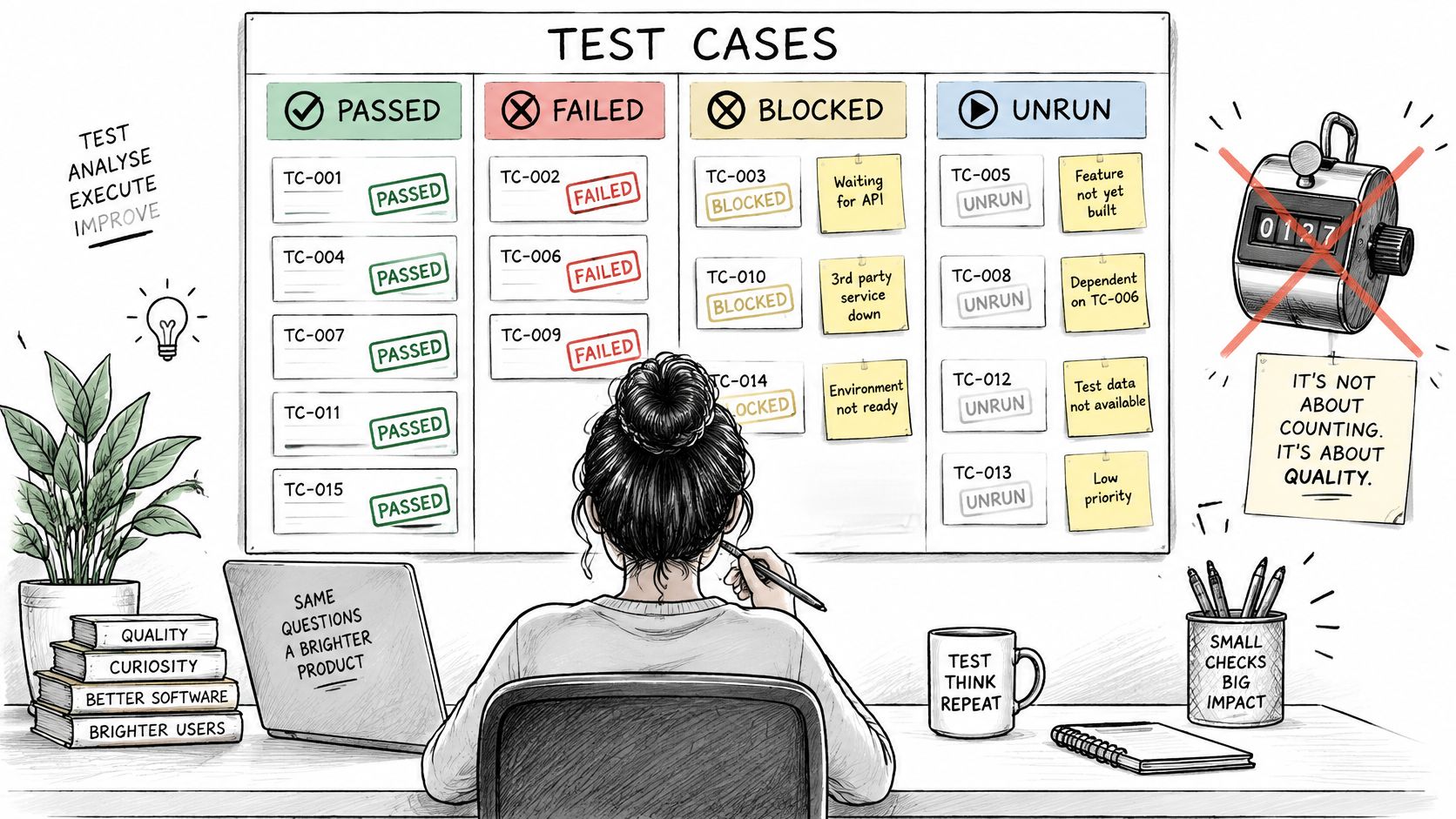
Tuesday's release call opens on a dashboard that says 412 cases passed. The product owner asks which payment path never ran, and on which Android build. A rising pass count does not answer that. It climbs when the suite adds easy cases and drops when the suite adds realistic ones, so the total mostly records how ambitious the suite is. What the release needs is a status on every case, plus a written reason wherever the case never produced a result.
Every case ends in exactly one of four states: passed, failed, blocked, or unrun. Passed and failed are self-explanatory. Blocked means the environment stopped the run: a missing login, a build that would not install, or a device on the wrong OS version. Unrun means the case never got a slot. Write the reason next to every blocked and unrun case, in the tracker, on the day it happens. Those two columns are the evidence you read out when someone asks whether the release is safe. A clean pass rate with a silent unrun column hides the journeys you chose not to cover.
Automation moves that status work into a different queue. It still has to be read.
Verifying Tests You Didn't Write
AI coding tools now produce tests faster than teams can check them. A 2026 survey of 996 quality professionals and technology decision-makers found respondents spend about 20% of their working week manually verifying AI-generated tests and code, and 33% named manual review of AI-generated tests as the leading barrier to scaling test suites (mabl's 2026 State of Quality Engineering report). Generated tests can raise coverage without proving stronger behavioural or production protection. The bottleneck is verification, not generation.
Three checks catch most of the bad ones. First, is the case executable against the current build, with real data and a real environment? Second, does it map to a journey a user takes? Third, does it duplicate a case you already have?
Then hunt for tautological tests. A test that asserts a function returns what the mocked function was told to return proves nothing. So does an overly linear test that walks one happy path through a form and never touches validation, back navigation, or a rotated screen. Those cases pass forever and detect nothing. I would rather mark them unrun, with "asserts the mock" as the reason, than let them inflate the pass count before a release decision.
Triage Means Grading, Not Listing
Triage starts with merging. Ten testers reporting the same broken upload button is one defect with ten pieces of evidence, not ten tickets. Merge first, then grade each defect against a written rubric so two managers reach the same answer about the same bug. Severity is a release action, not a label.
Defect severity and release action
| Severity | Meaning | Example | Release action |
|---|---|---|---|
| Critical | Blocks a core journey or causes data loss | Payment fails on a specific Android model | Stop the release until fixed and retested |
| High | Major feature broken, with no reasonable workaround | Photo upload crashes on iOS Safari | Fix before release or document a formal exception |
| Medium | Feature works but with noticeable errors or a workaround | Filter resets after page refresh | Schedule for next release with a tracked ticket |
| Low | Cosmetic issue with no effect on function | Icon misaligned on a tablet layout | Log and batch with later polish work |
Record the reason for every severity change in the ticket. When someone asks three weeks later why a crash was graded High rather than Critical, the note answers for you. Pair that note with the blocked and unrun list, and the release call can say what failed, what never ran, and why the gap was accepted.
Release Reporting and Readiness Sign-Off
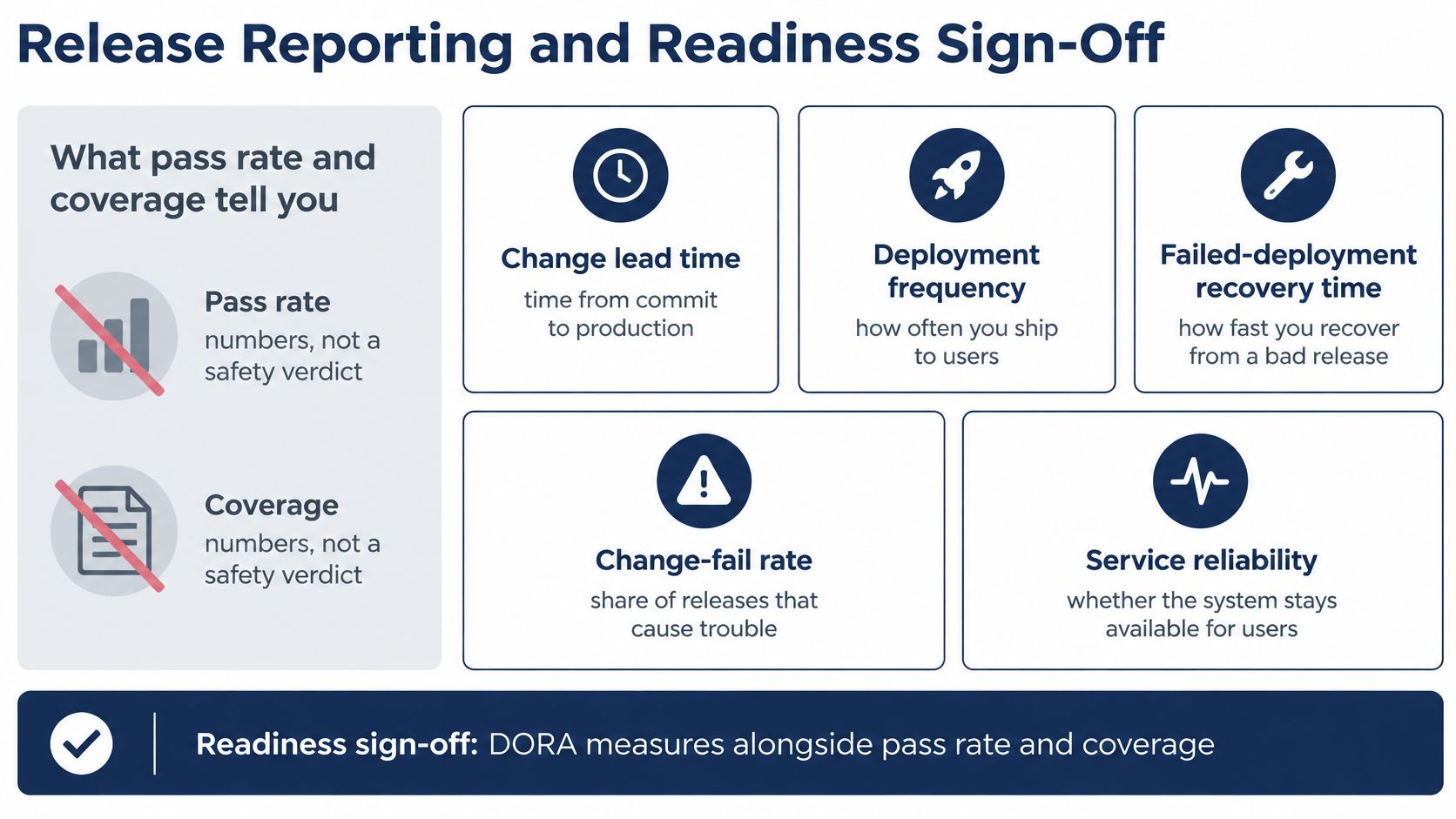
Pass rate and coverage answer "what did we run?" They don't answer "is this safe?" A suite can hit 92% coverage and still miss the one journey that loses money on a Friday night. Delivery measures are a better second opinion, which is why the DORA research programme's metrics history matters to test managers: the framework grew from four measures in 2014 into today's five, adding availability in 2018 and evolving it into reliability by 2021, and the 2021 report drew on seven years of research with more than 32,000 professionals.
DORA metrics and the testing lever that moves each
| Metric | What it reveals | Testing lever |
|---|---|---|
| Change lead time | Time from code change to running in production | Automated regression in CI |
| Deployment frequency | How often releases ship | Reliable automation and a risk-ranked plan |
| Failed-deployment recovery time | How fast a bad release is reverted | Clear rollback paths in the test plan |
| Change-fail rate | Share of releases causing failures | Testing that catches failures before release |
| Deployment rework rate | Unplanned fixes after release | Triage that grades and resolves defects before release |
Read those five together and the test plan's real output becomes visible. Automation that runs on every commit shortens lead time and supports frequent deploys. A plan that names rollback steps before the release shortens recovery. Testing that finds failures pre-release lowers change-fail rate and rework. None of that shows up in a coverage percentage.
Maturity is the constraint. In 2025, only 11% of surveyed teams had reached the optimized stage of QA maturity, using advanced automation or AI, according to Katalon's State of Software Quality Report. Others are running this on manual effort and partial automation, which makes disciplined reporting more valuable, not less.
The Release Report Is a List of Gaps
A release report is a checklist, not a dashboard screenshot. It carries six things: coverage claimed versus coverage evidenced, the device and browser matrix with passed, failed, blocked and unrun counts per target, the reason for every gap, the open defects with severity and reproduction steps, the environment details needed to reproduce any finding, and a line naming who accepted each untested area.
That last item is the one teams skip, and it's the one that matters most. The gap you don't name is the gap the next release inherits, because nobody has budgeted to close it. If you want a structure to copy, this software testing report template covers the sections a release manager reads.
The Readiness Check Before Sign-Off
Run four checks and refuse to sign until each is clean.
- Ownership: every critical journey has a named owner and at least one run on a real device.
- Status integrity: every case carries passed, failed, blocked or unrun, with a written reason for anything not executed.
- Defect discipline: every Critical and High defect is merged, reproduced and graded against the rubric.
- Matrix match: the environments executed match the minimum set agreed in the plan, or the difference is documented and accepted.
Sign-off isn't a testers' ritual. It's the moment someone with delivery responsibility accepts a named set of risks in writing.
Then write the decision in one paragraph: ship or hold, the evidence behind it, the gaps you're accepting, and who accepted them. Teams that pick a 99tests package for execution get reports built around that structure, since package scope is selected to match the testing scope rather than a fixed bundle.
A release decision built on evidence beats one built on a green dashboard, and getting there usually means more real-device execution than an internal team can staff. 99tests runs your test cases, including ones generated by AI coding tools, as device-specific sessions on tester-owned phones, laptops and browsers, then returns verified reports that separate what passed, what failed, what was blocked and what never ran, with reasons. Upload your cases, pick the device and browser targets, and let the coverage gaps show up before your users find them at 99tests.