Drawbacks of Manual Testing and How Teams Manage Them
Learn the main drawbacks of manual testing, from slow execution and human error to hidden coverage gaps, and how teams can contain each one.
In this article
- Drawbacks of Manual Testing at a Glance
- Why Slow Execution Stops Scaling
- The coverage trap under time pressure
- How Human Error Creeps into Manual Results
- What two testers do with one login case
- Controls that make results comparable
- The Cost of Finding Defects Late
- Where manual capacity creates the delay
- When Manual Testing Is the Better Choice
- Six questions before you keep a case manual
- Coverage Gaps You Cannot See
- What a green row actually proves
- Build a Manual Testing Plan That Covers Its Gaps
84.4% of respondents in a 2026 survey of 105 QA engineers, software developers, and academics affirmed the risk of human error in manual testing, and that result was statistically significant at p < 0.001, according to a study of manual-testing obstacles. That figure reframes the drawbacks of manual testing. The issue is not only that a person is slower than a script. A release decision can rest on notes a tired tester wrote inconsistently, or on cases nobody ran.
A mostly green sheet can still hide blocked rows, copied statuses from the last build, and two severity labels for one login failure. Those gaps stack. Less time means fewer runs. Fatigue makes the runs that do happen less trustworthy. An unfinished device matrix then gets treated as coverage.
Manual testing still belongs where judgment matters: exploratory sessions, usability, and odd hardware behavior. It stops paying for itself when the same person repeats identical checks on every build and every browser. The rest of this piece separates those uses and shows how to record what ran.
Drawbacks of Manual Testing at a Glance
Manual testing has six main drawbacks: slow execution, human error, inconsistent reporting, device and browser multiplication, late defect discovery, and hidden coverage gaps. Each one feeds the next. A tester who is already behind on a long regression gets tired, skips a low-traffic browser, and files a thin note. The release manager then reads a shorter failure list and treats silence as a pass.
Say a mobile team ships every two weeks. The sheet covers login, checkout, and push notifications. Chrome on a laptop passes. Safari on an older iPhone never gets a turn because the session ran long. The status cell still says pass, pasted from last time. That shared pattern is why these drawbacks are a coverage-evidence problem, not only a speed problem. The artifact looks finished while the work was partial.
Use the table as a map. Each row names where the drawback shows up in a normal release, what it typically costs, and the containment that changes the evidence.
| Drawback | Where It Shows Up | Typical Impact | Main Containment |
|---|---|---|---|
| Slow execution | Long regression cycles | Delayed releases and skipped cases | Automate stable regression and timebox manual sessions |
| Human error | Repeated steps and long test sessions | Missed or misjudged defects | Standard test-case templates and reproduction checks |
| Inconsistent reporting | Different testers and different severity calls | Non-reproducible bugs and slow triage | Calibrated severity rubric and required environment details |
| Device and browser multiplication | Each OS, browser, handset, and network condition | Matrix only partly executed | Prioritise the device matrix by real user share |
| Late defect discovery | Testing that starts too late in the cycle | Costly rework close to release | Earlier test planning and continuous regression |
| Hidden coverage gaps | Blocked or unrun cases left unrecorded | False confidence in release readiness | Case-level status of passed, failed, blocked, or unrun |
Mark the rows that match your current cycle. If the last report cannot say which cases were blocked or unrun, start with hidden coverage gaps. If the same bug returns with two severity labels, start with inconsistent reporting. Read those sections before you add more cases to a crowded spreadsheet.
Why Slow Execution Stops Scaling
Take 300 regression cases and 8 device and browser combinations. That is 2,400 executions in one cycle. At about 2 minutes of hands-on time each, you are near 80 hours before anyone captures a screenshot or writes a defect. A rerun after a fix doubles the hours. Capacity grows with cases times environments times reruns, not with the number of features you shipped.
A literature review of software testing describes manual execution as time-consuming, dependent on human resources, and cost-effective mainly for smaller test volumes. It also notes that human intervention is a source of execution errors, and that manual testing is not feasible for performance activities such as load and stress testing. An empirical comparison covered in that review found lower creation, execution, and reporting costs for generated automated suites, though a person still has to interpret the results.
The coverage trap under time pressure
Under a deadline, teams run the happy path first. Login on the latest Chrome. Checkout on one Android phone. Low-frequency combinations fall off the plan, and nobody records the denominator. You cannot claim those cases passed. You can only say they were not attempted.
The same squeeze shows up in practitioner surveys. A 2024 mabl report found that 19% of respondents ranked test execution among their most time-consuming testing tasks. Katalon's 2024 State of Software Quality Report found that 48% of respondents cited a lack of time to ensure quality, up from 39% in both 2022 and 2023.
Practical rule: Timebox manual sessions for exploratory behavior and hardware-specific defects. Repetitive deterministic regression is a poor use of scarce tester hours.
Point the stable checks at reliable browser test automation strategies and keep people on paths a script cannot judge. Growing matrices against flat headcount are also among the top software testing challenges release teams keep hitting.
Reporting should separate passed, failed, blocked, and unexecuted cases, name the environment, and keep the reason for every omission. Otherwise an 80-hour plan becomes a 30-hour sample, and the sample gets labeled as the suite.
How Human Error Creeps into Manual Results
Three things move a manual result off the truth of the build: fatigue on long runs, two people reading the same steps differently, and transient behavior that is easy to miss.
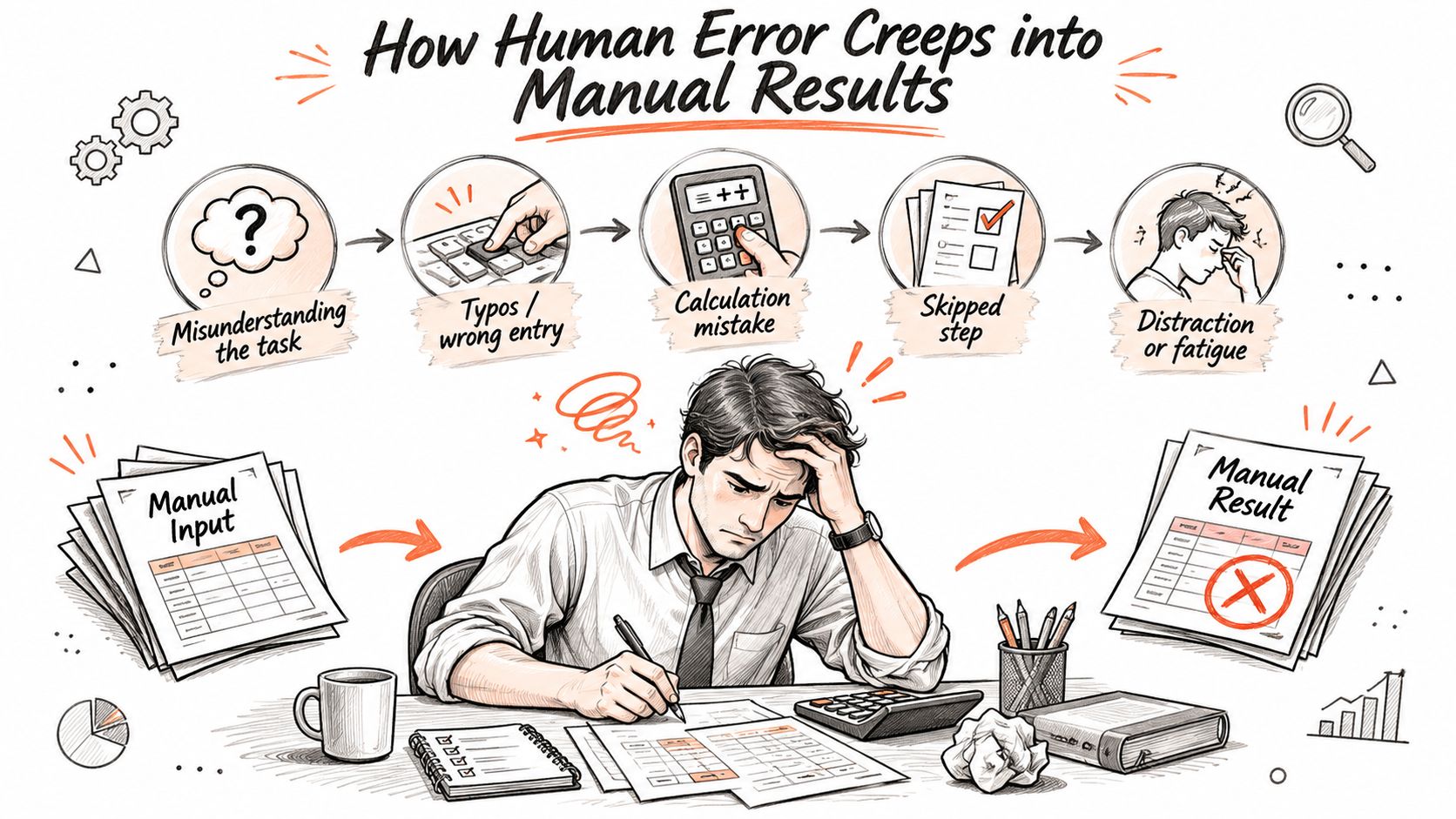
Testers repeatedly interpret steps, set up data, watch the screen, and write evidence. Attention drops across a long regression. A toast that flashes for a second, or a button that enables only after a slow call, gets skipped. The final screen looks fine, so the case is marked passed.
What two testers do with one login case
Say two testers run the same login case on the same build. Tester A starts from a fresh session, hits a timeout, and logs High. Tester B starts from a cached session, sees a shorter delay, and logs Medium. Triage cannot reproduce "the" bug, because setup, timing, and severity all moved.
Mobile and browser work multiplies that drift. OS version, viewport, permission state, and network conditions change what the product does. Office Wi-Fi is not the same test as a congested mobile network. Inconsistent action timing, data setup, environment choice, or assertions can make a real failure non-reproducible, which slows triage and weakens the release record.
A short walkthrough of how small setup differences change what gets written down:
Controls that make results comparable
- Standard templates: Same steps, same data setup, same expected result, so two people are not inventing the procedure.
- A severity rubric: Medium and High mean the same thing on every ticket, and the rubric is written down.
- Reproduction checks: A second person reruns the failing steps before the bug enters the queue.
- Environment on every row: Device or browser, OS version, build hash, and network context.
Manual testing remains the right tool for exploratory behavior, usability, and complex dynamic scenarios. It does not stay reliable for identical checks across many builds once those controls are missing. Coverage then depends on who was on shift, not on a repeatable process.
The Cost of Finding Defects Late
Fixing a defect after release takes roughly 15 times the effort of fixing it during the requirements phase, according to a historical estimate in NIST's summary of inadequate software testing. The expense comes from where the evidence arrives, and from how much of the release was believed to be covered before it did.
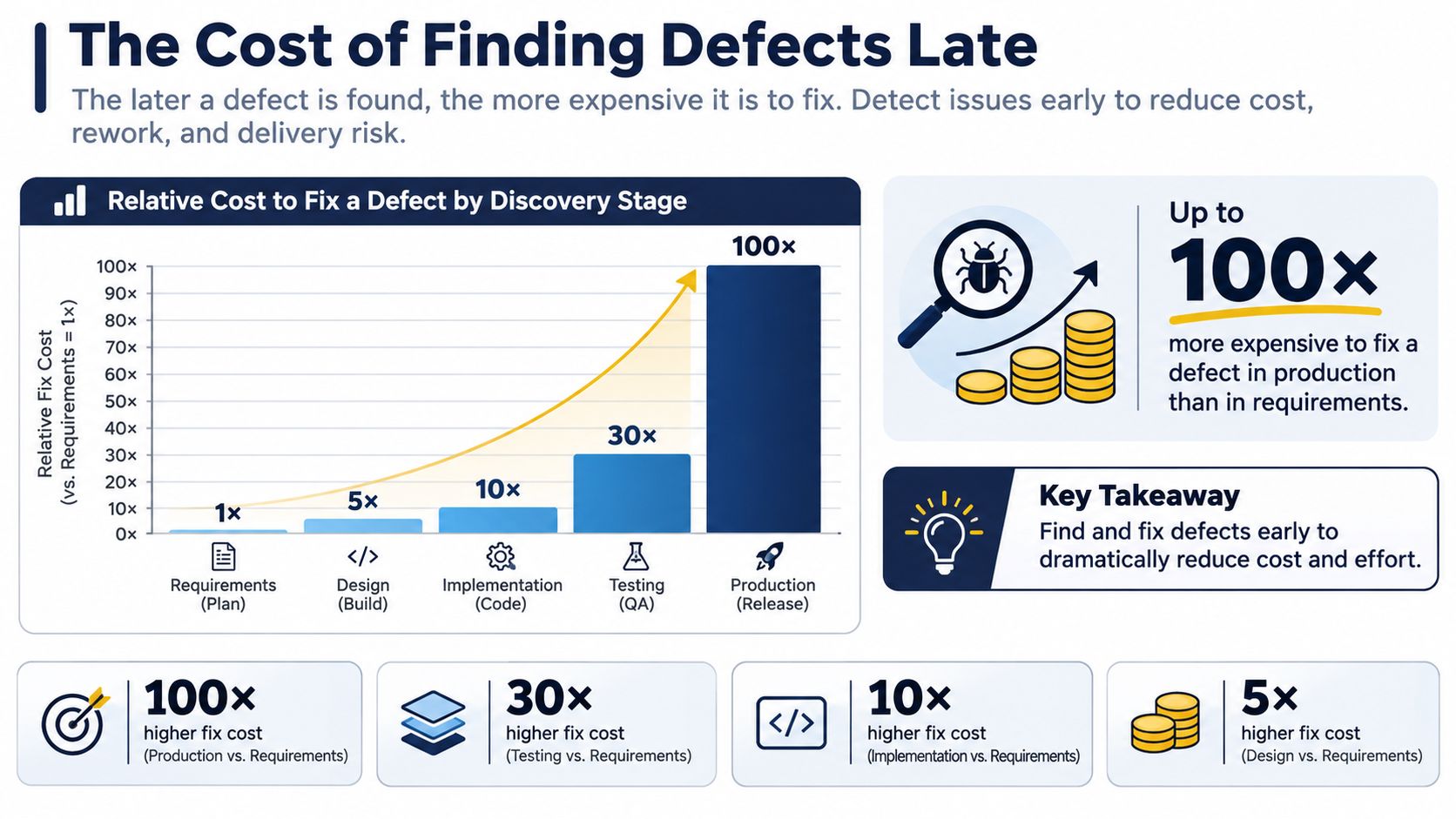
The same analysis frames the wider pattern: many defects surface downstream, after earlier checks have already created confidence, and identification plus correction can absorb a large share of development effort. The cost rises because the failing case is now tied to built features, test data, integrations, and customer-facing promises. A pass list that looked complete at unit time becomes weaker when whole journeys, devices, and release timing enter the picture.
Where manual capacity creates the delay
A team that cannot repeat a broad regression, reach every target environment, and document failures before deployment is making a capacity bet. Complexity, release frequency, and the compatibility matrix raise the size of that bet. Manual execution still supplies judgment; the risk appears when human effort is the only thing standing between an unrun case and a launch decision.
One showstopper that escapes into a live checkout is the kind of miss a cost-of-a-showstopper analysis puts next to revenue and support load. Earlier test planning, plus a regression slice on every build, cuts that exposure. The goal is a smaller unknown zone: fewer unrun cases, clearer blocked reasons, and evidence that survives triage.
A defect found while the requirement is still on the table is a conversation. The same defect found after release is a rollback, a patch, and a customer ticket.
When Manual Testing Is the Better Choice
The drawbacks of manual testing are greatest when you apply it to every case. They shrink when the case calls for a person. Judgment-heavy evaluation stays manual. Identical, high-frequency checks do not.
| Test Type | Better Fit | Reason |
|---|---|---|
| Exploratory testing | Manual | Discovering unexpected behaviour needs human judgment and curiosity |
| Usability and visual behaviour | Manual | Whether a flow feels right or a layout looks wrong is hard to script |
| Device-specific interactions | Manual on real devices | Hardware quirks and OS behaviour often differ from emulators |
| Permission flows and network interruptions | Manual on real devices | Real network changes and permission prompts are difficult to simulate reliably |
| Stable, high-frequency regression | Automated | Identical checks repeated across many builds reward repeatability |
| Load and stress testing | Automated tooling | Manual execution is not feasible for performance activities |
| Newly generated test cases | Manual first run, then decide | Validate that each case is valuable before choosing automation |
Six questions before you keep a case manual
Rate the case. Don't sort it by habit.
- Repetition frequency. If it runs on every build, automation usually wins on cost.
- Volatility. A screen that changes weekly will break a script faster than a person can update it. Keep the early cycles manual.
- Oracle difficulty. If you cannot write the expected result in a sentence a tool could check, a person should look.
- Device dependence. Hardware buttons, permission sheets, and flaky radios belong on real devices.
- Defect impact. A payments failure justifies more human attention than a tooltip.
- Maintenance cost. If the automated check costs more to keep alive than the bug it would catch, leave it manual.
The drag is often unassisted repetition, not the fact that a human held the mouse. Empirical research on augmented support for manual GUI regression reported a 36% reduction in duration overall, and shorter tests in 70% of cases, in this study of assisted GUI regression. Related empirical work treats manual testing as the better fit when the requirement is exploratory, novel, or too rare to justify a script.
AI coding tools can drop a large inventory into the backlog overnight. Volume is not value. Run a new case by hand once, decide whether the oracle is real, then automate only the stable ones.
Coverage Gaps You Cannot See

A report lists 180 cases, every row marked passed. Only 120 were executed. Sixty never ran, and the release read green as full coverage. That is the governance failure most drawback lists skip: false confidence from an inventory whose cases never ran, ran on the wrong environment, or produced an ambiguous note.
Speed problems are visible. Coverage-evidence problems are not. A slow cycle delays a release date everyone can see on a calendar. An unrun case hides inside a green total, and nobody discovers the gap until a defect ships.
What a green row actually proves
Passed means someone executed the case on a named environment and the product matched the expected behavior. It does not mean every other phone would do the same. A pass on one laptop can miss a Safari layout bug, an older Android permission dialog, or a timeout that appears only on a weak network.
Four statuses cover every possible outcome of a case in a cycle, and each one demands a different record:
| Status | Meaning | Required record |
|---|---|---|
| Passed | Executed on the stated environment and matched expected behaviour | Environment, build, steps, and evidence |
| Failed | Executed and deviated from expected behaviour | Screenshot or recording, expected versus actual, severity rubric level |
| Blocked | Could not run because of an external dependency | Blocking reason and owner |
| Unrun | Not executed in this cycle | Reason for omission and risk accepted |
The unrun row is where coverage lies hide. A case that did not execute still counts toward the inventory, so 180 planned and 120 executed produces the same reassuring green bar as 180 passed unless someone separates the two numbers.
For each execution, keep a short context block:
- Device or browser and the OS version
- Build identifier so the result ties to one binary
- Network condition, including offline or a constrained mobile link
- Exact steps, not a paraphrase written the next morning
- Expected versus actual behavior
- Screenshot or recording when the outcome is a fail
Blocked needs a reason and an owner. Unrun needs a reason and an explicit risk acceptance. A blank status is not evidence.
Automation does not erase this risk. It can scale execution and also scale a wrong assumption about the test bed, because a script that runs on an unknown configuration produces false passes and false fails at machine speed. The same applies to device coverage. One way to widen the matrix without buying hardware is crowd testing: 99tests, for example, assigns testers who execute cases on their own phones, laptops, and browsers rather than emulators, with each case marked pass or fail by a human and each failure carrying a screenshot of what the tester saw.
AI-generated inventories raise the same risk faster, because volume can outrun anyone's ability to confirm each case is worth running. A 2025 IEEE Computer article concludes that AI-generated testing artifacts still need human validation to avoid missed defects, inappropriate exclusions, and oversimplified tests.
Accessibility is a clear case of judgment-heavy coverage that a green functional row will not show. An accessible web app testing guide helps you decide which of those checks stay manual, and which must be marked unrun if a screen reader session never happened.
If the status is not passed, failed, blocked, or unrun, you don't have a coverage number. You have a wish.
Build a Manual Testing Plan That Covers Its Gaps
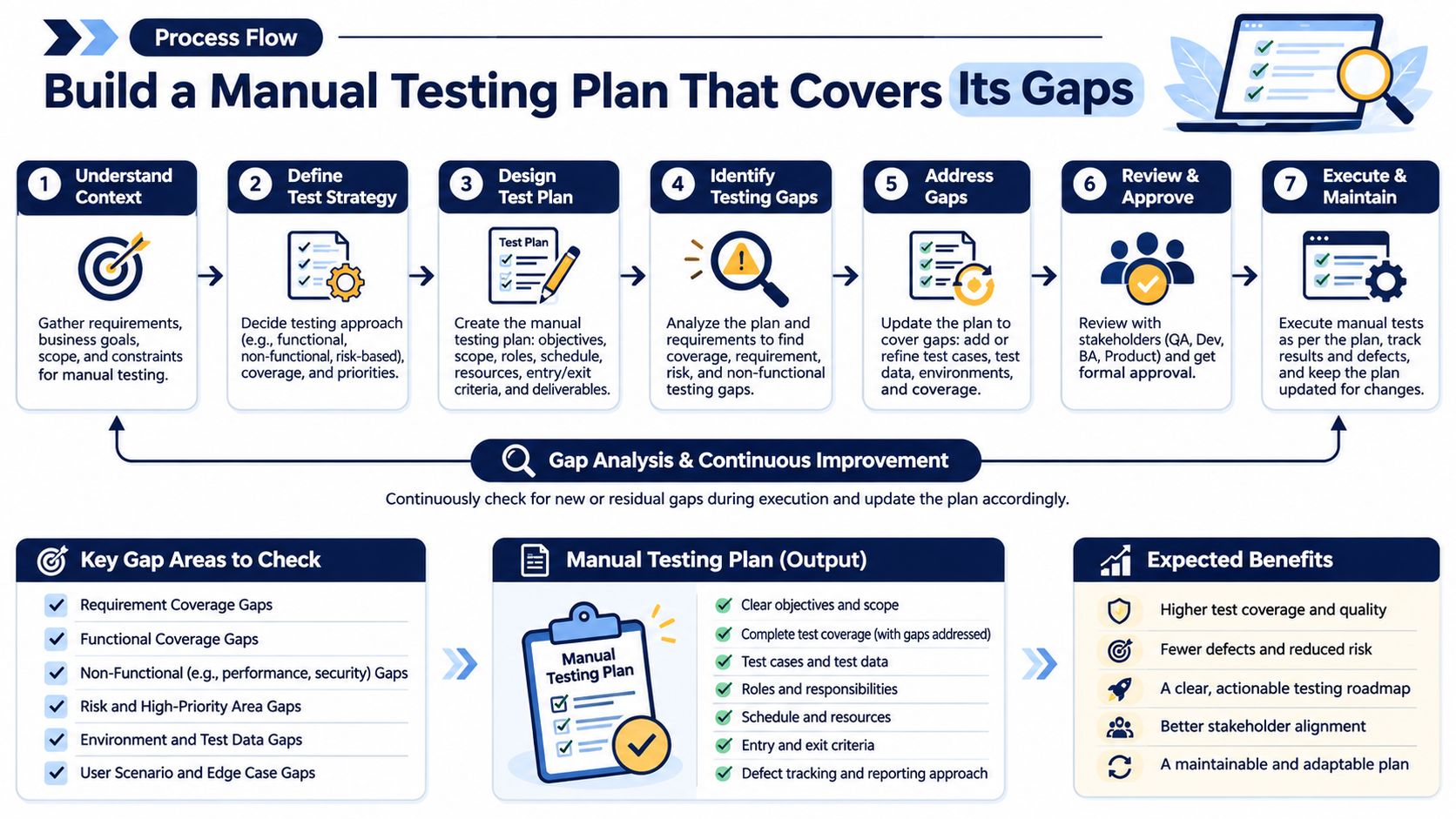
- Tag every case by repetition frequency, volatility, and device dependence. Untagged cases sit in one pile and get the same treatment, which is how stable checkout checks steal hours from exploratory work.
- Keep judgment-heavy cases manual. Exploratory sessions, usability, and device-specific interactions are where a person adds signal a script will not.
- Move stable, high-frequency regression to automation. Those checks are identical across builds. Tester hours belong on the cases from step 2.
- Build the matrix from analytics, not habit. Cover the OS, browser, and handset combinations your users have, in that order. A laptop Chrome pass is not a stand-in for a budget Android phone on a variable network.
- Timebox the session and log every omission. If a case does not run, write why. An unrecorded skip is how dozens of cases vanish inside a green total.
- Block sign-off on status plus environment. Every case needs passed, failed, blocked, or unrun, with device, OS, build, and network. A risk-based approach to testing helps you decide which unrun rows are acceptable and which ones stop the release.
Emulators and simulators often miss OS-specific quirks, network interruptions, and unexpected UI rendering on diverse hardware. Cases you kept manual for those reasons should run on real phones, laptops, and browsers.
If your team cannot staff steps 4 through 6, we can run the cases you already have, including AI-generated ones. Human testers execute them on their own phones, laptops, and browsers, mark each case pass or fail, attach a screenshot of what they saw for every failure, and return a human-verified report within three business days. We don't write your test cases, and we don't replace load testing or security testing.
99tests runs the test cases you supply, including ones from AI coding tools, as hands-on sessions on real phones, laptops, and browsers, then returns human-verified pass and fail reports that show what ran, what failed, and what never executed. That is a direct way to shrink the coverage gaps and inconsistent notes that make manual testing look finished when it is not. If your next release needs that evidence, visit 99tests and send the cases you want executed.