Alpha Testing and Beta Testing: Key Differences Explained
Alpha testing and beta testing compared: who tests, when each runs, what each catches, and how to use both in one software release cycle.
In this article
- Alpha and Beta Testing Side by Side
- Read the table as a risk map
- Where Each Phase Sits in the Release Cycle
- Follow a payment flow through the gates
- Who Tests in Alpha and Who Tests in Beta
- Recruit for conditions, not enthusiasm
- Closed, Open and Private Beta Variants
- Choose access to match the question
- What Each Phase Catches and How to Measure It
- Read the segment before the average
- Keep execution status explicit
- Choosing Alpha, Beta or Both for Your Release
- Balance exposure against delay
- Run a Beta Test and Set Exit Criteria
- Build an executable test plan
- Make reports usable for release decisions
- Turn the evidence into an approval record
Your release meeting is tomorrow. QA says the main workflows pass, product wants customers to try the app, and someone asks whether the build is ready for alpha or beta. Everyone agrees testing matters, but they're using the labels to mean different things.
Alpha testing and beta testing answer different release-risk questions. The useful distinction isn't just which phase comes first. It's who produces the evidence, which conditions they test, and what that evidence lets your team approve.
Alpha and Beta Testing Side by Side
Alpha and beta testing compared
| Dimension | Alpha testing | Beta testing |
|---|---|---|
| Who tests | Developers, internal QA and product staff | Intended external users |
| Where it runs | Controlled internal environment | Real devices, networks and locations |
| Build maturity | Early builds with incomplete features | Feature-complete candidate builds |
| Main goal | Find blockers, regressions and core workflow failures | Confirm usability, compatibility and reliability |
| Feedback channel | Direct engineering contact through tickets and triage | Structured reports, in-app feedback and crash data |
| Typical group size | Small internal group assigned to core workflows | External group sized to cover intended user segments |
| Typical length | Until core flows are stable and blockers are closed | Until sampling targets and stability criteria are met |
| Release decision | Gate to enter beta | Gate to general availability |
Alpha testing is an internal check run by developers and QA before the team exposes the product to outside users. Beta testing puts a near-finished product into intended users' own devices, networks and workflows.
The biggest difference is the question. Alpha asks, does the product work as designed? Beta asks, does it work for the people and conditions it was built for? Neither question replaces the other.
Read the table as a risk map
Look for the biggest gap between your internal setup and your customers' circumstances. If your team tests on modern office laptops but customers use budget phones on unreliable mobile connections, a clean internal result leaves an important question unanswered.
Group size should follow that gap, not a fashionable recruitment target. A larger beta panel doesn't help much if everyone uses the same phone and connection. A deliberately selected panel can provide more useful evidence when each participant covers a relevant environment.
Practical rule: Classify the testing by its participants and conditions, not by the filename of the build.
Say an internal QA engineer finds that submitting an empty registration form crashes a development build. That's alpha evidence about a core workflow. A customer who discovers that registration stalls when their phone switches networks during beta provides field evidence.
The defect itself doesn't have an alpha or beta identity. The phase describes how the team discovered it and the release decision that discovery should influence. An external report about a basic blocker can therefore reveal that the team opened beta too early.
Where Each Phase Sits in the Release Cycle
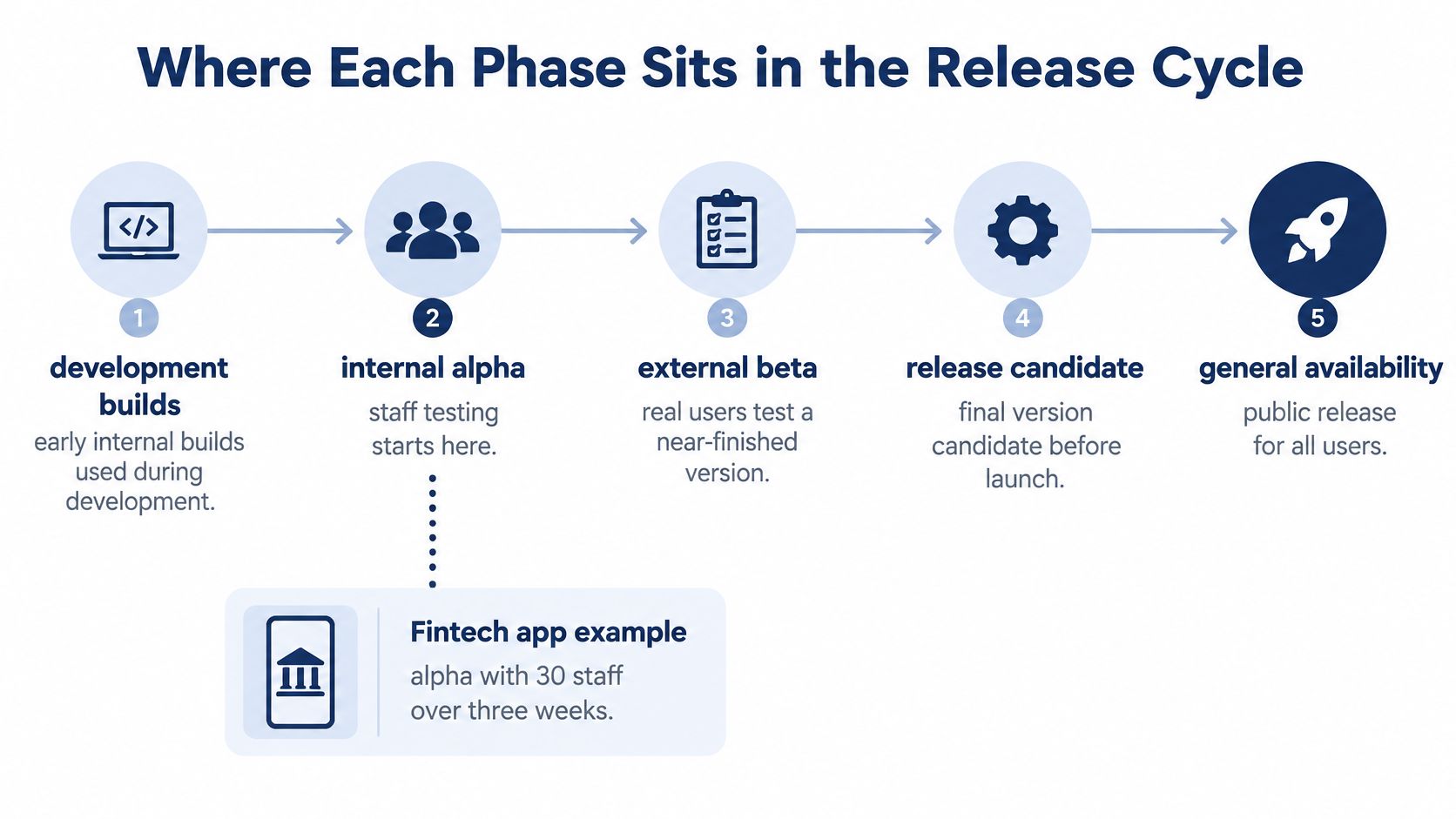
A practical release sequence is development builds → internal alpha → external beta → release candidate → general availability. Teams may use different labels, but the handoffs should still require explicit evidence.
The terminology traces back to IBM's A and B testing labels, which evolved into alpha and beta, preserving a distinction between early internal verification and broader validation described in the software release life cycle overview.
Use the timeline to separate development activity from release approval.
Follow a payment flow through the gates
Say a fintech team is preparing a money-transfer feature. During development, engineers check individual components and integrations. In internal alpha, staff test the complete journey: signing in, selecting a recipient, authorizing a transfer and finding the transaction receipt.
The alpha exit rule names the required regression paths and allows no open blockers. If a failed transfer leaves the balance display incorrect, the team fixes that before inviting customers. A calendar deadline doesn't turn an unsafe build into a suitable beta.
During external beta, selected customers use the feature under controlled access. The team evaluates stability in the required environment groups and investigates failures that staff couldn't reproduce internally. After fixes and confirmation testing, it promotes a specific build to release-candidate status.
- Alpha approval: Core regression paths pass, blockers are closed, and outstanding limitations are documented.
- Beta approval: Required segments have sufficient exposure, stability meets agreed thresholds, and critical defects are resolved.
- Launch approval: A named owner approves the exact build, deployment plan and recovery path.
Release approval also needs operational controls. Server Scheduler's guidance on change approval and rollback procedures is useful when defining who authorizes deployment and what happens if production behaves differently.
Agile teams can run these activities concurrently, with new features in alpha while the previous feature set remains in beta. Check gates per build and feature scope, not only per sprint. If engineers change the transfer logic during beta, earlier results don't automatically validate the replacement.
Who Tests in Alpha and Who Tests in Beta
Alpha participants include developers, QA engineers, product managers, support staff and sometimes sales engineers. They understand the intended behavior and can deliberately reach difficult states, inspect logs and explain failures precisely.
The participant split is straightforward, even when responsibilities overlap.
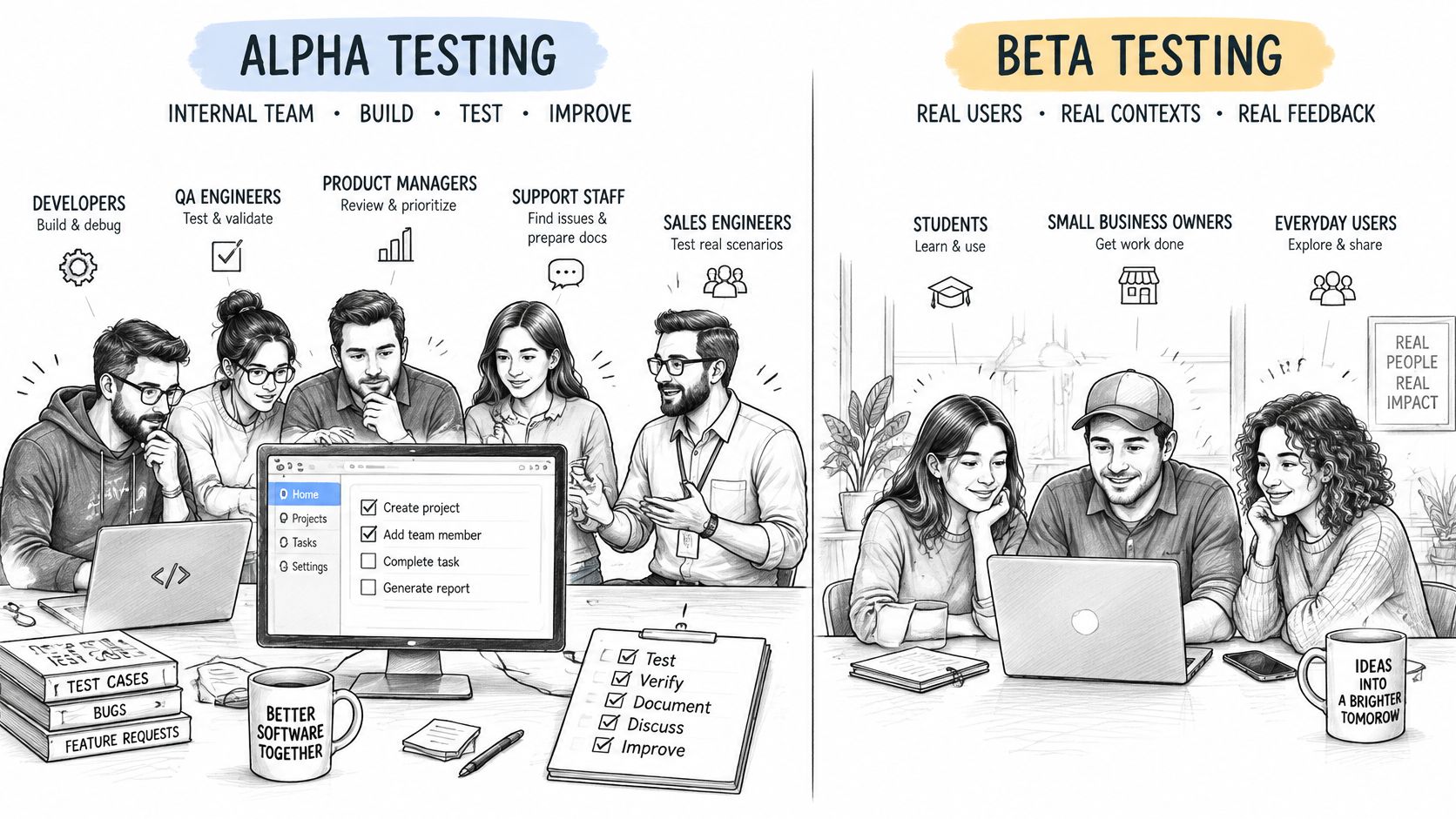
That familiarity creates a blind spot. Staff may automatically refresh a stalled screen, avoid an awkward navigation path or grant permissions without reading the prompt. A new customer won't necessarily know those workarounds.
Recruit for conditions, not enthusiasm
Beta participants should represent the people expected to use the release. For a mobile product serving customers on constrained hardware, recruitment should include owners of lower-memory phones and people using local mobile networks, rather than relying entirely on employees' flagship devices.
A 2018 comparative study of security-software users analyzed records from more than 600,000 consenting participants, comparing beta testers with standard users and treating beta testers as potential early adopters. That scope is specific to security software, but the recruitment question applies broadly: are volunteers representative of your intended audience?
Self-selected enthusiasts can overrepresent technically confident users. Balance them with participants who need the product but aren't interested in troubleshooting it.
- Environment fit: Match device model, operating system, browser, network and location.
- Behavior fit: Include relevant user roles and usage patterns.
- Experience fit: Recruit newcomers as well as confident existing customers.
The following video provides another explanation of the distinction between the phases.
Internal ownership still matters. A QA lead should define coverage and severity, while a beta coordinator manages access, participation and follow-up. If those capabilities are missing, GENTY recruitment's QA hiring guide can help frame the staffing discussion.
Before interpreting results, compare the recruited panel with the target audience. Record missing device, network and experience groups explicitly. A participant list isn't yet proof of a representative sample.
Closed, Open and Private Beta Variants
Beta access models change what your team can control and what its results can establish. The terms also overlap: many teams use closed, private and invite-only to describe similar programs, so document your actual admission rules.
| Variant | Who can join | What it helps establish | Main limitation |
|---|---|---|---|
| Closed beta | A selected, named tester list | Whether planned user segments can complete specified workflows | Coverage is limited to the selected panel |
| Open beta | Anyone meeting published eligibility rules | What happens across a broader, less predictable audience | Participation can be noisy and unbalanced |
| Private or invite-only beta | Approved customers or partners | Whether known customer contexts and integrations work | Existing relationships can influence feedback |
A closed beta gives the team control over recruitment and follow-up. You can reserve places for missing device groups, check access before testing begins and contact participants when a report needs clarification.
An open beta broadens access, but it also creates duplicate reports, incomplete submissions and feedback from people outside the intended market. More volunteers can improve discovery without improving coverage of your most important segment.
Choose access to match the question
Say a payments team first invites customers with specific account types and mobile environments. Once those workflows are stable, it opens participation more widely to discover unexpected interactions. The team keeps results separated by environment instead of treating the expanded audience as a single uniform sample.
A private partner beta suits a different question, such as whether an enterprise integration works with customers' actual approval processes. Those participants may offer detailed feedback while still being more patient than unfamiliar buyers.
Open access increases the opportunity to discover problems. It doesn't guarantee that anyone tested the configuration you need.
Recruitment through a crowd can complement these models when you need particular conditions. The 99tests article on Google and crowd testing provides context for that approach.
Whichever model you choose, report who participated, which environments they covered and which planned scenarios remained untouched. Don't use an access label as a substitute for an evidence statement.
What Each Phase Catches and How to Measure It
Alpha supports deliberate, repeatable investigation under known configurations. QA can isolate a broken checkout transition, reproduce a regression or inspect resource use while repeating a demanding workflow.
Beta introduces configuration diversity, unexpected usage, interrupted networks and local settings. An ACM paper on beta-test reliability estimation frames beta as operational field use by intended users and proposes stratified sampling rather than relying only on undirected feedback.
Metrics that show each phase's evidence
| Phase | Metric to track | What it reveals |
|---|---|---|
| Alpha | Open blocker count | Whether core workflows are usable enough to enter beta |
| Alpha | Regression pass rate on core paths | Whether known flows still work after each build |
| Alpha | Crash count per build | Crashes requiring investigation, including possible memory or resource faults |
| Beta | Crash-free sessions by segment | Stability on each device, OS and network group |
| Beta | Time to first failure | How quickly real users hit a defect |
| Beta | Share of users who hit a defect | Breadth of impact across the audience |
| Beta | Daily failure rate by segment | Whether failures are stabilizing before release |
Read the segment before the average
Suppose most participants complete checkout successfully, but users on a particular iPhone and Safari combination repeatedly lose their basket. A favorable overall result can conceal that broken customer journey if the affected group contributes relatively little traffic.
Start with the relevant device, operating system, browser and network groups. Then inspect the overall figure. Always show the exposure behind a rate, because an apparently clean segment with little activity provides weak reassurance.
Define each metric before collecting it. A checkout failure rate needs checkout attempts as its denominator, not all app launches. A crash-free session measure also won't reveal a transfer that fails without crashing.
Use a risk-based approach to software testing to prioritize combinations where failure would prevent access, lose money or corrupt data. Functional success doesn't establish security either, so teams shipping generated code may pair behavioral testing with an AI code security audit from AY Automate to investigate a separate class of risk.
Keep execution status explicit
Every case needs a build identifier, environment, execution status, observed result and reproducibility record. Report passed, failed, blocked and unrun separately.
A blocked case might require an unavailable account permission. An unrun case might lack the requested hardware. Neither says the product passed.
The same discipline applies to AI-generated tests. A benchmark of generated unit tests reported that leading models covered only 35.2% of tested lines, illustrating why generated volume isn't a reliable coverage claim. Review assertions and requirement traceability before execution, then check whether the cases exercise distinct behavior rather than repeating familiar paths.
Choosing Alpha, Beta or Both for Your Release
Which phases to run by release situation
| Release situation | Alpha | Beta |
|---|---|---|
| New product with unstable core workflows | Run first to close blockers | Run only after blockers are closed |
| Mobile app on many Android and iOS devices | Run for core logic | Run segmented by device, OS and network |
| Web app that must work across browsers | Run for core flows | Run across Chrome, Safari, Edge and Firefox |
| Internal tool used by one company | Run with staff | Optional, with representative operational users |
| Small patch to a stable release | Targeted regression | Add focused field testing if device behavior changes |
| Regulated banking or payments app | Run with full regression | Run with a controlled cohort and documented criteria |
Treat these as planning recommendations, not compliance requirements. A regulated product may need security, audit, contractual and formal acceptance activities beyond alpha and beta.
For an internal tool, the key distinction may be between the people building it and the staff who use it during actual work. A warehouse employee scanning items under time pressure can reveal operational issues that an office-based product team misses, even though both work for the same company.
Balance exposure against delay
Moving an unresolved defect into beta can shorten internal testing, but it exposes participants to the failure and creates additional support and investigation work. Extending alpha can reduce that exposure while delaying useful field feedback.
A software-reliability study of beta testing explicitly models the trade-off between in-house fault removal, beta-stage correction and the penalty associated with field failures. The practical lesson is to decide which uncertainty requires controlled investigation and which requires field exposure.
- Beta isn't replacement QA: Customers shouldn't need to rediscover failures your team can reproduce reliably in-house.
- Alpha isn't universal validation: Internal success doesn't establish compatibility across your supported customer environments.
- A narrow change needs a scoped plan: Trace its dependencies before deciding that targeted regression is enough.
Decision shortcut: Put core-logic uncertainty through alpha first. Put environment uncertainty through a representative beta.
A presentation-only patch may justify focused checks. A change to authentication, payments or browser storage deserves broader consideration because its effects can reach beyond the visible interface.
The right plan isn't automatically the longest one. It's the plan that produces credible evidence for the release's actual risks, with unresolved uncertainty recorded rather than hidden behind a phase label.
Run a Beta Test and Set Exit Criteria
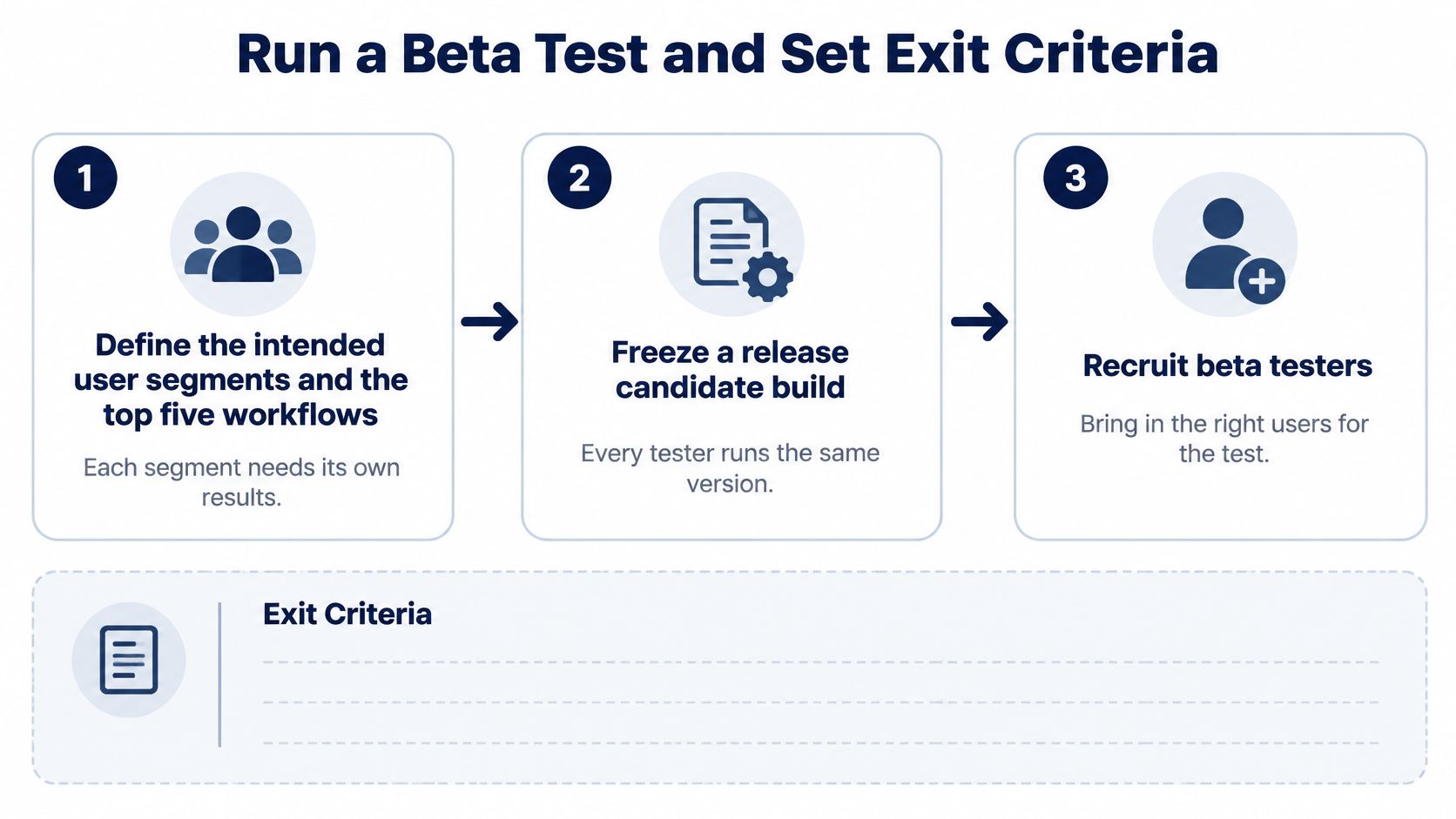
A useful beta starts with a written release question. Replace “get customer feedback” with something testable, such as whether intended customers can register, complete checkout and recover from an interrupted payment in supported environments.
The initial setup should connect recruitment directly to the workflows being evaluated.
Build an executable test plan
Define intended segments and priority workflows. List the journeys that must succeed, then assign them to relevant user and environment groups. For a shopping app, include browsing, authentication, checkout, payment recovery and order lookup. Give every required combination a clear coverage status.
Freeze and identify the beta build. Record the application version, backend configuration and feature flags. Every report must identify what the participant tested. If you distribute a fix, separate the results and rerun affected cases rather than pooling old and new behavior.
Recruit participants who can reproduce the conditions. Confirm device ownership, operating system, browser, location and network access before assigning sessions. Check that participants can install the build and obtain the necessary test accounts. Keep production credentials and sensitive customer information out of shared reporting channels.
Set exposure targets for each segment. Choose meaningful usage units, such as completed workflows, attempted transactions or active sessions. Set observation windows that fit the behavior being tested. A renewal workflow, for example, needs a way to reach renewal conditions rather than repeated ordinary logins.
Keep the execution sequence consistent enough that another tester can repeat it. The 99tests guide to testing procedures provides context for organizing that work.
A missing case doesn't always deserve more effort. An ACM study of fuzz-test coverage gaps found that developers considered whether gaps were worth testing and that filtering irrelevant gaps improved the usefulness of generated tests and reports. For beta planning, document why you exclude an irrelevant scenario instead of chasing raw coverage.
Make reports usable for release decisions
Collect structured evidence. Require reproduction steps, expected and actual behavior, build and environment details, and supporting screenshots or recordings where appropriate. Record interruptions, permission states and account prerequisites. A report saying payment failed is much less actionable than one identifying when the user lost connectivity and what happened after retrying.
Verify, grade and merge findings. Use a fixed severity rubric based on user impact, not the reporter's urgency. Merge duplicate defect records while preserving the number and environments of affected users. Separate reproducible failures from reports that still need investigation, and protect personal information in attachments.
Apply a written stop rule. Close beta only when critical defects are resolved, required exposure targets are met and each required segment satisfies its stability threshold over the agreed observation window. A flat failure rate isn't sufficient if it remains unacceptable. A segment with no meaningful usage hasn't passed.
Plan moderation and engineering availability around likely feedback arrival. According to Centercode's analysis of beta-test data, in 2024, 78.1% of beta-test feedback had typically been submitted by the end of the third week. That observation can inform staffing, but it isn't a universal instruction to end testing then.
Turn the evidence into an approval record
Before sign-off, record the approved build, covered segments, unresolved defects, excluded scenarios and the person accepting residual risk. Keep the rollback trigger alongside that decision.
For teams validating AI-generated cases, we at 99tests have human testers manually execute them on diverse real mobile devices, laptops and browsers, with detailed, human-verified pass/fail reports delivered within three business days. Case-level reporting distinguishes passed, failed, blocked and unrun results so incomplete execution remains visible.
This week, write your alpha exit checklist, name the beta segments you must cover and agree on the severity rubric before recruiting. Assign an owner to every missing environment and every unresolved release condition.
99tests offers real-device mobile testing in India, cross-browser testing, exploratory testing and human validation of AI-generated test cases. To gather alpha or beta evidence across customer-selected configurations without buying devices or hiring full-time testing staff, visit 99tests with your build, test cases and target device or browser list.