Functional Testing Services: Scope and Delivery
Functional testing services execute your cases on real phones and browsers and report passed, failed, blocked, and unrun results.
In this article
- What Functional Testing Services Include
- Why a Long Case List Is Not Coverage
- Four questions a generator can't answer
- Four statuses and no fifth
- Phones and Browsers a Service Must Cover
- What the emulator hides, class by class
- How Sessions Run and Findings Get Checked
- What the Report Must Show Before Release
- The pass-rate trap
- Brief a Provider and Pick a First Package
The most repeated advice about buying functional testing services is to maximize case count. Find the provider that will run the biggest list at the lowest price per case, hand over everything your AI coding tool has generated this quarter, and treat the invoice as proof of coverage.
That advice breaks at the first release gate. A test case is a claim about behavior. A run is evidence about behavior on a specific phone, browser, build, and network. Nothing in a generated file tells you whether login survives on a budget Android handset on a congested mobile network, whether checkout renders in Safari on macOS, or whether the case you paid for was skipped because the build wouldn't grant camera permission.
A bought cycle is worth exactly what its matrix says. What follows is a working definition of what these services include, what they refuse, how sessions run, what a report must prove, and how to pick a first package addressing the smallest set of targets capable of changing a release decision.
What Functional Testing Services Include
Start with a boundary, not a brochure. A functional testing service runs test cases you already wrote, including cases an AI coding tool produced, as timeboxed manual sessions on hardware the testers own. That's the engine. Everything a vendor quotes is a wrapper around it, and the wrapper is where comparisons go wrong.
The wrapper is generous but finite. Testers execute your cases on Android phones, iPhones, laptops, and desktops; add short exploratory notes where the scripted path looks fragile; file findings with steps, expected and actual results, and screenshots or recordings; and rerun the same plan against your next build. They don't write your cases, automate them, run a penetration test, load-test the backend, or hand you a certification an auditor will accept.
| Work item | In the service | What the buyer gets |
|---|---|---|
| Execution of supplied cases, including AI-generated cases | Yes | Passed, failed, blocked, and unrun results |
| Exploratory notes around those cases | Yes | Extra observations beside the scripted path |
| Real Android phones, iPhones, laptops, and desktops | Yes | Device and browser matrix on tester-owned equipment |
| Chrome, Safari, Edge, and Firefox on Windows, macOS, and ChromeOS | Yes, when named | Case-by-browser-and-OS results |
| Rerun of the same plan on a new build | Yes | Comparable results against the prior matrix |
| Writing the customer's test cases | No | Customer supplies the cases |
| Test automation, security testing, load testing, audits | No | Not part of the package |
| Report | Yes | Hosted page and PDF with a case-by-target coverage matrix |
Read that table as a checklist against your own case list. A 400-row Jira export sits inside the boundary, provided every row carries an expected result. A row that says "test checkout" with no expected behavior converts verification into a tester's guess. Cases arrive as spreadsheets, documents, plain text, Markdown, or TestRail and Jira exports, and builds arrive as APK links, Google Play internal testing, TestFlight, or a URL, so there's no packaging project before session one.
Two rows carry most of the value. Report is where a service becomes auditable or stays a pile of tickets, because a hosted page supports live review while a PDF supports your audit trail. Rerun is where the second cycle gets cheaper, since the same plan on a new build produces comparable cells instead of a fresh unstructured hunt.
Practical rule: if a work item isn't in the buyer's table and isn't in the vendor's, it won't happen. Name the five you expect before you ask for a quote.
Sessions are paid whether or not a bug appears, which is worth saying plainly to whoever signs the purchase order. You're buying verified execution time on named environments, not a bug bounty. Before comparing prices, confirm three things: your case list fits inside the boundary above, your target set includes at least one environment your own team can't easily reproduce, and the report format shows unexecuted cases without a follow-up email.
Why a Long Case List Is Not Coverage
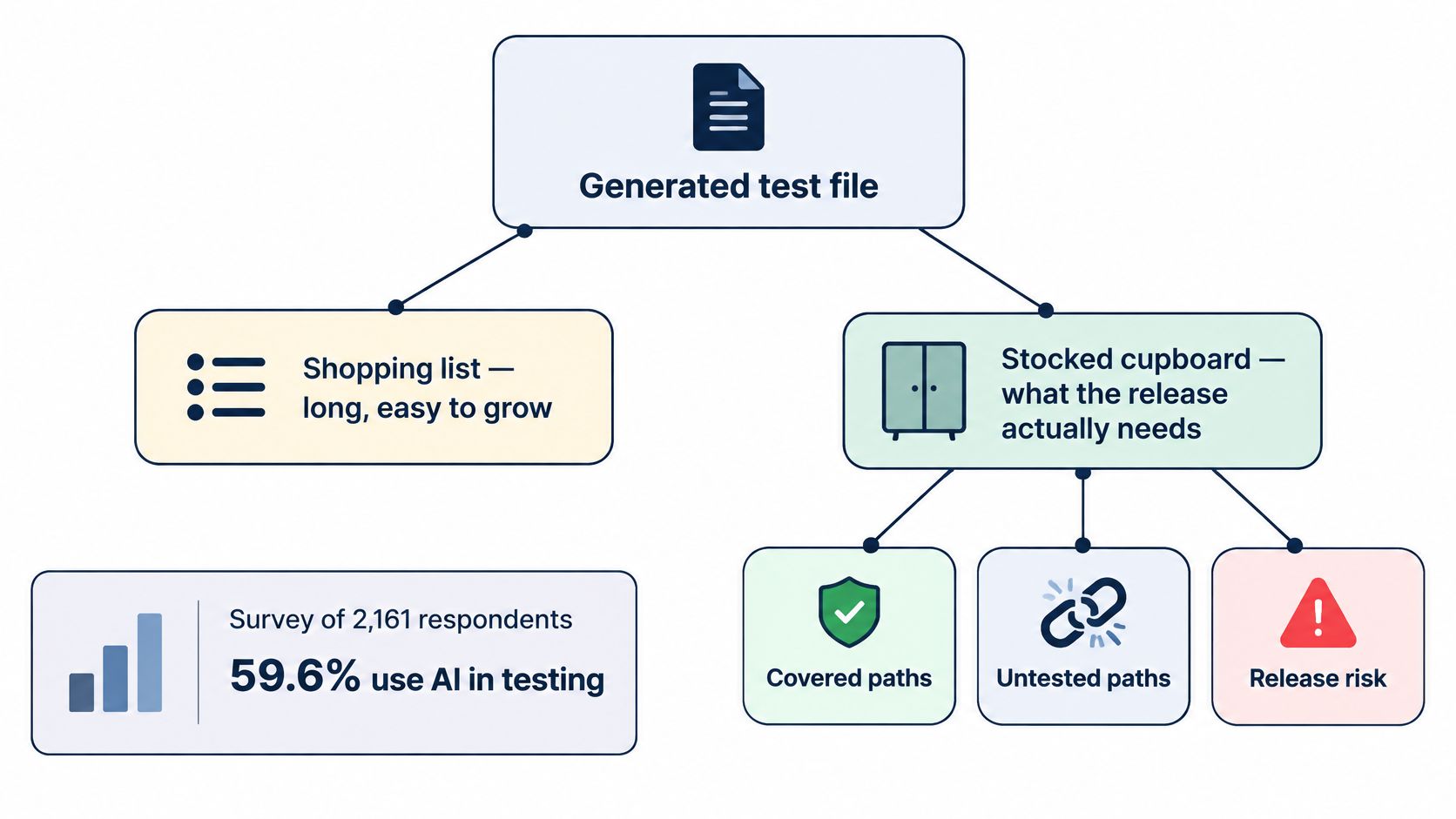
Generating cases is cheap now. A prompt in Cursor or Claude can produce two hundred scenarios in a minute, and the file looks like progress. Treat it like a shopping list, not a stocked cupboard. The list records what someone intended to buy. The cupboard holds what dinner depends on.
The volume is real, and so is the gap it leaves. In a survey of 2,161 respondents, 59.6% use AI in testing and 70.3% of those AI users apply it to create test cases, according to Applause's 2025 functional testing report. The same respondents still named familiar blockers: insufficient pre-release time at 36.8%, unstable environments at 36.7%, and unclear reporting. AI grew the input, not the hours available to execute it.
The economics explain why the gap matters more than the list length. NIST's 2002 study of testing economics estimated that inadequate software testing and infrastructure cost the United States about $59.5 billion a year, that more than half of software defects weren't discovered until downstream stages, and that identifying and correcting defects accounted for roughly 80% of development costs. The same study put annual costs at about $1.8 billion in the sectors it examined directly and estimated about $22.2 billion a year in potential benefit from better software infrastructure. Those are historical figures, not current dollars, and the principle holds regardless of the currency: a failure found before release costs less than one found by a customer.
Four questions a generator can't answer
A service earns its fee by answering what the file cannot:
- Validity: is this case redundant with three others, impossible on a phone with no removable storage, or unsafe because it deletes a real account?
- Execution: did a named tester run it on a named model, OS version, browser, and network, or does it merely exist in the repository?
- Evidence: what proves the outcome, a screenshot, a recording, a log line, or one tester's sentence?
- Residual gaps: which cases stayed unrun, and what specifically stopped them?
Four statuses and no fifth
Every case ends in exactly one state: passed, failed, blocked, or unrun. A blocked case needs a named reason, such as a missing test account, an OTP you can't receive, or a permission the build won't grant. An unrun case lowers release confidence even when every executed case passes, because it's an unknown, and unknowns are what production finds first.
Holding a provider to a written scope for the test cycle beats arguing about coverage after delivery. It also helps to separate what automation should own from what stays human. If you're layering checks on top of manual evidence, this guide to automated QA in enterprise CX covers where automation pays off and where it only produces dashboards. Our functional exploratory testing with expert insights sits beside the scripted cases for exactly that reason: scripts prove the paths you thought of, and notes around them catch the ones you didn't.
The failures this prevents are boring and expensive. Generated cases that nobody ran. Emulator-only passes that miss OEM and carrier behavior. Tickets with no steps. Duplicate reports carrying conflicting severity. Ask any provider how they report the cases they didn't run, not how many they accept.
Phones and Browsers a Service Must Cover
Platform coverage is a matrix, not one handset with a green tick. Android compatibility is governed by the Android source platform, the Compatibility Definition Document, and the Compatibility Test Suite, and the CTS alone contains more than 20,000 tests designed to catch device implementation issues, as this OSNews report on Android fragmentation describes. Those checks confirm a device broadly conforms. They don't prove your login, camera, biometric, permission, or payment flow works on the phone a customer named.
| Target class | What the buyer specifies | What a lab shortcut often misses |
|---|---|---|
| Android phones | Brand and minimum OS | OEM skin, screen size, permissions, biometrics, local mobile network |
| iPhones | Model and iOS version | TestFlight install, permission prompts, camera and sensor flows |
| Chrome on Windows | Browser version | Viewport, input, and Windows-only behavior |
| Safari on macOS | Browser version | WebKit failures hidden by a Chrome-only pass |
| Edge and Firefox | Browser and operating system | Engine-specific layout and script failures |
| Chrome on ChromeOS | Browser and device | Viewport, keyboard, and managed-device limits |
What the emulator hides, class by class
On Android, vendor skins restyle system dialogs and permission prompts, so a flow your emulator approves can stall on a real handset. Background execution limits bite hardest on the budget models that make up much of the Indian market. On iPhone, the TestFlight install itself is a test, and camera or Face ID prompts arrive at moments no simulator reproduces cleanly.
On desktop browsers, the operating system is part of the target. A WebKit failure in Safari on macOS is a compatibility defect, not a generic bug, and it deserves its own line in the report. Chrome on ChromeOS adds a keyboard and viewport profile that most QA teams never open.
Two practical rules follow. First, name the brands, minimum operating systems, and browsers before the first session, plus any network or account precondition, since a case that needs an OTP inbox can't run without one. Second, don't buy a lab to reach one handset. Crowd testing lets companies test across multiple configurations without investing in devices or hiring full-time staff, which is how a four-person team covers budget Android phones and local mobile networks. Our real-device and cross-browser work in India leans on the same idea, and five parameters for choosing test devices is a useful way to cut the target list before it becomes a spreadsheet of every phone you can imagine.
How Sessions Run and Findings Get Checked
Execution and checking are two jobs. Mix them and duplicate bugs plus inflated severity reach the release board, where they cost more political capital than the defect itself.
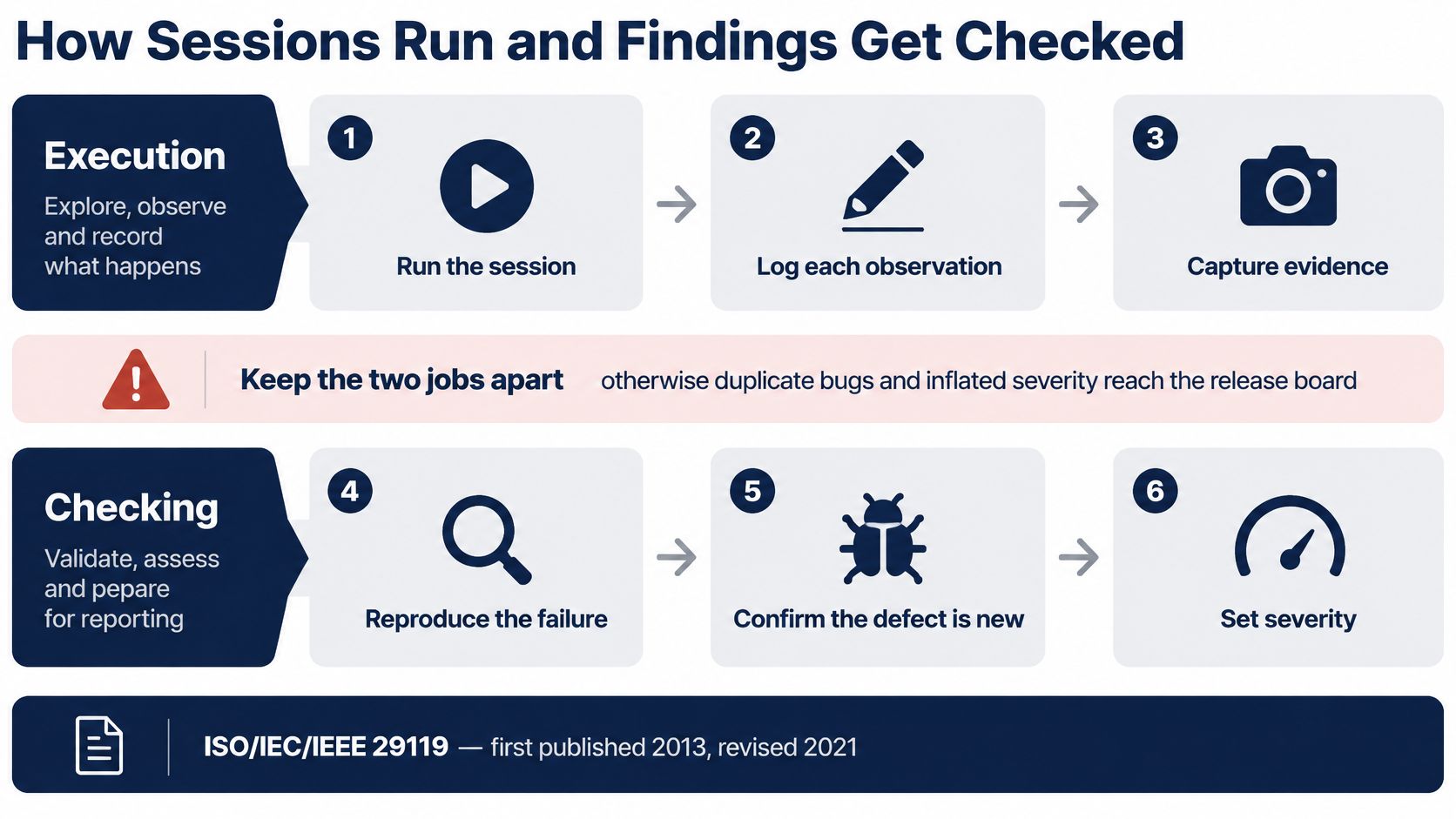
The split isn't improvisation. ISO/IEC/IEEE 29119, whose first edition arrived in 2013 and whose 2021 revision updated the test-process and test-technique parts, treats testing as planned execution plus documented evidence rather than ad hoc device poking, as the ISO/IEC/IEEE 29119 overview sets out. A practical cycle follows six steps whether or not anyone cites the standard.
- Brief and target. You send cases, access, and the device and browser targets. Ambiguity here is the most common cause of a wasted session.
- Match testers to equipment. Testers are assigned from a registered pool by skill and by the phones and computers they own, not by who happens to be free. Our community assignments work the same way, on skill set and project requirements.
- Run a timeboxed session. Forty-five or ninety minutes, cases executed on that exact environment, with brief exploratory notes added where the scripted path looks fragile.
- File the finding. Steps, expected and actual behavior, build, device, OS, browser, network, plus a screenshot or recording. No media, no finding.
- Verify separately. A reviewer reproduces the failure, merges duplicates, confirms every listed case was fully run, grades severity against a published rubric, and records a confidence score.
- Account for the remainder. Unexecuted cases are listed with a reason instead of being omitted from the total.
Here's the same separation in practice, a recorded session followed by an independent review pass.
The person who files a bug is never the only person who grades it.
That single rule kills most of the noise in a report. A tester working through ninety minutes of cases has an incentive to log something, and a second pair of eyes is what separates a real defect from a misunderstanding of the spec. Verified bugs can earn a severity bonus, which keeps the incentive on evidence quality rather than ticket count. Sessions are paid either way, so nobody is rewarded for inventing failures.
What the Report Must Show Before Release
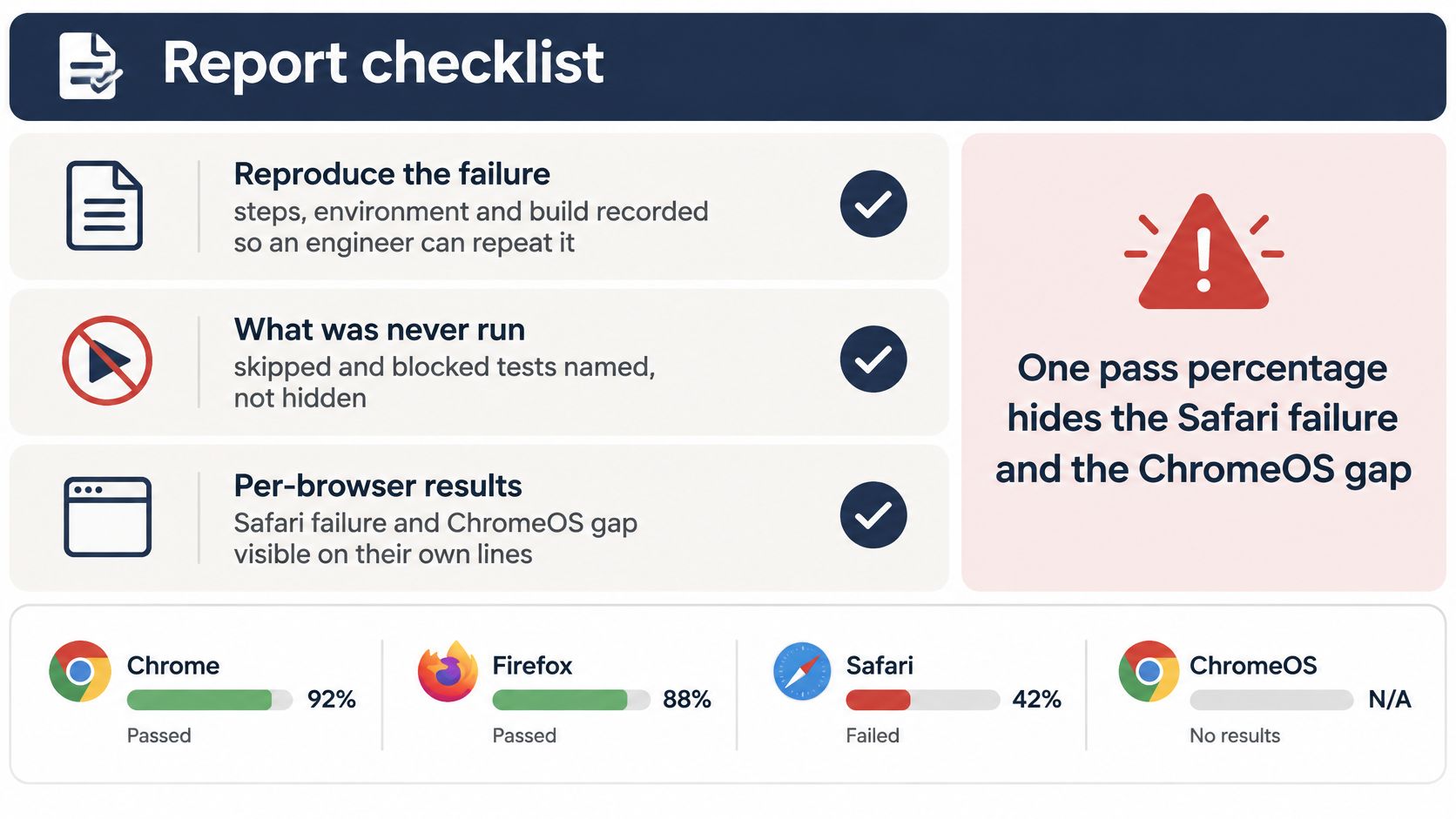
A useful report does two jobs at once. It lets an engineer reproduce a failure on the first attempt, and it lets a release manager see what was never run. Open the report in this order and you'll know within ten minutes whether the cycle was worth the invoice.
- Coverage table: every case against every target, each cell marked passed, failed, blocked, or unrun.
- Accepted findings: steps, expected behavior, actual behavior, environment, and a screenshot or recording attached to each.
- Device and browser matrix: what was tested, on which model, OS version, and browser build.
- Session logs and verification notes: who ran what, when, and who checked it.
- Unexecuted cases: a plain explanation of every case that didn't run, in language a non-tester can act on.
The W3C Web Platform Tests project exists so the same test can run across multiple browsers and prove that implementations stay compatible, as the Web Platform Tests documentation explains. Run that idea through your own reporting. For web targets, record browser version, operating system, viewport, and network condition. For phones, record model, OS version, build, connectivity, account state, and any permission or hardware precondition.
The pass-rate trap
A single pass percentage hides everything that matters. Combine Chrome, Safari, Firefox, and ChromeOS into one figure and the Safari failure plus the ChromeOS cell nobody touched both disappear into an average. Coverage metrics have to distinguish executed, passed, failed, blocked, and unrun combinations, or a high number creates confidence the release hasn't earned.
Reject any report that quotes only a pass rate. Ask for the cells behind it. Human-verified pass and fail results are a reasonable expectation within three business days on shorter packages, and a test report template helps you compare two vendors on structure rather than on how glossy the PDF looks.
On reruns: apply the identical plan to the new build so the team can see which cells flipped. A fresh hunt tells you nothing about whether last cycle's fixes held.
If your release also involves migration or cutover work, the same evidence discipline applies to the data itself, and these data reconciliation checks before cutover are worth pairing with the functional matrix. On the next build, our reports rerun the same plan so the comparison is cell by cell.
Brief a Provider and Pick a First Package
Choosing a provider is a briefing exercise, not a feature checklist. Vendors look similar until you hand them a case list and a target set, because that's the moment scope, price, and reporting either line up or don't.
- Count what must be verified before this release, then delete redundant or device-impossible generated steps. A list of 120 usable cases beats 400 that half-run.
- Pick two, four, or six targets that mirror real users. Include at least one budget Android phone if Indian mobile networks matter to your traffic.
- Buy time, not unlimited hours. Fixed packages cap the spend before the cycle starts, and extra sessions come in blocks of five with no hourly overage.
- Read the first report for two things: the reasons cases stayed unrun and the quality of reproduction steps. Then rerun the same plan on the next build.
| Package | Price | Sessions | Targets | Report |
|---|---|---|---|---|
| Starter | ₹9,999 plus GST | Five 45-minute sessions | 2 | 3 business days |
| Standard | ₹18,999 plus GST | Ten 45-minute sessions | 4 | 3 business days |
| Deep | ₹34,999 plus GST | Twenty 90-minute sessions | 6 | 5 business days |
| Extra time | Priced as added blocks | Blocks of five sessions | Same plan | Unused sessions become credits |
Start with the smallest target set that could plausibly change your release decision. If your risk sits in Android fragmentation, the Starter block on two named phones tells you more than a scattered pass across six environments. If the release hinges on cross-browser checkout, Standard on four browser and OS pairs is the honest minimum. Deep suits a release where six targets all carry customer traffic and a regression would be expensive to explain.
Our functional testing work has supported over 200 clients worldwide, including P&G, Intuit, and Security Scorecard, and much of it starts exactly here, with a customer-supplied case list and a named device set rather than a device farm. The first cycle should return three things: a matrix you can read without a call, reproducible defects your engineers can pick up the same day, and a clear list of what wasn't run and why. If it returns only a pass rate, you bought a receipt.
When you're ready to put a real case list in front of real testers, 99tests runs exactly this kind of cycle: your cases, including AI-generated ones, executed on tester-owned Android phones, iPhones, laptops, and browsers, with passed, failed, blocked, and unrun results reported per device and per browser inside three business days. Fixed packages start at ₹9,999 plus GST for five sessions on two targets, and every report includes the coverage matrix, reproducible findings, and the reasons any case stayed unrun. Visit 99tests to brief a first cycle and see what your current coverage proves.