Scope of Test: What It Covers and How to Define It
Learn what scope of test means, how teams define what is in and out, and which risks, devices and environments to cover before release.
In this article
- What Test Scope Covers and Why It Matters
- Write a Scope Statement in Six Steps
- Order matters more than detail
- In-Scope and Out-of-Scope Items in a Login Example
- Environments and Conditions Worth Covering
- Why selection beats exhaustion
- Which devices earn a slot
- Keep the Scope Current as the Release Changes
- Confirm Test Scope Before Sign-Off
- The four statuses a report must show
- Where AI-generated cases change the evidence
- The check before you sign
The release is two days out and the tracker is green. Someone in standup asks which Android versions the new password reset was tried on, and the room goes quiet. The suite passed. Nobody can say what "passed" covered.
That silence is a scope problem, not a testing problem. Scope of test is the written boundary around the work. It names what you set out to prove, the environments you proved it in, the things you deliberately left out, and the evidence that tells those three apart. Without that page, a green dashboard only means the team finished the cases it happened to run.
Two questions separate a team that knows its coverage from one that hopes: what did we test, and what did we skip? A scope answers both in writing, before the answer gets expensive.
What Test Scope Covers and Why It Matters
A release dashboard shows 80 of 100 planned cases executed. That sounds like strong progress, until the skipped cases turn out to cover the checkout payment path. The execution rate is accurate. The release risk is still unclear because the boundary was never defined.
A test list names the work people intend to run. Test scope sets the boundary around that work: what the testing must establish, which parts of the product and environments it covers, what is excluded, and what evidence will show the result. A case count alone cannot answer those questions.
A route map works the same way. It marks the streets a driver must cover and the roads outside the route. A written scope makes those boundaries visible before testing starts, so a completed test run has a clear meaning.
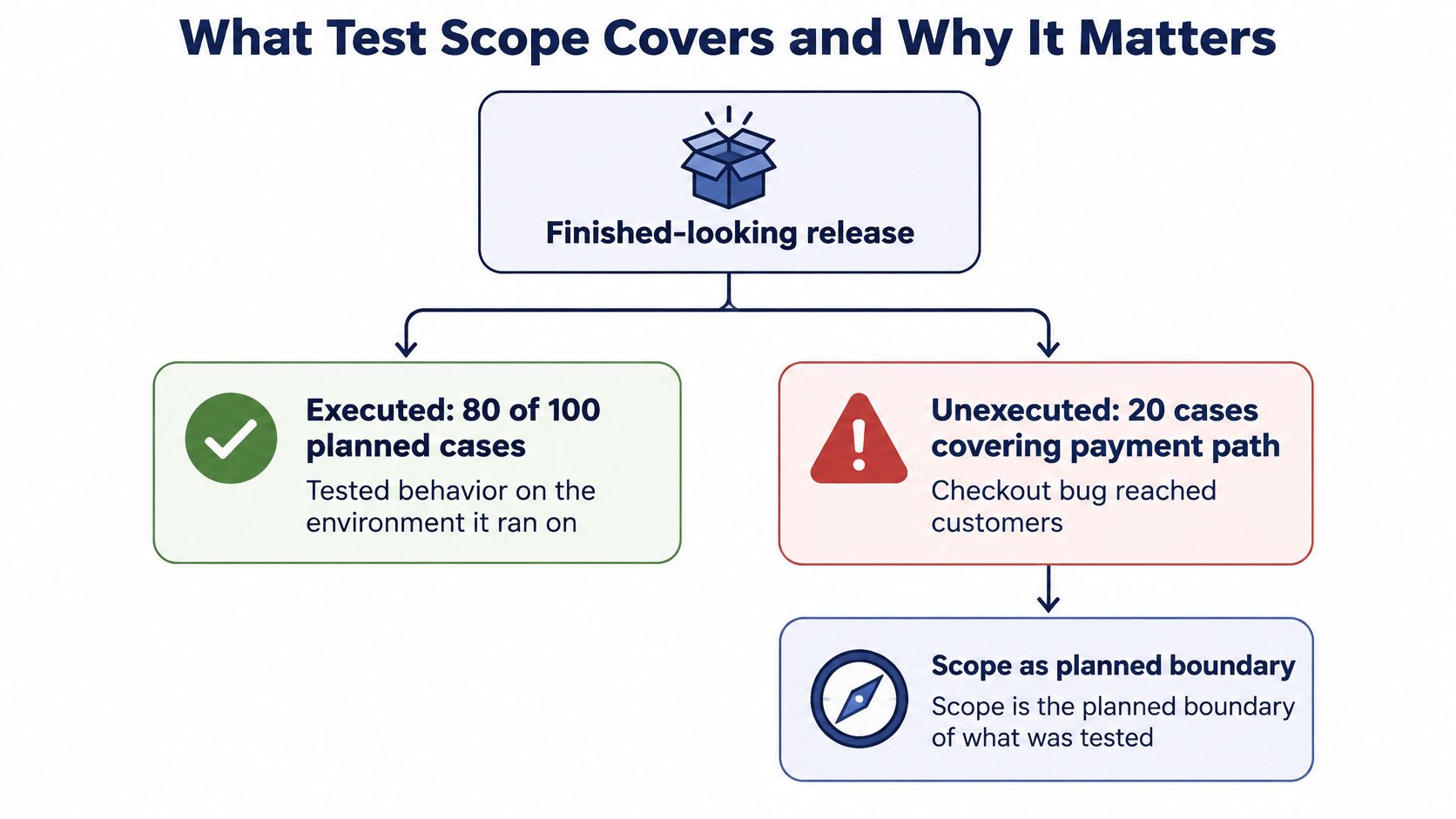
The number everyone quotes: execution rate is executed cases divided by planned cases, multiplied by 100. It tells you how much of the plan you ran, not how much of the product you covered.
Coverage figures need a clear counting rule. Statement, branch, and code coverage measure different things, so a percentage without a definition can mislead. The distinction between test coverage and code coverage makes that difference easier to see.
The scope must also name the kind of testing required. A functional test checks whether features behave as expected; security testing and performance testing address different risks and need different evidence. For SaaS teams choosing the right test for SaaS, that decision shapes what belongs in the boundary and what a useful result looks like. A well-written scope lets readers tell what was tested, what was skipped, and why.
Write a Scope Statement in Six Steps
A scope statement is a single page that a tester, a developer and a release manager can all read, and at least one of them should want to argue with it. If nobody pushes back, it's too vague to be useful.
The risks go beyond first impressions. In 2024, the Applause state of digital quality report found that only 28% of surveyed organizations had thorough end-to-end testing processes and documentation used consistently. A team can test hard for a month and still be unable to show what it covered, and the difference is usually a page nobody wrote.
Order matters more than detail
The six steps below run from the outcome outward, which is the opposite of the usual drafting approach. Case lists get written first because they're concrete, then someone reverse-engineers a rationale. Writing the boundary first means the cases you eventually write are the ones the risks demanded.
1. State what testing must prove. Start with the outcome. "Returning customers can complete checkout with a saved card" is an objective. "Test the checkout screen" is a task. Objectives come from the product owner and describe success in user terms, so every later decision can be judged against them.
2. List the test objects and the resources together. Test objects are the features, screens, APIs, integrations and builds this release changes. Name each one, because anything unnamed gets assumed covered. Resources belong on the same page: who tests, how many hours they have, which phones and browsers they'll hold. Be deliberate here. The JetBrains Qodana software quality report found that 39% of more than 800 software professionals identified manual testing as their most resource-intensive quality practice, which is exactly why hours need assigning to named objects instead of being absorbed by whatever is quickest to run.
3. Rank risks before you write cases. Payment, login, and anything that loses or corrupts data are priority one. Rank by user harm and business impact, not by how interesting the technical problem is. The common slip is starting from the case list you already have. It feels productive, and it leaves the riskiest paths unplanned because nobody wrote a case for them yet.
4. Choose environments from your user population. Map devices and browsers to the people who use them. If a meaningful share of your audience runs budget Android phones on older operating systems and patchy mobile data, those conditions earn a place even though they're the most awkward to test.
5. Write every exclusion down with a reason. "Third-party payment gateway, covered by its own contract and its vendor's certification" is an exclusion with an owner. "We didn't get to it" is a gap wearing a label. An unstated exclusion reads as an oversight at the post-mortem and as a missed defect in a customer's bug report.
6. Define completion in numbers. All P1 cases executed on the agreed device list, zero open critical defects, and every blocked or unrun case reported with its reason. Completion is what stops a release being declared done because the calendar ran out.
| Element | Question it answers | Example entry |
|---|---|---|
| Objectives | What must testing prove? | Checkout completes for returning customers |
| Test objects | What is being tested? | Checkout screen, payment API, and the iOS and Android builds tagged 4.3 |
| Risks | Which failures hurt most? | Duplicate charges, lost orders on weak networks |
| Resources | Who tests and with what? | Three testers, two hours each, one budget Android phone and one iPhone on iOS 17 |
| Environments | Under which conditions? | Android 14 and iOS 17, Chrome and Safari, Wi-Fi and throttled 3G |
| Exclusions | What is not tested, and why? | Third-party payment gateway, covered by its own contract |
| Completion measures | When does testing stop? | All P1 cases executed, zero open critical defects |
The statement is ready when someone who has never opened the test tool can read it and predict three things: what will be tested, what will be skipped, and when testing ends. If any of those needs a follow-up question, the page isn't finished. For a filled-in version of the same structure, this set of test plan examples shows how the elements look in practice.
Hand the page to a developer who missed the planning meeting. If they say "wait, we're not testing the wallet?", the scope is doing its job.
In-Scope and Out-of-Scope Items in a Login Example
Abstract rules are easy to agree with and hard to apply. Take one build: a banking app adds a stricter password policy and a biometric login option. The product owner wants it live by Friday. Here's how the boundary gets drawn, decision by decision.
| Item | Status | Reason |
|---|---|---|
| Password login on Android and iPhone | In scope | Main entry point and high-risk path |
| Biometric login on devices with fingerprint sensors | In scope | New in this build |
| Biometric login on devices without sensors | Out of scope | Feature not supported on those devices |
| Password reset link flow | In scope | Changed with the new password policy |
| Reset email delivery by the mail provider | Out of scope | Owned and tested by the provider |
| Ten thousand simultaneous logins | Out of scope | Needs a separate performance plan |
| Screen reader support on the new password form | In scope | Accessibility requirement for the release |
Password login is the first decision and the least debatable one. It's how nearly everyone gets in, it sits in front of account balances, and a defect there is a security incident, not a bug.
Biometric login splits into two rows because the device capability splits it. On phones with fingerprint sensors, the new code path exists and needs proving. On phones without sensors, the app doesn't offer the option, so a "test" there would only be verifying the store's device filter, not the feature. That's the sort of distinction a device list alone can't express.
The reset link is in scope and the outbound email isn't, which looks inconsistent until you ask who owns the failure. The link flow changed with the new password policy, so it's ours to prove. Whether the mail provider delivers the message is covered by that provider's own testing, and duplicating it here would spend hours detecting someone else's infrastructure.
Load testing is excluded because it needs its own plan, its own environment budget and a different definition of done. The same restraint applies in security work, where a scoped network device discovery exercise names the subnet range it will sweep rather than crawling everything reachable. Ten thousand simultaneous logins would produce a number nobody could act on inside this release.
Screen reader support on the new password form is in scope because accessibility is a requirement of the release, not a nice-to-have, and the new form is where a regression would land.
Every exclusion needs a name beside it. An item marked out of scope with no owner and no follow-up date is an oversight wearing a label.
Each of those calls holds for this build only. The next build may change the password policy again, and the boundary moves with it.
Environments and Conditions Worth Covering
A login that works on a new iPhone over strong Wi-Fi may still fail on an older phone, a different browser, or a weak connection. The environment list turns scope into testable conditions. For mobile and web releases, these can include device model, operating system, browser, screen size, locale, connectivity, permissions, and input method.
Why selection beats exhaustion
Testing every possible combination is usually impractical. Research published by NIST covering 1999 to 2004 found that most software bugs and failures were triggered by one or two parameters, with progressively fewer caused by interactions among three or more. This interaction rule supports combinatorial testing: select representative combinations rather than test the full cross-product.
The potential reduction is substantial. In one NIST evaluation, four-way tests found all faults using less than 5% of the tests required for exhaustive testing, a reduction of at least 20 times. The practical lesson is to choose combinations according to risk and record the choice, so reviewers can see which conditions were covered.
A compact set is useful only if it represents conditions that could change behavior. Record both the selected combinations and the reason for each exclusion.
Which devices earn a slot
More device labels do not automatically mean more useful coverage. Twenty sessions on similar flagship phones may reveal less than six sessions spread across budget hardware, an older operating system, and a weak network. The goal is to cover meaningful differences, not to collect the longest device list. These five parameters for choosing devices for mobile app testing can help shape that list.
A platform label alone is not proof of coverage. The mabl Testing in DevOps 2025 report found that only 14% of surveyed teams reported at least 80% end-to-end test coverage in 2025, while one in three production bugs was discovered by customers. A scope should therefore name the combinations tested, the cases completed, and any cases left blocked or unrun, with reasons. That evidence helps distinguish a product defect from a compatibility issue or a condition no one examined.
Keep the Scope Current as the Release Changes
A scope statement starts drifting the moment the build changes, and the drift is silent. Someone adds a feature, the case count rises, and nobody revisits the risk ranking or the exclusions.
Say build 4.3 adds a digital wallet option. Wallet checkout becomes an in-scope test object ranked P1, because moving money belongs in the top tier. In the same pass, 2G network support can move from in scope to excluded with a reason attached: the audience using it is now too small to justify a session, and the decision is dated rather than forgotten. Run that review in four steps.
- Diff the change list against the statement. Every added, changed or removed capability is a row that needs a decision.
- Add new test objects and rank their risk before writing a single case. Cases written first become the definition of risk, when it should be the other way round.
- Recheck every exclusion. It still needs a reason and an owner, and this build may have invalidated it. A gateway that added a new payment method is no longer safely covered by its old contract.
- Record the change with a date and an approver. A scope history that can be traced answers the question "who decided we weren't testing this?" months later.
Scope creep is the gradual addition of items without an updated risk ranking or updated completion measures. It rarely looks like a decision. It looks like a helpful colleague adding "just one more thing" to the run three days before launch.
A fixed scope after sign-off is a false comfort. A scope nobody updates isn't stable, it's stale, and the work that arrives later simply isn't covered by it.
Every review should leave three things intact: the ranking of what matters most, the reasons behind what's excluded, and the definition of done. Anything added without those three changing is a candidate for the next release, not this one.
Confirm Test Scope Before Sign-Off
Sign-off isn't a feeling about the test run. It's a check that the boundary held, and it needs evidence laid out where a reviewer can see it rather than inferred from a percentage.
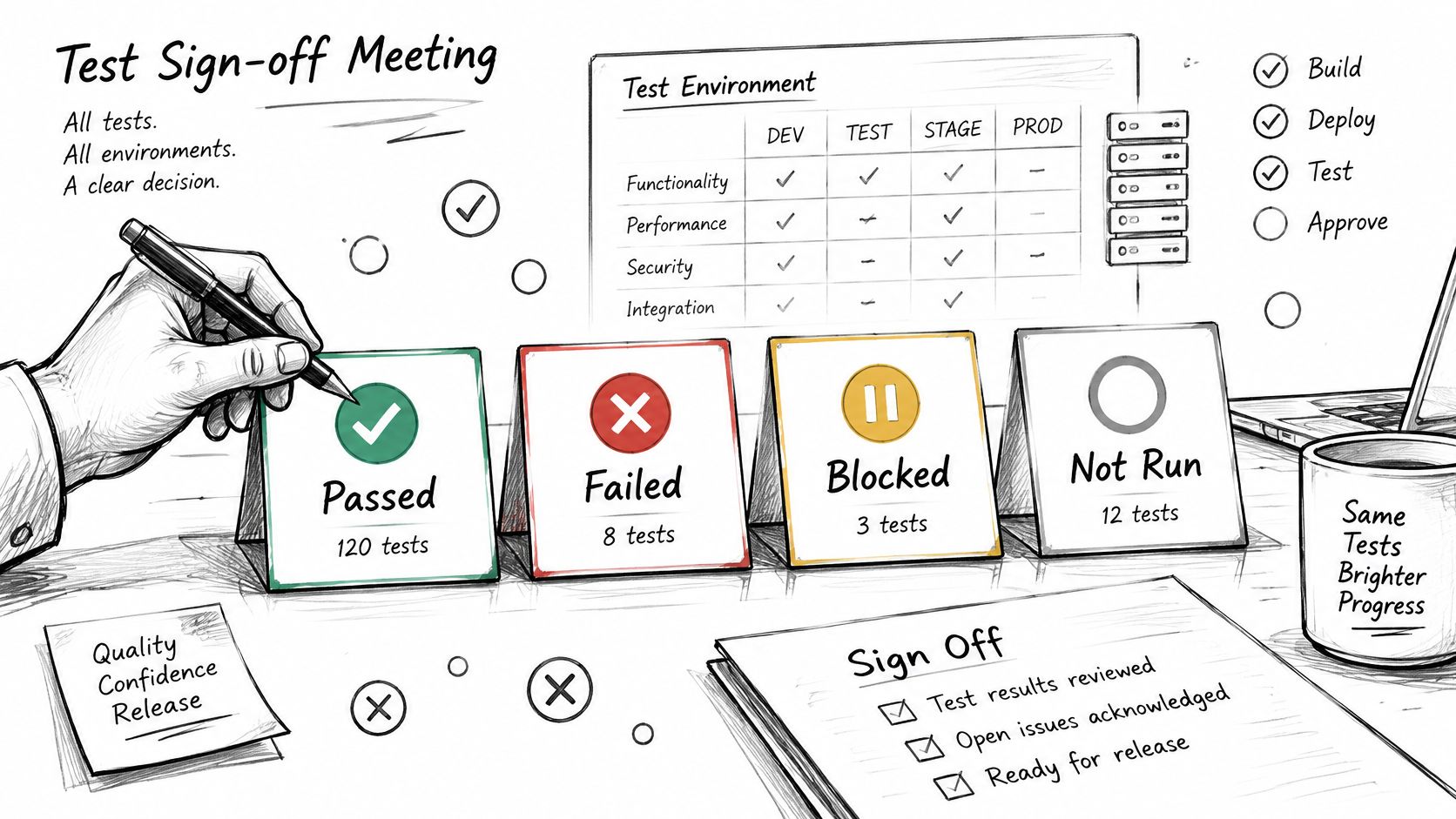
A passing result proves one narrow thing: the case matched expected behavior on the environment it ran on. That sentence has four parts, and every one of them can fail in a report that only counts passes and failures.
The four statuses a report must show
| Status | Meaning | What to record |
|---|---|---|
| Passed | Matched the expected behavior on the environment tested | Environment and build |
| Failed | A defect was found under the stated conditions | Steps, expected and actual behavior, severity |
| Blocked | A dependency stopped the case from running | The blocker and its owner |
| Not run | Planned but skipped | The reason, and whether it is an accepted gap |
An 80% execution rate hides the not-run cases, and those are often the riskiest paths in the plan. Review the gaps first, not the passes. Every requirement and every ranked risk should point at the executed cases that prove it, and whatever remains unknown belongs in the record rather than in someone's memory.
Where AI-generated cases change the evidence
Generated tests make this harder, not easier. Research published in the Journal of Engineering Science and Technology Review found that generated tests can look syntactically correct while failing to reflect intended system behavior, and that vague or incomplete requirements caused approximately 8% of generated tests to fail initially. A separate 2025 study reported in the same review found that AI-generated tests can improve measured coverage while overfitting modules with historically high defect counts and under-testing recently changed code.
That's a coverage claim with a hole in it. A team can now produce thousands of cases that execute cleanly and still not know whether the acceptance criteria, decision branches, negative paths and newly changed features were exercised. Reporting has to distinguish cases that were generated, executable, executed, behaviorally validated and independently verified, and it has to name the untested assumptions, ambiguous requirements and duplicate scenarios behind those numbers.
A coverage table beats a summary, which is why each 99tests report shows every test case against every device as pass, fail, blocked or not run, with a reason recorded for blocked and unrun cases.
The check before you sign
Work through these five before the release meeting, and don't accept "mostly" as an answer to any of them.
- Every P1 workflow has an executed case on each in-scope environment.
- Every failed case has a defect with reproduction steps and a severity.
- Every blocked case names its blocker and the person responsible for clearing it.
- Every not-run case has a reason, and someone has accepted it as a gap for this release.
- Every exclusion still holds for this build, with its owner and date intact.
The scope is confirmed only when each check passes or each remaining gap is named, accepted and written into the record. A release with three documented gaps is in better shape than one with a 94% pass rate and no idea what the other 6% contained.
If your release plan lives in a spreadsheet of cases that nobody has run yet, 99tests executes them on real tester-owned phones, laptops and desktops and returns a report showing which cases passed, failed, were blocked or were never run, with a reason for every gap. You choose the device and browser targets, sessions go to testers who own that hardware, and the same plan can be rerun against your next build. Send us your test cases and see what your coverage looks like before launch at 99tests.