10 Cross Browser Testing Tools Compared for 2026
Compare 10 cross browser testing tools by browser, OS, and device coverage, real-device execution, pricing, and which fits your release workflow best.
In this article
The build passed QA on Tuesday. By Thursday a customer on a mid-range Android phone, on a train, with two bars of signal, can't get past the checkout button, and nobody on the team can reproduce it on a MacBook running Chrome.
That gap is what the category called cross browser testing tools is supposed to close, except the label now covers three jobs that ask different things of you. Self-serve cloud grids (BrowserStack, TestMu AI, Sauce Labs, TestingBot, Browserling, Endtest, HeadSpin) rent you browsers and real devices and leave the driving to your team. Visual validation layers (Percy, Applitools) compare rendered interfaces across engines and report what changed. Execution services put real people on real devices to run your cases and hand back verified findings.
Choosing badly is expensive in a quiet way. A grid nobody logs into is a subscription. A visual tool with no functional coverage underneath reports layout shifts while the checkout flow itself is broken. A testing service is wasted if you hand it vague cases and no build access.
Every entry below gets judged on three things: the browser, OS, and device coverage it reaches, how much work lands back on your team, and the limitation the pricing page doesn't lead with. Where a compatibility bug turns out to be a usability bug in disguise, it helps to know how to find hidden website usability problems before you file it against a browser.
1. 99tests
If your team has test cases but limited time to run them across real devices and browsers, 99tests offers a different execution model. You provide test cases, including cases generated by AI coding tools, select device brands and minimum OS versions, and set browser and operating-system targets. Testers then execute the cases manually on their own equipment.
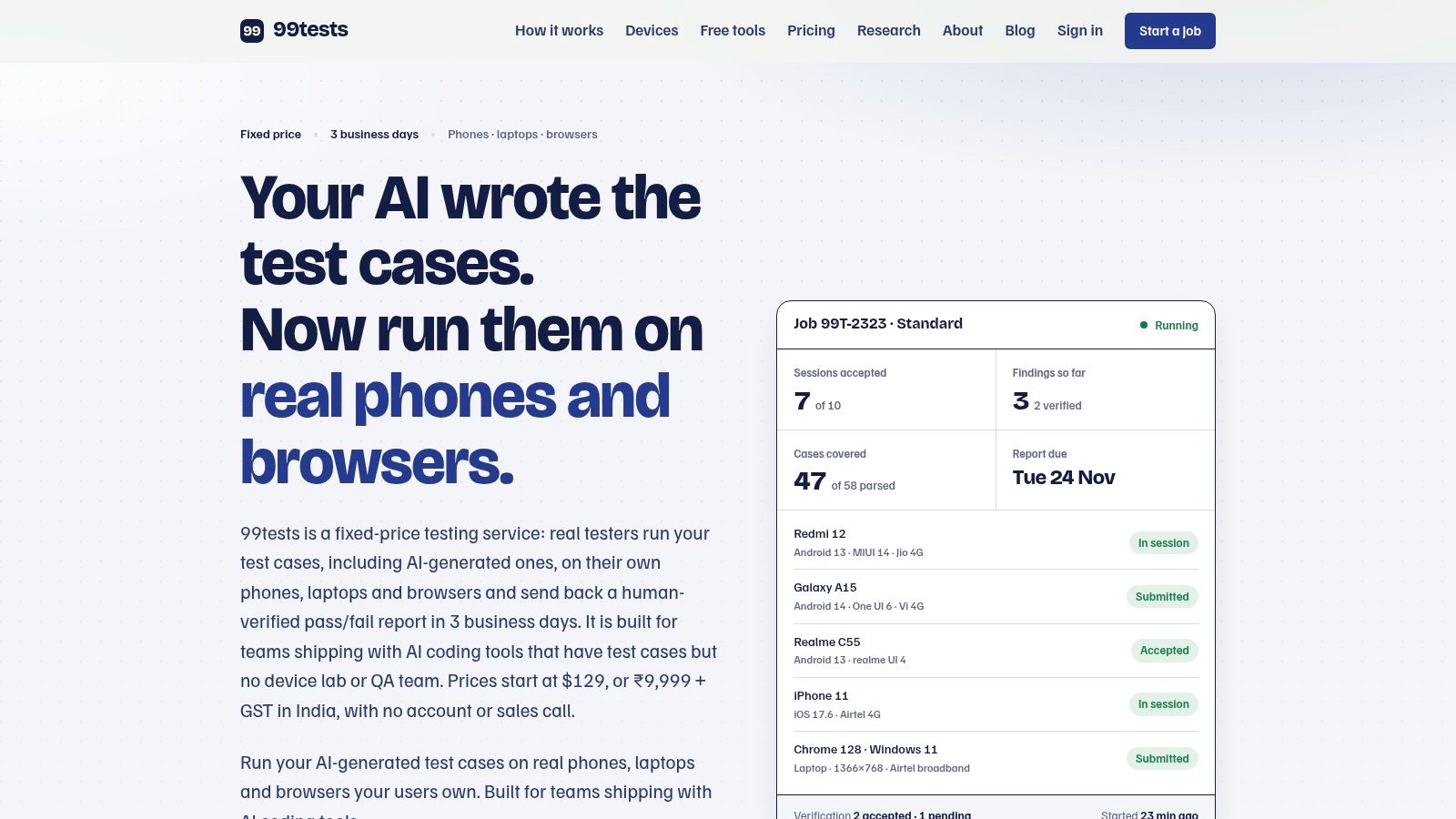
Coverage includes Android phones, iPhones, and laptops, with Chrome, Safari, Edge, and Firefox across Windows, macOS, and ChromeOS. Because sessions use testers' own devices rather than emulators, they can expose differences tied to hardware, input methods, and network conditions. The trade-off is that this is manual execution: your team needs to supply clear cases and build access, and it does not replace automated regression runs.
What lands in the report
Reports organize results by case and device, with passed, failed, blocked, and not run statuses, reproduction steps, screenshots or recordings, and the device, OS, and browser used. Findings go through a separate verification process that merges duplicates, checks completeness, and grades severity against a published rubric. That gives the team a clearer basis for triage, though it still needs to decide which issues to fix.
Pricing is fixed:
- Starter: ₹9,999 plus GST for five 45-minute sessions across two targets, with reporting within three business days.
- Standard: ₹18,999 plus GST for ten 45-minute sessions across four targets, also with three-business-day reporting.
- Deep: ₹34,999 plus GST for twenty 90-minute sessions across six targets, with reporting within five business days.
Unfilled sessions become credits for a later job, and packages have no hourly overages. Test cases can be provided as spreadsheets, documents, Markdown, or TestRail and Jira exports. App access supports an APK, Google Play internal testing, TestFlight, or a web URL. The registered tester pool includes 20,000 testers from more than 150 countries.
- Pros: real-device execution on selected phones and browsers, verified reports, fixed package pricing, support for AI-generated test cases, and the option to rerun a plan against a new build.
- Cons: manual testing depends on the quality of your cases and build access. It is not a substitute for automation, security or load testing, certification, or native desktop application testing, and the work is offered in set packages.
The practical choice is between buying execution and buying access to infrastructure. A browser grid gives your team control but requires people to run and assess each check. 99tests handles case execution and finding verification, while your team still owns the test scope and release decisions. This comparison of crowdsourced execution against device clouds and scripted automation explains how those models differ.
Official site: 99tests
2. BrowserStack
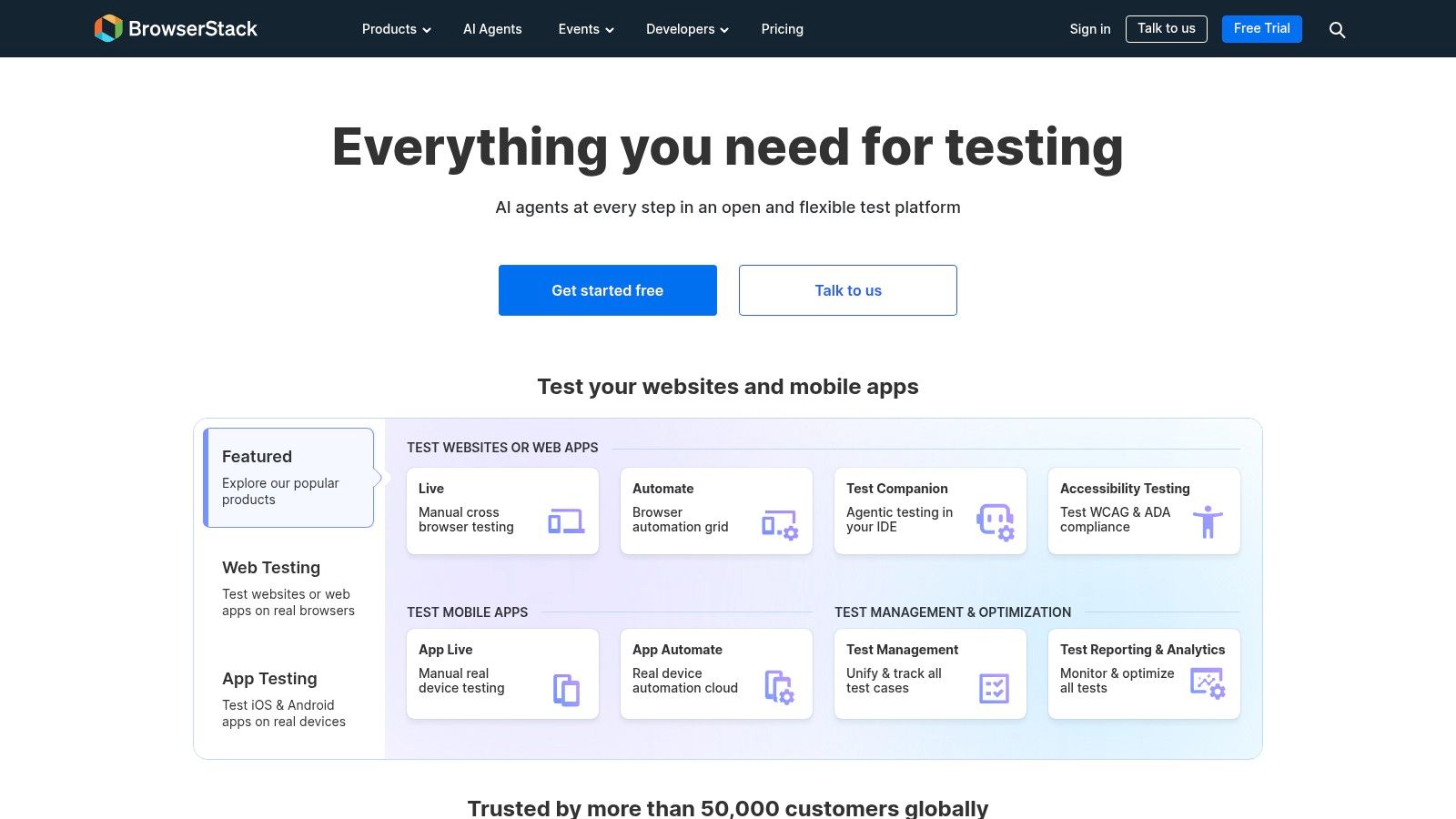
BrowserStack is a common starting point, and the catalogue is the reason. Live sessions cover desktop browsers and real iOS and Android devices across more than 3,500 advertised desktop and mobile browser combinations, with local and staging site testing, network conditions and geolocation on eligible plans, and session history you can relaunch when a bug needs a second look.
The live session view is where your team will spend most of its time.
Breadth isn't vanity here. In April 2025 StatCounter put Chrome at 66.19% of worldwide browser usage across desktop and mobile, Safari at 17.25%, Edge at 5.20%, and Firefox at 2.55%, which made Chrome and Safari together 83.44% of usage while the next four named browsers held 12.06% (StatCounter platform market share). A matrix that skips WebKit tests most of your traffic and none of your risk.
The honest limit is what you're buying. A grid hands your team a browser and a stopwatch. Every case still needs someone to drive it, judge it, and write it up, and feature availability moves between plans, so a check that worked in a trial session can sit behind a different tier at renewal.
- Pros: the widest practical coverage many teams will need, live sessions that support genuine exploration and debugging, and a free trial with limited interactive and automated testing.
- Cons: plan tiers differ in what they include, and the platform supplies tooling for your team rather than independent execution.
Before you build that matrix, it's worth knowing which engine differences break layouts. This guide to cross browser compatibility testing covers the failure patterns to target first.
Official site: BrowserStack
3. TestMu AI (formerly LambdaTest)
TestMu AI, formerly LambdaTest, combines interactive browser sessions with automated runs across browser and operating-system configurations. It also offers real-device testing for mobile apps and websites, support for Selenium, Playwright, and Cypress, and AI-assisted testing products. That mix makes it a grid your team operates, not a service that takes over test execution.
Mobile and desktop usage differ, so a browser check on one form factor cannot stand in for the other. StatCounter's mobile and desktop split provides a useful reminder to plan coverage by platform, not just by browser name (StatCounter mobile and desktop split).
“Chrome” is not a single target. Chrome on Android, iPhone, and desktop can differ in viewport behavior, touch handling, permission models, and performance limits. A passing desktop run does not establish that the same flow works on a customer's phone.
The practical trade-off is execution effort. Your team still needs to author tests, run them, and interpret results, while parallel-session pricing can shape how quickly automation runs finish.
- Pros: free tiers for evaluation, manual sessions, automation, and real devices in one account, plus automation plans built around parallel sessions.
- Cons: check current plan details rather than relying on older reviews, free access may not cover a full manual cycle, and your team remains responsible for test creation and findings.
For release teams, the value is having interactive checks and automated coverage in one platform. For independent execution and verification, a grid alone does not provide that service.
Official site: TestMu AI
4. Sauce Labs
Sauce Labs sells infrastructure and expects a QA team that knows what to do with it. Live manual testing runs across desktop and mobile environments, the lineup spans desktop browsers, mobile virtual devices, and real devices depending on plan, and Sauce Connect tunnels into sites behind a firewall so pre-production work doesn't need a public URL.
The plan structure is where your choice bites. W3Counter's January 2026 sample recorded 15,977,539 browser observations and put Chrome at 75.14%, Safari at 8.54%, Edge and Internet Explorer at 3.70%, and Firefox at 1.91%, with Windows 10 the leading platform at 45.19% (W3Counter global statistics). Read those two facts together, because coverage is a browser and operating system pair. Chrome on Windows 10 doesn't validate Chrome on macOS or ChromeOS.
Real devices and virtual devices sit in different plan types, and parallel-session capacity depends on the tier, so a suite that runs comfortably in month one can stall once a second squad starts pushing builds into it.
- Pros: exploratory manual checks and automated workflows on one platform, real-device access in the product lineup, and CI integrations that fit established release pipelines.
- Cons: tiers split device types and concurrency, and what you get is infrastructure rather than outsourced execution or independent verification of findings.
For teams working out how mobile fits beside desktop browser coverage, this roundup of mobile app testing tools is a useful companion read.
Official site: Sauce Labs
5. TestingBot
TestingBot is the quieter option: desktop browsers and real iOS and Android devices for manual and automated work, Selenium and Appium execution on the automation plans, screenshots and video on every test, local-site testing, and single-use virtual machines for isolated sessions.
Its real contribution is the question it forces. Most lists argue about which tool launches the most browsers. The harder question is which browsers and versions deserve a slot at all. Global usage stays fragmented by platform and version, with Chrome for Android and Safari on iPhone appearing as distinct high-share targets rather than footnotes inside a desktop number (StatCounter browser market share).
A default matrix built on rankings alone over-tests cheap desktop combinations and under-tests mobile variants, older versions, and real network conditions. Start from product analytics, add the OS and browser boundaries your support policy names, then add the workflows you already know are fragile: payments, uploads, date pickers, session expiry.
A smaller matrix you actually execute beats a catalogue you browse. Record which combination each case ran on, or the coverage claim is unverifiable.
- Pros: published pricing gives a real starting point for budgeting, browser and native mobile app testing in one place, and pay-as-you-go credits.
- Cons: automated plans cap testing minutes and concurrency, requested browser and OS pairs aren't always available, and your team still performs the steps and judges the results.
Official site: TestingBot
6. HeadSpin
HeadSpin tests the experience rather than the page. Cross-browser testing runs on real mobile and desktop browser environments, devices sit in multiple global locations with real network conditions, and the platform measures performance across application, device, and network signals, with Selenium and Appium integrations plus private and on-premise deployment.
The same browser behaves differently across viewport size, hardware acceleration, OS text rendering, extensions, and network conditions. If a bug only appears on a throttled connection in one region, a clean pass on office wifi proves nothing about it.
Why blended averages mislead, in one line: StatCounter's October 2026 worldwide figures show Chrome at 68.79%, Safari at 16.59%, Edge at 5.36%, Firefox at 2.57%, Opera at 2.16%, and Samsung Internet at 2.05% (StatCounter browser share data). Samsung Internet at 2.05% worldwide is a rounding error in one market and a primary target in another.
Real devices answer a different question than real browsers. Buy the one that matches the bug you keep shipping.
- Pros: real devices and networks expose issues simulators hide, performance sits beside functional compatibility, and enterprise deployment options exist.
- Cons: the performance and deployment depth can exceed what a basic release needs, some plans price per device or need a custom quote, and setup is heavier than a plain manual testing tool.
Official site: HeadSpin
7. Browserling
Browserling is the fastest route to a browser you don't have installed. Sessions run interactively on browsers hosted on real operating systems, with uploads, screenshots, SSH tunnels for local testing, and a few debugging tools, and each session is isolated from your own machine. It's the tool I'd open to confirm one rendering complaint before booking time in a bigger grid.
There's a catch worth naming. Manual spot-checks only tell you what your sample tells you. W3Schools' December 2024 figures show Chrome at 79.6%, Edge at 10.5%, Firefox at 3.9%, Safari at 3.9%, and Opera at 1.4% (W3Schools browser statistics). That's a developer and tutorial audience, not a customer population, and it looks nothing like the global picture. Check any published share against your own analytics before you treat it as your matrix.
- Pros: simple for one-off manual compatibility checks, published individual and team pricing, and a free browser demo to try first.
- Cons: manual rather than automated, browser and mobile coverage depends on the plan, and there are no testers to execute supplied cases or verify what they find.
Official site: Browserling
8. Endtest
Endtest goes the other way: no-code test creation, then parallel execution of the same tests across Chrome, Firefox, Safari, Edge, and Internet Explorer per its product page, on real Windows and macOS machines, with CI/CD integrations, scheduling, and video playback on listed plans.
That fits a small team without an automation engineer. Write the flow once as steps, then let it run across the matrix on every deploy instead of a person clicking through browsers the week before release. The cost shifts from people's hours to test maintenance, which is a real trade rather than a free upgrade.
The matrix itself still needs a decision. A Canadian government Web Experience Toolkit analysis covering March 2023 through February 2024 reported Chrome at 65.31%, Safari at 18.31%, Edge at 5.07%, and Firefox at 3.04% (WET-BOEW browser usage research). A public-service audience on Safari at 18.31% justifies more WebKit time than a global average would suggest, and that's the whole argument for running your own numbers first.
- Pros: visual test creation suits teams who don't want to write automation code, parallel runs shorten repeat sweeps, and plan tiers and prices are published.
- Cons: someone still has to create and maintain the tests, listed prices are higher than entry-level manual browser access, and exact browser and device availability should be confirmed for the plan you pick.
Official site: Endtest
9. Percy by BrowserStack
Percy captures interface snapshots and compares them between builds, turning a layout shift into a review item instead of a support ticket. It slots into existing development workflows, compares pages across browsers, and gives reviewers a way to inspect visual changes rather than trusting a pass or fail.
This is the layer functional tests miss. A page can return 200, render every element, and still push a price under the fold on one engine. W3Counter's September 2024 sample of 13,915,189 observations put Chrome at 68.63%, Safari at 15.25%, Firefox at 2.79%, and Internet Explorer and Edge at 3.75% (W3Counter September 2024 statistics). Fifteen percent of that sample browsing in WebKit is reason enough to screenshot every release in it.
Practical rule: treat a visual diff as a question, not a verdict. Someone still has to decide whether the new spacing is the change you shipped or the bug you didn't.
- Pros: catches regressions functional assertions ignore, offers a review workflow that supports judgment rather than a binary result, and complements existing tests instead of replacing them.
- Cons: a visual check never establishes that a flow works, snapshots need wiring into your test and review process, and teams already on BrowserStack should price Percy against their current plan rather than assume it's included.
Official site: Percy
10. Applitools
Applitools compares interfaces across browsers and devices using Visual AI, aimed at teams who already have a test workflow and want automated visual validation added to it. CI/CD integrations and component-level workflows such as Storybook are part of the product, and accessibility testing is included in the listed Starter plan.
The AI angle is about tolerance. A pixel diff flags a font-rendering shift on every run until someone mutes the check; a comparison that understands layout intent keeps the signal and drops the noise. That's the difference between a visual suite people trust and one they route around.
Where it earns its place is a design-heavy product with a shared component library, where a padding regression ships to thousands of pages at once. Where it doesn't is a team still arguing about whether the checkout flow works at all.
- Pros: visual comparison adds coverage beyond functional assertions, the pipeline integration fits existing automation, and public pricing gives a budgeting reference.
- Cons: the listed Starter price is substantial for a small team, visual testing still needs functional execution underneath, and browser, device, and checkpoint limits should be checked against your workload before you commit.
Official site: Applitools
Coverage and Execution Model at a Glance
Cross-browser coverage can mean three different things: a grid your team drives, a visual-regression layer added to existing tests, or a service that runs supplied cases and verifies the findings. The table compares execution models, not just browser lists. Coverage and access can depend on the plan, so match the listed model to the work your team needs done.
| Execution model | Browser and OS coverage | Mobile device coverage | Pricing access | Best for |
|---|---|---|---|---|
| Manual testing by real testers using supplied test cases | Chrome, Safari, Edge, and Firefox on Windows, macOS, and ChromeOS | Real Android phones and iPhones | Fixed-price packages from ₹9,999 + GST | 99tests: teams needing human-verified release evidence across real devices |
| Live manual sessions and optional automation or visual testing | Advertised desktop and mobile browser combinations | Real iOS and Android devices | Free trial; paid plans vary by product | Broad compatibility testing and repeatable cloud configurations |
| Live sessions, automation, and AI-assisted testing | Virtual browsers across browser and OS configurations | Real-device testing available | Limited free tiers; paid plans available | Teams combining interactive checks, automation, and device access |
| Live manual testing and automation | Desktop browser and OS combinations | Mobile virtual and real devices, depending on plan | Limited free trial; plan-dependent pricing | QA teams integrating cloud testing into established workflows |
| Live manual testing and Selenium or Appium automation | Cloud desktop browser coverage; requested combinations may vary | Real iOS and Android devices | Public pricing and pay-as-you-go credits | Teams seeking cloud browser and native mobile testing |
| Real-device testing, automation, and performance analysis | Real mobile and desktop browser environments | Real devices across locations and network conditions | Some plans require custom quotes | Teams investigating device, network, and performance issues |
| On-demand manual browser sessions | Desktop browsers on real operating systems; plan-dependent coverage | Mobile access on eligible plans | Free demo; published individual and team pricing | Quick exploratory browser checks |
| No-code automated test creation and parallel execution | Chrome, Firefox, Safari, Edge, and IE on Windows and macOS, according to product listings | Web and mobile app testing; specific availability varies by plan | Published plan tiers and prices | Teams wanting repeatable automated tests without scripting |
| Automated visual snapshots and cross-browser comparisons | Cross-browser visual checks for web pages and apps | Depends on the functional test runner it is paired with | Paid plans; confirm which tier includes the browsers you need | Teams reviewing visual changes alongside functional tests |
| Visual AI validation integrated with automated workflows | Cross-browser coverage; device testing available | Device testing supported | Public pricing reference available | Teams adding automated visual validation to existing test workflows |
A cloud grid provides configurations, but your team still needs to write or run checks and judge failures. Visual tools compare rendered output; they do not establish that a functional flow works. A service that executes supplied cases takes on that manual work, with coverage shaped by the device and browser targets you select.
For 99tests, customers choose browser and OS targets, and sessions are matched to testers who own those machines. Reports record the device, operating system, and browser used, giving teams evidence tied to the tested environment. That execution model suits releases where the cases are ready but internal time or device access is limited.
Match the Tool to How Your Team Actually Ships
The common mistake is buying a grid to solve an execution problem. A grid gives your team browsers, not hours. If nobody has four hours a week to sit in live sessions, a BrowserStack or TestMu AI subscription documents good intentions, and the release still ships on the strength of one engineer's Chrome window.
Match the model to the constraint instead.
- Someone on the team can drive sessions and judge what they see. Buy a self-serve grid. BrowserStack for breadth, Sauce Labs if your people live in DevTools, TestingBot for published pricing on a lighter budget, TestMu AI if automation belongs on the same account, Browserling for one-off checks.
- Your recurring failure is layout, not logic. Add Percy or Applitools on top of whatever runs your functional tests. Neither replaces a functional suite, and neither will tell you the checkout is broken.
- Coverage has to run on every merge without a person. Endtest for no-code parallel suites, HeadSpin when device and network performance is the suspect.
- The cases exist but nobody can run them. That's the gap 99tests fills, converting submitted test cases, including AI-generated ones, into device-specific manual sessions and returning verified reports across testers' own Chrome, Safari, Edge, and Firefox setups on Windows, macOS, and ChromeOS.
Order of operations matters more than the vendor. Write down your target device and browser matrix from analytics first, name the operating system versions you support, then choose the execution model that fits the capacity you have. Teams that pick the tool first end up with a matrix shaped by a vendor's catalogue instead of by their customers.
Before you sign anything: ask what the report says about the cases nobody ran. A coverage number without an unexecuted list is an average pretending to be an answer.
One more test of any trial: hand it a build with a known bug on a known device, in a browser the vendor claims to cover. If the tool or the team can't surface it, the rest of the coverage claim is marketing. That single check tells you more than any feature matrix.
99tests turns the test cases you already have, including the ones AI tools generated for you, into manual sessions on real phones and desktops, then returns a verified report showing which cases passed, failed, or never ran on each browser and device. If your team can write the cases but can't find the hours to run them across Chrome, Safari, Edge, Firefox, Windows, macOS, and real Android and iOS hardware, that's the gap it closes. Send a build link and your cases to 99tests and choose the devices your users carry.