Cross Browser Compatibility Testing: A 2026 Guide
Learn cross browser compatibility testing with a 2026 share matrix, a weighted browser plan, and checks for layout, JavaScript, and real devices.

In this article
- Browser Share and the Minimum Test Matrix
- Four fields for the starting table
- How to Weight the Browser and Device Matrix
- Six steps before the sprint starts
- Feature Support to Check Before Execution
- Walk one feature to a decision
- What Changes When the Browser Changes
- Layers one page crosses
- Workflows That Still Fail After Standards Pass
- Evidence a release note keeps
- Three Failures a Chrome Pass Would Miss
- Lock the Matrix and Run It on Real Browsers
A Chrome-only sign-off still leaves a large slice of the web unchecked. StatCounter's worldwide desktop-and-mobile figures for September 2026 put Chrome at 66.62% and Safari at 18.06%. Those two together were 84.68% of measured usage, while the other named browsers still accounted for more than 13% collectively. Share tells you who you might miss. It doesn't prove the page works.
Cross browser compatibility testing asks whether the same job finishes on the browsers, operating systems, and devices your users bring. A global top-four list on the latest builds isn't risk-based coverage. Audience, revenue, and the cost of a failed journey decide which rows you must test, sample, or exclude in writing.
Browser Share and the Minimum Test Matrix
A browser's share sets an initial order for testing, not a pass mark. In the September 2026 figures above, Chrome accounts for 66.62% of measured usage and Safari for 18.06%. Edge is at 6.10%, Firefox at 2.85%, Samsung Internet at 2.33%, and Opera at 1.78%. Treat these figures as a broad starting point: a smaller audience can still matter if a broken journey affects revenue or blocks a key task.
A Chrome pass cannot confirm that a pay button, upload, or video works elsewhere. Each browser and environment is another route through the same product, and differences in layout, forms, authentication, media, or responsive behavior can change whether users finish the task.
Four fields for the starting table
Use this table to compare browser share, the audience potentially missed, and an initial testing priority. In your later decision records, add the version, operating system, device category, viewport, and test outcome for each row.
| Browser | Worldwide share | Who is left out if skipped | Starting priority |
|---|---|---|---|
| Chrome | 66.62% | Most desktop and Android users | Test the latest version and one older major version |
| Safari | 18.06% | iPhone, iPad, and macOS users | Test on iOS and macOS |
| Edge | 6.10% | Windows and enterprise-managed browser users | Test on Windows |
| Firefox | 2.85% | Users who choose a non-Chromium browser | Sample, or prioritize if your analytics show a meaningful audience |
| Samsung Internet | 2.33% | Samsung Android phone users | Test if that audience is a target |
| Opera | 1.78% | A smaller, multi-platform audience | Sample or record why it is excluded |
A browser name alone does not define a test row. Chrome on a laptop can behave differently from Chrome on a phone, where screen size, touch input, graphics, privacy settings, and network conditions also shape the experience. Record the specific combination you test so a passing result has a clear meaning.
Practical rule: Mark each combination must-test, sample, or defer, and record why. Use your own audience, revenue, and the cost of a failure to justify the decision.
Once the rows are set, automation can repeat stable checks. Teams choosing a scripting approach can compare browser automation choices for enterprise DXP teams. Automation repeats selected checks; it does not decide which combinations deserve coverage.
How to Weight the Browser and Device Matrix
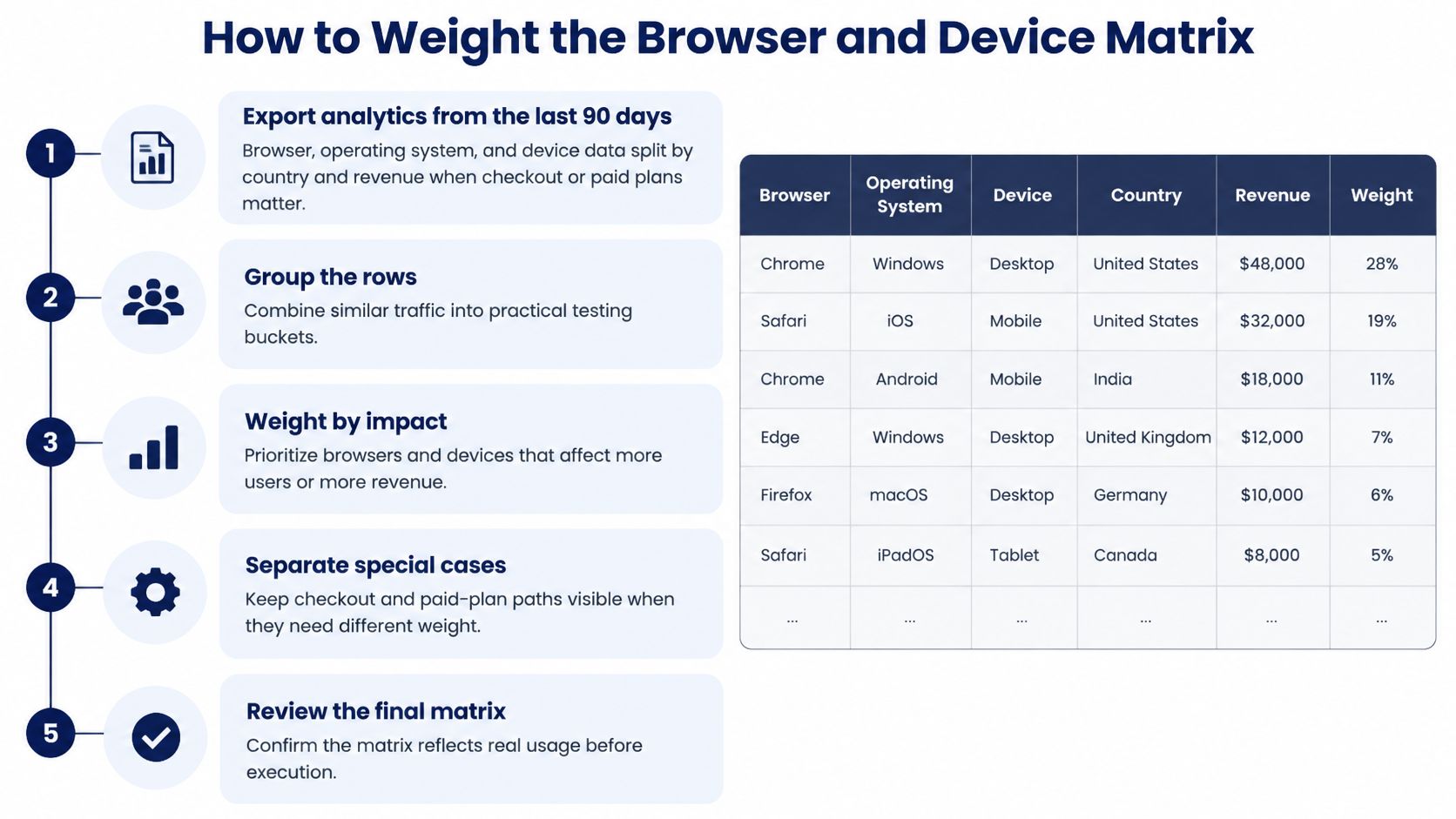
A top-four, latest-only plan looks tidy and still misses the cohort that pays you. Published shares also move by source. One September 2026 worldwide reading, separate from the baseline above, put usage near Chrome 66.36%, Safari 18.27%, Edge 6.04%, Firefox 2.80%, and Samsung Internet 2.31%, as listed in StatCounter's browser version view. Treat that second snapshot as a caution that averages shift. Don't build a second priority table from it. Weight your own analytics.
Six steps before the sprint starts
- Export browser, operating system, and device from the last 90 days, split by country and by revenue when checkout or paid plans matter.
- Group rows that share an engine and a major version. Don't list every patch.
- Score each group on audience share, revenue or task criticality, and how badly a failure blocks the journey.
- Put a group in must-test when any score is high, even if global share is small. Samsung Internet, embedded Android WebViews, older iOS, and enterprise-managed Edge are the usual misses.
| Combination | Signal to look for | Default action | Write an exclusion note |
|---|---|---|---|
| Latest Chrome, Safari, Edge, Firefox | High share or default desktop and mobile engines | Must-test | No |
| Older major still in analytics | Residual users on a supported engine | Sample, or must-test if revenue is material | Yes if deferred |
| Samsung Internet or another regional browser | Target country or budget-phone cohort | Must-test for that cohort | Yes if ignored |
| In-app WebView | Traffic from embedded Android or social apps | Sample the critical journeys | Yes |
| Enterprise-managed Edge | Corporate Windows estate | Must-test for business products | Yes if the product is consumer-only |
| Long tail under the share floor | Below the chosen threshold and no revenue | Exclude | Yes |
- Write an exclusion note for every combination you won't run. Cite a share floor, no revenue, or coverage by a sibling version.
- Freeze the matrix before the sprint so new bugs don't expand scope mid-test.
A smaller browser still belongs when it serves a target country, budget phones, an accessibility path, or a high-value cohort. The output is a decision record, not a generic pass list. If you need a shape for that record, start from a worked test plan and replace the sample journeys with yours.
A globally averaged top four isn't automatically the risk-based set.
Feature Support to Check Before Execution
Run the inventory before anyone opens a browser. List release-critical capabilities: WebRTC, WebSockets, service workers, CSS layout primitives, form controls, and newer JavaScript syntax. MDN's Browser Compatibility Data records support for Web APIs, CSS properties, selectors, at-rules, JavaScript syntax, and built-in objects by browser and version, and it separates desktop from mobile.
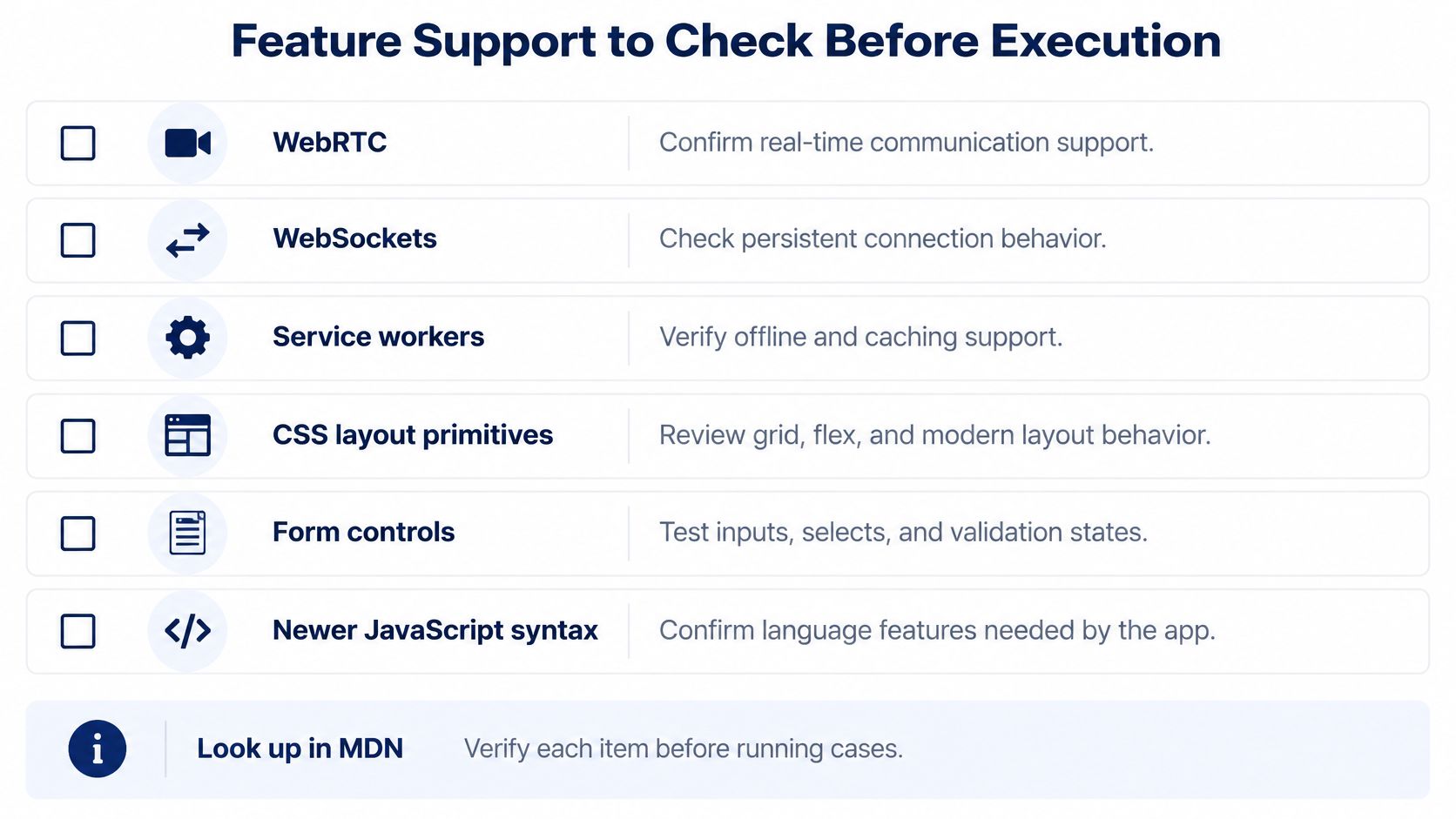
Compare each minimum supported version in Chrome, Safari, Edge, and Firefox with the oldest version still on the frozen matrix. If support is missing or partial, that browser may ignore a CSS declaration, fail to parse the script, or expose a different API. The same case can pass everywhere else.
Walk one feature to a decision
Say the release adds offline draft save with a service worker.
- Inventory: name the API, the page, and the oldest matrix row that must keep the draft.
- Lookup: read desktop and mobile rows. iOS Safari, Android Chrome, and operating-system web views often differ from their desktop cousins.
- Gap note: record browser version, operating system, device, feature status, the fallback the user will see, and the cause. The cause is an unsupported feature, a browser-specific difference, or an application defect.
- Choice: transpile, polyfill, add progressive enhancement, or remove the dependency. For a missing worker, show a normal save and skip the offline promise. Don't ship a spinner that never finishes.
That choice is the point of the lookup. A support table isn't a test result. It only tells you which rows are even eligible to run.
What Changes When the Browser Changes
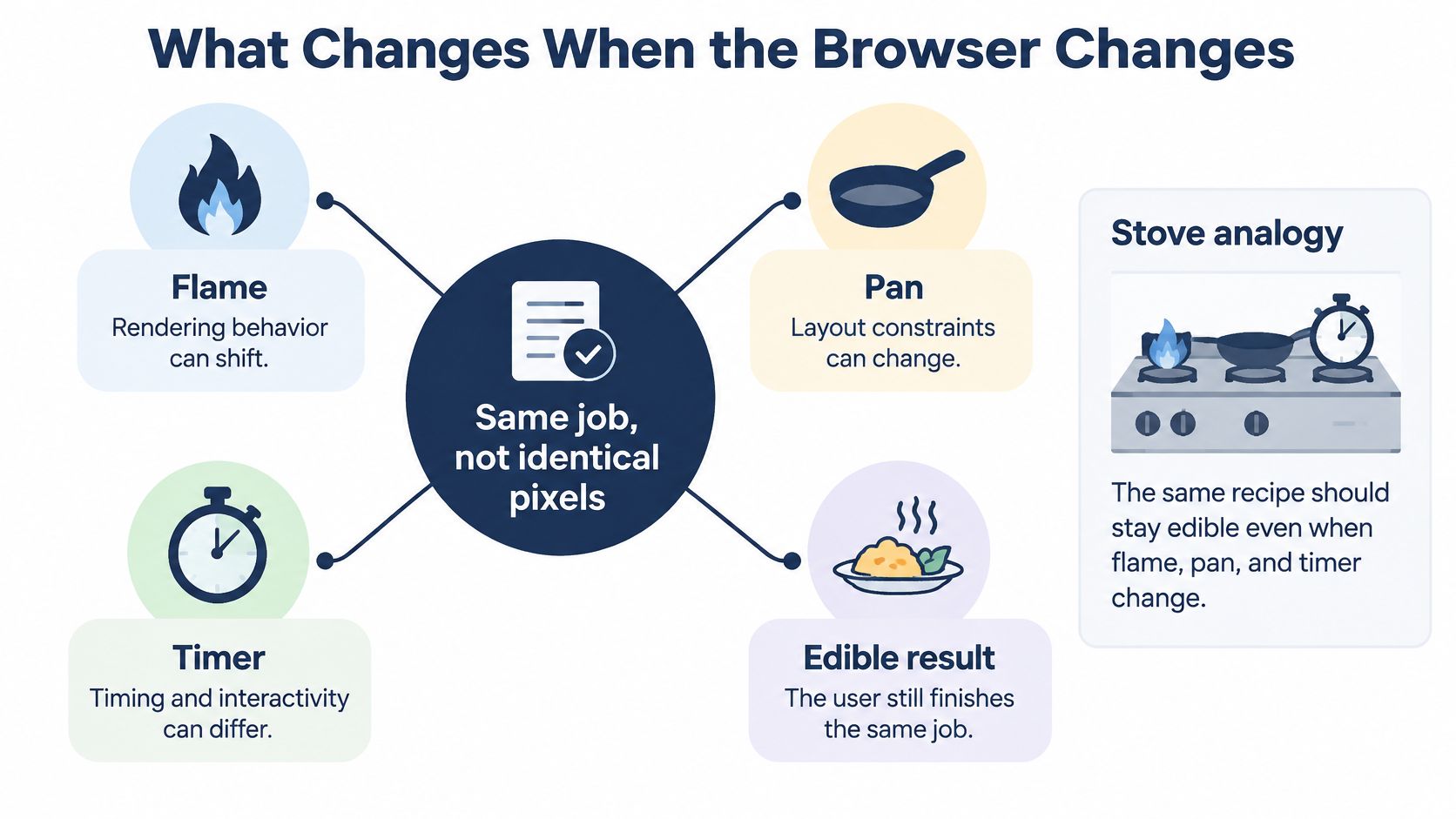
Compatibility means the user can finish the same job, not that every window shows identical pixels. Think of a stove. The same recipe should stay edible when the flame, the pan, and the timer differ. A checkout that still takes payment on a short phone has passed, even if the spacing isn't a pixel match with desktop Chrome.
Layers one page crosses
HTML and CSS decide layout. The JavaScript engine decides whether a script parses and which APIs exist. After that, smaller surfaces diverge on their own.
- Forms and file pickers change validation text, accept filters, and drag-and-drop order.
- Media changes by codec, autoplay policy, and whether the tab is backgrounded.
- Cookies, permissions, and focus order change with privacy mode, platform dialogs, and keyboard versus touch.
On 28 October 2014, the World Wide Web Consortium published HTML5 as a Recommendation, calling it a cornerstone of the Open Web Platform. The standard brought native audio and video, canvas, SVG, accessibility features, and APIs for modern applications. The associated test suite held more than 100,000 tests in October 2014. Interoperability was never a handful of happy-path pages.
Standards cut the gaps. They don't erase them. Browsers still ship newer CSS, media, accessibility, and security behavior at different speeds, and they keep platform quirks. A meaningful pass therefore names operating system, screen size, input method, graphics capability, privacy mode, and network, not only the brand.
The short video below shows how the same markup can paint differently once those layers change.
One green Chrome run is a sample. It isn't coverage of the web.
Workflows That Still Fail After Standards Pass
A clean standards result can still hide a broken task. The W3C DOM test suite contains more than 52,000 tests. Published analysis reported 743 tests failing in two implementations, equal to 1.43% of the suite, and 75% of those failures sat in one method. A small residual rate matters when that method sits on a busy path, such as updating the cart or moving focus into a dialog.
Keep automated DOM, CSS, and JavaScript checks. Then add real-browser checks that automation often flattens.
- Rendering and breakpoints: sticky bars, 100vh panels, and overflow on short screens.
- Input and focus: click, touch, keyboard order, and where focus lands after an error.
- File upload, scrolling, and media: silent failures, scroll locking, and playback stalls.
- Permissions and a dropped network: a denied camera, a mid-request timeout, and what the user can retry.
Baseline support summaries help you triage Safari on iOS and macOS, Chrome on Android and desktop, Edge, and Firefox. MDN notes that those summaries don't replace accessibility, usability, performance, security, or checks on older devices and web views. Print paths diverge the same way. Teams turning HTML into a document can use CSS tips for HTML to PDF so a page that looks right in a window isn't assumed to paginate.
Evidence a release note keeps
Order workflows by user impact, run them on the frozen matrix, and keep screenshots, console output, network traces, and exact environment metadata. The failure note names browser version, operating system, device, and viewport so someone else can reproduce it. “Browser incompatibility” isn't a defect title.
A software testing scenario should separate three causes and never mix them. An unsupported feature needs a fallback or a cut. A browser implementation difference needs a targeted workaround. An application defect is yours to fix in shared code. Shipping the wrong label sends the wrong person to the wrong fix.
Three Failures a Chrome Pass Would Miss
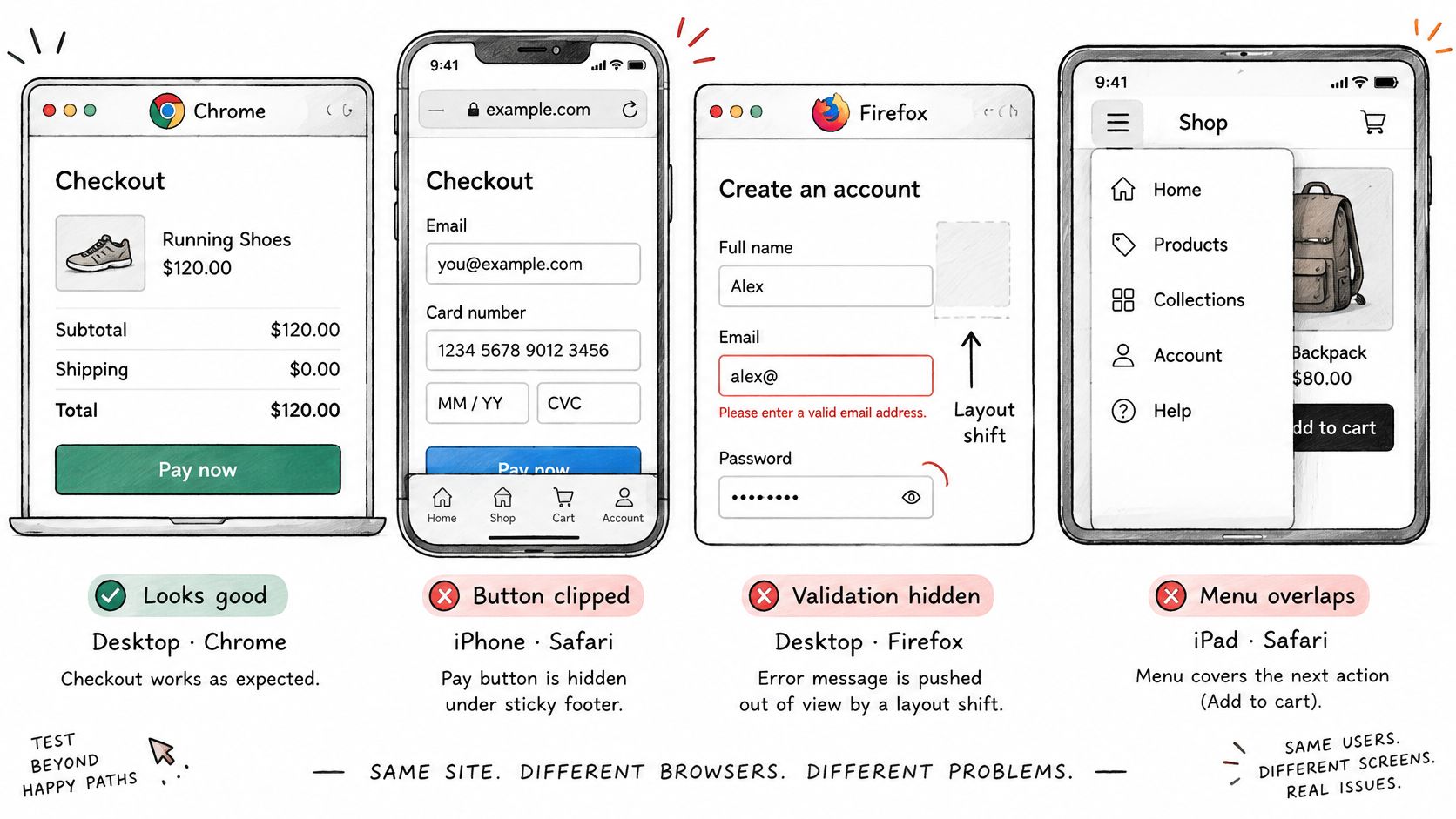
Three jobs can look finished in desktop Chrome and still fail the matrix. Each story uses the same fields, so you can drop sign-in, upload, or payment into the row without a new template.
Clipped pay button. Checkout looks correct in desktop Chrome. On Safari, a short iPhone clips the pay control because a sticky footer and a 100vh panel collide. The row needs Safari version, iOS version, phone class, viewport, expected button visibility, and the actual clip. Severity is release-blocking if that cohort checks out on phones.
Silent resume upload. The file lands in Chrome and Edge. Firefox fails with no message because the accept filter and the drag-and-drop event order differ. Record Firefox version, desktop operating system, and input method. Mark whether the cause is a browser event difference or an application handler that assumed Chromium's order. The user sees a form that never confirms the file.
Stalled hero video. Desktop Safari plays the loop. Samsung Internet on a constrained mobile network stalls because codec and autoplay rules diverge. Record browser version, Android device class, network condition, and severity for that regional cohort. If the video is decoration, degrade it. If it's the product demo that sells the plan, don't.
Copy one decision-record line after each failure: browser share, target audience, operating-system version, device capability, and observed severity, plus the action to ship, polyfill, or block release. The phone checkout blocks. The Firefox upload gets a handler fix or a visible error before you ship. The regional video ships only with a poster and a tap-to-play control.
Same fields, three jobs. If a field is blank, the bug isn't ready for a release call.
Lock the Matrix and Run It on Real Browsers
Freeze must-test rows and run them on real browsers and devices. Emulators and a resized window won't stand in for a laptop GPU, a phone keyboard, or a flaky network.
- Freeze journeys that move money, create an account, or block sign-in as must-test. Sample the long tail instead of every patch.
- Name browser and version, operating system, and for phones the brand plus the minimum OS.
- Run desktop coverage on real laptops and desktops for Chrome, Safari, Edge, and Firefox on Windows, macOS, and ChromeOS.
- When the lab lacks a phone or OS, match that session to someone who already owns the machine, including embedded Android WebViews. Scripted runners are a separate choice. A developer's guide to scraping tools compares Playwright and Puppeteer, and it doesn't replace a device you can hold.
- Keep a release record with the phone, OS build, browser version, step-by-step reproduction, screenshots, console output, and the combinations left unrun with the written exclusion reason. Our sessions use testers' own phones, laptops, and browsers, never emulators, and targets can be set by browser and OS as well as by phone.
- Attach the cases, set the deadline, and finish the pass before the release cut. A practical path for testing an app on real devices is to lock those rows first. Where an internal lab can't hold a required device, we run the customer-supplied cases on testers' machines and return the remaining coverage gaps.
99tests runs crowdsourced manual checks of websites and mobile apps on real phones, laptops, and browsers, including the Chrome, Safari, Edge, and Firefox targets your matrix names. You send the cases and the device targets, and you get verified pass, fail, and unrun coverage with reproduction detail instead of a Chrome-only green build. Bring your frozen matrix to 99tests and put the rows your lab doesn't own on machines people already use.