Procedure of Testing: Steps from Setup to Sign-Off
Learn the procedure of testing step by step: test design, environment setup, execution, defect reports and release sign-off, with exit checks at each phase.
In this article
- The Seven Phases of a Software Testing Procedure
- What an Exit Check Actually Buys You
- How to Prepare Test Cases and the Test Environment
- Five Preparation Steps in Order
- The Cases Generated Tests Usually Miss
- How to Execute Tests and Record Every Result
- Five Steps That Keep the Record Honest
- Every Case Ends in One Status
- Why a High Test Count Proves Nothing
- Defect Reports Developers Can Act On
- The Fields Every Report Carries
- Three Rules That Cut the Noise
- Confirm the Test Cycle Is Complete Before Sign-Off
- Problems That Make a Passing Test Run Misleading
- Why a Passing Emulator Run Isn't Evidence
- What an Automated Sweep Actually Covers
Your last cycle closed with 94% of cases passing. Which screens did nobody open on the budget Android phone that most of your users carry?
That pass count answers a question nobody asked. It says cases ran and reported success. It says nothing about which configurations were covered, which cases never ran at all, or whether the expected results were specific enough for a failure to be visible in the first place. A procedure of testing fixes that by attaching a written exit check to every phase, so the run is judged on documented coverage and on the cases left unrun rather than on the share that went green.
The Seven Phases of a Software Testing Procedure
A test cycle runs as seven phases in a fixed order: entry review, test design, environment setup, execution, defect logging, retest and regression, then completion review. Each phase closes with an exit check, a short written statement that must be true before anyone starts the next one. That single habit separates a procedure from a checklist someone abandons in week two.
Here is the sequence as a single flow, with the gate marked between phases.
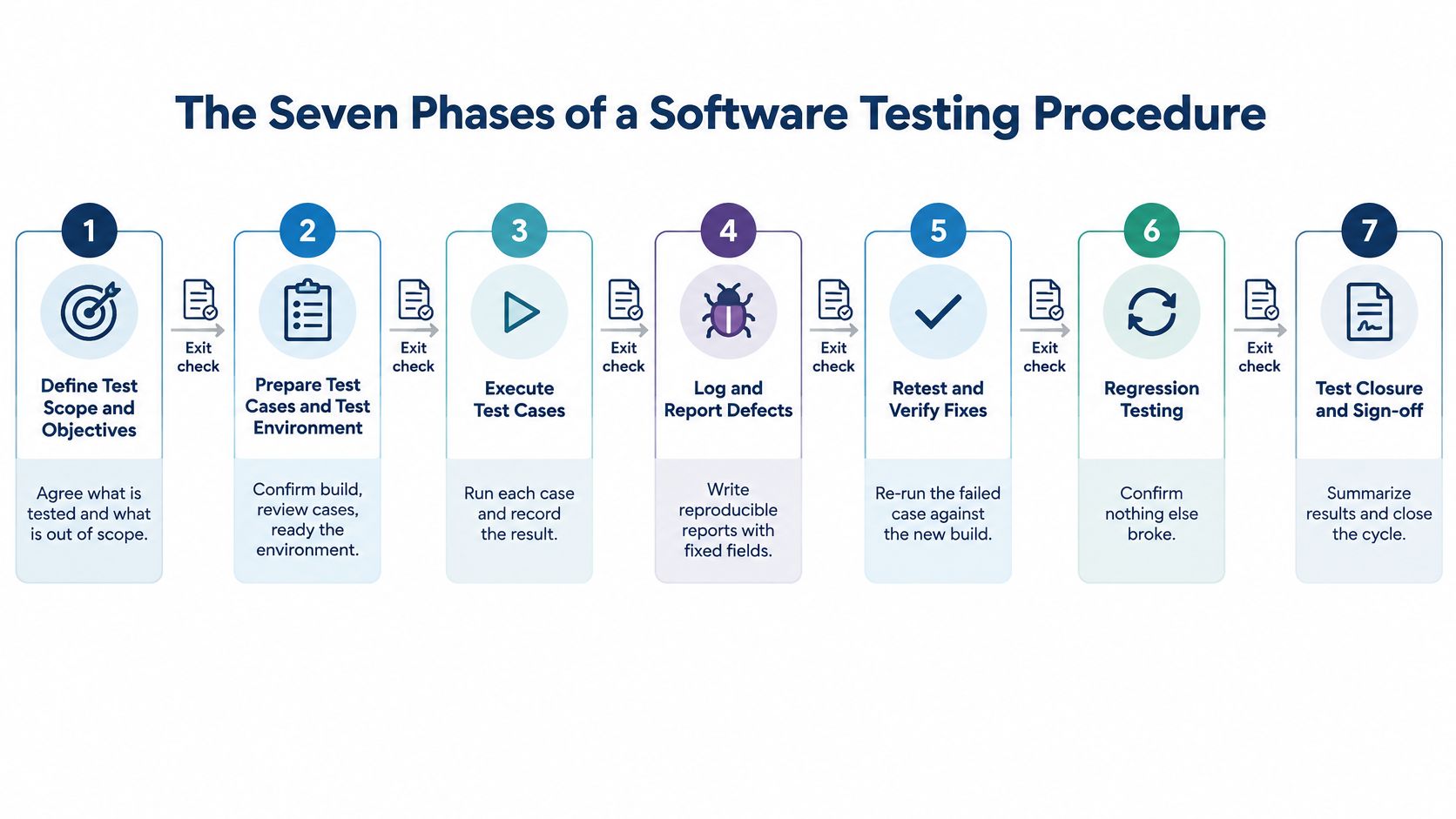
The order matters because every phase consumes the previous phase's output. Design cases against the wrong build and you've documented behaviour that shipped last month. Execute before the environment is fixed and a failure on one handset gets blamed on the code. The 2002 NIST study of testing infrastructure put the annual cost of software defects to the U.S. economy at about $59.5 billion and found that more than half of defects stayed hidden until late development or after release, which is the arithmetic behind verifying early instead of at the end.
| Phase | What Happens | Output | Exit Check |
|---|---|---|---|
| 1. Entry review | Confirm build, scope and test object | Scope note | Build ID recorded and matches release candidate |
| 2. Test design | Review cases by risk and expected result | Approved case set | Each case has a risk reason and an observable expected result |
| 3. Environment setup | Fix devices, browsers, data and network | Configuration matrix | Environment verified before the first run |
| 4. Execution | Run cases in priority order | Result per case and configuration | Every case has one explicit status |
| 5. Defect logging | Investigate anomalies and file reproducible reports | Defect records | Each failure has steps, environment and evidence |
| 6. Retest and regression | Verify fixes on the same configuration | Retest results | Fix confirmed and adjacent workflows checked |
| 7. Completion review | Review coverage, open defects and risks | Test summary report | Unrun cases and accepted risks documented |
What an Exit Check Actually Buys You
The two phases teams skip are the first and the last. Entry review feels bureaucratic when the release is close, and completion review feels optional once the build has gone out. Skipping them is exactly why a later failure looks like a product bug when it was really a scope problem or a missing piece of evidence.
Exit check rule: no phase starts until the previous phase's check is written down and owned by a named person.
Writing those checks into the plan is the easy half. Making them survive a deadline is the other half, and writing procedures people actually follow covers the mechanics: one owner per step, observable completion, and no step that depends on someone remembering.
Before the next cycle starts, open the test plan and write the seven exit checks into it as a numbered list. If you can't state a check in one sentence, that phase isn't defined yet.
How to Prepare Test Cases and the Test Environment
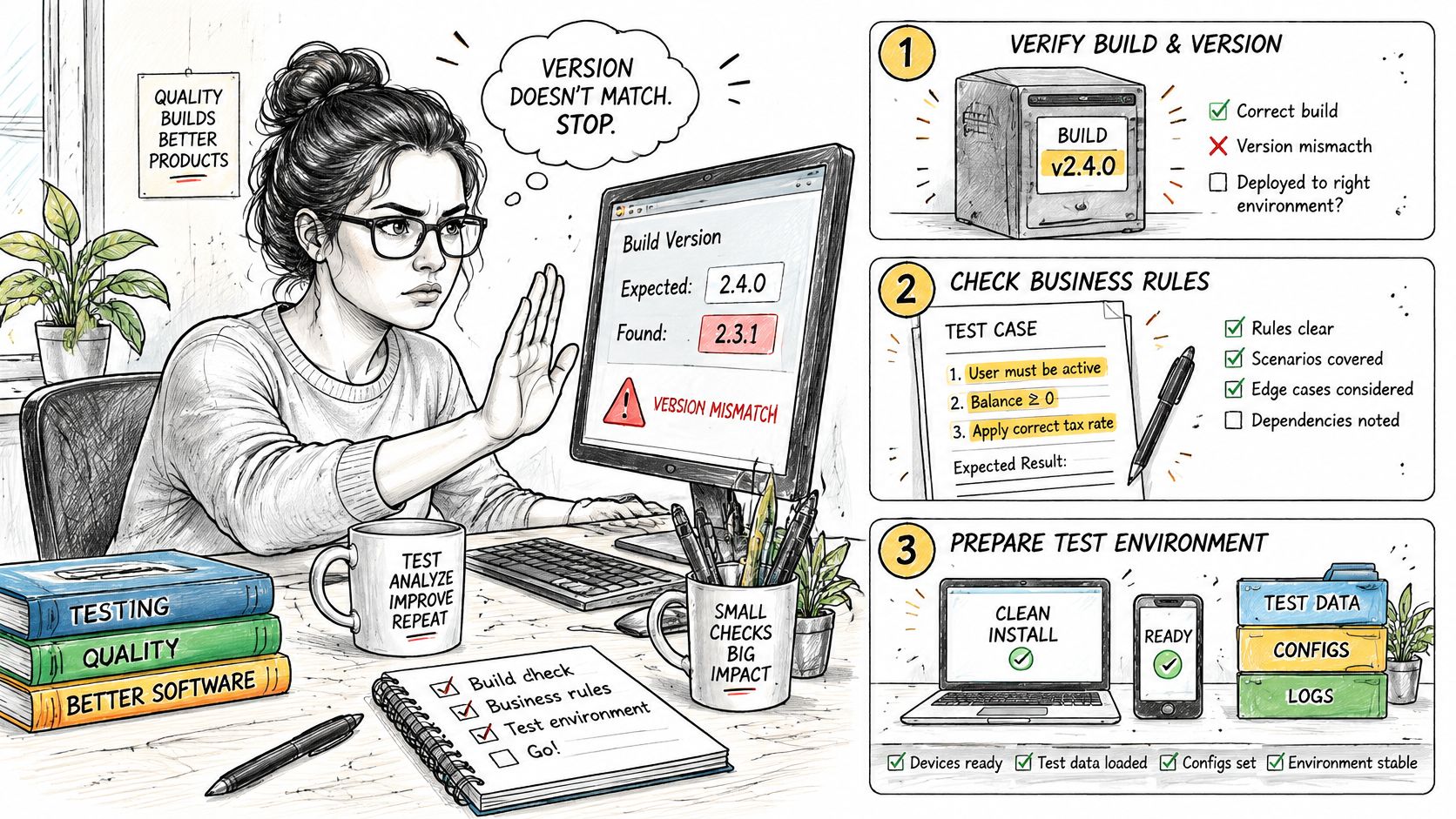
Preparation decides most of the outcome. A case set with vague expected results produces a green run whether the software works or not, and an environment you never fixed produces failures nobody can reproduce the next morning. The two cheapest hours in the cycle are the build check and the case review.
Five Preparation Steps in Order
1. Confirm the build and the test object. Record the build ID, the version string and precisely what is under test. If any of it differs from the release candidate, stop and say so, because every result after that point describes a different artifact.
2. Review every case against a business rule and an oracle. Each case needs the rule it protects, the boundary or error path it exercises, and an expected result a person could observe. Rewrite or reject anything that says only that the feature works correctly.
3. Build the configuration matrix from real users and release risk. List device model, OS version, browser, screen size, locale, network profile and account state, then rank combinations by how many users depend on them and how much release risk they carry. You don't need every permutation. NIST's summary of combinatorial testing research reports that roughly 70% to 95% of software failures are triggered by interactions between just two variables and nearly all by no more than six, and that pilot applications cut testing costs by about 20% while improving coverage by 20% to 50%.
4. Prepare data, accounts and conditions. Reset accounts to a known state, seed records with values you can predict, sync clocks across devices, and write down the network profile in use. A failure you can't tie to a build and a configuration is a story, not evidence.
5. Check entry criteria and log unmet conditions as blockers. Missing test data is a blocked case, not a failed one. Naming it before the first run keeps it out of the defect queue.
Setup is finished when two statements are true. Every case maps to at least one configuration in the matrix, and every combination you chose not to test has a written reason beside it. If you're formalising that mapping for the first time, this test plan example shows how cases, configurations and exit criteria sit in one document.
The Cases Generated Tests Usually Miss
Cases written by an AI assistant cover the happy path thoroughly and the edges thinly. A recent analysis of AI-generated test cases found null inputs covered in only 34.8% of applicable cases, negative inputs in 23.8% and empty inputs in 38.8%, and noted that roughly one-third of generated assertions were incorrect in some categories.
Add at least one case for each applicable input type, plus interruption, retry and rollback paths. Check every generated assertion against the written requirement before the matrix is approved. If the release touches money, catching checkout bugs on Android devices deserves its own line in the matrix, since payment flows fail differently on low-memory handsets and slow networks than they do on a desktop browser.
How to Execute Tests and Record Every Result
A test run is useful only if its record shows what ran, where it ran, and what remains untested. Treat execution as a sequence of checks: each case needs a result, and each unrun case needs a reason.
Five Steps That Keep the Record Honest
Run core journeys first, in scheduled priority order. Start with sign-in, search, checkout, payment and password recovery. Then check harder conditions such as interruptions, upgrades, weak or unavailable networks, rotation and resize, permission prompts, backgrounding and recovery. A broken sign-in can make later results hard to interpret, so establish that the basic journey works before continuing.
Record five fields for every case: case ID, build, device or browser configuration, actual result and status. Comparing actual with expected is meaningful only when the record identifies the build and configuration that produced the result.
Compare the result with the written expectation. Record each mismatch before judging its importance, including visual differences. For example, a button that shifts on a narrow screen may indicate a layout issue that becomes more disruptive on a smaller display.
Check possible causes before classifying a failure. Confirm the preconditions and test data, then check the script, environment and requirement interpretation. A faulty test can produce a false defect and waste time during investigation.
Reproduce the failure before filing it. Use the same build, configuration and data. If it cannot be reproduced, record it for investigation with the available evidence rather than treating it as a confirmed defect.
Every Case Ends in One Status
| Status | Meaning | Counts as Executed | Required Note |
|---|---|---|---|
| Passed | Actual result matches expected on the stated configuration | Yes | Configuration and build recorded |
| Failed | Actual result differs and the failure reproduces | Yes | Defect ID, steps and screenshot or recording |
| Blocked | Case cannot run because of a defect or missing dependency | No | Blocking reason and owner |
| Skipped | Case deliberately not run | No | Reason and approver for the risk accepted |
| Unexecuted | Planned case that was not run | No | Reason and the risk it leaves open |
Only passed and failed cases count as executed. A coverage percentage that includes blocked, skipped or unexecuted cases can make an incomplete run look finished.
Why a High Test Count Proves Nothing
A large number of test cases does not show whether the important risks were covered. Structured, risk-based test design can find more defects than a high raw test count, because it directs attention to meaningful conditions rather than increasing the number of runs.
A case that passes on desktop Chrome and fails on a budget Android phone is a compatibility failure, not a global pass.
Close the phase with a written exit check: list the cases that passed or failed, the configurations covered, and every blocked, skipped or unexecuted case with its reason. Judge completion by that record, not by the pass count.
Defect Reports Developers Can Act On
A defect report has one job. Someone who wasn't in the room reads it once and reproduces the failure on the same build.
The Fields Every Report Carries
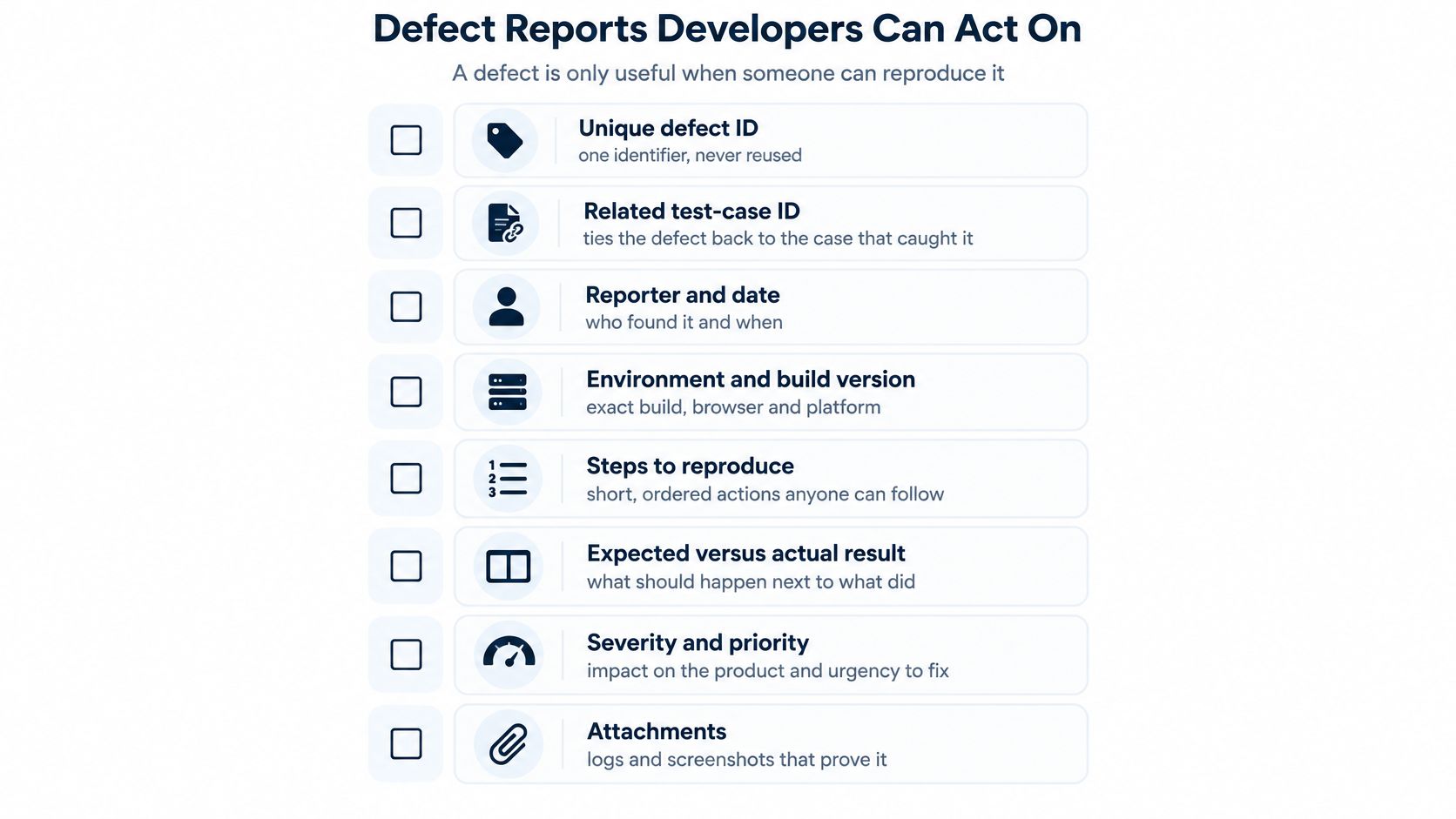
Every report uses the same fields in the same order. Start with the defect ID (unique, never reused), the related test-case ID, and the reporter with the date. Then the build or version, followed by the exact device model, OS, browser and network condition, because a failure on one handset model is a different report from a failure everywhere.
Next comes severity graded against a published rubric, then expected behaviour and observed behaviour written on two separate lines. After that, numbered reproduction steps short enough for someone who has never seen the screen, and a screenshot or screen recording that shows the failure rather than the page before it. Close with a lifecycle status so triage, retest and closure are visible without a meeting.
Three Rules That Cut the Noise
One defect per root cause, merged before it reaches a developer. Say five testers on five Android builds hit the same crash in the cart. That's one defect with five environment rows, not five defects competing for attention.
Severity describes impact. Priority describes scheduling. A crash on a settings screen used by a small slice of users can be high severity and low priority. A mislabelled price in the checkout header can be low severity and top priority.
Reproduction steps belong to the configuration where the failure happened. A report that says checkout fails, illustrated with a screenshot from one handset, is not a claim about an iPhone.
Close the defect only after a retest on the same configuration and a regression check on the adjacent workflow, and write both into the record. If you want a starting structure for the summary that carries these records, this software testing report template covers the fields and the coverage tables.
Here's a short walkthrough of the triage conversation that follows a well-written report.
Confirm the Test Cycle Is Complete Before Sign-Off
- Reconcile the count. Every planned case carries one status, and the total matches the approved case set from the design phase.
- Weigh each gap. Every unexecuted, blocked and skipped case gets judged against the risk it leaves open.
- Check the retest trail. Each fixed defect was retested on the same configuration, and adjacent workflows passed regression, with a record for every fix.
- Write the summary. Totals per configuration, open defects by severity, unexecuted counts with reasons, and accepted risks with named approvers.
- Record accessibility evidence where the release needs it. The U.S. federal FY2025 Section 508 assessment found that only 40% of agencies systematically tracked software conformance evidence and only 47% of software was fully conformant.
- Decide and file. Release, release with the listed risks, or hold. File the summary with the test plan so the next cycle opens against the same exit checks.
A skipped case on a payment flow is a different decision from a skipped case on a settings screen nobody opens.
The summary is a document, not a conversation. A report that gives every case a pass or fail, attaches a screenshot to each failure, and states why the rest weren't run is what makes the decision auditable, which is the shape of the verified report 99tests returns after human testers execute your cases on their own phones, laptops and browsers.
Problems That Make a Passing Test Run Misleading
The pattern repeats on release day. A healthy pass rate, and a field failure nobody saw in testing. Six symptoms account for most of it.
| Symptom | Likely Cause | Fix |
|---|---|---|
| Every case passes on an emulator but fails on a handset | Emulator misses hardware, OS or browser behaviour | Rerun critical cases on a real device matching the reported model |
| Failures appear on one day and cannot be reproduced | Test data or account state drifted | Reset the account, document the data and rerun the failing cases |
| High pass count but a critical flow has no failures | Happy-path cases duplicated, risk not mapped | Reclassify cases by risk and add invalid input, interruption and permission cases |
| Expected results say only that the feature works | Vague expected result, no observable oracle | Rewrite each expected result as an observable outcome before execution |
| Failures blamed on the product | Build mismatch or clock drift between devices | Verify the build identifier and time sync, then rerun |
| Sign-off shows a pass rate with no gaps | Unrun and blocked cases hidden in the total | Report unexecuted and blocked counts with reasons and risk notes |
Why a Passing Emulator Run Isn't Evidence
A simulator tests your code against a simulated device, not against a handset whose manufacturer changed the memory behaviour of the operating system. A 2024 ACM study of more than 20,000 Android apps detected device-specific behaviours in 2,357 of them, so the same build behaves differently on real hardware. If your evidence comes from one emulator profile, it isn't compatibility evidence.
The middle two symptoms on that table are cheaper to fix than they look. Duplicated happy-path cases inflate the count without touching invalid inputs, interruptions or permission prompts, and a vague expected result is what lets a real failure be recorded as a pass. Both are fixable inside a single cycle.
What an Automated Sweep Actually Covers
A green automated suite feels like completeness and rarely is. A 2025 ICSE study reported that advanced GUI exploration techniques typically cover only around 30% of a real-world mobile application. A passing sweep shows the explored third works, not that the app has been tested.
The pass rate tells you what ran. It never tells you what was never opened.
Fixes split into two groups by cost. Rerunning critical cases on the reported device model, resetting account state and verifying the build identifier each take one cycle. Risk classification, observable expected results and gap reporting in the summary require the test plan to be rewritten, and that work belongs in the next planning session rather than in the last week before a release. Map the flows in the configuration matrix to explicit manual cases first, then treat the pass rate as a summary of those cases, and run validation of the case set before that count becomes a release argument.
If your cases were generated faster than anyone could run them, the gap between planned and executed coverage is the thing to close before the next build goes out. 99tests puts human testers on real phones, laptops and browsers to run each case manually, then returns a verified pass or fail with a screenshot and step-by-step reproduction notes for every failure, plus a reason wherever a case couldn't be run. Send your case set and the device matrix you care about through 99tests, and the report that comes back will show coverage rather than a pass rate.