Software Testing Scenario: What It Is and How to Write One
Learn what a software testing scenario is, how it differs from a test case, and how to define scenarios teams can actually execute.
In this article
- What a Software Testing Scenario Describes
- Why the missing run costs money
- How a Scenario Differs from a Test Case
- One payment, three checks
- The mix-up that inflates the suite
- How to Define a Useful Testing Scenario
- Edges that belong in the sentence
- Worked Scenarios for Payment Login and Browsers
- Card payment on a budget Android phone
- Password recovery on a flaky network
- Expense form on two desktop browsers
- Which Condition Combinations Deserve a Scenario
- What to put in the model
- Turning Scenarios into Verified Coverage
- What each result must carry
- Run the highest-risk scenario on real devices
A software testing scenario is a user goal under specific conditions, while a test case is one check inside that situation. You may have watched the same checkout pass on the office laptop and fail for a shopper on a cheaper phone, and the step list in the ticket doesn't say which of those worlds you proved.
That gap is the whole job. A long file of checks can look finished while the journey your customers take was never run, never blocked on purpose, and never marked not run. The rest of this piece treats a software testing scenario as an accountable situation: who is trying to do what, under which conditions, what they should see, and whether that run happened.
What a Software Testing Scenario Describes
Say a returning shopper pays for a cart. On your office laptop, over office Wi-Fi, the order confirmation appears and the cart clears. The same shopper, on a budget Android phone, over a slow mobile network, gets a spinner, then an error, and the cart is still full. Why do the two results differ? The steps in the ticket were the same. The world around those steps was not.
That world is the software testing scenario. One actor, one goal, the conditions that can change the result, and the outcome the user should see.
Actor: a returning shopper. Goal: pay for the cart. Conditions: device model, OS version, browser, network speed, and account state. Expected result: an order confirmation, with the cart cleared.
A numbered list that never names the user, the phone, or the network can't show which journey was tested. It only shows that someone typed steps. Scenarios decide which journeys deserve evidence before you ship. They are a planning unit you can see on day one, not a checklist you invent the night before release.
The same checkout can pass in one environment and fail in another. That is why environment belongs inside the definition, not in a footnote after the pass mark.
Why the missing run costs money
In 2002, the U.S. National Institute of Standards and Technology commissioned the Research Triangle Institute to price inadequate testing. The study NIST commissioned estimated that software defects cost the U.S. economy approximately $59.5 billion annually, about 0.6% of national GDP at the time, and that improved testing could remove more than one-third of that loss, approximately $22.2 billion a year. Developers absorbed roughly 75% of the impact in the sectors studied. Escaped defects become rework, support, patches, and user losses. A scenario is how you choose which of those losses you refuse to discover after launch.
A scenario is not yet the checks inside it, and it is not yet a writing template. Those come next.
How a Scenario Differs from a Test Case
Sort the artifact you already have before you rewrite it.
| Aspect | Software testing scenario | Test case |
|---|---|---|
| Purpose | A user goal under conditions that can change the outcome | One check with a stated expected result |
| Scope | An end-to-end situation or journey | A single step, input, or assertion |
| Inputs | Actor, data, device, OS, browser, network, and account state | Specific values and preconditions for that check |
| Result | The outcome the user should experience | Pass or fail against the expected result |
| Volume | Few, chosen by risk and user traffic | Many, often derived from one scenario |
| Evidence | Where it ran and whether it was blocked or not run | The step result on that particular run |
The scenario is the situation of use. The test case is one executable check inside it.
One payment, three checks
Take a returning shopper completing payment on a mid-range Android phone over mobile data. That sentence is the scenario. The cases under it are narrower.
Valid card: the bank approves, the shopper sees success, and the cart is empty. Expired card: the shopper sees the bank's decline message and can try another card. Session timeout: the shopper lands back on a cart that still holds the items.
One scenario usually produces several cases. A case with no scenario is an orphan check. Nobody can rank it against traffic or against the cost of a bad release, because nobody can say which user goal it protects.
Sorting rule: If you can't name the actor, the goal, and the conditions, the item is a test case.
The mix-up that inflates the suite
Teams paste expected results into a story and call the whole file a scenario. You then have a pile of pass/fail lines and no situation to attach them to. The file gets longer. Release confidence doesn't.
Keep the scenario sentence free of button-level assertions. "Order confirmed and cart cleared" is a user outcome. "HTTP 200 on /checkout" is a case result. Mixing them makes every row look equally important, so the risky journey and the cosmetic check compete for the same hour.
A scenario stays few on purpose. Cases multiply because one goal has a happy path, a refusal, and a recovery. Evidence sits at both levels: the scenario records where that situation ran and whether a required environment was blocked or not run. The case records the step result on that particular run. Without the first record, a green case on a laptop can be mistaken for a green journey on a phone.
How to Define a Useful Testing Scenario
A useful scenario survives a simple audit. Someone outside the team can read it and say who is trying to do what, under which conditions, what outcome counts, and whether the required run passed, failed, was blocked, or did not run. That makes the scenario an accountable situation with an environment and an execution status. The definition works for handwritten cases, inherited suites, and cases produced by an AI tool.
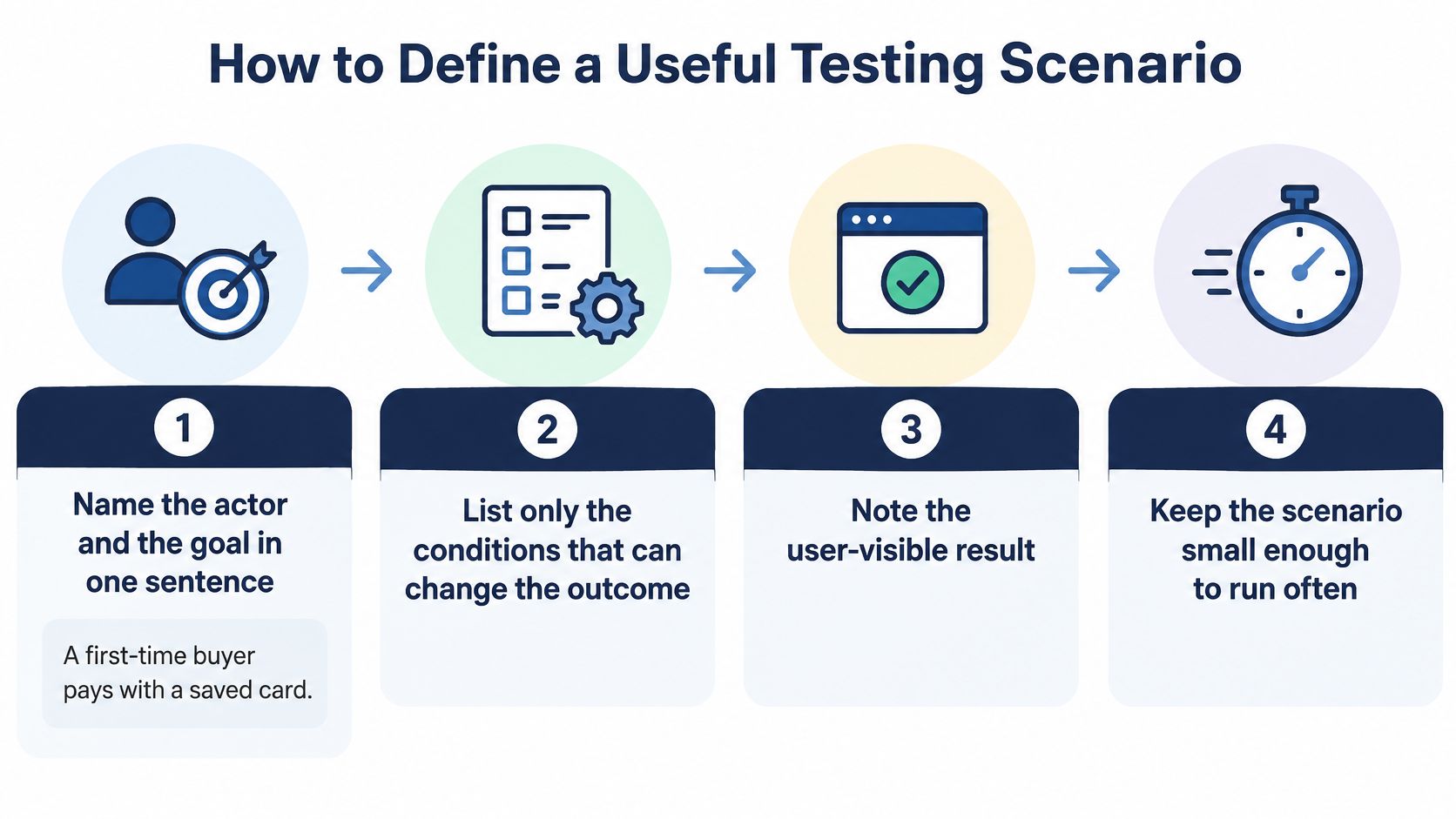
A scenario works like a booking for a specific lab bench. The build, device class, account state, network, and permissions are part of what is being claimed, so they need to be fixed before individual checks begin.
- Name the actor and the goal in one sentence. “A first-time buyer completes checkout with a saved card” gives the suite a user outcome to protect. Starting with “open the payment screen” anchors the work to an interface step before the journey is defined.
- List only the conditions that can change the outcome. Device class, OS version, browser, network, account state, locale, permissions, and feature flags can all qualify. Test each candidate with one question: could changing this alter what the user sees or whether the journey finishes? A condition that fails that test is inventory, not scope.
- Write the observable result in user language. “The buyer sees a paid order and an email receipt” describes evidence the user can experience. For a decline scenario, the result might be a clear bank message and an obvious way to retry. Internal responses and logs can support the check, but they do not replace the visible outcome.
- Split into test cases only after the scenario sentence is stable. Give each child case a meaningful variation and keep it attached to the parent's environment. When the goal or required conditions change, review every child case that inherited them.
- Rank by user exposure and failure consequence. Correction work usually rises sharply the later a defect is found, so prioritize paths used by many people and failures that block a goal, lose data, charge incorrectly, or prevent recovery. Automation effort belongs after that judgment; an easy check does not become high value because it is cheap to run.
- Define done as pass, fail, blocked, or not run for each required environment. Record a reason for blocked and not-run results. A blocked scenario names the prerequisite that prevented execution, while a not-run scenario marks a coverage gap. A blank cell is not evidence.
Edges that belong in the sentence
Some edges change the scenario itself because they alter the account state, environment, or expected result:
- Guest checkout: there is no saved profile, so the account state is “none.”
- Payment interrupted mid-flow: the shopper backgrounds the app or loses the network while on the bank page.
- A permission the OS denies: notifications, photos, or location is refused, and the journey must continue or fail with a message the user can act on.
Store the scenario where release decisions are made, alongside a worked test plan example, so the required environments and status rules are visible before child cases multiply.
Copy this blank and fill it for one journey:
Actor:
Goal:
Conditions:
Outcome the user should see:
Required environments:
Priority:
Execution status: pass, fail, blocked, or not run
Reason if blocked or not run:
Worked Scenarios for Payment Login and Browsers
Copy the shape onto your riskiest journey. Don't collect more examples than you can run.
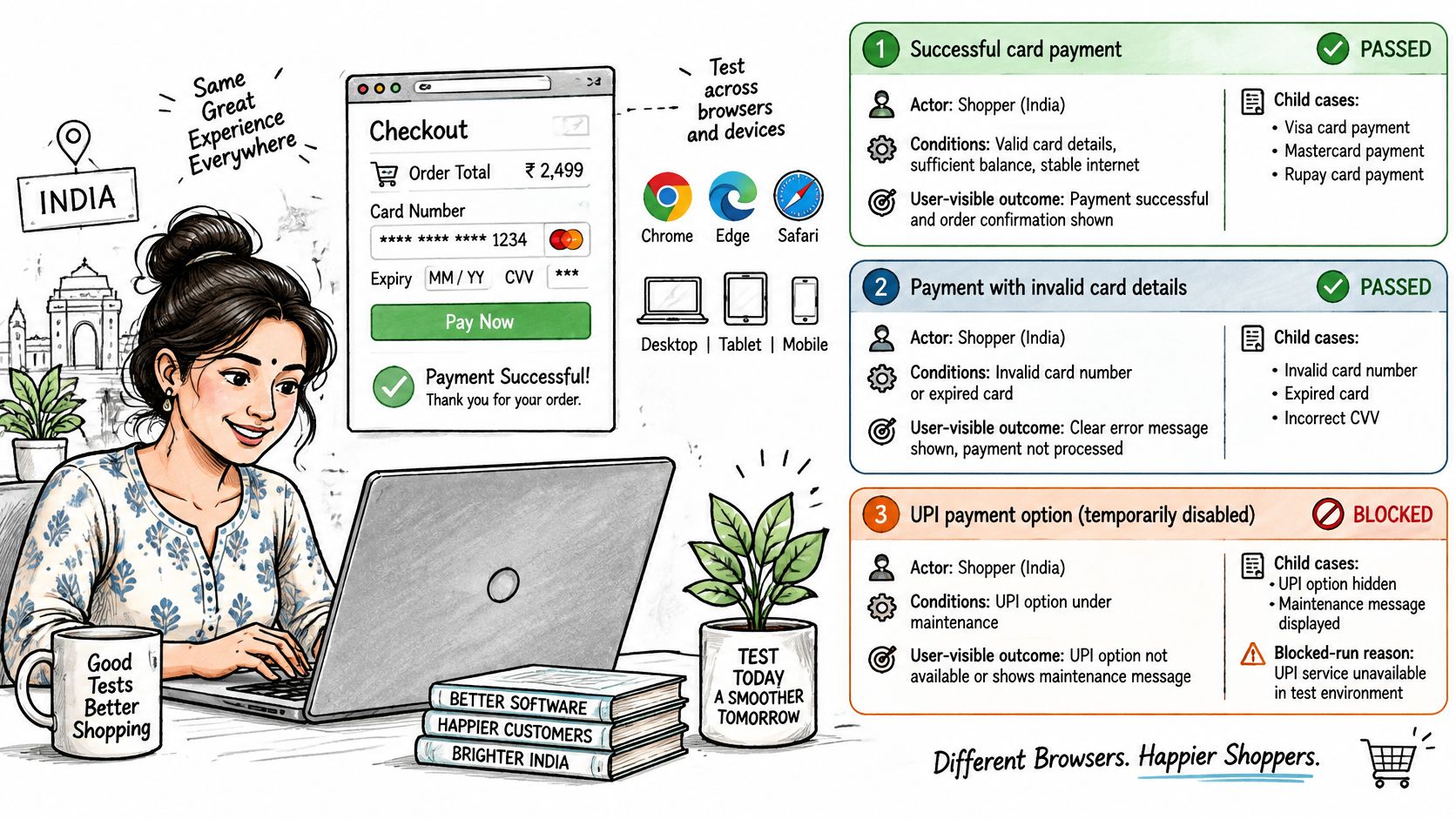
A comparative look at Android test-input tools found that none of the assessed tools was built for cross-device testing, even though Android fragmentation is a major development problem, as an academic evaluation of Android input tools records. Code coverage on an emulator is not field proof. Each scenario below names what would falsify a vague claim.
Card payment on a budget Android phone
Actor and goal: a shopper in India completes a card payment. Conditions: a Redmi-class handset, 4G, the release build, a real card sandbox. User-visible outcome: a success screen and a cleared cart, or a clear decline the shopper can act on.
Child cases: a successful charge, a declined card, and the app backgrounded on the bank page. Blocked when: the test build can't reach the payment sandbox.
"Works on Android" is false if this row is not run. Passing on a flagship emulator doesn't speak for this handset or this network. If you need a method for picking those phones, start from how to test an app on real devices and keep the blocked reason in the scenario, not in a chat thread.
Password recovery on a flaky network
Actor and goal: a logged-in user recovers a password with a one-time code. Conditions: intermittent mobile data, SMS as the delivery channel, an existing account. User-visible outcome: one account, a new password, and a session that belongs to that person.
Child cases: the code arrives and works, an expired code is rejected, and a retry doesn't create a second account. Blocked when: SMS delivery can't be observed, so you can't tell a product bug from a carrier delay.
"Login works" is false if you never watched the code fail to arrive. A green unit test of the token checker doesn't cover that wait.
Expense form on two desktop browsers
Actor and goal: a web user files an expense. Conditions: Safari on macOS, then the same person on Chrome on Windows, with a receipt file under the size limit. User-visible outcome: the expense is saved and visible in the list, or a validation message names the bad field.
Child cases: form save, a validation error, and a file upload. Blocked when: the staging URL rejects that browser.
"Works in the browser" is false if only one of those two rows ran. A layout bug in Safari and an upload bug in Chrome are different defects. Tie each failure to the browser and OS you used.
Which Condition Combinations Deserve a Scenario
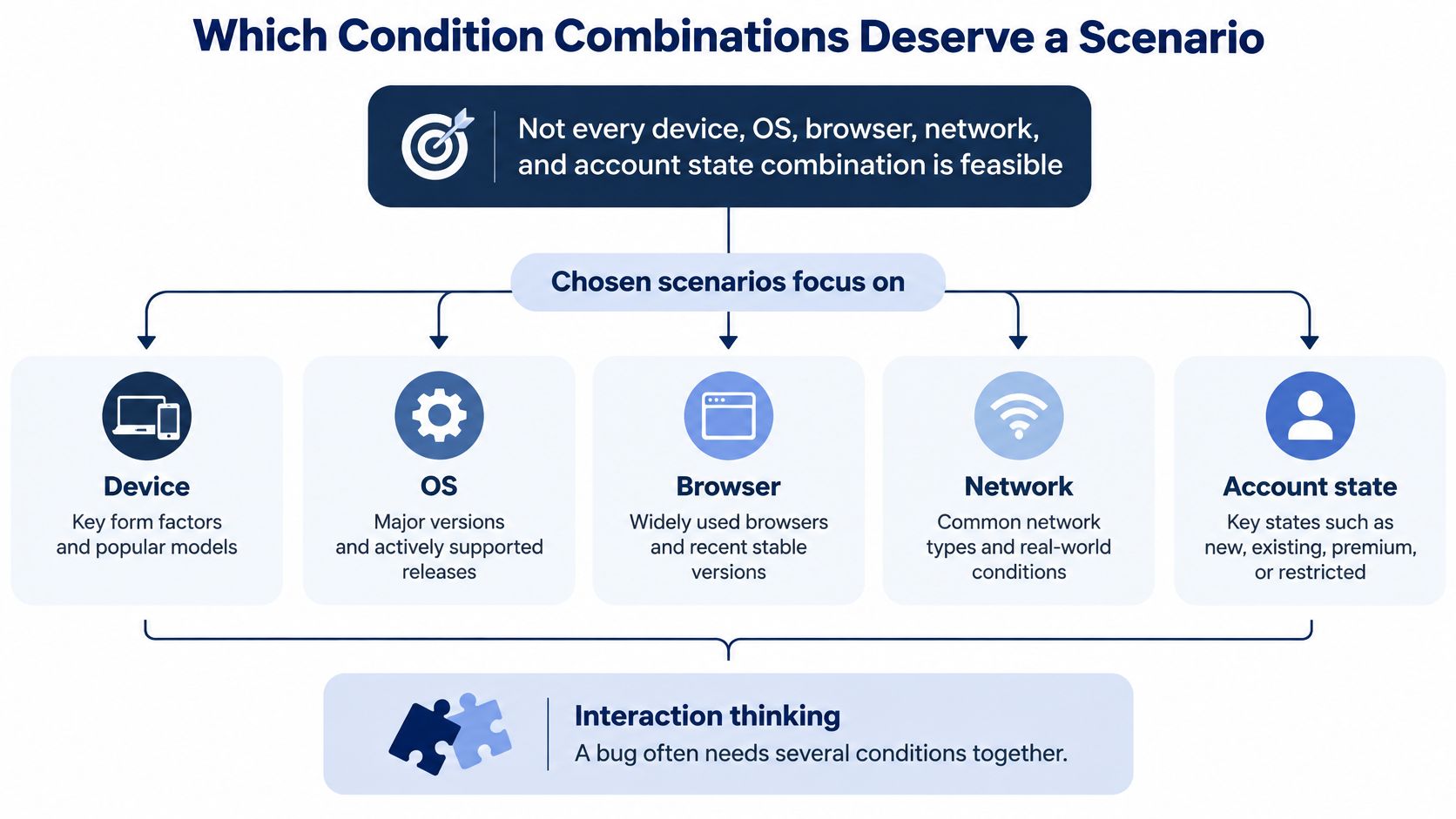
You can't run every device, OS, browser, network, and account state together. The scenario set has to be chosen, or the matrix is a wish list.
Many bugs need several conditions at once. One browser, one OS, and a logged-out state can fail together when each factor alone looks fine. Sampling "a few popular phones" misses that intersection on purpose.
| Strength | What it covers | When to use it |
|---|---|---|
| 1-way | Each parameter value on its own | Smoke checks only; misses interactions |
| Pairwise 2-way | Every pair of parameter values | Default for broad UI and browser checks |
| 3-way | Every triple, such as OS, network, and account | Login, payments, and permission flows |
| 4-way | Every quadruple of parameter values | High-risk compatibility; NIST saw over 95 percent of observed errors in two programs |
| Exhaustive | Every full combination | Rarely practical for device and browser matrices |
In an empirical study of two real-world programs, NIST reported that test cases covering all 4-way combinations of parameter values detected more than 95% of the observed errors. That is a prioritization target for high-risk compatibility work, not a promise to find every defect. The right strength depends on the product and on where its faults cluster.
What to put in the model
Model these parameters explicitly: device family, OS version, browser, connectivity, account state, locale, permissions, and feature flags. Then rank rows by customer geography, traffic share, the minimum supported OS, low-cost phones, and combinations that have failed before.
Report which combinations were executed, not only how many cases were written. An unrun intersection is a hole, even if the case count looks high.
For teams serving users in India, budget Android handsets and local mobile networks are first-class scenario conditions. They are not leftovers after the emulator suite goes green.
Pairwise is enough for a lot of layout and copy checks. Payments, login, and permission flows earn 3-way because OS, network, and account state interact. Save 4-way for the journeys where a miss becomes a charge, a lockout, or a data loss. Functional checks and the slower qualities around them, including how a page behaves on a weak network, sit in different rows of the same matrix. A short guide to functional and non-functional testing helps you label those rows so a speed failure isn't filed as "the button works."
Turning Scenarios into Verified Coverage
A long AI-generated case list records one thing: a model produced text. It records no run, no device, no result. Release confidence needs something colder: this case, on this device, with this outcome, or an honest blank where the run never happened.
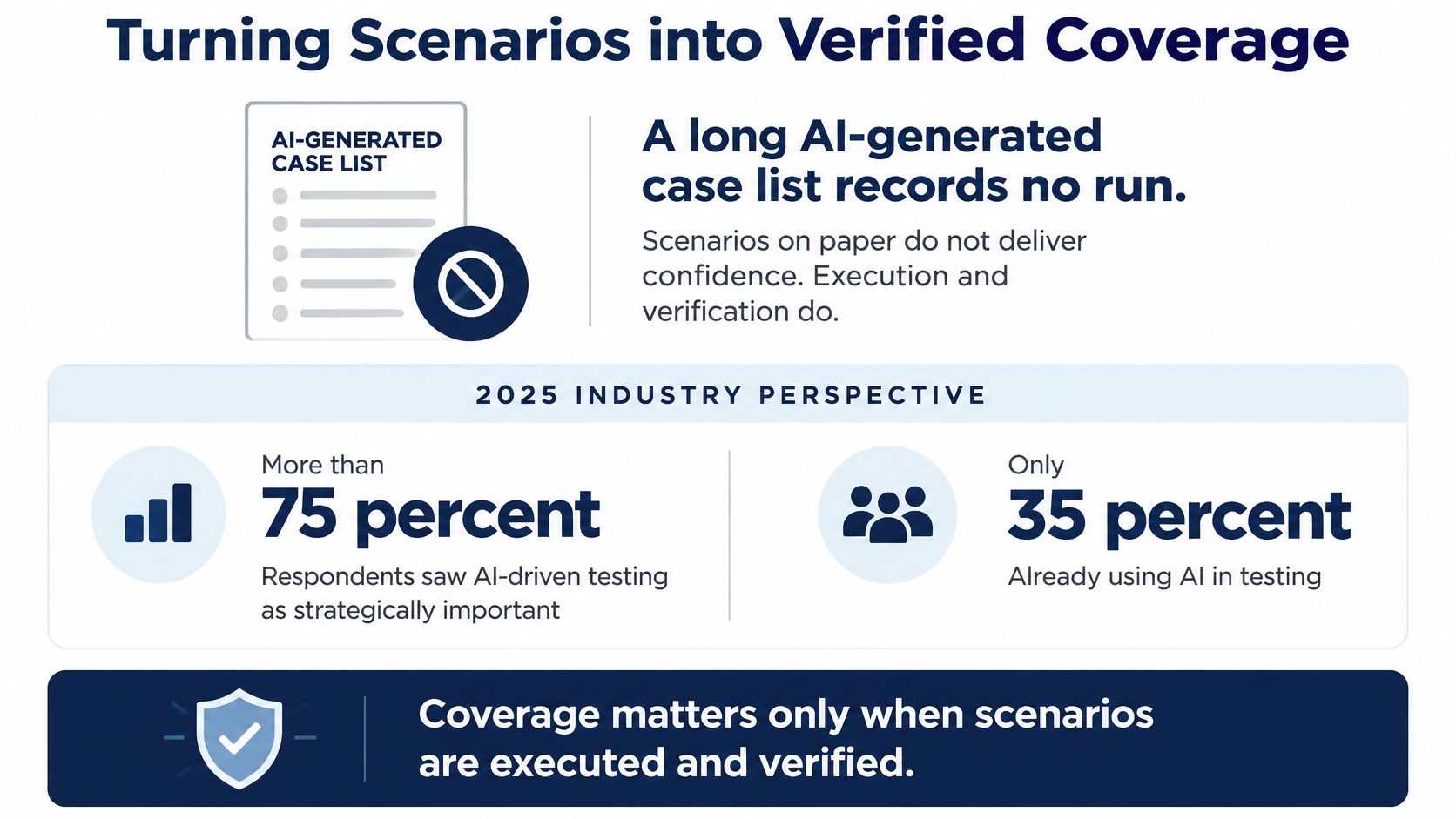
The gap between generated cases and verified coverage is already wide. A 2025 secondary study reports that more than 75% of respondents viewed AI-driven testing as strategically important, while only 16% had adopted it in testing. Case lists can grow faster than the evidence behind them, so the suite swells while the journeys stay unproven.
That is why a scenario only earns its name once it carries an execution status. For every case, record the status, the target environment, the evidence, the defect outcome, and the reason it did not run. A human checks ambiguous expected results before anyone trusts a pass. "Page looks fine" stays a guess until a person says what fine means.
What each result must carry
Keep device model, OS build, app version, network, locale, account state, and permissions attached to the result. Emulators and code coverage still miss hardware, OS skins, WebView behavior, and real networks. A pass without that context cannot be rerun, so it cannot be trusted on the next build either.
Most checks still depend on a person sitting in a real environment. Generating more text does not change that.
Run the highest-risk scenario on real devices
- Name the minimum device and browser rows the scenario must run on before anyone calls the release covered.
- Treat every unrun row as not run, never as a pass. Silence is not success.
- Build a coverage grid marking each case against each device as pass, fail, blocked, or not run, with a reason for each non-pass.
- Tie each failure to its real phone, OS, and browser so the fix is aimed at the exact configuration that broke.
If the cases already exist, including ones an AI tool wrote, 99tests is one way to get that grid without standing up a device lab first. It accepts CSV, Excel, a Google Sheets export, Word, Markdown, plain text, and TestRail or Jira exports. Within five minutes of submission, cases are parsed into sessions by device, so you see exactly what will run before testers start. Real testers then execute the cases on their own phones, laptops, and browsers and send back a human-verified pass/fail report in three business days. The coverage table shows every test case against every device as pass, fail, blocked, or not run, with a reason when it did not pass, and every accepted finding carries reproduction steps, expected and actual results, device, OS version, network, and a screen recording. The boundary stays plain: human execution of the cases you bring. No automation, no security test, no certification.
Upload the build link or URL, the cases, and the device targets. Read the not-run rows before you ship. Those rows decide the release.
99tests runs the software testing scenarios you already wrote, including AI-generated cases, on tester-owned phones, laptops, and browsers, then returns a human-checked pass, fail, blocked, and not-run grid you can read before release. Bring a build link or URL, your cases, and the device targets that match your users. Start at 99tests.