Generate Test Cases Using AI: A Step-by-Step Workflow
Learn how to generate test cases using AI, review and validate them, and run them on real devices before release.

In this article
- The Five Stages From Requirement to Evidence
- How to Prompt AI for Usable Test Cases
- The Input Sequence
- Automated Gates Before Any Case Runs
- Gates With Reject Conditions
- Reviewing Passed Cases for Traceability and Usefulness
- The Review Pass in Order
- Running Generated Cases on Real Devices
- Start With One Feature and Re-run Every Build
- Keeping the Suite Credible
Generating more test cases is the most popular advice in AI testing, but it is the wrong goal. A bigger list feels like progress, but it tells you nothing about what works on a real phone or browser. When teams generate test cases using AI, generation is the cheap step. Auditing, gating, executing, and recording evidence are the steps that turn a plausible list into coverage you can defend at release time.
The Five Stages From Requirement to Evidence
An AI tool can produce a large suite in minutes. Only the work after generation shows whether those cases are relevant, runnable, and worth counting. I would treat every generated case as a candidate specification until it has passed review and execution on the target environment.
The five stages run in a fixed order. First, give the model the requirement text, acceptance criteria, interface or API notes, and target platform. Second, split each requirement into single behaviours and boundary values. Third, generate positive, negative, edge, and state-transition cases with steps, data, and expected results. Fourth, trace each case back to a requirement, remove duplicates, and fix vague outcomes. Fifth, execute the cases and label every result.
| Stage | What the AI Produces | What a Person Checks | Evidence to Keep |
|---|---|---|---|
| Provide context | Requirement summary, interface notes, fixtures | Requirement is complete and unambiguous | Source requirement IDs |
| Decompose requirements | Atomic behaviours and boundary list | Each behaviour can be tested on its own | Behaviour-to-requirement map |
| Generate cases | Steps, test data, expected results | Positive and negative paths are both present | Prompt text and output version |
| Review and refine | Edited cases with traceable IDs | No duplicates and no invented behaviour | Review log of removed and rewritten cases |
| Execute and record | Passed, failed, blocked or unexecuted labels | Each result tied to device, OS and build | Screenshots, logs and environment details |
A test case that hasn't run isn't coverage. It's a suggestion with good formatting.
Many teams already handle stage one reasonably well. They collect requirements and pick a tool. The time disappears between stages three and five, when duplicates pile up, expected results stay vague, and nobody can say which cases ran on which build. Keep each stage's handoff explicit and small. If the behaviour map is wrong, generation will multiply the mistake. If review is rushed, execution will waste hours on cases that never should have survived.
How to Prompt AI for Usable Test Cases
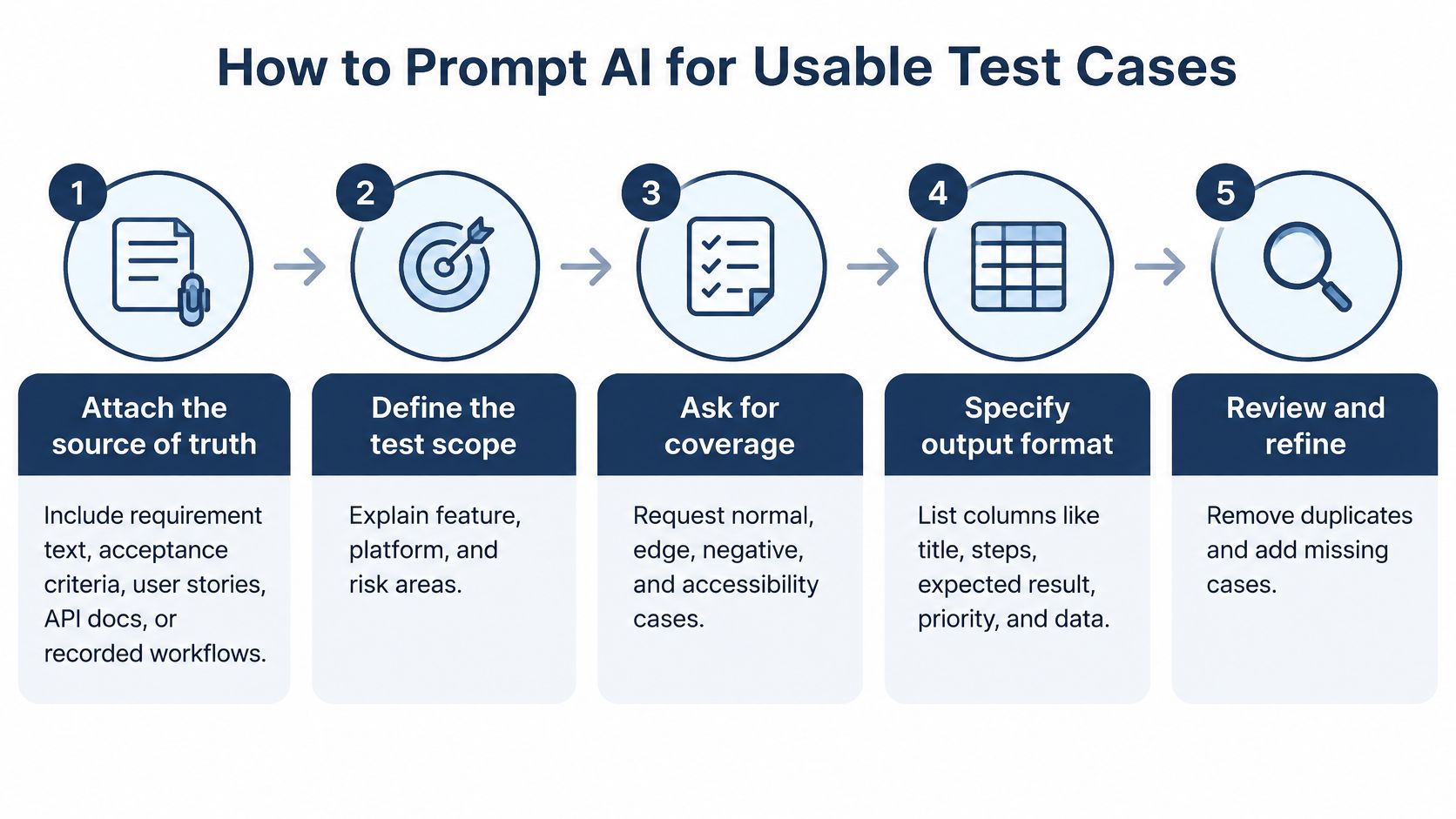
Pasting a feature name into a chat and asking for test cases wastes more time than writing them by hand. You get fluent, generic output that ignores your actual screens, accounts, and constraints. Use a staged input sequence instead, and stop for review before the model scales a misunderstanding.
The sequence below produces cases a reviewer can work with.
The Input Sequence
- Attach the source of truth: Give the model the requirement text, acceptance criteria, API contract, or screen description. When tests touch code, include the current implementation, because the empirical study on LLM test generation found that prompting with correct code rather than incorrect code improved test accuracy by 57%, coverage by 12%, and bug detection by 24%, while roughly 20% of generated tests failed to compile.
- Name the fixtures and platform: Specify test accounts, data states, and the target device, such as a budget Android phone running Chrome. A case that cannot start because its preconditions are imaginary is dead weight.
- Ask for behaviours first: Request atomic behaviours and boundary conditions before any test case. This exposes what the model thinks the feature does while correction is still cheap.
- Generate in separate passes: Request positive, negative, exception, state-transition, and data-variation cases separately so negative paths do not get skipped. If a scenario is hard to frame, tighten the underlying software testing scenario before prompting.
- Fix the output format: Require an ID, requirement link, preconditions, steps, test data, and one observable expected result per case.
A usable prompt looks like this: "Using REQ-7.2 and the attached checkout code, list atomic behaviours and boundary conditions for guest checkout on an Android phone running Chrome, then stop and wait for review."
Keep the review stop inside the prompt. Ask the model to wait after behaviours, again after draft cases, and again before assertions. That gives a reviewer two cheap places to cut invented behaviour before the suite grows around it.
Practical rule: Generate automation assertions only after the cases have been reviewed, never in the same pass.
If several people are drafting prompts and requirement summaries, shared research and writing assistance can help standardize wording before it reaches the model. Ambiguity fixed in the prompt is ambiguity you do not have to fix in forty generated cases later.
Automated Gates Before Any Case Runs
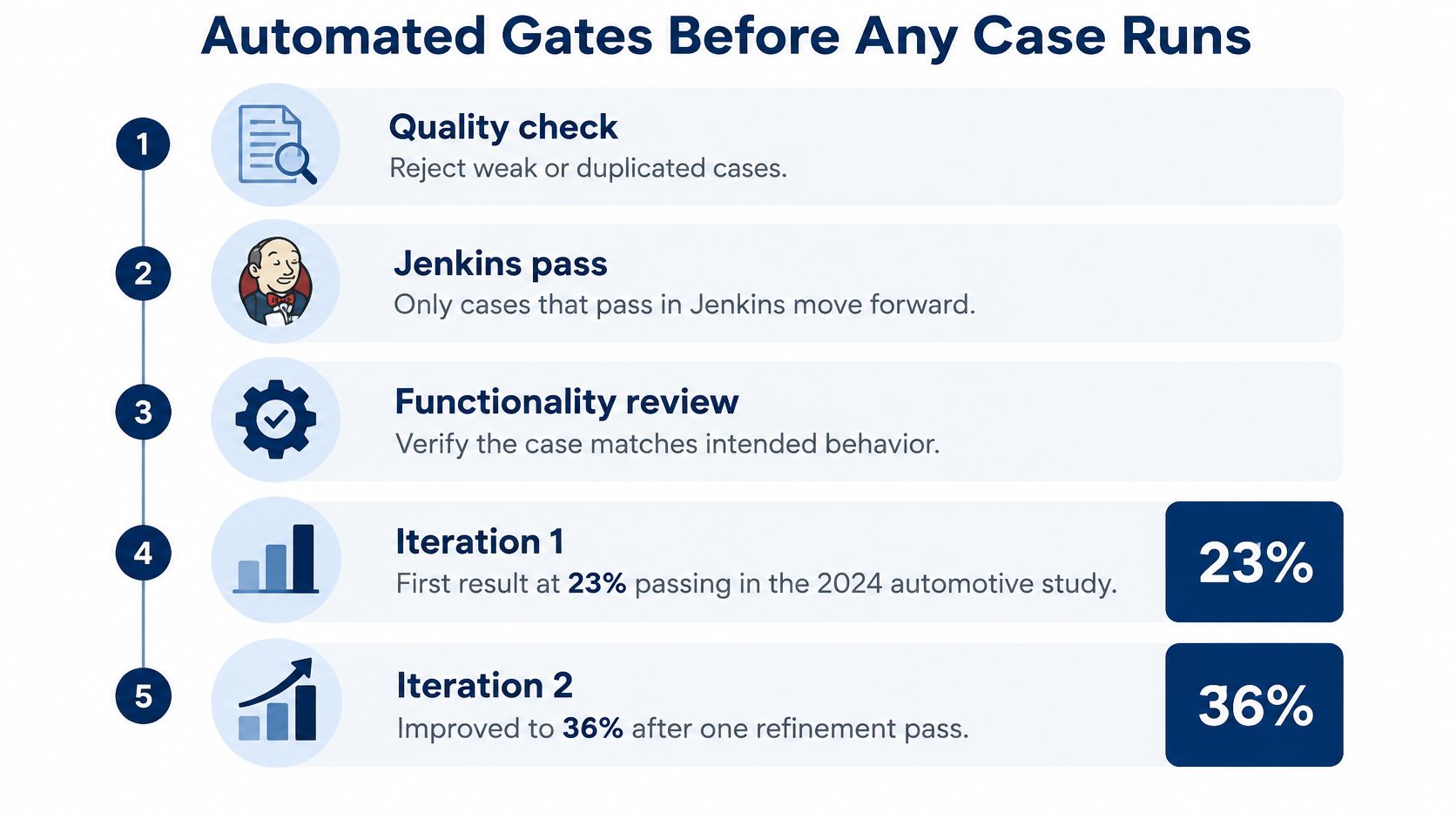
A bigger suite doesn't mean more coverage. The 2024 action-research study on generative AI in automotive test automation reported that only 23% of AI-generated cases passed in Jenkins and received high functionality scores in the first iteration, rising to 36% after one improvement cycle. Those exact figures come from an automotive framework and shouldn't be applied directly to every app. The lesson transfers, though. Most raw output won't meet a combined pass and functionality bar without refinement.
The checklist below orders the gates I would run before any case reaches a human reviewer.
Gates With Reject Conditions
- Compile and run: Reject any case with a build error. It doesn't matter how sensible the intent looks.
- Repeat runs: Run each case several times and reject any case that passes and fails without a code change. Flaky cases destroy trust in the whole suite.
- Oracle quality: Reject weak oracles that only confirm a page loaded. The expected result must distinguish correct behaviour from broken behaviour.
- Duplicates: Flag duplicate inputs and duplicate expected results for the reviewer. Merging them is a human decision, not an automated deletion.
- Implementation restating: Reject assertions that only mirror internal method names or private variables. They pass even when users see the wrong thing.
- Existence checks: Verify every selector, endpoint, and fixture exists in the current build, and reject any case that references something missing.
- Effectiveness measures: Measure line and branch coverage and mutation score to see whether the suite catches deliberately seeded defects.
Record the pass rate per feature, not just a single suite-wide number. A healthy checkout suite can hide a broken login suite inside an average. Passing these gates means the cases are ready for human review and then device execution. It doesn't mean the feature works. Confusing those two claims is how teams end up reporting green dashboards for releases that fail on customer phones.
Reviewing Passed Cases for Traceability and Usefulness
Consider a suite of 120 generated cases where 40 test the same login path with different wording and none check what happens after a failed OTP. That suite looks thorough in a spreadsheet. It isn't. The 2025 review in the Indonesian Journal of Artificial Intelligence identifies overfitting, insufficient edge-case coverage, overlooked system dependencies, outdated cases after software changes, and difficulty defining expected results as recurring problems in generated suites. Human review is where those defects get caught.
Only cases that survive the automated gates reach this pass, and a reviewer works through them in order.
The Review Pass in Order
- Trace to a requirement: Link every case to a requirement ID and question any case that traces to nothing. Untraceable cases are usually invented behaviour.
- Merge duplicates: Combine cases where inputs and expected results match, even if the wording differs.
- Rewrite vague outcomes: Turn "works correctly" into something a tester can observe and a developer can dispute.
- Remove invented behaviour: Delete character limits, permission prompts, or error messages the requirement never mentions. This is the core discipline behind sound validation of test work.
- Check preconditions: Confirm account type, login state, locale, and device so each case can start.
- Mark real-phone cases: Flag SMS OTP delivery, camera permission, or biometrics explicitly instead of leaving the execution target ambiguous.
A usable case reads like this. ID TC-014, requirement REQ-7.2, precondition is a verified account, logged out, with one item in cart. The step is to place the order as a guest. The expected result is that a confirmation screen shows the order number and a new entry appears in order history.
Finish with a review log recording each removed or rewritten case and the reason. That log is your audit trail when someone later asks why the suite shrank. Shrinking is fine. A smaller suite where every case traces, starts, and proves something is worth more than a large suite nobody trusts.
Running Generated Cases on Real Devices
Emulators miss the things that break in the field, including hardware behaviour, OS versions, browser engines, network conditions, permissions, screen sizes, and how people use budget phones on local networks. The device setup below shows the range of screens and conditions a reviewed suite needs to survive.
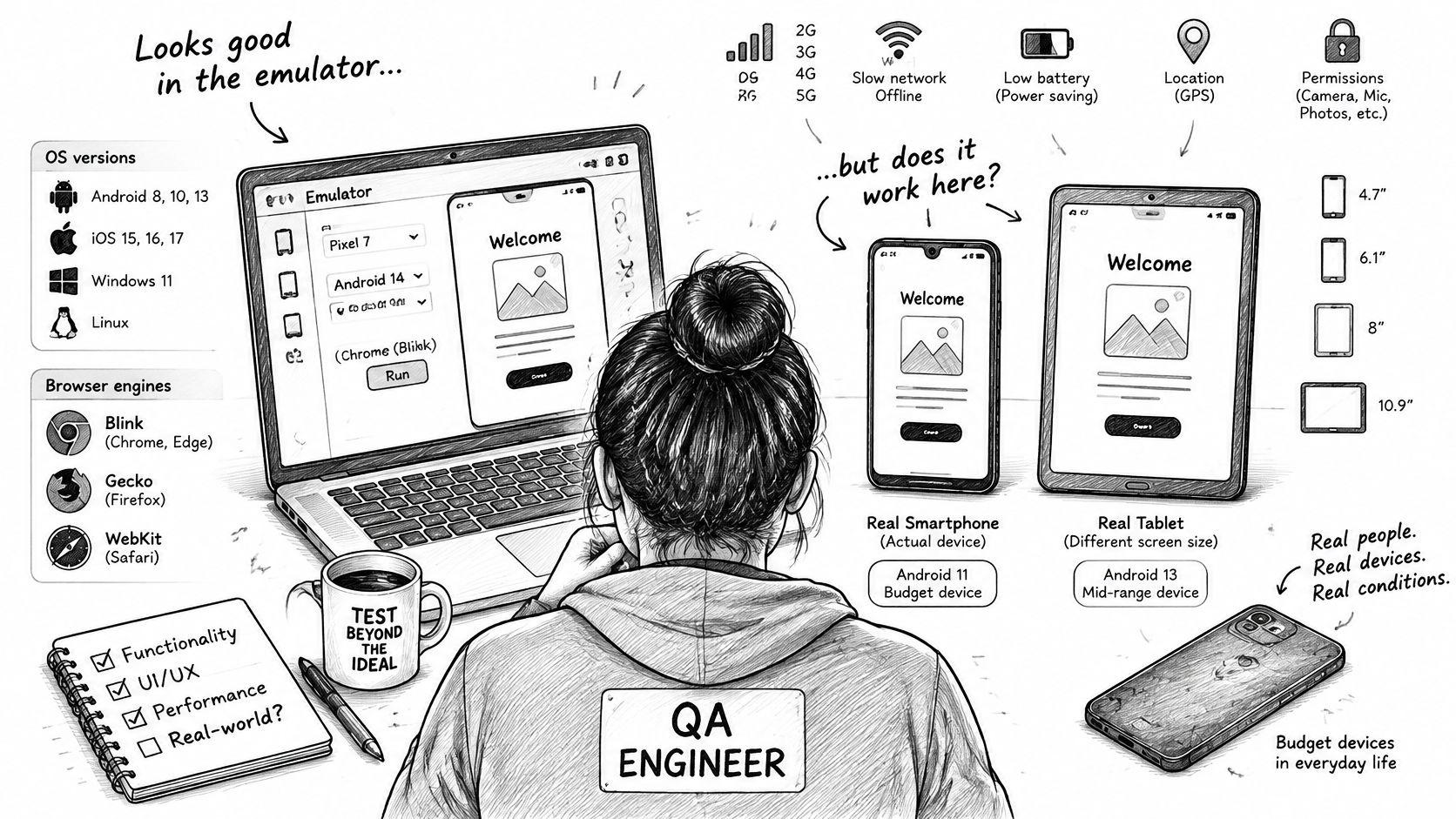
Prioritise physical devices in this order: camera or fingerprint access, SMS or OTP delivery, payment apps, push notifications, low-memory phones, then Safari-specific layouts. Logic-only API cases can stay on an emulator. Rising adoption doesn't remove this need, since the 2025 industry survey reported in the SAST proceedings found test-case generation was used by 65.6% of respondents while 65.5% had encountered a generative AI problem, with hallucinations affecting 32.3%. If you're choosing tooling for the browser side, the Clearcote Labs browser testing comparison is a useful starting point before you commit. Practical guidance on how to test an app on real devices also helps when you're building your own device matrix.
The short walkthrough below shows what hands-on device execution looks like in practice.
| Result | Meaning | What to Record |
|---|---|---|
| Passed | Expected result observed on a named device | Device model, OS version, browser, build number |
| Failed | Observed behaviour differed from the expected result | Screenshot, steps, logs, severity |
| Blocked | A precondition such as an account or SIM was missing | The missing precondition and who owns it |
| Unexecuted | Case did not run in this cycle | Reason and the planned device or browser |
Teams without enough devices can hand cases to human testers on their own phones. Our testers run your cases on their own Android phones, iPhones, and laptops on Jio, Airtel, and Vi, and we deliver detailed, human-verified pass and fail reports within three business days. That converts a generated inventory into evidence of what worked, on named hardware, under real network conditions.
Start With One Feature and Re-run Every Build
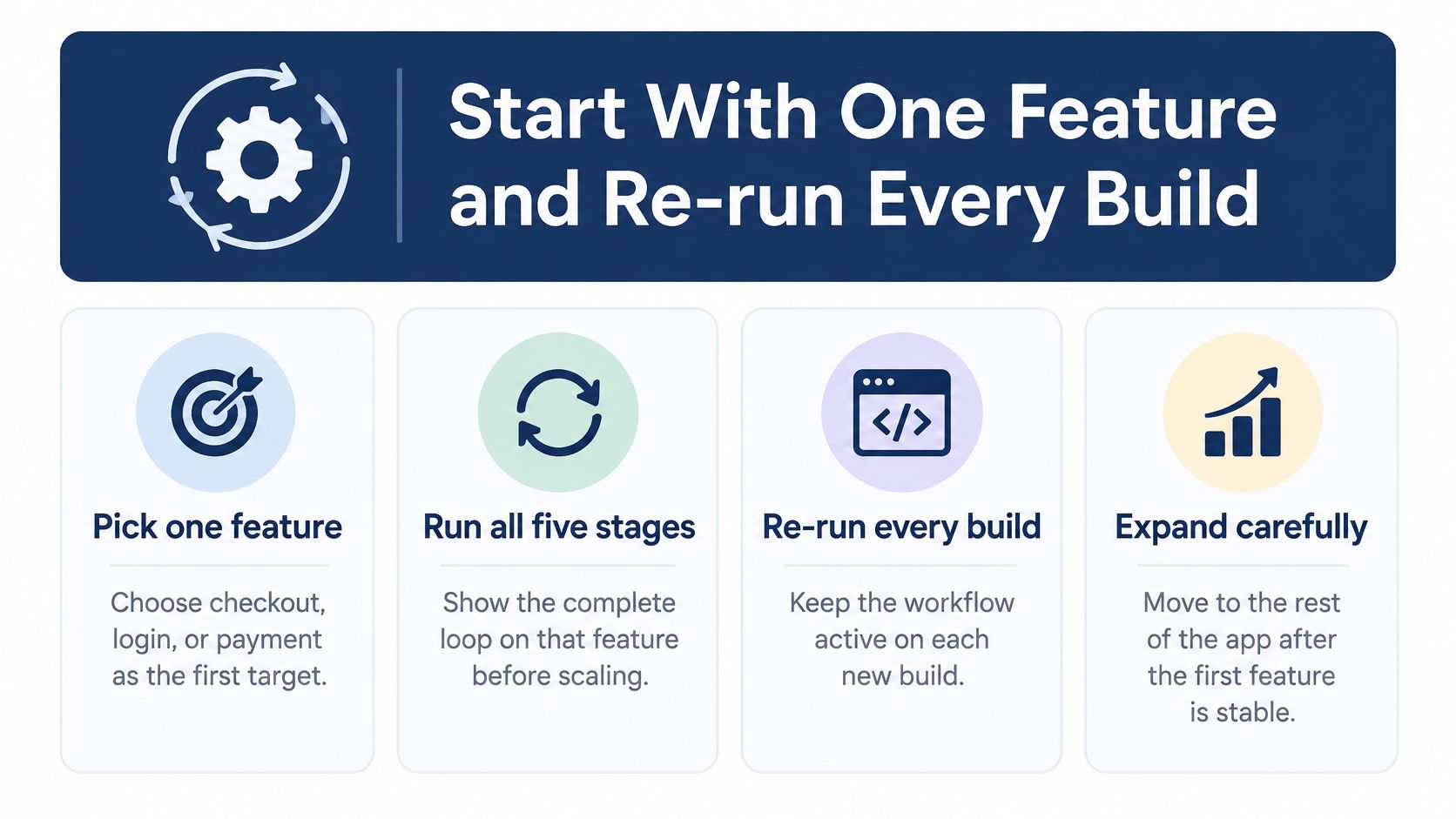
Don't roll this workflow out across the whole app at once. Pick one feature with real stakes, such as checkout, login, or payment, and run all five stages on it first. You'll find your prompt gaps, fixture problems, and reporting weaknesses on one flow instead of fifty.
The four-step summary below shows the rollout order I would follow.
Keeping the Suite Credible
Generated suites drift as the product changes. The multi-domain evaluation on Research Square reported that under software changes, pass rate fell to 66.5% from 100% and branch coverage declined to about 60% from 76.1%. A suite that passed last month can mislead you now.
- Re-run every build: Execute the full reviewed suite on each build and label each result consistently.
- Refresh stale cases: Regenerate or review cases whose selectors, APIs, fixtures, or expected behaviour changed.
- Track trends per build: Follow pass rate and branch coverage on every build, not once per quarter.
Treat a falling pass rate as a signal to inspect the suite, not automatically as a product regression.
When your first feature is stable, export the reviewed cases as CSV, Excel, Markdown, or a TestRail or Jira export and upload them. Customers upload AI-generated cases to our platform as the first step of validation, in a spreadsheet, a document, or directly from their AI tool. Check the coverage the platform shows before any tester starts, so gaps surface while they're still cheap to fix. Then expand feature by feature, keeping the same gates and labels everywhere.
If you've generated a suite and need proof it works on real hardware, upload your cases to 99tests and have human testers execute them on real Android phones, iPhones, and browsers. You'll get human-verified pass and fail reports with screenshots and environment details for every case, including the ones that were blocked or couldn't run. Bring the cases from any AI tool, and leave with release evidence instead of a list.