Android Application Testing Across Devices and OS
Android application testing on one phone is not a release. See which devices, OS versions, and networks to sample, plus Play crash and ANR limits.

In this article
- Why One Green Phone Is Not a Release
- Why a Popular Phone Still Misses the Defect
- Building a Device Matrix from Real Users
- Start with the Users You Already Have
- Write the Coverage Claim in Three Lists
- Testing Under Real Network Conditions
- Six Runs Worth Repeating on a Phone
- Host Tests, Device Runs and AI-Generated Cases
- A Case Belongs to One Layer
- Status per Case per Device
- AI-Generated Cases Create an Accountability Problem
- Play Crash and ANR Limits That Affect Release
- Why the Average Lies
- What Goes in the Test Record
- Confirm What This Build Still Has Not Proven
More than 15% of test cases produced a different outcome when the same Android application ran under a different configuration, and only 1 of 18 apps held steady across every configuration tested, according to the peer-reviewed fragmentation study that ran more than 2,000 tests across 88 configurations. Those differences weren't cosmetic. Code coverage moved, functional results flipped, and some configurations crashed where others passed clean.
Read that as a release owner and the ground shifts. A green suite on your Pixel is a data point about one Pixel. It says almost nothing about the Redmi a first-time user in a smaller city carries, the foldable someone opens mid-checkout, or the three-year-old budget phone on which your app is one of forty installed.
Android application testing earns its keep when it stops being a pass or fail ritual and becomes evidence about real user conditions. That means knowing which devices and OS levels a build exercised, what share of your users they represent, which cases never ran, and where the store's quality thresholds sit.
Why One Green Phone Is Not a Release
Across 18 Android applications, more than 2,000 tests were run across 88 configurations that varied device model, screen size, form factor, Android API level, locale, and orientation. More than 15% of test cases produced a different outcome under a different configuration, while just 1 of the 18 apps showed no variation, according to the Android fragmentation study published through NSF's public access repository.
The differences affected code coverage and functional results, and some configurations crashed while others ran cleanly. A result that changes with the configuration is a release risk, not noise to dismiss with a retry.
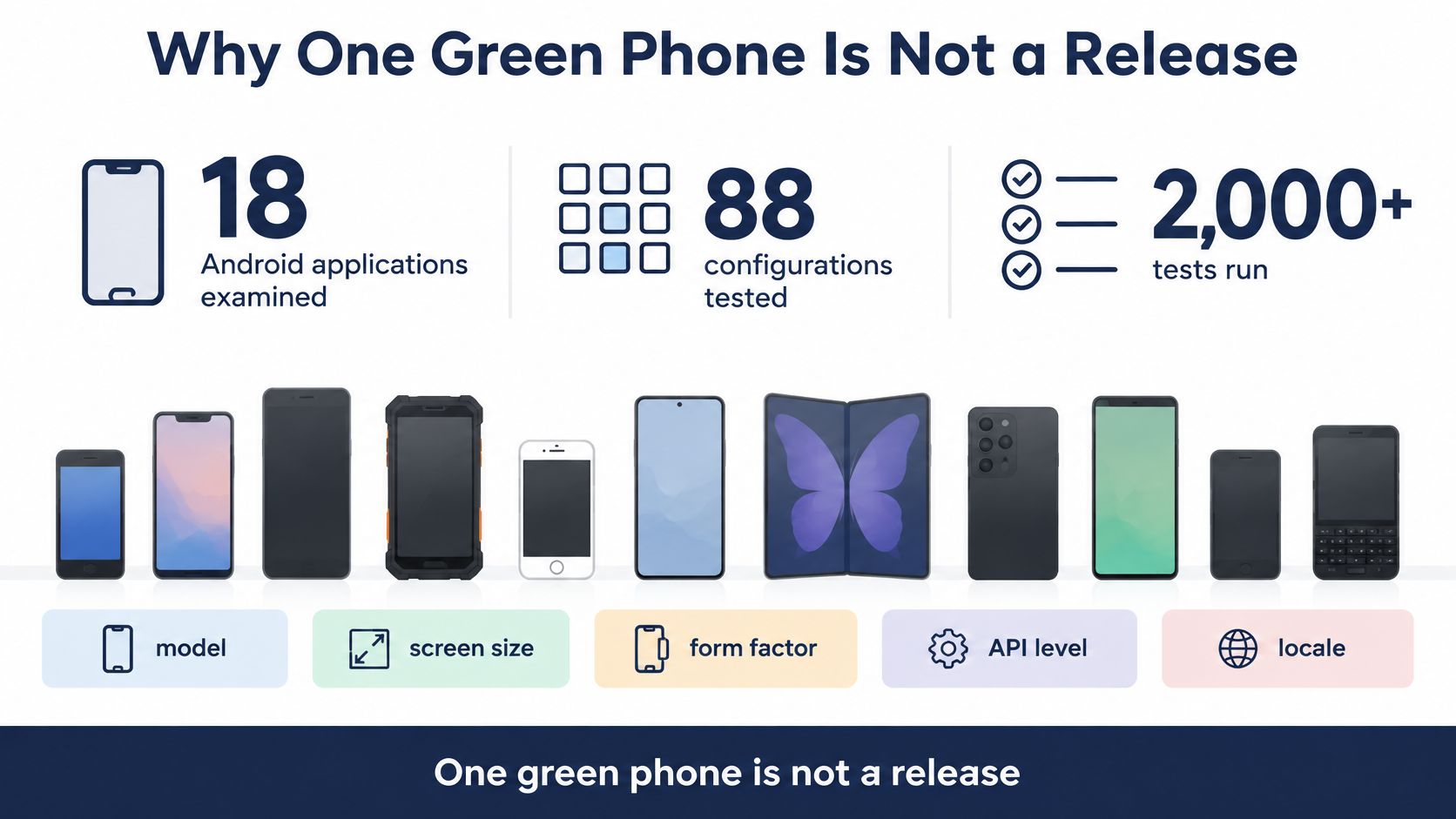
The same study recorded 26 Android API levels at the time, with roughly 98.8% of devices distributed across 11 levels, from API 16 through API 26. That combination matters: versions form a long tail, yet most devices still span a broad band of platform behavior. A release tested on only one API level leaves much of that variation unexamined.
Why a Popular Phone Still Misses the Defect
One temperature reading at noon in one city measures that moment, not the climate. A passing run on one emulator is similarly narrow evidence. It shows that a flow worked in that setup, not that it will work across the conditions users bring.
A popular phone represents volume, not every kind of risk. A current flagship may pass while the app runs out of memory on a low-RAM budget model, loses state when a foldable changes posture, clips a button where translated text is longer, or has background sync stopped by a manufacturer's battery policy. The green result cannot prove behavior on conditions the test never exercised.
The release question is not simply whether the suite passed. It is which user conditions the build actually proved.
Coverage is more useful when read as a share of real users and risk segments, rather than a count of devices. A build tested on the most common phone may cover substantial traffic while missing a smaller group with a distinct failure risk. Likewise, a generated test case that never ran is unknown, not passed. Track what executed, on which conditions, and what remains untested before treating a green suite as release evidence.
Building a Device Matrix from Real Users
Most device lists start as a shopping question and end as a list of phones. Start with your own telemetry instead and the matrix nearly writes itself. Compatibility means the app behaves correctly on a specific platform version, on devices that satisfy the Compatibility Definition Document and pass the Compatibility Test Suite, which is why four visually similar flagships make a weak sample (Android testing fundamentals).
Start with the Users You Already Have
- Export the actual distribution. Pull active users by device model, OS version, and network type for the release window you care about. Two weeks captures a weekday and weekend pattern. A full month is better if you release monthly and want the tail included.
- Rank the list twice. Sort first by share of active users so the big cohorts are visible, then re-sort by crash and ANR frequency so a small but badly broken cohort can't slip off the page. The second sort is where most real failures hide.
- Anchor two rows regardless of volume. The minimum API level you still support and the newest Android version you can target both stay in, even when each looks like a rounding error in your analytics.
- Fill the rest by risk dimension. A common OEM skin such as Samsung, Xiaomi or Redmi, Pixel, or OnePlus; one budget low-memory phone your users still keep; a phone alongside the 8-inch, 10.5-inch, 13-inch and 160-ppi profiles Android's adaptive guidance recommends; 1:1 and 4:3 foldables for posture changes; and the public beta if you ship early.
- Record every row identically. Model, Android version, screen configuration, build identifier, network context, and reproduction evidence. A bug triaged from "it fails on Android" wastes a day you don't have.
Those screen profiles exist precisely because layouts clip, resources resolve to the wrong density, navigation breaks, and state vanishes during a resize (Android compatibility and adaptive-quality guidance). Sampling by risk beats sampling by familiarity.
| Risk dimension | Sample this | Failure it exposes | Record with the result |
|---|---|---|---|
| Minimum supported API | Oldest API level you still ship | Removed or changed platform behavior | API level and build identifier |
| Common OEM skin | Samsung, Xiaomi or Redmi, Pixel, OnePlus | Permission, keyboard, and battery-policy differences | Brand, model, and Android version |
| Low-memory phone | A budget device active users still keep | ANRs, jank, and out-of-memory crashes | Model and memory class |
| Screen size and density | Phone plus 8-inch, 10.5-inch, 13-inch, and 160-ppi profiles | Clipping, wrong resources, and density scaling | Size, density, and aspect ratio |
| Foldable or posture change | 1:1 and 4:3 foldables | State loss while resizing or changing posture | Posture and orientation |
| Network | Wi-Fi and variable 4G or 3G, including real carriers | Timeouts, retries, and partial loads | Network type and carrier |
| Newest platform | Current Android version and the public beta | New lifecycle and compatibility breaks | Exact OS build |
Write the Coverage Claim in Three Lists
A device list proves nothing on its own. Coverage becomes defensible when the release note closes with three lists: the device and OS combinations exercised, the estimated share of active users those combinations represent, and the combinations left untested with a reason attached to each.
That third list is the one teams skip, and it's the one that carries the risk. Counting devices rather than users produces confident-sounding reports that miss whole segments, and a handful of high-volume models can look statistically strong while never touching the OEM permission flow, keyboard, sensor, or low-end performance problem your users hit (a review of mobile app testing strategy). If you want the selection criteria in more detail, the parameters for choosing test devices are worth reading before you lock the matrix.
Coverage claim: name the combinations you ran, the share of users they cover, and the ones you didn't run. A report that skips the third list is a device inventory, not a coverage statement.
Testing Under Real Network Conditions
A green checkout on office Wi-Fi proves only that the flow worked on that connection. Mobile users may lose packets, switch between towers, enter a basement with weak signal, or drop to a single bar on a train. An emulator's repeatable connection cannot reproduce every condition a real handset encounters.
Six Runs Worth Repeating on a Phone
- Establish a Wi-Fi baseline. Run each critical flow on a stable connection. Compare later failures against that reference.
- Repeat on users' mobile networks. Check variable 4G and 3G on carriers used in your target market. Timeouts, retries, and partial loads can depend on real network conditions.
- Throttle, then confirm on hardware. Emulator throttling provides a repeatable slow connection for debugging. Follow it with a phone run to check behavior under actual radio conditions.
- Switch networks mid-flow. Move from Wi-Fi to mobile data during an upload or payment. Check whether the app creates duplicate submissions, loses form state, or leaves the result unclear.
- Cold-start in airplane mode. Force-stop the app, enable airplane mode, and open it. Cached content or a clear error is more useful than a blank screen or crash.
- Slow the server as well as the connection. Add latency to the API and check whether loading states and retries appear, rather than a frozen screen that may end in an ANR.
Record the network type, carrier, and signal strength with each result. “Checkout failed” is hard to reproduce without knowing the connection conditions.
A practical habit: keep a test phone on a throttled mobile connection for regular checks. Many network bugs surface on a throttled connection before anyone files them.
Emulator throttling is repeatable and useful for debugging. Real carrier behavior on real handsets shows how a flow responds to conditions users may encounter. The app network testing checklist for Indian carriers covers handovers and weak-signal cases on Jio, Airtel, and Vi. Record network conditions as matrix rows alongside device results. That makes the remaining gaps visible: a generated test that never ran on the relevant connection is unknown, not passed.
Host Tests, Device Runs and AI-Generated Cases
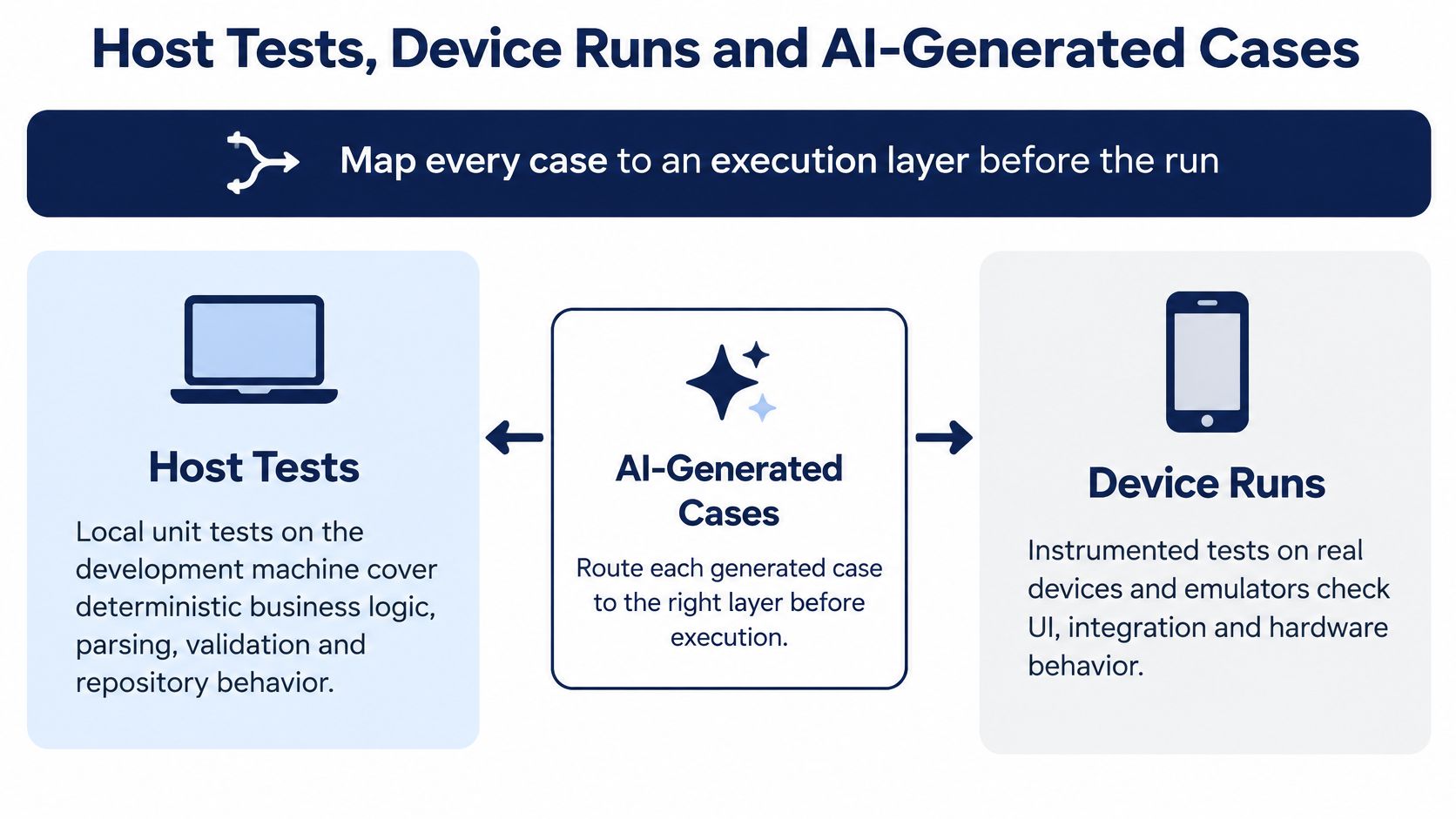
Two execution layers catch two different families of failure, and mixing them up is how teams buy confidence they haven't earned. Host-side local unit tests run on the development machine and suit deterministic logic: parsing, validation, calculations, repository behavior. Instrumented tests run inside an Android environment and reach the framework APIs, lifecycle transitions, permissions, rendering, storage and device configuration that a host test cannot observe, which is why Android's official guidance keeps the two types separate (Android developer testing documentation).
Map each case to its layer before the run, not after a failure.
A Case Belongs to One Layer
A pricing calculation runs in milliseconds in a host suite and tells you nothing you'd learn faster on a phone. A notification permission flow, a deep link, keyboard behavior, rotation, background restrictions, or camera access needs instrumentation every time. An emulator pass on an instrumented test still isn't device compatibility, because the emulator has no OEM skin, no real sensor, no vendor battery policy and no radio.
| Failure class | Execution layer | Example |
|---|---|---|
| Deterministic business logic | Host unit test | Pricing calculation |
| Parsing, validation, repository behavior | Host unit test | Date parsing of an API response |
| Framework APIs and lifecycle | Instrumented test on device or emulator | Activity recreated on rotation |
| Permissions | Instrumented test on device | Notification permission prompt |
| Rendering and screen sizes | Instrumented, screenshot or behavior test | Clipping on a 10.5-inch tablet |
| Storage and device configuration | Instrumented test on device | Locale change with stored data |
| OEM, sensors, battery and radios | Physical phone | Background kill on a budget OEM |
Status per Case per Device
Report every case on every device as passed, failed, blocked, or unexecuted, with a written reason for anything that isn't passed or failed. Login wall, missing test data, permission denial, no network: each is a legitimate reason to record, and each one is a gap someone has to accept.
That single reporting habit kills the most common illusion in mobile QA. A generated case that was never executed against the API level and configuration it targets isn't coverage. It's a placeholder.
AI-Generated Cases Create an Accountability Problem
Recent research suggests generation is getting better at exploration. GraphDroid, evaluated on 41 real-world Android apps, reported up to 36.4% higher code coverage than comparison systems while using less than one-eighth the cost of its strongest pure-LLM baseline (the GraphDroid study, ACM Digital Library). That's a real result about exploration inside the app.
It's also a lab metric. Code coverage isn't user-flow coverage, and it certainly isn't release confidence on hardware where OEM behavior, sensors, battery management and cellular networks decide the outcome. Generation answers "what could we try". Execution answers "what did we prove".
Execution rule: a case with no device-specific result is unknown, not passed. Count the unknown set in the release decision the same way you'd count a failing test.
So a generated checkout case that never got past the login wall on a budget phone over weak 4G is unexecuted. A generated permission case blocked by an OS dialog on one manufacturer's skin is unexecuted. Both belong in the gap list, not the green column. If you want the failure patterns catalogued, what AI-generated test cases tend to miss is a useful companion read.
Here's a walkthrough of the same idea in practice, running UI tests against real hardware instead of local simulators.
Send only the device-layer cases to human execution, keep the host suite in continuous integration where it belongs, and let the unrun set show up as a number in the release decision rather than as silence.
Play Crash and ANR Limits That Affect Release
Four percentages turn crash and responsiveness testing into a distribution question, and they come straight from Google Play's quality signals. Google identifies a user-perceived crash rate of 1.09% across devices as an overall bad-behavior threshold, and 8% on an individual phone model. The user-perceived ANR thresholds are 0.47% overall and 8% per phone model (Android Vitals documentation).
| Signal | Overall threshold | Per phone model | What the percentage counts |
|---|---|---|---|
| User-perceived crash | 1.09% | 8% | Daily users with at least one crash |
| User-perceived ANR | 0.47% | 8% | Daily users with at least one ANR |
Why the Average Lies
Those figures are calculated from daily users, so they measure the share of people who hit at least one crash or ANR during a day, not a raw count of log lines. That distinction matters because a quality problem can cluster on one device while the app-wide average looks perfectly healthy.
Say a release reports an app-wide crash rate of 0.4%, comfortably inside the overall line. The same build sits above the per-model line on one low-memory OEM handset that a meaningful slice of your users still carry. The average says ship. The per-model number says you're about to lose a cohort, and the reviews on that handset will say so before your analytics do.
What Goes in the Test Record
Every execution needs the device model and OS version attached, so a failure can be reproduced on the hardware that produced it instead of being closed against an aggregate pass rate. Keep crashes and ANRs in separate buckets as well. A crash is a process death the user sees. An ANR is the app failing to respond while the user waits, and the two have different causes and different fixes.
Ship rule: block the release when a tested model crosses its per-model line, and investigate any cohort sitting close to the overall threshold rather than averaging it away.
A test plan that reports one pass percentage for the whole run cannot support that decision. It hides exactly the device-specific instability the store is measuring.
Confirm What This Build Still Has Not Proven
A green host suite is a good sign and a poor release argument. Before you ship, get four answers in writing, in this order.
- What share of active users did the exercised device and OS pairs represent? If nobody computed it, you have a device list, not coverage.
- Which matrix rows were blocked or left unrun, and why? Every unexecuted case is an unknown, and unknowns belong in the release note.
- Does any tested model sit near the overall or per-model crash and ANR lines? A healthy average doesn't cancel a single bad cohort.
- Which AI-written cases have independent evidence rather than a generated script? A script proves intent. A recorded run on a named device proves behavior.
If any answer is missing, the build isn't ready, even when every host test is green. Rerun the unproven rows on the next build, and ship only when the release owner accepts the remaining gaps in writing.
When the gaps sit on phones, OEM skins or carriers your team doesn't own, outside testers close them. Our testers run your supplied cases on their own Android phones on Jio, Airtel and Vi, and we return human-verified pass or fail reports within three business days, with screenshots, step-by-step reproduction instructions, and the device model, OS and network for every finding.
If your coverage claim has holes where real hardware and real networks should be, 99tests executes the test cases you already have on testers' own Android phones across Jio, Airtel and Vi, then returns reports that list what passed, what failed, what was blocked, and what never ran. Send a build link, an APK, a Play internal testing track or a URL along with your cases, and the unexecuted work stays visible in the report instead of counting as coverage. Visit 99tests to put a real-device run behind your next Android release.